Choosing the right MIDI interface can make a big difference in timing, flexibility, and overall setup simplicity. Whether you need a compact USB connection or a multi-port hub for a larger rig, the right pick depends on how you work.
Below, we break down the best options for different needs, from portable controllers to multi-device studios, so you can match the interface to your workflow with confidence.
Best 10 Midi Interfaces Picks for 2026
Compact router
CME U6MIDI Pro 3-in-3-out MIDI Interface

- USB-C plug-and-play across major OS platforms
- Standalone 3-in-3-out routing with filter and merge
- Supports clock, sysex, timecode, and MPE
Best For: Users who need flexible MIDI routing in a compact interface
Audio starter
M-AUDIO M-Track Duo USB Audio Interface

- Two combo inputs with phantom power
- Zero-latency direct monitoring switch
- Includes MPC Beats software bundle
Best For: Beginners recording vocals, instruments, or podcasts
Basic cable interface
Roland UM-ONE-MK2 One in Two Out MIDI Cable

- One-in/one-out MIDI interface with low latency
- Integrated USB and MIDI cables for simple setup
- Bus-powered design with input and output indicators
Best For: Simple computer-to-hardware MIDI connections
Hybrid host bridge
CME H2MIDI Pro Compact USB Host MIDI Interface

- Standalone USB host mode for class-compliant devices
- USB-C client mode with 2-in-2-out virtual MIDI ports
- Routing, filtering, mapping, and four presets
Best For: Hybrid setups that need USB MIDI devices connected to DIN hardware
Compact MIDI Thru Hub
CME MIDI Thru5 WC 1-in-5-out MIDI Thru

- Splits one MIDI input to five DIN outputs
- Supports all MIDI channels and messages
- USB-C powers the unit only
Best For: Simple, space-saving MIDI splitting in studio or live rigs
USB-C MIDI Cable Interface
LEKATO MIDI Cable, MIDI to USB C

- 1-in/1-out cable with signal LEDs
- Plug-and-play for Windows and Mac
- Supports up to 16 MIDI channels
Best For: Basic keyboard and synth connections to a computer
Multi-Port MIDI Routing Hub
iConnectivity mioXL 8x12 MIDI Interface

- 8 DIN inputs and 12 DIN outputs
- 10 USB-MIDI host ports plus Ethernet RTP-MIDI
- OLED display and Auracle routing software
Best For: Large MIDI studios needing flexible multi-device routing
Advanced USB MIDI Cable

- Plug-and-play on major operating systems
- Adds filter, mapping, and routing tools
- Supports 16 channels and MPE
Best For: Users who want a compact USB-to-MIDI cable with extra control features
Audio/MIDI Recording Interface
Behringer UMC404HD 4x4 Interface
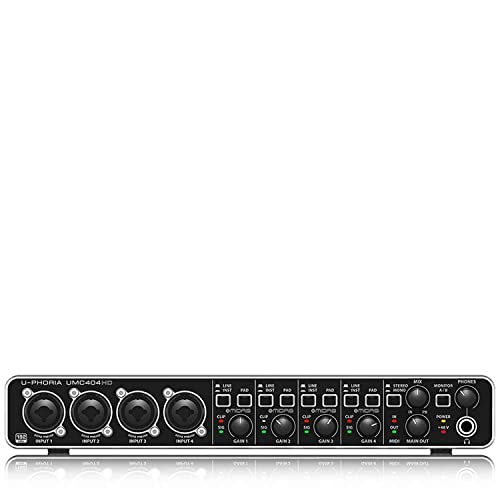
- 4x4 USB audio with one MIDI I/O
- 24-bit/192 kHz recording support
- Four MIDAS mic preamps with phantom power
Best For: Home studios that need audio recording and basic MIDI connectivity
Standalone MIDI Router
CME H4MIDI WC USB Host Interface

- Runs USB MIDI devices without a computer
- USB-C client mode with virtual MIDI ports
- Split, merge, mapper, and filter tools
Best For: Advanced hardware setups, pedalboards, and flexible standalone routing
Compact router – CME U6MIDI Pro 3-in-3-out MIDI Interface
If you want midi interfaces that do more than simply pass data, the CME U6MIDI Pro is built for flexible routing in a very small box. It works as a plug-and-play USB-C interface for computers and also functions as a standalone 3-in-3-out MIDI router with split, thru, merge, and filtering options.
Best For: Players and producers who need a compact MIDI interface with advanced routing and wide device compatibility.
Pros:
- USB-C plug-and-play support across macOS, iOS, Windows, Android, Linux, and Chrome OS
- Standalone MIDI router, filter, split, thru, and merge functions
- Supports notes, controllers, clock, sysex, MIDI timecode, and MPE
- Low-latency transmission with high-precision optocoupler design
Cons:
- Only handles MIDI, not audio
- Advanced routing setup relies on the free UxMIDI Tools software
Overall, this is a strong pick if your setup needs reliable MIDI routing and broad OS support in a portable format. It is especially appealing for users who work across computers and standalone hardware and want fine control over MIDI flow.
Audio starter – M-AUDIO M-Track Duo USB Audio Interface
If you’re shopping for midi interfaces but also need a basic recording front end, the M-Track Duo is really an audio interface focused on easy capture and monitoring. It offers two combo XLR/line/instrument inputs, 48 kHz recording, direct monitoring, and a headphone output for straightforward home studio use.
Best For: Beginners, podcasters, and creators who want an easy USB audio interface for recording vocals, instruments, or streams.
Pros:
- Two combo XLR/Line/Instrument inputs with phantom power
- USB/direct monitoring switch for zero-latency monitoring
- 48 kHz audio resolution for basic recording needs
- Includes MPC Beats software and works with Mac, PC, Android, and iOS
Cons:
- Not a dedicated MIDI interface
- Only 2 channels, so it is limited for larger setups
This is a practical starter interface if your main goal is recording audio rather than routing hardware MIDI. It is best treated as a simple, portable recording tool instead of a full MIDI hub.
Basic cable interface – Roland UM-ONE-MK2 One in Two Out MIDI Cable
For a compact option in midi interfaces, the Roland UM-ONE-MK2 keeps things simple with one-in/one-out connectivity and low-latency performance. Its integrated USB and MIDI cables make it easy to connect without extra adapters, and the built-in data indicators help you see input and output activity at a glance.
Best For: Musicians who want a small, affordable MIDI interface for basic computer-to-hardware connections.
Pros:
- Low-latency FPT processing for tighter clock timing
- Compatible with Mac, Windows, and iOS via iPad Camera Connection Kit
- Integrated USB and MIDI cables reduce cable clutter
- Bus-powered, so no external power supply is needed
Cons:
- Only one-in/one-out MIDI support
- Not suited for more complex routing or multi-device setups
This is a dependable no-frills choice when you just need a basic MIDI link between a computer and a single device. It is best for straightforward setups where compact size and simple operation matter more than advanced routing.
Hybrid host bridge – CME H2MIDI Pro Compact USB Host MIDI Interface
If your setup mixes modern USB gear with older DIN hardware, this midi interface is designed to bridge both worlds. The CME H2MIDI Pro works as a standalone USB host for class-compliant devices and also offers USB-C computer connectivity with 2-in-2-out virtual MIDI ports for hybrid rigs.
Best For: Players who need a compact MIDI bridge for connecting USB controllers to 5-pin DIN gear without a computer.
Pros:
- Standalone USB host mode for class-compliant MIDI devices
- USB-C client mode with 2-in-2-out virtual MIDI ports
- Supports routing, filtering, mapping, splitting, and up to 4 presets
- Compact design with support for complex MIDI data like clock, sysex, MTC, and MPE
Cons:
- Only 1-in/1-out DIN hardware I/O
- Advanced setup depends on the free HxMIDI Tools software
This is a strong choice for hybrid studios and performance setups that need USB host functionality in a tiny footprint. It is especially useful when you want to connect USB MIDI devices directly to traditional hardware while keeping flexible computer integration available.
Compact MIDI Thru Hub – CME MIDI Thru5 WC 1-in-5-out MIDI Thru
If you need one of the most practical midi interfaces for a simple hardware rig, the CME MIDI Thru5 WC is built to split a single MIDI input into five clean outputs. It focuses on dependable DIN MIDI distribution with low latency, no jitter, and support for all MIDI channels and messages.
Best For: Studio or live setups that need a compact, reliable 1-in-5-out MIDI splitter.
Pros:
- 1-in-5-out DIN MIDI routing for multiple devices
- Supports notes, controllers, clock, sysex, timecode, and MPE
- High-speed optocoupler design aims for error-free synchronization
- Compact, lightweight housing for desks, road setups, or pedalboards
Cons:
- USB-C is for power only, not MIDI data
- Requires external MIDI cabling for every connection
- Best suited to splitting MIDI, not converting to computer USB MIDI
For straightforward MIDI distribution, this unit keeps things focused: stable hardware routing, small footprint, and power from a standard 5V USB source. If your goal is to expand one MIDI stream across several devices without adding complexity, it fits that job well.
USB-C MIDI Cable Interface – LEKATO MIDI Cable, MIDI to USB C
For players who want a straightforward way to connect keyboards, synths, or drum pads to a computer, this midi interface cable keeps the setup simple. It offers 1 in and 1 out with indicator lights to help you track signal flow while recording or editing.
Best For: Plug-and-play USB-C MIDI connections for keyboards, synthesizers, and other standard MIDI gear.
Pros:
- 1-in/1-out design with clear input and output indicators
- Supports up to 16 channels in and out
- Built-in driver and plug-and-play setup for Windows and Mac
- LED lights help monitor power and MIDI transfer
Cons:
- Compatibility can vary with some older or vintage synths
- Works best with standard MIDI setups
- Limited to a cable-style interface rather than a multi-port hub
This is a practical choice if you want a low-fuss cable interface for basic MIDI recording and editing. It emphasizes simple connection, stable transmission, and easy troubleshooting rather than advanced routing features.
Multi-Port MIDI Routing Hub – iConnectivity mioXL 8×12 MIDI Interface
If you need a more advanced option among midi interfaces, the iConnectivity mioXL is designed for large MIDI ecosystems. It combines 8 DIN inputs, 12 DIN outputs, USB-MIDI host ports, Ethernet RTP-MIDI networking, and computer connectivity so you can route hardware and software together in one unit.
Best For: Complex studios and performance rigs that need extensive MIDI routing across DIN, USB, network, and computer connections.
Pros:
- 8 in x 12 out DIN MIDI with 10 USB-MIDI host ports
- Ethernet RTP-MIDI support and 22 virtual network ports
- Class-compliant plug-and-play connectivity with no drivers required
- OLED display and Auracle software for routing, filtering, and presets
Cons:
- More expensive and complex than a basic cable interface
- Designed for larger setups that may be overkill for simple needs
- Requires configuration to take advantage of advanced routing features
The mioXL is a serious routing center, not just a simple interface. It stands out when you need many ports, multiple connection types, and the ability to manage a large amount of MIDI traffic from one place.
Advanced USB MIDI Cable – CME U2MIDI Pro USB MIDI Cable
If you want a straightforward option in midi interfaces, the CME U2MIDI Pro focuses on fast, reliable USB-to-MIDI connection with extra control features. It works plug and play across macOS, iOS, Windows, Android, Linux, and ChromeOS, and adds filtering, mapping, and routing for more flexible setups.
Best For: Players and producers who need a simple USB MIDI cable with advanced MIDI control tools.
Pros:
- Plug-and-play USB MIDI support with no drivers needed on major operating systems
- Supports 16 channels plus notes, controllers, clock, sysex, MTC, and MPE
- Includes free UxMIDI Tools for filtering and routing on Mac/Windows
- Compact 6.5 ft cable with integrated technology to reduce clutter
Cons:
- Only 1-in/1-out MIDI, so it is not built for larger multi-port rigs
- Designed for standard MIDI sockets, so it may not suit every specialty setup
This is a practical pick if you value wide device compatibility and want more than a basic adapter. It is especially appealing when you need dependable MIDI transfer with onboard tools for cleaning up and customizing messages.
Audio/MIDI Recording Interface – Behringer UMC404HD 4×4 Interface
Among midi interfaces, the Behringer U-PHORIA UMC404HD is aimed at users who need audio recording as well as MIDI in one box. It offers 4×4 USB 2.0 audio, one MIDI I/O, and 24-bit/192 kHz resolution, making it a practical budget-friendly hub for home studios.
Best For: Home-recording musicians who need multiple audio inputs plus built-in MIDI connectivity.
Pros:
- 4×4 USB audio interface with 1x MIDI I/O
- 24-bit/192 kHz resolution for high-quality recording
- Includes four MIDAS-designed mic preamps with +48V phantom power
- Metal chassis gives it a rugged, built-like-a-tank feel
Cons:
- Windows-focused compatibility is listed in the product details
- Only one MIDI input/output pair, so it is not a multi-device MIDI hub
If your priority is recording microphones and instruments while still having MIDI on the same interface, this model is easy to justify. It combines solid audio specs, multiple inputs, and a durable design in a straightforward package.
Standalone MIDI Router – CME H4MIDI WC USB Host Interface
If you need midi interfaces that can handle more complex routing, the CME H4MIDI WC stands out as a standalone USB host and client interface. It connects class-compliant USB MIDI gear without a computer, supports USB-C computer connections, and adds split, merge, mapper, and filter functions for more advanced setups.
Best For: Guitarists, pedalboard users, and producers who need flexible standalone MIDI routing.
Pros:
- Acts as a standalone USB host for class-compliant MIDI devices
- Supports computer connection via USB-C with virtual MIDI ports
- Includes routing tools like thru, split, merge, mapper, and filter
- Compact design with dual power options and four preset slots
Cons:
- Advanced features may be more than casual users need
- Optional WIDI Bluetooth MIDI requires an additional module
This is the most flexible option in the group for hardware-heavy MIDI workflows. It is especially useful when you want to run USB MIDI gear directly, manage presets on the device, and keep a small footprint on a pedalboard or crowded desk.
How We Picked These Midi Interfaces
We focused on Midi Interfaces that offer dependable connectivity, practical port layouts, and strong compatibility with common DAWs, keyboards, synths, and controllers. Priority went to models with stable performance, low-latency operation, and clear use cases for both home studios and performance setups.
Quick Comparison
At a glance, smaller USB-to-MIDI cables are best for simple single-device connections, while multi-port desktop units suit players running several synths or hardware modules at once. Host-capable models are especially useful when you want to connect a keyboard or controller without a computer in the middle.
Key Buying Factors for Midi Interfaces
Port Count and Routing
Start with how many devices you need to connect now, then leave room for growth. A 1-in/1-out cable may be enough for one keyboard, but larger studios usually benefit from multiple inputs and outputs or dedicated thru functionality.
USB, DIN, and Host Support
Many Midi Interfaces connect directly to a computer over USB, but some also support standalone hardware routing through 5-pin DIN or USB host mode. If you use modern controllers, vintage synths, or mobile gear, make sure the interface matches those connections.
Latency and Stability
For recording and live play, solid timing matters more than extra features. Look for interfaces known for reliable drivers, simple setup, and consistent performance under load.
Power and Compatibility
Check whether the unit is bus-powered, requires external power, or can work in standalone mode. Also confirm compatibility with your operating system, tablet, or computer before buying.
Who Should Buy Which Midi Interfaces?
Buy a compact cable-style interface if you only need to connect one keyboard or controller to a laptop. Choose a multi-port desktop model if you run several synths, drum machines, or external modules and want cleaner routing. If you need to connect gear directly without a computer, look for a host interface. For hybrid setups that also need audio input and output, an audio interface with MIDI may be the most practical all-in-one choice.
In short, the best Midi Interfaces are the ones that fit your exact workflow, not just the ones with the most ports. Focus on your current devices, future expansion, and how you prefer to record or perform.