Choosing the right MIDI interface can make a live rig feel effortless instead of fragile. For performers, the best options are the ones that connect fast, stay stable, and handle the exact routing your setup needs.
This roundup focuses on practical gear for real-world shows, from compact foot controllers to multi-port MIDI interfaces and audio/MIDI hybrids.
Best 10 Midi Interfaces for Live Performances Picks for 2026
Compact MIDI Foot Control
Blackstar Live Logic 6-button MIDI Footcontroller

- 6-button MIDI foot controller
- Two expression pedal inputs
- USB MIDI for hardware and software
Best For: Guitarists and performers needing hands-free stage control
USB Audio Interface with MIDI
Universal Audio Volt 2 USB Audio Interface

- 2x2 USB-C interface with MIDI
- 610 preamp emulation with Vintage mode
- Works with Mac, Windows, iPad, and iPhone
Best For: Musicians wanting audio recording and MIDI in one compact unit
Reliable MIDI Thru Hub
CME MIDI Thru5 WC 1-in-5-out MIDI Thru

- 1-in-5-out MIDI distribution
- Close to zero latency and no jitter
- Compact design for pedalboards and tight spaces
Best For: Users who need to split one MIDI source to several devices
All-in-One Studio Hub
Focusrite Scarlett 4i4 4th Gen USB-C Audio Interface

- MIDI I/O plus multiple audio inputs and outputs
- Two mic preamps and two Hi-Z inputs
- Auto Gain, Clip Safe, and Air mode
Best For: Performers needing a flexible interface for audio and MIDI
Live Routing MIDI Interface
CME U6MIDI Pro 3-in-3-out MIDI Interface

- Standalone 3-in-3-out MIDI routing and filtering
- Close to zero latency with no jitter
- USB-C plug-and-play across major operating systems
Best For: Live keyboard and synth rigs needing flexible MIDI routing
Portable Record-Ready Interface
PreSonus AudioBox 96 25th Anniversary USB Audio Interface

- Includes MIDI I/O plus mic and instrument inputs
- Bus-powered design for mobile setups
- Zero-latency monitoring with balanced outputs
Best For: Solo performers needing audio and MIDI in one portable unit
Multi-Port Stage Hub
ESI M4U eX 8-Port USB 3.0 MIDI Interface

- Eight configurable MIDI ports for flexible stage routing
- Standalone routing and merging without a computer
- Built-in USB 3.0 hub with three connectors
Best For: Large live rigs that need multiple MIDI ports and USB expansion
Compact MIDI Routing for Hybrid Setups

- Standalone USB host mode for USB-to-DIN bridging
- USB-C client mode with 2-in/2-out virtual MIDI
- Routing, filtering, mapping, and 4 preset recall
Best For: Hybrid live rigs that mix USB controllers and DIN hardware
Rack-Style 4x4 Audio and MIDI Interface
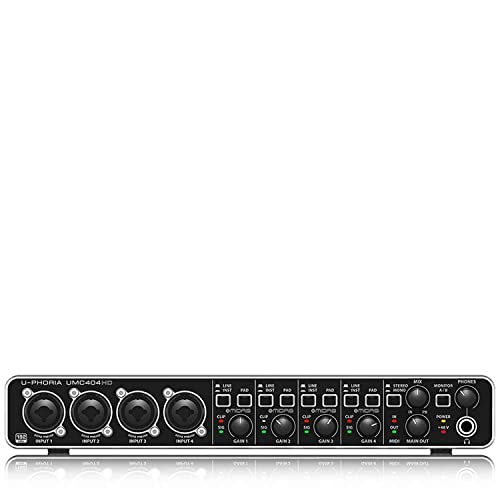
- 4x4 USB audio plus 1x MIDI I/O
- 24-bit/192 kHz audio with MIDAS mic preamps
- Rugged metal chassis for live use
Best For: Small live or rehearsal rigs that need audio and MIDI in one unit
Low-Latency USB-C Interface for Stage Monitoring

- USB-C 2-in/2-out with MIDI I/O
- DSP effects for latency-free monitoring
- 32-bit/192 kHz support in a rugged metal build
Best For: Compact stage setups that need audio monitoring and MIDI together
Compact MIDI Foot Control – Blackstar Live Logic 6-button MIDI Footcontroller
If you need midi interfaces for live performances, the Blackstar Live Logic is built around hands-free control. It uses MIDI over USB and gives you six buttons plus two expression pedal inputs, making it a practical choice for triggering program changes, control changes, notes, and clock messages on stage.
Best For: Guitarists and performers who want compact foot control for MIDI software or hardware.
Pros:
- 6-button MIDI foot controller for direct onstage control
- Supports customizable MIDI messages, including program change, control change, note, and clock
- Two expression pedal inputs add real-time control options
- Compact metal build with LED display and USB connectivity
Cons:
- Only one USB port is listed
- Focused on MIDI control rather than audio routing
- Best suited to users comfortable with footswitch-based workflows
For players who want a small, stage-friendly controller, this Blackstar unit covers the essentials without taking much space. It is especially appealing if your live setup depends on triggering and expression control rather than multiple I/O connections.
USB Audio Interface with MIDI – Universal Audio Volt 2 USB Audio Interface
For musicians looking at midi interfaces for live performances, the Universal Audio Volt 2 adds MIDI alongside a simple 2×2 USB-C audio interface. It also brings 610 preamp emulation, up to 24-bit/192 kHz recording, and compatibility with Mac, Windows, iPad, and iPhone for flexible performance or portable tracking.
Best For: Musicians who want a compact audio interface with MIDI and high-quality recording features.
Pros:
- 2×2 USB-C interface with MIDI support
- Vintage mode provides UA 610 preamp-style sound
- Up to 24-bit/192 kHz quality with crystal clear converters
- Works with Mac, Windows, iPad, and iPhone
Cons:
- Primarily an audio interface, not a dedicated MIDI controller
- Requires external Volt power supply for some mobile use cases
- Single-user recording setup rather than a multi-device MIDI hub
If you want one interface to handle audio and MIDI, the Volt 2 is a straightforward option with a polished recording feature set. It makes the most sense for performers who value audio quality and portability as much as MIDI connectivity.
Reliable MIDI Thru Hub – CME MIDI Thru5 WC 1-in-5-out MIDI Thru
If your live rig depends on clean distribution, this is one of the more focused midi interfaces for live performances. The CME MIDI Thru5 WC takes one MIDI input and splits it to five outputs with low-latency, no-jitter wired transmission, making it useful for syncing multiple MIDI devices on stage or in the studio.
Best For: Players and technicians who need to fan out one MIDI source to multiple devices.
Pros:
- 1-in-5-out MIDI Thru design for distributing a single signal
- Supports notes, controllers, clock, sysex, timecode, and MPE
- Close to zero latency with no jitter or signal dropout
- Compact, lightweight housing suited to pedalboards and tight spaces
Cons:
- USB port is for power only, not MIDI data
- Does not convert or create MIDI commands on its own
- Requires standard 5-pin MIDI cabling for use
This is a specialist utility device rather than a controller, but that is exactly what many live setups need. If you already have a MIDI master device and want clean multi-output routing, the Thru5 WC is built for the job.
All-in-One Studio Hub – Focusrite Scarlett 4i4 4th Gen USB-C Audio Interface
When you need midi interfaces for live performances that also handle full audio duties, the Focusrite Scarlett 4i4 4th Gen is a strong all-rounder. It combines MIDI I/O with two mic preamps, two Hi-Z inputs, four line inputs, and four line outputs, so it can sit at the center of a compact stage or recording rig.
Best For: Performers who want a flexible interface with MIDI, multiple inputs, and broad I/O.
Pros:
- Built-in MIDI In/Out for connecting keyboards, controllers, and other gear
- Four line inputs and four line outputs for flexible routing
- Two 4th Gen mic preamps plus two Hi-Z instrument inputs
- Auto Gain, Clip Safe, and Air mode add useful performance tools
Cons:
- More interface than you need if you only want basic MIDI routing
- Requires USB-C or included adapters for best connectivity
- Better suited to full rigs than ultra-minimal setups
The Scarlett 4i4 stands out because it does more than MIDI without feeling overbuilt for everyday use. If your live setup mixes instruments, microphones, and MIDI gear, this interface offers enough flexibility to keep everything organized.
Live Routing MIDI Interface – CME U6MIDI Pro 3-in-3-out MIDI Interface
If you need midi interfaces for live performances that can route, split, merge, and filter on the fly, the CME U6MIDI Pro is built for exactly that kind of job. Its standalone 3-in-3-out design and near-zero-latency operation make it a practical choice when timing and signal accuracy matter on stage.
Best For: Keyboard players, drummers, and live rigs that need flexible standalone MIDI routing.
Pros:
- Standalone 3-in-3-out MIDI interface with routing, split/thru, merge, and filtering tools.
- Close to zero latency and no jitter, with support for notes, controllers, clock, sysex, MIDI timecode, and MPE.
- Plug-and-play USB-C connectivity with broad OS support including macOS, iOS, Windows, Android, Linux, and Chrome OS.
- High-precision wired transmission designed for stable synchronization with digital pianos, drum machines, keyboards, and synths.
Cons:
- Configuration tools are software-based and may take some setup time for advanced routing tasks.
- Primarily a MIDI-only device, so it does not add audio recording inputs.
This is a strong pick for live setups where dependable MIDI flow matters more than extra features. The combination of standalone routing and broad compatibility gives it real flexibility for compact performance rigs.
Portable Record-Ready Interface – PreSonus AudioBox 96 25th Anniversary USB Audio Interface
For buyers comparing midi interfaces for live performances, the PreSonus AudioBox 96 is more of a compact audio interface with MIDI I/O than a dedicated MIDI router. It makes sense for performers who also need mic, instrument, and monitoring connections in a portable, bus-powered box.
Best For: Solo performers and small live rigs that need audio inputs plus MIDI I/O in one portable interface.
Pros:
- Includes MIDI I/O alongside 2 mic preamps and 2 instrument inputs.
- Bus-powered over USB 2.0, making it easy to carry for mobile use.
- Zero-latency mixer control helps create a custom monitor blend during performance.
- 24-bit/96 kHz conversion and balanced TRS outputs support solid recording and playback.
Cons:
- Only a 2-channel interface, so it is not built for complex multi-device MIDI stage setups.
- Live MIDI routing features are limited compared with dedicated MIDI interfaces.
This is a sensible choice if your live setup needs both audio capture and MIDI connectivity in one small unit. If MIDI routing is your main priority, a dedicated interface will usually offer more flexibility.
Multi-Port Stage Hub – ESI M4U eX 8-Port USB 3.0 MIDI Interface
If your live setup depends on multiple controllers and tight timing, this is one of the more capable midi interfaces for live performances in the group. The ESI M4U eX offers 8 adaptable MIDI ports, standalone routing, and a built-in USB hub, making it useful as a central connection point on stage.
Best For: Larger live rigs that need many MIDI ports and standalone routing.
Pros:
- Eight adaptable MIDI ports can be configured as inputs or outputs.
- Standalone operation supports routing and merging without a computer.
- Built-in USB 3.0 hub adds three connectors for extra devices.
- Class-compliant, plug-and-play support for Windows and macOS with low-latency performance.
Cons:
- The feature set is geared more toward multi-device setups than simple one-controller rigs.
- Windows users may need the optional driver for more complex multi-client setups.
This model stands out when you need a more central stage hub rather than just a basic MIDI adapter. Its combination of port count, standalone operation, and USB expansion makes it especially useful for bigger performance systems.
Compact MIDI Routing for Hybrid Setups – CME H2MIDI Pro
If you’re comparing midi interfaces for live performances, the CME H2MIDI Pro is built for players who need to bridge modern USB gear and older 5-pin DIN hardware without a computer in the middle. Its standalone USB host mode, flexible routing tools, and tiny footprint make it a practical fit for compact rigs.
Best For: Performers who want a small, computer-free MIDI bridge for hybrid live setups with USB and DIN gear.
Pros:
- Standalone USB host mode connects class-compliant USB MIDI devices directly to DIN hardware.
- Expandable USB host support via a standard USB hub for up to 8 device ports.
- USB-C client mode adds 2-in/2-out virtual MIDI for computer and mobile workflows.
- HxMIDI Tools lets you route, filter, map, split, and save up to 4 presets.
Cons:
- Only 1-in/1-out DIN MIDI on the hardware side.
- Advanced setup depends on the HxMIDI Tools software.
- Best suited to MIDI routing rather than audio recording.
For live players who need fast, flexible MIDI control in a minimal box, the H2MIDI Pro stands out as a versatile bridge between old and new gear. It is especially useful when you need reliable routing changes and preset recall on stage.
Rack-Style 4×4 Audio and MIDI Interface – Behringer UMC404HD
Among midi interfaces for live performances, the Behringer UMC404HD makes sense when you need audio I/O and basic MIDI in one sturdy interface. It pairs 4-in/4-out USB audio with 1x MIDI I/O, so it can handle small performance rigs, backing tracks, and live instrument recording from a single box.
Best For: Musicians who want an affordable audio-and-MIDI interface for small live or rehearsal setups.
Pros:
- 4×4 USB audio plus 1x MIDI I/O keeps a compact live rig organized.
- 24-bit/192 kHz support offers high-resolution audio capture and playback.
- Four MIDAS-designed mic preamps with +48 V phantom power support microphones.
- Metal chassis is designed for rugged, road-ready use.
Cons:
- MIDI connectivity is limited to a single in/out pair.
- The supplied notes focus on computer-connected use rather than standalone MIDI routing.
- Larger and heavier than a dedicated MIDI-only interface.
The UMC404HD is a practical pick if your live setup needs both recording-friendly audio inputs and a simple MIDI connection. It is less specialized than a dedicated MIDI router, but the extra audio capability can be valuable on stage.
Low-Latency USB-C Interface for Stage Monitoring – Yamaha URX22C
If you’re shopping midi interfaces for live performances and also need dependable audio monitoring, the Yamaha URX22C is aimed at streamlined stage and rehearsal setups. It combines 2-in/2-out USB-C audio with MIDI I/O, plus DSP-powered effects for latency-free monitoring.
Best For: Performers who want a durable USB-C interface with MIDI and onboard monitoring tools.
Pros:
- 2-in/2-out USB-C interface includes MIDI I/O for compact live rigs.
- DSP-powered monitoring adds REV-X reverb, Channel Strip, and Guitar Amp Classics.
- 32-bit/192 kHz support and D-PRE mic preamps suit high-quality audio work.
- Full-metal housing is built for durability.
Cons:
- Only two analog inputs, so it is not ideal for larger band setups.
- MIDI support is included, but the unit is primarily an audio interface first.
- Uses bundled software tools, which may be more than some players need.
The URX22C is a strong fit when stage reliability, low-latency monitoring, and compact connectivity matter more than lots of channels. It brings MIDI into a modern USB-C workflow without adding much complexity.
How We Picked These Midi Interfaces for Live Performances
We focused on reliability, routing flexibility, stage-friendly connections, and ease of setup. For Midi Interfaces for Live Performances, the most important factor is not just port count—it is whether the unit fits your performance workflow without adding latency, clutter, or troubleshooting.
We also looked at class-compliant support, standalone operation, USB-C or USB 3.0 compatibility, and whether each device makes sense for keyboards, foot controllers, hybrid audio rigs, or computer-based playback.
Quick Comparison: What Matters Most
Some players need a simple USB MIDI link for one keyboard and laptop. Others need multiple inputs and outputs to route several instruments, trigger backing tracks, or chain devices on stage. A few performers may prefer an audio interface with MIDI built in, while others need a dedicated MIDI-thru or host interface to keep a rig compact.
In practice, the best choice depends on whether you value portability, port density, standalone flexibility, or audio integration.
Key Buying Factors for Midi Interfaces for Live Performances
Port Count and Routing
Count both inputs and outputs, not just total ports. A solo keyboard player may only need a simple 1-in/1-out setup, while a more complex live rig may need multi-port routing to separate controllers, modules, and DAW playback.
Standalone Vs. Computer-Dependent Use
If you perform without a laptop, look for standalone MIDI-thru or host functionality. If your show runs from a computer, prioritize solid USB connectivity and dependable driver support.
Latency and Stability
For live use, consistent timing matters more than extra features. Class-compliant operation, robust power handling, and proven compatibility can reduce dropouts and sync issues.
Audio Needs
Many performers want one box to handle both sound and MIDI. Audio/MIDI interfaces can simplify your rig, but dedicated MIDI hardware may be better if your setup is already covered for audio.
Physical Layout
Pedalboard size, rack placement, and cable access all matter on stage. Compact foot controllers and small host interfaces suit minimal rigs, while multi-port desktop units work better in fixed performance setups.
Who Should Buy Which Midi Interfaces for Live Performances?
Choose a compact footcontroller if you want hands-free song control. Pick a dedicated multi-port MIDI interface if your live set includes multiple keyboards, modules, or external clocks. Go with an audio/MIDI interface if you also need mic or instrument inputs for vocals, acoustic sources, or backup playback.
If your priority is a simple, dependable setup, the best approach is usually the least complicated one that still covers every device in your rig. For Midi Interfaces for Live Performances, that often means selecting the interface that matches your routing needs today, with a little room to grow tomorrow.