Adding SSD caching to a network-attached storage setup can make frequently used files, app data, thumbnails, and virtual machines feel much more responsive. The right enclosure also needs to balance drive capacity, networking, cooling, software, and expansion options.
We selected 10 options ranging from compact two-bay systems and direct-attached enclosures to flexible hybrid models with NVMe support and larger four-bay NAS platforms.
Best 10 Nas Enclosure with SSD Cache Picks for 2026
Best DAS Alternative

- USB 3.2 Gen 2 up to 10Gbps
- Supports two 2.5-inch or 3.5-inch drives
- Hot-swappable, tool-free design
Best For: Fast local storage expansion without NAS networking
Best 2-Bay NAS

- Two HDD bays plus two M.2 NVMe slots
- Intel N100 and 8GB DDR5 RAM
- 2.5GbE for advanced home workloads
Best For: Home users wanting SSD expansion, backups, and media apps
Best Hybrid Expansion

- Four SATA bays and four M.2 NVMe slots
- Up to 152TB listed capacity
- 10Gbps USB connection and independent drives
Best For: Local HDD and NVMe expansion for creators and power users
Best 4-Bay NAS

- Four bays with up to 144TB listed capacity
- 10GbE, 2.5GbE, and 10Gbps USB
- RAID, backups, remote access, and Docker support
Best For: Families and small teams needing fast shared storage
Maximum NVMe Expansion

- Holds six M.2 NVMe SSDs
- Up to 48TB total capacity
- USB 3.2 Gen 2 with active cooling
Best For: High-capacity external NVMe expansion
Creator-Ready NAS

- Four SATA bays plus SSD expansion
- Dual 10GbE networking
- Supports Docker, VMs, and media apps
Best For: Creators, offices, and advanced home users
Best Beginner NAS

- Two-bay storage up to 64TB
- Automatic cross-device backups
- AI photo organization and privacy controls
Best For: Beginners and personal users building a private backup hub
Best Drive Dock
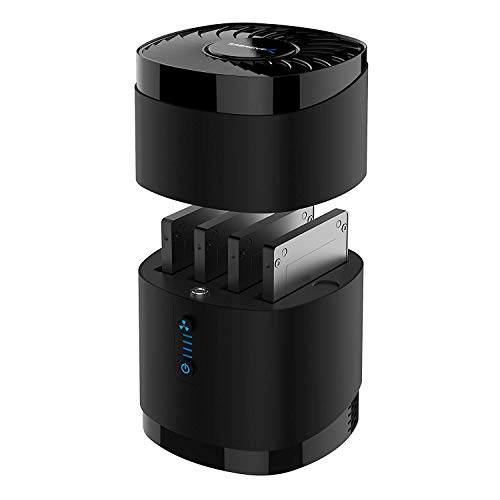
- Holds four 2.5-inch SATA drives
- Tool-free drive swapping
- USB 3.0 up to 5Gbps
Best For: Desktop users managing multiple SATA SSDs or HDDs
Best High-Capacity NAS

- Four bays and up to 128TB capacity
- 2.5GbE, 8GB RAM, and Docker support
- AI photo backup plus 4K HDMI output
Best For: Families and remote workers with large private media libraries
Best DAS Alternative – 2-Bay 10Gbps Enclosure
If you are searching for a nas enclosure with ssd cache, note that this CENMATE model is a direct-attached storage enclosure rather than a NAS. It provides two SATA bays, USB 3.2 Gen 2 connectivity, hot swapping, and support for both 2.5-inch and 3.5-inch drives.
Best For: Users who want fast, expandable external storage without NAS networking or RAID.
Pros:
- USB 3.2 Gen 2 supports transfer rates up to 10Gbps.
- Accepts two 2.5-inch or 3.5-inch HDDs or SSDs, with up to 20TB per drive.
- Tool-free, hot-swappable design includes USB-A and USB-C connectivity.
- Aluminum construction and a built-in cooling fan help manage heat.
Cons:
- It does not provide NAS functionality or RAID.
- Fan noise is approximately 40–50 decibels.
- Actual speeds depend on the drives and connected computer.
This is a practical choice for local storage expansion, especially when simple drive access and high USB throughput matter more than remote access, caching, or network services.
Best 2-Bay NAS – UGREEN DXP2800
The UGREEN DXP2800 is a strong fit for shoppers seeking a nas enclosure with ssd cache because it combines two HDD bays with two M.2 NVMe slots. Its Intel N100 processor, 8GB DDR5 memory, and 2.5GbE networking support backups, media libraries, Docker, virtual machines, and other advanced home-NAS workloads.
Best For: Advanced home users, remote workers, creators, and households needing centralized storage with NVMe expansion.
Pros:
- Two M.2 NVMe slots can add fast SSD storage alongside two HDD bays.
- Intel N100 CPU and 8GB DDR5 RAM support heavier applications.
- 2.5GbE networking is suited to faster file transfers than standard gigabit Ethernet.
- Supports backups, media serving, Docker, virtual machines, and AI photo organization.
Cons:
- HDDs and SSDs are not included.
- It has only two main HDD bays.
- Actual capacity and performance depend on the installed drives and network.
Among these options, the DXP2800 most directly matches the nas enclosure with ssd cache concept: its dedicated NVMe slots provide a straightforward way to add SSD-based storage while retaining high-capacity HDD bays.
Best Hybrid Expansion – TerraMaster D8 Hybrid 2
The TerraMaster D8 Hybrid 2 is a high-capacity USB enclosure that pairs four SATA drive bays with four M.2 2280 NVMe slots. While it is a diskless DAS rather than a networked NAS, it is worth considering for anyone comparing a nas enclosure with ssd cache and prioritizing flexible HDD-plus-NVMe expansion.
Best For: Creators and power users who need many independent drives for local editing, backups, and capacity expansion.
Pros:
- Holds four SATA HDDs or SSDs and four M.2 NVMe SSDs.
- Supports up to 152TB based on the listed drive configurations.
- USB 3.2 Gen 2 provides up to 10Gbps connectivity, with up to 1020MB/s single-NVMe reads.
- All eight drives operate independently, with plug-and-play support for major desktop operating systems and NAS operating systems.
Cons:
- There is no built-in RAID.
- It is a direct-attached enclosure, not a standalone NAS.
- All storage drives must be purchased separately.
This model offers the broadest drive flexibility in the group, but its NVMe storage is expansion rather than a documented NAS cache feature. Choose it when independent-drive access and local throughput are more important than integrated NAS management.
Best 4-Bay NAS – UGREEN DXP4800 Plus
The UGREEN DXP4800 Plus is a full-size four-bay NAS for families, creators, and small teams. It is a compelling option for a nas enclosure with ssd cache if you want centralized storage, RAID options, remote access, and fast networking, though the supplied specifications list a 128GB SSD rather than dedicated user-installable cache slots.
Best For: Small offices and households needing high-capacity shared storage, backups, collaboration, and private-cloud features.
Pros:
- Four bays support up to 144TB using compatible drives.
- Includes 10GbE, 2.5GbE, 10Gbps USB, 4K HDMI, and 8GB DDR5 RAM.
- Supports RAID options, centralized backups, remote access, Docker, and virtual machines.
- AI photo organization and permission controls add useful management features.
Cons:
- Storage drives are not included.
- Advertised capacity is based on RAID 0 with compatible drives.
- It uses wired Ethernet and does not support Wi-Fi.
For buyers who need more capacity and resilience than a two-bay system can provide, the DXP4800 Plus is the most capable NAS here. Its networking and four-drive layout make it better suited to shared storage and team workloads than a USB enclosure.
Maximum NVMe Expansion – 6-Bay M.2 NVMe Enclosure
For shoppers seeking a nas enclosure with ssd cache-style high-speed storage expansion, the CENMATE six-bay NVMe enclosure offers unusually large capacity in a compact desktop unit. It supports six M.2 NVMe drives in multiple lengths and connects over USB 3.2 Gen 2.
Best For: Users who need up to six NVMe SSDs and up to 48TB of external storage for a desktop, workstation, or media library.
Pros:
- Supports six 2230/2242/2260/2280/22110 NVMe SSDs, up to 8TB each.
- USB-A and USB-C 3.2 Gen 2 connectivity with up to 10Gbps interface speed.
- Aluminum construction, continuous cooling fans, and tool-free drive installation.
- Compatible with Windows, Mac, and Linux systems.
Cons:
- The continuously running fans may be noticeable in quiet environments.
- It is an external USB enclosure rather than a complete NAS with built-in networking or NAS software.
The CENMATE is a strong fit when maximum NVMe drive count matters more than silent operation or integrated NAS features. Its six-drive layout and broad M.2 compatibility make it a flexible high-capacity expansion option.
Creator-Ready NAS – UGREEN DXP4800 GT 4-Bay NAS
The UGREEN DXP4800 GT is the most complete choice here for shoppers comparing a nas enclosure with ssd cache. It combines four SATA bays with M.2 SSD support, dual 10GbE networking, expandable memory, and NAS software for backups, media, containers, and multi-user workflows.
Best For: Creators, offices, and advanced home users who want networked storage with SSD expansion, fast Ethernet, and flexible self-hosted applications.
Pros:
- AMD Ryzen Embedded processor, 8GB DDR4 RAM, and memory expansion up to 64GB.
- Supports four SATA drives, up to two U.2 NVMe SSDs in compatible bays, and two M.2 SSDs.
- Dual 10GbE ports, USB 10Gbps ports, SD card backup, and 4K HDMI output.
- UGOS Pro supports backups, media management, Docker, virtual machines, and surveillance features.
Cons:
- Drives are not included, so the total system cost depends on separately purchased storage.
- Its advanced features may be more than needed for basic file sharing.
With networking, SSD expansion, RAID support, local security features, and a broad application ecosystem, the DXP4800 GT is the strongest all-around NAS platform in this group. It is particularly well suited to demanding storage and media workflows.
Flexible SATA Storage – WAVLINK 4-Bay USB-C SATA Enclosure
For buyers considering a nas enclosure with ssd cache but primarily needing flexible direct-attached storage, the WAVLINK four-bay enclosure supports both 3.5-inch and 2.5-inch SATA drives. It adds USB-C 10Gbps connectivity, HDMI output, and temperature-controlled cooling.
Best For: Desktop users who want a multi-drive SATA enclosure for large storage pools, backups, media files, or game libraries.
Pros:
- Four SATA 6Gbps bays support 3.5-inch and 2.5-inch HDDs or SSDs.
- Capacity can reach up to 88TB with four 22TB drives.
- USB-C 3.2 Gen 2 provides up to 10Gbps transfer speeds.
- Includes 4K@60Hz HDMI output, independent bay power switches, and temperature-controlled fans.
Cons:
- 2.5-inch drives require separate mounting brackets.
- HDMI output requires a host USB-C port that supports video output and the included USB-C-to-C connection.
- It is a direct-attached enclosure, not a networked NAS with built-in storage services.
The WAVLINK is a practical choice for straightforward SATA expansion, especially when drive swapping and display connectivity are useful. Choose it over a true NAS when direct computer access is your priority.
Best Beginner NAS – UGREEN NAS DH2300
The UGREEN NAS DH2300 is a straightforward choice for shoppers seeking a nas enclosure with ssd cache for personal files, photos, entertainment, and device backups. Its two bays, 4GB of onboard RAM, 1GbE connectivity, and support for up to 64TB make it a practical private-storage hub, though storage drives are not included.
Best For: Beginners, personal users, and creators who want simple local storage and automatic backups.
Pros:
- Supports up to 64TB across two drive bays.
- Automatic backups for Windows, macOS, iOS, and Android devices.
- AI photo organization can identify faces, locations, text, and objects.
- Includes privacy features such as RAID modes, two-factor authentication, permissions, and encrypted transfers.
Cons:
- Storage drives are not included.
- Does not support Docker or virtual machines.
- Wi-Fi requires an external USB adapter; wired Ethernet is recommended.
The DH2300 focuses on ease of use rather than advanced server workloads. It is a sensible entry point for private backups and media storage, but buyers needing containers, virtual machines, or faster networking should consider a more capable model.
Best Drive Dock – SABRENT 4-Bay 2.5-Inch Dock
The SABRENT DS-4SSD is a drive dock rather than a full NAS, so it is best viewed as a simple companion for a nas enclosure with ssd cache setup. It holds up to four 2.5-inch SATA SSDs or HDDs and connects over USB 3.0 for convenient external access, but it does not provide RAID functionality.
Best For: Users who need tool-free access to multiple 2.5-inch SATA drives from a Windows, macOS, or Linux computer.
Pros:
- Accommodates up to four 2.5-inch SATA SSDs or HDDs.
- Tool-free drive swapping with a magnetic cover.
- USB 3.0 offers transfers up to 5Gbps and works with USB 2.0 and 1.1.
- Built-in fan supports cooling during continuous operation.
Cons:
- Does not support RAID.
- Not compatible with 15mm drives; supported drives must be up to 12.5mm thick.
- It is a USB docking station, not a network-attached storage system.
The DS-4SSD is useful for managing or testing several SATA drives without installing them in a chassis. Choose it for flexible desktop drive access, not for NAS software, remote sharing, or built-in SSD caching.
Best High-Capacity NAS – UGREEN NAS DH4300 Plus
The UGREEN NAS DH4300 Plus is a four-bay option for shoppers comparing a nas enclosure with ssd cache for larger home libraries and remote access. It combines up to 128TB of capacity with 8GB of RAM, 2.5GbE networking, Docker support, and 4K HDMI output, although drives are sold separately and virtual machines are not supported.
Best For: Families, remote workers, and home users managing large photo, video, and backup collections.
Pros:
- Four bays provide up to 128TB of storage capacity.
- 2.5GbE networking and 8GB LPDDR4X RAM support faster, capable multitasking.
- Automatic phone photo and video backup with AI albums, semantic search, and duplicate removal.
- Supports Docker and 4K HDMI video output.
Cons:
- Storage disks are not included.
- Does not support virtual machines.
- Its larger capacity and feature set may be more than casual users need.
With four bays, faster networking, and Docker support, the DH4300 Plus is the strongest fit here for expanding private home storage. It is a better match than the DH2300 for larger collections and heavier app use, while still targeting beginners and home users.
How We Picked the Best Nas Enclosure with SSD Cache
We compared each model’s bay count, supported drive types, connection speeds, SSD-cache potential, cooling design, expansion flexibility, and intended user profile. We also considered whether a product is a complete NAS with network software or primarily a USB-attached enclosure, since those are different buying decisions.
For a true Nas Enclosure with SSD Cache, the system should provide a practical way to install SSDs and use them for caching or fast storage through its operating system. Hybrid models may instead offer dedicated NVMe slots, while simpler direct-attached products are best for local storage expansion rather than network caching.
Quick Comparison
- Best for advanced home users: UGREEN NAS DXP2800
- Best for creators and small teams: UGREEN NAS DXP4800 Plus or DXP4800 GT
- Best hybrid expansion: TERRAMASTER D8 Hybrid
- Best beginner-friendly NAS: UGREEN NAS DH2300
- Best four-bay starter option: UGREEN NAS DH4300 Plus
- Best direct-attached 10Gbps enclosure: CENMATE Aluminum 2 Bay
- Best compact NVMe enclosure: CENMATE dual M.2 NVMe model
- Best high-capacity USB enclosure: WAVLINK 4-Bay
- Best simple SSD/HDD dock: SABRENT DS-4SSD
Key Buying Factors for a Nas Enclosure with SSD Cache
Drive Bays and Redundancy
Two bays are compact and affordable, but four bays provide more usable capacity, stronger RAID options, and room to grow. Check the supported 2.5-inch and 3.5-inch drive formats before buying, especially if you already own disks.
SSD-Cache Support
Confirm whether the NAS supports NVMe or SATA SSD caching, how many SSDs it accepts, and whether read-only, read-write, or tiered storage modes are available. A cache helps most with repeated access; it does not automatically make large sequential transfers faster.
Networking and Connectivity
2.5GbE or faster networking can improve transfers between compatible devices, while 10Gbps USB is useful for direct-attached storage. Match the enclosure to your router, switch, computer ports, and cabling so the extra speed is usable.
Cooling, Software, and Data Protection
Fans and temperature control matter for multi-drive systems running continuously. Also review the operating system’s backup tools, remote access, snapshots, user permissions, and RAID migration features. RAID improves availability but is not a substitute for an independent backup.
Who Should Buy Which Nas Enclosure with SSD Cache?
Choose a two-bay NAS if you need personal backups, phone-photo storage, remote work files, or a compact media library. Move to a four-bay model if you manage larger collections, share storage with a family or team, or want room for future drives. Creators should prioritize faster networking, SSD support, and flexible expansion, while beginners may prefer a simpler interface and guided backup features.
If you only need extra local storage for one computer, a CENMATE, WAVLINK, or SABRENT enclosure may be more practical than a full NAS. If you want centralized access across devices, remote availability, user accounts, and automated backups, choose a genuine NAS platform with documented SSD-cache support.