Moving video projects, photo libraries, game files, and backups requires more than a fast SSD. The enclosure must also provide the right interface, reliable cooling, broad drive compatibility, and enough sustained performance for lengthy transfers.
We selected 10 options covering high-speed NVMe drives, 2.5-inch SATA SSDs, dual-protocol M.2 storage, and multi-bay setups. Use the guide below to match connection speed, capacity, thermals, and convenience features to your workflow.
Best 10 SSD Enclosures for Large Files Picks for 2026
Best for Active Cooling
ACASIS 40Gbps M.2 NVMe Enclosure

- 40Gbps connectivity with up to 2805/2734 MB/s tested speeds
- Built-in fan helps manage heat during heavy workloads
- Supports M.2 2230–2280 drives up to 8TB
Best For: Sustained video editing, backups, and professional workloads
Best Multi-Drive Capacity
ORICO 5-Bay All-Flash Enclosure

- Five 2.5-inch bays support up to 40TB total
- Seven RAID modes support flexible storage setups
- Adds 10Gbps USB ports and SD/TF card readers
Best For: Creators managing multiple drives and large media libraries
Best Silent NVMe Option
UGREEN 40Gbps M.2 NVMe Enclosure
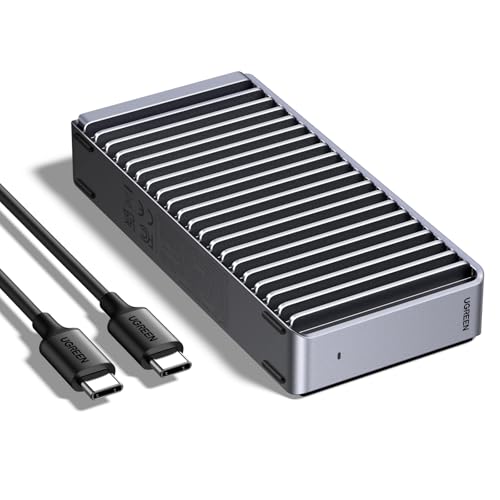
- Up to 3600MB/s with compatible Thunderbolt 4 equipment
- Fanless finned aluminum design for quiet cooling
- Supports NVMe M.2 drives up to 8TB
Best For: Quiet, portable large-file transfers with compatible NVMe drives
Best for Sustained NVMe Transfers

- Tool-free installation for M.2 NVMe SSDs
- 10Gbps USB-C performance for large transfers
- Aluminum body and thermal pad for heat management
Best For: Creators and gamers using high-capacity NVMe drives
Best for 2.5-Inch SATA Drives

- Fits 2.5-inch SATA SSDs and HDDs up to 6TB
- UASP and USB-C support up to 6Gbps SATA speeds
- Tool-free installation with no external power
Best For: Repurposing SATA drives for backups and portable storage
Best for Mixed M.2 Compatibility
Dual-Protocol 10Gbps Enclosure

- Supports compatible M.2 NVMe and SATA SSDs
- 10Gbps USB 3.2 Gen 2 interface
- Includes USB-C and USB-A cables plus thermal pads
Best For: Users managing compatible NVMe and SATA M.2 drives
Best 10Gbps 2.5-Inch Pick
Cable Matters Aluminum USB-C Enclosure

- 10Gbps USB-C connectivity
- Aluminum housing for protection and cooling
- Tool-free 2.5-inch SATA installation
Best For: Fast external storage using a 2.5-inch SATA drive
Best Budget SATA Option
SABRENT Tool-Free USB 3.0 Enclosure

- Tool-free 2.5-inch SATA installation
- Up to 5Gbps over USB 3.0
- UASP and legacy USB compatibility
Best For: Affordable everyday use with older 2.5-inch SATA drives
Best Dual-Protocol M.2 Pick
VCOM 10Gbps NVMe/SATA Enclosure

- Supports M.2 NVMe and SATA SSDs
- Up to 10Gbps NVMe transfer speed
- Heatsink and aluminum cooling design
Best For: Portable large-file transfers from compatible M.2 SSDs
Best for Active Cooling – ACASIS 40Gbps M.2 NVMe Enclosure
For demanding transfers and sustained workloads, this ACASIS model is one of the more performance-focused ssd enclosures for large files. Its 40Gbps connection, built-in fan, and aluminum construction are designed to help an NVMe drive maintain speed during extended use.
Best For: Video editors, professionals, and power users with compatible USB4 or Thunderbolt systems.
Pros:
- 40Gbps connectivity with tested read/write speeds up to 2805/2734 MB/s.
- Built-in cooling fan and heat-dissipation holes help reduce thermal throttling.
- Supports M.2 sizes 2230, 2242, 2260, and 2280, plus up to 8TB drives.
- Compatible with USB4, Thunderbolt 4/3, and older USB standards.
Cons:
- The fan must be activated with its switch.
- Performance depends on a compatible high-speed host, cable, and NVMe SSD.
- It supports NVMe drives rather than SATA or mSATA SSDs.
The ACASIS is a strong choice when sustained speed matters more than absolute simplicity. Its active cooling and broad host compatibility make it especially suitable for large video projects and frequent backups, provided your computer supports the required connection speeds.
Best Multi-Drive Capacity – ORICO 5-Bay All-Flash Enclosure
The ORICO is built for users who need more than a single external drive. With five 2.5-inch bays, RAID options, card readers, and USB expansion, it is a practical storage hub for large files, photo libraries, and video projects.
Best For: Video editors, photographers, and creators managing multiple 2.5-inch SSDs or HDDs.
Pros:
- Five bays support up to 40TB total, with up to 8TB per drive.
- Offers RAID 0, 1, 3, 5, 10, JBOD, and CLEAR modes.
- Includes two 10Gbps USB ports plus SD and TF 3.0 card slots.
- Supports daisy-chaining up to three devices for up to 120TB of expanded storage.
Cons:
- Limited to 2.5-inch drives and does not accept 3.5-inch drives.
- Its SATA connection reaches 5Gbps, while 10Gbps requires a compatible PSSD connection.
- Its multi-bay design is less compact than a single-drive enclosure.
Choose the ORICO when expandable capacity and drive organization are more important than maximum single-drive speed. Its RAID flexibility and built-in card readers make it well suited to a creator’s desktop or on-site workflow.
Best Silent NVMe Option – UGREEN 40Gbps M.2 NVMe Enclosure
UGREEN’s compact enclosure is a strong fit for fast, quiet file transfers. Its ASM2464PD chip supports up to 40Gbps connectivity, while the fanless double-sided fin design helps manage heat without adding fan noise—useful when working with large files in quiet environments.
Best For: Laptop, Mac, and desktop users who want a portable, fanless NVMe enclosure.
Pros:
- Supports maximum speeds up to 3600MB/s with compatible Thunderbolt 4 equipment.
- Fanless aluminum cooling design operates without fan noise.
- Fits M.2 2230, 2242, 2260, and 2280 NVMe drives up to 8TB.
- Works with USB4, Thunderbolt 3/4, USB 3.2, and older USB standards.
Cons:
- SSD is not included.
- It does not support SATA NGFF or mSATA drives.
- Some thicker SSDs may require thinner thermal pads for proper fit.
This UGREEN model balances high potential speed, quiet operation, and portability. It is a good pick for large-file transfers when your host and cable support the necessary bandwidth, but buyers should verify their drive type and physical thickness first.
Best for Maximum Expandability – WAVLINK 4-Bay SATA Enclosure
For a desktop storage system that can hold several large drives, the WAVLINK combines four SATA bays with 10Gbps USB-C connectivity. It supports both 3.5-inch and 2.5-inch drives, adds HDMI output and USB expansion, and uses temperature-controlled fans for heavier storage workloads.
Best For: Desktop users building high-capacity storage for archives, media projects, or game libraries.
Pros:
- Four bays support up to four 22TB drives, for a stated maximum of 88TB.
- Accepts both 3.5-inch and 2.5-inch SATA HDDs and SSDs.
- 10Gbps USB-C supports faster transfers of large files.
- Temperature-controlled fans activate at 48°C, and each bay has an independent power switch.
Cons:
- 2.5-inch drives require separate 2.5-to-3.5-inch mounting brackets.
- It is a larger desktop enclosure rather than a travel-friendly portable unit.
- HDMI output requires a host USB-C port with video support and a USB-C-to-C cable.
The WAVLINK is the most suitable option here for users prioritizing total capacity and multiple-drive access. Its cooling, hot-swappable bay design, and extra connectivity are useful for a workstation, though its size and mounting requirements make it less convenient for mobile use.
Best for Sustained NVMe Transfers – Tool-Free 10Gbps Cooling
For shoppers comparing ssd enclosures for large files, the SABRENT EC-PNVO is a focused option for M.2 NVMe drives. Its USB 3.2 Gen 2 interface supports up to 10Gbps, while the aluminum cover and thermal pad are designed to help manage heat during longer transfers.
Best For: Creators, gamers, and users who need a compact, tool-free enclosure for a high-capacity M.2 NVMe SSD.
Pros:
- Tool-free flip-open design simplifies drive installation, cloning, and troubleshooting.
- Supports M.2 NVMe sizes 2230, 2242, 2260, and 2280, with capacity support up to at least 8TB.
- Aluminum construction and direct thermal-pad contact support cooler, more consistent performance.
- Includes USB-C connectivity and requires no drivers or external power.
Cons:
- Supports NVMe SSDs only and is not compatible with M.2 SATA drives.
- USB-C connectivity may require an adapter for devices with only USB-A ports.
This is a strong match when sustained transfer performance and easy installation matter more than broad drive-format compatibility. Confirm that your SSD is NVMe before buying.
Best for 2.5-Inch SATA Drives – USB-C Aluminum Expansion
The UGREEN 2.5-inch enclosure is a practical choice for large files when your drive uses the SATA form factor. It supports 2.5-inch SATA SSDs and HDDs up to 6TB, with UASP and a USB-C connection intended to improve transfer performance over traditional USB 3.0 setups.
Best For: Users repurposing or carrying a 2.5-inch SATA SSD or HDD for backups, storage expansion, data recovery, or media access.
Pros:
- Supports most 2.5-inch SATA I, II, and III SSDs and HDDs up to 6TB.
- USB 3.1 Gen 2 USB-C connection and UASP support enable up to 6Gbps SATA transfer speeds.
- Tool-free, plug-and-play installation requires no drivers or external power supply.
- Aluminum construction helps dissipate heat without a cooling fan.
Cons:
- Designed for 2.5-inch SATA drives, not M.2 NVMe SSDs.
- The advertised drive speed is limited by the SATA interface to 6Gbps.
Choose this enclosure if you already own a 2.5-inch SATA drive and want a simple portable case for large file storage or transfers. It is less suitable for newer M.2 NVMe hardware.
Best for Mixed M.2 Compatibility – Dual-Protocol 10Gbps Enclosure
The SSK SHE-C325 PRO offers useful flexibility for ssd enclosures for large files because it supports compatible M.2 NVMe PCIe and SATA drives in one enclosure. Its USB 3.2 Gen 2 interface, included USB-C and USB-A cables, and aluminum shell make it convenient for transferring files across different computers.
Best For: Users who have compatible M.2 NVMe and SATA drives and want one portable enclosure with broad connection options.
Pros:
- Supports compatible M.2 NVMe PCIe and SATA M-Key/B+M-Key SSDs in 2242, 2260, and 2280 sizes.
- USB 3.2 Gen 2 supports up to 10Gbps and is backward compatible with USB 3.0 and USB 3.1 Gen 1.
- Includes both USB-C and USB-A cables, two thermal pads, and an installation screwdriver.
- Aluminum shell, UASP, and TRIM support help with portability, heat dissipation, and drive management.
Cons:
- Does not support M.2 PCIe AHCI SSDs, mSATA drives, Wi-Fi or capture cards, or non-M.2 SSDs.
- SSD capacity and file-system compatibility depend on the installed drive and host operating system.
This enclosure is appealing when drive-format flexibility and included cables are priorities. Carefully verify your SSD’s interface, keying, and size because not every M.2 drive is supported.
Best 10Gbps 2.5-Inch Pick – Cable Matters Aluminum USB-C Enclosure
For shoppers comparing ssd enclosures for large files, this Cable Matters model combines a 10Gbps USB-C connection with a sturdy aluminum shell for 2.5-inch SATA SSDs or HDDs. It supports SATA III drives up to their rated 6Gbps interface speed and includes both USB-C and USB cables.
Best For: Users who need a fast, durable enclosure for a 2.5-inch SATA drive and compatible USB-C, Thunderbolt 3, Thunderbolt 4, or USB4 computer.
Pros:
- Up to 10Gbps USB-C transfer rate with compatible hardware.
- Aluminum housing helps protect the drive and assist heat dissipation.
- Tool-free installation with UASP, TRIM, and S.M.A.R.T. support on compatible systems.
- Works with Windows and Mac computers and includes USB-C and USB cables.
Cons:
- Limited to 2.5-inch SATA SSDs and HDDs rather than M.2 drives.
- Actual speeds depend on the computer, drive, and connection used.
This is a strong all-around choice when your large-file workflow uses a 2.5-inch SATA drive and you want a faster USB-C enclosure with a metal build.
Best Budget SATA Option – SABRENT Tool-Free USB 3.0 Enclosure
This SABRENT enclosure is a straightforward option for ssd enclosures for large files when your computer has USB 3.0. Its tool-free design accepts a standard 2.5-inch SATA SSD or hard drive, with transfer rates up to 5Gbps over USB 3.0.
Best For: Users who want an inexpensive, simple enclosure for a 2.5-inch SATA drive and broad compatibility with older Windows or Mac systems.
Pros:
- Tool-free installation and plug-and-play operation.
- Supports transfer rates up to 5Gbps through USB 3.0.
- UASP support helps optimize compatible SATA III SSDs.
- Backwards-compatible with USB 2.0 and USB 1.1.
Cons:
- USB 3.0 tops out below the 10Gbps speed offered by newer enclosures.
- Plastic construction provides less substantial protection than an aluminum enclosure.
- Limited to 2.5-inch SATA or notebook drives.
Choose this model for uncomplicated drive reuse and everyday transfers, but consider a 10Gbps enclosure if large-file transfer time is a priority.
Best Dual-Protocol M.2 Pick – VCOM 10Gbps NVMe/SATA Enclosure
For large-file transfers from newer compact drives, the VCOM enclosure supports both M.2 NVMe and SATA SSD protocols. Its USB 3.2 Gen 2 interface reaches up to 10Gbps for NVMe or 6Gbps for SATA, while the aluminum shell, heatsink, and thermal pad help manage heat.
Best For: Users who need one portable enclosure for compatible M.2 NVMe and SATA SSDs in 2230, 2242, 2260, or 2280 sizes.
Pros:
- Supports M.2 NVMe M-Key and M+B-Key drives plus M.2 SATA M+B-Key drives.
- Up to 10Gbps NVMe or 6Gbps SATA transfer speed.
- Includes USB-A-to-USB-C and USB-C-to-USB-C cables.
- Metal cooling design includes a heatsink, thermal pad, and striped aluminum shell.
Cons:
- Compatibility depends on the SSD protocol, key type, and supported size.
- Requires a compatible USB-C connection to reach its highest rated speed.
- Supports one SSD at a time.
This is the most flexible choice here for users moving between M.2 drives, especially when compact size, dual-protocol support, and cooling are more important than 2.5-inch drive compatibility.
How We Picked the Best SSD Enclosures for Large Files
We focused on the factors that matter most during sustained transfers rather than short burst-speed claims alone. Our comparison considers USB and PCIe bandwidth, supported drive formats, cooling, construction, installation, capacity limits, and practical compatibility with modern computers.
The selection includes 40Gbps NVMe enclosures for demanding workloads, 10Gbps models for a strong balance of speed and value, simple 2.5-inch SATA cases, and a four-bay enclosure for users who need substantially more storage. We also considered useful extras such as tool-free installation, USB hubs, card-reader functionality, temperature control, and support for both NVMe and SATA M.2 drives.
Quick Comparison
| Type | Best for | Typical advantage | Watch for |
|---|---|---|---|
| 40Gbps M.2 NVMe | Large video and project files | Highest potential transfer speeds | Requires a compatible USB4 or USB 3.2 Gen 2×2 port |
| 10Gbps NVMe | Everyday heavy transfers | Strong performance and broad compatibility | Real-world speed depends on the host port and SSD |
| 2.5-inch SATA | Existing SATA SSDs or HDDs | Affordable, simple installation | SATA limits performance below NVMe |
| Multi-bay enclosure | Large libraries and backups | Multiple drives and high total capacity | Larger footprint and more setup complexity |
Key Buying Factors for SSD Enclosures for Large Files
Interface and Real-World Speed
A 40Gbps enclosure can be an excellent choice for demanding work, but only when the computer, cable, and SSD support the required standard. On many systems, a 10Gbps enclosure offers better value because it is more widely compatible. Check the exact USB-C port specification rather than assuming every USB-C connector supports maximum speed.
Drive Compatibility
Confirm whether the enclosure accepts NVMe, SATA, or both. M.2 drives also use different keying and lengths, while 2.5-inch SATA enclosures require a separate physical drive. A multi-bay model is better suited to several 3.5-inch or 2.5-inch drives than a compact portable enclosure.
Cooling and Sustained Workloads
Large-file transfers can expose thermal limitations quickly. Aluminum bodies help disperse heat, while thermal pads, vents, or an active fan can reduce throttling. Cooling matters most for high-performance NVMe drives and repeated video or backup transfers.
Capacity, Power, and Portability
Verify the stated capacity limit and whether the enclosure supplies enough power for the installed drive or drives. A bus-powered case is convenient for travel, while a powered multi-bay enclosure is more appropriate for desktop storage and large archives.
Who Should Buy Which SSD Enclosures for Large Files?
Choose a 40Gbps NVMe model if you routinely move very large files and own a compatible high-speed port. A 10Gbps NVMe enclosure is the sensible all-around choice for most creators and professionals. Pick a 2.5-inch SATA enclosure when reusing an existing SSD or hard drive is the priority. For mixed M.2 requirements, choose a dual-protocol enclosure after confirming its supported key types. Finally, select a multi-bay enclosure if capacity, drive consolidation, and backup flexibility matter more than portability.