A good control surface can make mixing feel faster, more tactile, and less distracting than endless mouse clicks. If you want hands-on control over levels, transport, plug-ins, and automation, the right unit can streamline your entire workflow.
This roundup focuses on practical choices for home and project studios, from compact single-fader controllers to deeper multi-fader surfaces for serious DAW work.
Best 10 USB Control Surface for Recording Studio Picks for 2026
Full-Size Control Surface
Behringer X-TOUCH Universal Control Surface

- 9 touch-sensitive motorized faders
- 8 LCD scribble strips for track feedback
- USB, MIDI, and Ethernet connectivity
Best For: multi-track DAW mixing with tactile mixer-style control
Compact Automation Controller
PreSonus FaderPort V2 DAW Controller

- Single touch-sensitive motorized fader
- 24 buttons with 40 assigned functions
- USB 2.0 with broad DAW compatibility
Best For: compact automation, transport, and editing control
Ultra-Portable Mixer Controller
Korg nanoKONTROL2 Slim-Line USB Control Surface

- Slim, low-profile control surface
- Eight mixer channels with mute control
- USB connection for portable DAW use
Best For: laptop-based mixing and mobile studio control
Screen-Focused DAW Controller
Solid State Logic UF1 Advanced DAW Controller

- Two high-resolution displays, including 4.3-inch TFT LCD
- Includes SSL Meter plug-in license
- Controls pans, sends, plug-ins, and virtual instruments
Best For: engineers who want detailed visual feedback in a compact controller
Universal DAW Remote
Behringer X-TOUCH ONE Universal Control Surface

- Touch-sensitive motor fader
- HUI and Mackie Control support
- Major DAW compatibility on PC/Mac
Best For: Solo producers needing compact DAW control
Portable Ableton Mixer
Akai Professional MIDImix USB MIDI Controller Mixer

- 8 faders plus master fader
- 24 knobs and 16 buttons
- Instant 1:1 Ableton Live mapping
Best For: Ableton Live users wanting portable hands-on mixing
Expandable EUCON Surface
Avid S1 EUCON Enabled Control Surface

- EUCON-enabled workflow
- USB and Windows compatible
- Connect up to four units
Best For: Expandable studio control setups
Studio Monitor Controller
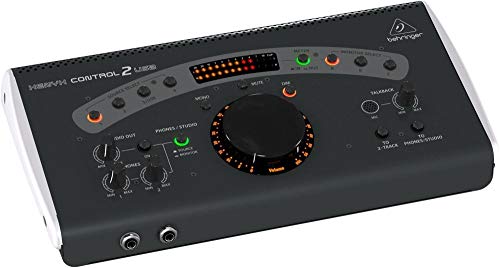
- All-in-one monitor controller with talkback
- Built-in USB audio interface
- High-headroom, low-noise studio hub
Best For: Small studios needing monitor control and talkback
Hybrid MIDI Control Surface

- 8 faders, 24 encoders, and 16 assignable buttons
- USB-C plus 5-pin MIDI I/O for hardware integration
- Deep DAW support with custom modes
Best For: Producers mixing DAWs with external synths and effects
Compact Bluetooth/USB Controller

- Compact, lightweight layout for portable use
- Bluetooth and USB connectivity
- Eight faders with backlit switches
Best For: Mobile producers and small desks needing tactile control
Full-Size Control Surface – Behringer X-TOUCH Universal Control Surface
If you want a USB control surface for recording studio work that feels closer to a full hardware mixer, the Behringer X-TOUCH is built for broad DAW control. It combines nine touch-sensitive motorized faders with LCD scribble strips, plus support for HUI and Mackie Control protocols for compatible music production software.
Best For: Producers who want hands-on control of multiple tracks, transport, and automation in a compact desktop surface.
Pros:
- 9 fully automated, touch-sensitive 100 mm motorized faders
- 8 LCD scribble strips provide track and parameter feedback
- Supports HUI and Mackie Control for broad DAW compatibility
- Includes Ethernet, USB, and MIDI connectivity options
Cons:
- More controller than minimalists may need
- Larger footprint than single-fader options
- Designed around compatible DAWs and workflows
Overall, the X-TOUCH is the most mixer-like option here, making it a strong pick when you want a tactile studio surface with real-time feedback and multiple faders at once.
Compact Automation Controller – PreSonus FaderPort V2 DAW Controller
The PreSonus FaderPort V2 is a practical USB control surface for recording studio users who want fast automation and transport control without taking up much desk space. Its single touch-sensitive 100 mm motorized fader, encoder, and dedicated buttons make it a focused tool for editing, mixing, and writing fades in real time.
Best For: Solo producers and home studios that need fast hands-on control in a compact footprint.
Pros:
- Touch-sensitive 100 mm motorized fader for automation and fades
- 24 buttons cover 40 functions, including transport and record-enable
- Session Navigator speeds up common DAW navigation tasks
- USB 2.0 connection and wide DAW support, including Pro Tools and Logic Pro X
Cons:
- Only one fader, so it is not ideal for multi-channel mixing
- Some advanced functions depend on DAW support
- Footswitch is not included
If you want a compact surface that improves workflow rather than replacing a mixer, the FaderPort V2 is a strong, efficient choice for everyday studio control.
Ultra-Portable Mixer Controller – Korg nanoKONTROL2 Slim-Line USB Control Surface
The Korg nanoKONTROL2 is a slim USB control surface for recording studio setups that need simple, portable control over multiple tracks. Its low-profile design, eight-channel mixer layout, and support for major DAW programs make it a straightforward fit for laptop-based production.
Best For: Mobile producers and small studio setups that want a lightweight, low-profile controller.
Pros:
- Low-profile design is easy to place beside a laptop
- Eight mixer channels suit basic track control
- Includes mute controls and new track select/marker advance functions
- USB-powered and comes with a USB cable
Cons:
- Button-based layout is less tactile than motorized-fader controllers
- Best suited to simpler control tasks
- Limited information on deep integration beyond supported DAWs
For compact projects where portability matters more than advanced hardware feedback, the nanoKONTROL2 offers useful control in a very small footprint.
Screen-Focused DAW Controller – Solid State Logic UF1 Advanced DAW Controller
The Solid State Logic UF1 is a compact USB control surface for recording studio users who want detailed visual feedback alongside hands-on DAW control. With two high-resolution displays, including a 4.3-inch TFT LCD, it is designed to show track names, parameters, time, and metering information clearly while you work.
Best For: Engineers and producers who want a compact controller with strong on-screen feedback and plug-in control.
Pros:
- Two high-resolution displays for track names, parameters, and time display
- Includes SSL Meter plug-in license with detailed metering tools
- Controls pans, sends, plug-ins, and virtual instruments
- Fader Mode lets the 4 V-Pots control 4 track volumes at the same time
Cons:
- Platform support is listed for Windows and PC hardware
- Uses a compact layout rather than multiple faders
- USB is the control interface, but the supplied notes list XLR under connectivity details
For users who care about visibility as much as control, the UF1 stands out with its large screen, metering integration, and compact but capable workflow.
Universal DAW Remote – Behringer X-TOUCH ONE Universal Control Surface
If you want a USB control surface for recording studio work that keeps essential DAW navigation close at hand, the Behringer X-TOUCH ONE is built around a single touch-sensitive motor fader and an LCD scribble strip. It supports HUI and Mackie Control protocols, includes labeled DAW templates, and offers assignment presets for major music production software.
Best For: Solo producers and engineers who want a compact, hands-on DAW remote with broad software compatibility.
Pros:
- Touch-sensitive motor fader for responsive control
- Supports HUI and Mackie Control for seamless DAW integration
- Includes labeled DAW templates and user preset options
- Works with major DAWs on PC and Mac
Cons:
- Single-fader layout limits deeper mixing control
- Wired USB design is less flexible than wireless options
For streamlined session control rather than full console-style mixing, this unit covers the basics well and keeps setup simple. It is a practical choice if you value compatibility and quick access to core DAW functions over a larger surface.
Portable Ableton Mixer – Akai Professional MIDImix USB MIDI Controller Mixer
The Akai Professional MIDImix is a USB control surface for recording studio use when you want a compact mixer-style layout with direct access to level, send, and transport-style workflow basics. It offers 8 faders, a master fader, 24 knobs, and 16 buttons, plus 1:1 mapping with Ableton Live for quick setup.
Best For: Ableton Live users who want a lightweight, portable mixer controller for hands-on mixing.
Pros:
- 8 channel faders plus a master fader
- 24 assignable knobs for EQ, sends, and instruments
- 16 buttons for mute, solo, and record arm functions
- Instant 1:1 mapping with Ableton Live
Cons:
- Official integration focus is specifically on Ableton Live
- No dedicated display or motorized faders listed
This is a strong fit if your workflow is centered on Ableton and you want tactile control without a bulky footprint. Its compact metal build and simple USB connection make it easy to move between home and project studios.
Expandable EUCON Surface – Avid S1 EUCON Enabled Control Surface
The Avid S1 is a USB control surface for recording studio environments where EUCON integration matters and expansion is a priority. According to the supplied notes, you can connect up to four S1 units to build an extended integrated surface, making it a scalable option for larger control setups.
Best For: Studios that want an expandable EUCON-based control surface and may add more units later.
Pros:
- EUCON-enabled control surface for integrated workflow
- USB connection with Windows compatibility noted
- Supports connecting up to four S1 units
- Can scale into a larger extended surface
Cons:
- Supplied notes do not list detailed control features
- Expansion is most useful if you plan to add more than one unit
If you are building a more serious studio control environment, the Avid S1 stands out for its modular approach. The ability to combine multiple units makes it better suited to growing setups than to minimal, single-device control needs.
Studio Monitor Controller – Behringer XENYX CONTROL2USB
Behringer CONTROL2USB High-End Studio Control with VCA Control and USB Audio Interface
Check Price On AmazonIf you want a USB control surface for recording studio monitoring and talkback duties, the Behringer XENYX CONTROL2USB is built as an all-in-one desktop hub. It combines master volume control, source selection, monitor switching, a USB audio interface, and a built-in talkback mic, so it can simplify everyday studio communication and routing.
Best For: Small studios that want monitor control, talkback, and USB audio in one box.
Pros:
- Combines master volume, source selector, monitor switcher, and talkback box in one unit
- Built-in talkback microphone with level control for direct communication with musicians
- Includes USB audio interface support and 192 kHz maximum sample rate
- Designed as a premium, ultra-low noise, high-headroom studio control center
Cons:
- Focused more on monitoring and communication than on DAW fader control
- Uses a larger desktop footprint at 5.3 pounds
- Software support listed for Ableton Live 10 or later, which may narrow some workflows
For studios that prioritize clean monitor management and easy talkback over deep mixing control, this is a practical and capable desktop solution. It makes sense when you want a straightforward control center rather than a full MIDI surface.
Hybrid MIDI Control Surface – Novation Launch Control XL 3
For anyone shopping for a USB control surface for recording studio mixing and hardware integration, the Novation Launch Control XL 3 is built around hands-on DAW and synth control. It pairs eight faders, 24 endless encoders, 16 assignable buttons, an OLED display, and USB-C bus power with MIDI In, Out, and Out2/Thru for flexible hybrid setups.
Best For: Producers who want a compact mixer-style controller for DAWs, synths, and hybrid rigs.
Pros:
- Deep integration with major DAWs including Ableton Live, Logic Pro, FL Studio, Cubase, and HUI
- 8 faders, 24 endless encoders, 16 buttons, and an OLED for real-time feedback
- MIDI In/Out/Out2-Thru lets it control external gear without a computer
- Supports custom mappings and stores up to 15 Custom Modes
Cons:
- It is a MIDI control surface, not an audio interface
- Best suited to users who want parameter control rather than full studio monitor management
- Compact form may feel limited if you want more than eight faders
This is a strong pick for hands-on production workflows where DAW control and hardware integration matter equally. It offers a lot of flexibility in a relatively compact surface, especially if you like customizing mappings for different projects.
Compact Bluetooth/USB Controller – Korg nanoKONTROL Studio
The Korg nanoKONTROL Studio is a compact USB control surface for recording studio use when portability matters. It offers eight faders, backlit switches, Bluetooth and USB connectivity, and compatibility with mobile and desktop setups, making it a practical choice for lightweight control on the move or at a crowded desk.
Best For: Mobile producers and compact desktop setups that need simple tactile control.
Pros:
- Very compact and lightweight for mobile or desktop use
- Supports both Bluetooth and USB for more flexible connection options
- Eight faders and backlit switches provide basic tactile control
- Compatible with PC, Mac, and iOS hardware platforms
Cons:
- More limited than larger control surfaces for detailed mixing
- Listed software support is narrower than some competing controllers
- Buttons and small format may feel basic for advanced studio workflows
If you need a simple controller that travels well and doesn’t take much space, this Korg model fits the role nicely. It’s best viewed as a lightweight control companion rather than a full-featured studio command center.
How We Picked the Best USB Control Surface for Recording Studio
We focused on controllers that offer useful day-to-day control for a USB Control Surface for Recording Studio setup. Priority went to DAW compatibility, build quality, fader responsiveness, transport access, labeling clarity, and how well each unit fits common mixing tasks. We also considered whether a model is better for compact desks, hybrid hardware rigs, or larger production sessions.
Quick Comparison
Multi-fader surfaces are best if you want to mix several channels at once and move quickly through sessions. Single-fader models suit engineers who value precision and space savings. Slim MIDI controllers are ideal for producers who need flexible mapping rather than deep DAW integration. For advanced workflows, EUCON and proprietary integration can offer tighter software control, while simpler USB MIDI devices tend to be easier to set up.
Key Buying Factors for USB Control Surface for Recording Studio
DAW Compatibility
Check that the surface supports your recording software well enough for transport, banking, automation, and mixer access. Some units work broadly through standard MIDI, while others are optimized for specific DAWs.
Fader Count and Feel
More faders usually mean faster mixing, but only if your desk space and workflow can support them. Motorized faders are helpful for reading session automation and recalling positions, while non-motorized designs can still be useful for hands-on MIDI control.
Connectivity and Power
USB bus-powered models are simpler to place and travel with. If you also use DIN MIDI, Ethernet, or expansion options, make sure your studio routing can support the added flexibility.
Display and Feedback
LCD scribble strips, backlit buttons, and clear channel labeling reduce mistakes during long sessions. Good visual feedback matters when you are juggling multiple tracks or plug-ins.
Size and Workflow Fit
A USB Control Surface for Recording Studio use should match your physical setup. Compact units work well near keyboards or laptops, while larger surfaces make sense for dedicated mix positions and bigger projects.
Who Should Buy Which USB Control Surface for Recording Studio?
Choose a larger multi-fader surface if you mix full sessions regularly and want faster navigation across many tracks. Pick a single-fader controller if you want focused control in a tight space. Go with a slim MIDI surface if you mainly need customizable hands-on control for production, drums, synths, or plugin parameters. If your studio depends on deep integration with professional DAWs, an advanced platform with tighter software support may be worth the investment.