AA Audio Accessory Low Profile Mic Boom Arm review buyers should read if they need a sturdier desk mount for serious microphones.
It is built for heavier setups, not lightweight convenience.
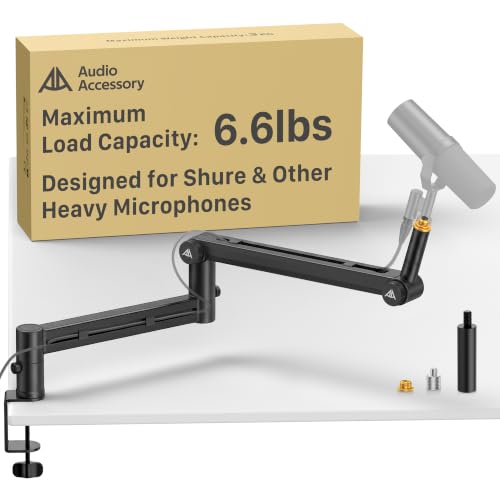
AA Audio Boom Arm Review Summary
The AA Audio Accessory Low Profile Mic Boom Arm is a strong choice for creators who want a stable, low-profile desk arm that can handle bigger microphones without slowly sagging out of position. If you record podcasts, stream games, or work in a home studio with a broadcast-style mic, this arm is aimed squarely at that use case.
The combination of a 6.6 lb / 3 kg load capacity, gear-lock construction, and long 780 mm reach makes it stand out from the many basic spring arms that struggle with heavier gear.
What makes the AA Audio Accessory Low Profile Mic Boom Arm especially compelling is that it focuses on the practical pain points buyers actually care about: stability, reach, cable routing, and compatibility.
That means less wobble on the desk, better mic positioning for camera framing, and fewer annoying setup compromises.
It is not the lightest or most minimal-looking arm available, but for a buyer who values long-term support over ultra-simple design, it looks like a smart and functional upgrade.
Scorecard
| Category | Score | What it means |
|---|---|---|
| Load support | 9.0 | Built for heavy microphones with a high load rating that should handle larger broadcast and USB mics better than basic spring arms. |
| Stability and sag resistance | 9.0 | Gear-lock design is positioned as more stable than spring-loaded arms and is meant to avoid gradual drooping over time. |
| Reach and positioning range | 9.0 | Extra-long arm reach plus wide horizontal and vertical adjustment make it flexible for desk setups and off-camera placement. |
| Build quality | 8.0 | Uses aluminum alloy and glass-fiber nylon with reinforced arm sections, suggesting a sturdier feel for heavier use. |
| Cable management | 8.0 | Deep cable channels are designed to route multiple cables cleanly, which helps keep a streaming or recording desk tidy. |
| Ease of adjustment | 8.0 | Tool-free knob adjustments should make repositioning straightforward without extra tools. |
| Mic compatibility | 9.0 | Supports a wide range of popular studio and streaming microphones, including heavier models like SM7B-class mics and Blue Yeti. |
Bottom line: this is best for buyers who want a dependable boom arm for heavy mics and do not want the arm drifting out of place over time.
Key Features and Specifications of AA Audio Boom Arm
The AA Audio Boom Arm is a low-profile mic boom arm desk mount designed to support modern podcasting and streaming microphones while keeping the desk area cleaner and more usable.
Its spec sheet shows that it is not trying to compete with lightweight entry-level arms; instead, it targets users who need better structural support and a more controlled range of movement.
| Spec | Details |
|---|---|
| Brand | AA AUDIO ACCESSORY |
| Style | Low Profile Mic Boom Arm Desk Mount |
| Color | Black |
| Material | Aluminum, Metal |
| Weight | 1.63 kilograms |
| Max load capacity | 6.6 lbs / 3 kg |
| Reach | 780 mm |
| Horizontal rotation | 360° |
| Vertical adjustment | 120° |
| Construction | 40 x 25 mm ultra-thick reinforced arms |
| Locking system | Gear-lock design |
| Mounting | Desk mount clamp included |
| Adapters | 3/8" to 5/8" adapter; 3/8" to 1/4" adapter |
| Included parts | Top boom arm, bottom boom arm, extension rod, clamp |
| Compatibility highlights | Shure SM7B, SM7dB, MV7, MV7+, MV7X, RODE PodMic, Audio-Technica AT2020, AT2035, FIFINE AM8, K669B, HyperX QuadCast, SoloCast, Blue Snowball iCE, Elgato Wave mics, Blue Yeti |
Several design choices matter here.
The gear-lock mechanism is a major one because it is intended to avoid the slow droop common in spring-loaded boom arms.
The extra-long 780 mm reach is another practical advantage because it gives users more freedom to position the microphone near the mouth without forcing the arm into a cramped angle.
The 40 x 25 mm reinforced arm sections and composite materials also suggest the manufacturer is prioritizing stiffness over lightness.
That is the right call for heavier mics, though it does mean the arm may feel more substantial on the desk than some minimalist alternatives.
Pros and Cons of AA Audio Boom Arm
Like most accessories in this category, the AA Audio Accessory Low Profile Mic Boom Arm pros and cons come down to what kind of microphone you use and how your desk is arranged.
| Pros | Cons |
|---|---|
| Strong weight support for heavier microphones | Heavier and more substantial than lightweight arms |
| Gear-lock system should resist sagging better than spring arms | Low-profile design may be less flexible for some desk layouts than taller boom arms |
| Long reach and broad movement range | Very heavy setups still depend on clamp placement and desk strength |
| Useful cable management | More mechanical parts than a simple spring arm may mean more setup consideration |
| Comes with multiple adapters and an extension rod | May feel bulkier than ultra-light alternatives |
| Works with many popular podcast and streaming microphones |
The biggest win is stability. The biggest trade-off is that this is not a featherweight, compact arm for casual desk users who just want something simple and cheap.
Who Should Buy AA Audio Boom Arm?
The AA Audio Boom Arm makes the most sense for buyers who are already dealing with microphone weight, desk clutter, or bad positioning from a weaker arm.
It is a good fit for a creator who wants the mic to sit exactly where it should and stay there.
- Podcasters using broadcast-style microphones that need secure support.
- Streamers who want the mic off-camera but still close enough for clear vocal capture.
- Home studio users who value a low-profile setup with long reach.
- Remote workers and voice actors who need cleaner desk organization and reliable positioning.
- Buyers replacing sagging spring arms and wanting a more stable long-term solution.
It is also a sensible upgrade for anyone who has outgrown a lightweight arm that cannot comfortably support an SM7B-class microphone or a similarly dense USB mic.
If your current boom arm feels wobbly, drifts downward, or forces awkward placement, this model addresses those problems directly.
Who should skip it? Buyers with very small desks, ultra-light microphones, or a preference for the simplest possible mounting setup may find this arm more robust than they actually need.
Will It Hold Heavy Broadcast Mics?
This is one of the main reasons to consider the AA Audio Accessory Low Profile Mic Boom Arm.
The published 6.6 lb / 3 kg maximum load capacity is significantly more reassuring than the vague claims often seen on generic mic arms.
For popular broadcast mics like the Shure SM7B, Shure MV7 series, and RODE PodMic, the real advantage is not only raw weight support but also sag resistance.
The gear-lock design should help the arm maintain position more predictably than a spring-loaded mechanism.
That matters because heavier mics do not just need to be held up once; they need to stay where you place them after repeated use, desk bumps, and daily adjustments.
In practice, that is often where cheaper arms fail.
They may hold at first, then begin to creep downward or require constant retightening.
Another practical benefit is the reinforced section size.
The 40 x 25 mm arm dimensions suggest that the arm is built for stiffness, which is exactly what a heavy microphone needs.
For a buyer using a broadcast mic, this is the kind of construction detail that can be more important than flashy design touches.
Desk Clearance and Low-Profile Setup
Low-profile mic arms are popular because they keep the boom low and out of the way of monitors, webcams, and sightlines.
The AA Audio Boom Arm follows that idea well, but it is worth understanding what low-profile means in real use.
Low-profile designs are ideal when you want the arm to extend from behind or beside the desk and swing into position without towering over your monitor.
That is useful for streamers and video creators who want a cleaner frame.
The 780 mm reach gives enough length to bring the microphone near the user while keeping the base relatively out of the way.
However, a low-profile arm can be less adaptable than a taller broadcast boom in some setups.
If your desk is unusually deep, if your monitor arm already occupies the rear edge, or if you need the microphone to travel around multiple obstacles, a taller geometry may be easier to work with.
So while this model is excellent for neat, low-line positioning, it is not automatically the best fit for every desk shape.
Cable Routing and Workspace Organization
One underrated reason to buy a better boom arm is cable control.
The AA Audio Accessory Low Profile Mic Boom Arm includes deep cable management channels, which is a meaningful quality-of-life feature for anyone running an audio interface, USB microphone, or XLR setup.
Clean cable routing helps in two ways.
First, it improves aesthetics: your desk looks more intentional and less like a temporary recording station.
Second, it reduces cable strain.
That matters because repeated twisting and tugging can shorten cable life, especially near the connector end.
A good cable route also minimizes the chance of the microphone rotating out of place when the cable gets snagged.
For a streamer or podcaster, this is one of those features that feels small until you go without it.
Once you have a tidy cable path, the whole setup feels easier to use.
It is the kind of detail that makes the difference between a functional mic arm and one that genuinely improves workflow.
Included Adapters and Mounting Hardware
The package is more complete than many entry-level desk arms.
You get the desk mount clamp, top boom arm, bottom boom arm, and an extension rod, along with 3/8" to 5/8" and 3/8" to 1/4" adapters.
That matters because microphone threading is not always standardized in the way buyers expect.
From a buyer perspective, the included adapters reduce friction.
You are less likely to discover after delivery that your microphone or shock mount needs a separate adapter.
The extension rod also adds flexibility for fitment and placement, which is especially useful when working around larger microphones or trying to fine-tune distance.
Still, the clamp deserves attention.
As with any heavy-duty desk mount, the arm is only as secure as the desk it is attached to.
Thick, unstable, or delicate furniture can undermine even a well-built arm.
So before buying, verify desk thickness and think about where the clamp will sit relative to your monitor stand, keyboard tray, or desk edge.
Best Mic Types for This Arm
The most obvious match is a heavier dynamic microphone, but the AA Audio Boom Arm is broader than that.
It is compatible with a wide range of popular microphones, which makes it appealing to buyers who may upgrade later and do not want to replace the arm again.
- Broadcast mics: Shure SM7B, SM7dB, MV7, MV7+, MV7X, RODE PodMic
- USB and hybrid mics: Blue Yeti, HyperX QuadCast, Elgato Wave models, Blue Snowball iCE
- Entry and midrange studio mics: Audio-Technica AT2020, AT2035
- Budget and creator mics: FIFINE AM8, K669B
This range is a real strength because it means the arm is not a one-mic accessory.
A buyer might start with a lighter USB mic and later move to a heavier broadcast microphone, and the arm should still be relevant.
That future-proofing is one reason the model is attractive for people building a long-term recording setup.
AA Audio Accessory Low Profile Mic Boom Arm Alternatives
If you are comparing options, there are several Amazon-friendly alternatives worth considering.
Each serves a slightly different buyer need, so the best choice depends on your desk and microphone weight.
- Elgato Wave Mic Arm LP – A popular low-profile option for streamlined creator setups, especially if you want a polished desk aesthetic.
- Rode PSA1+ – A premium-style choice known for smooth articulation and strong positioning, often favored by serious podcasters.
- InnoGear heavy duty mic arm – Good for buyers who want broad category availability and a more budget-conscious starting point.
- TONOR low profile mic boom arm – Worth a look if you want a similar layout concept with wide marketplace availability.
- Blue Compass microphone boom arm – Another recognizable option for creators who want a more refined desktop boom arm.
Compared with these alternatives, the AA Audio Accessory Low Profile Mic Boom Arm looks strongest on the combination of load capacity, gear-lock stability, and included adapters.
It may not be the most famous name in the category, but on paper it is very competitive where it matters most.
Design and Usability: What It Feels Like in Daily Use
Good mic arms are not just about specifications; they are about how the setup feels every day.
Here, the AA Audio model appears intentionally engineered to reduce small annoyances.
The tool-free knobs should make repositioning quicker, and the 360° horizontal rotation combined with 120° vertical movement provides enough freedom for voice, call, and recording positions.
For a creator who frequently switches between speaking straight ahead, leaning back, or moving the mic away when not in use, this flexibility matters.
The arm needs to adjust easily without becoming loose.
That is where the gear-lock format should help: it is designed for stable movement, not floppy movement.
There is a trade-off, though.
Because the structure is more substantial, the setup can feel less delicate than lightweight competitor arms.
That is not a negative for everyone; in fact, many buyers will prefer the more anchored feel.
But if you want the easiest possible one-hand repositioning experience, some lighter arms may feel a bit smoother, even if they do not hold heavy mics as well.
Buying Advice for the AA Audio Boom Arm
If your current boom arm sags, flexes, or forces you to compromise on mic position, this model is aimed at solving that exact problem.
The combination of heavy-duty load support, long reach, and gear-lock stability makes it a strong buy for serious home studio and streaming use.
The main thing to check before ordering is your desk setup.
A sturdy desk and sensible clamp placement are essential, especially if you are mounting a heavy microphone.
Also make sure your mic thread size matches the included adapters so you can install everything cleanly on day one.
Is AA Audio Boom Arm Worth It?
Yes, the AA Audio Accessory Low Profile Mic Boom Arm is worth it for the right buyer. If you need a low-profile arm that can confidently hold heavier microphones, keep its position over time, and clean up your desk with better cable routing, this is a well-targeted option.
It is especially appealing for podcasters, streamers, and studio users who are tired of cheap arms that slowly droop or feel unstable.
It is not the best choice for everyone.
If you only use a lightweight mic and want the smallest, simplest arm possible, the extra structure may be unnecessary.
But if your priority is durability, sag resistance, and broad mic compatibility, the AA Audio Accessory Low Profile Mic Boom Arm has a very strong case.
Final verdict: buy it if you want a dependable, heavy-mic-friendly desk arm and are willing to accept a bit more bulk in exchange for a much more secure setup.