The FIFINE AmpliGame D6 Stream Controller review reveals a compact tool that can seriously speed up a creator’s workflow.
If you manage scenes, audio, and app launches often, it deserves a close look.
AmpliGame D6 Review Summary
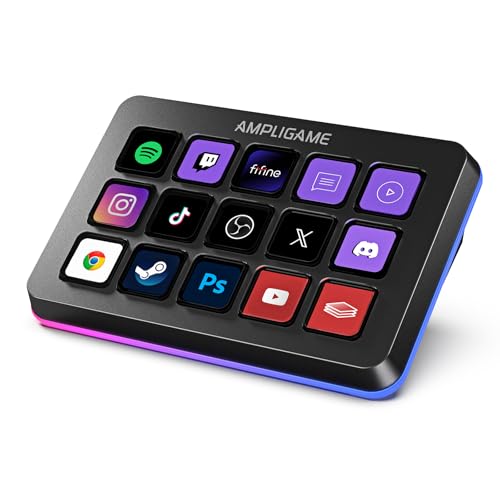
The FIFINE AmpliGame D6 Stream Controller is best for streamers and multitaskers who want one-touch control without cluttering their desk. Its 15 customizable LCD macro keys, drag-and-drop setup, and compatibility with OBS Studio, Streamlabs, Twitch, and YouTube make it a practical command center for live production.
If your workflow includes scene switching, audio changes, folder-based shortcuts, or repeated launches, this controller can make your setup feel faster and more organized.
For buyers asking is FIFINE AmpliGame D6 Stream Controller worth it, the answer is usually yes if you already work inside creator software and want a dedicated hardware shortcut panel.
It is less compelling for casual users who only need a few hotkeys, but it makes strong sense for anyone who values speed, visual control, and a desktop-friendly streaming layout.
The RGB ring and glowing keypad also give it a polished look that fits gaming and creator setups well.
Scorecard
| Category | Score | Why It Matters |
|---|---|---|
| Macro control flexibility | 9.0 | 15 customizable macro keys give creators plenty of one-tap actions for scenes, audio, launches, folders, and other repeated tasks. |
| Streaming software support | 8.0 | Built to work with OBS Studio, Streamlabs, Twitch, YouTube, and other apps, making it a strong fit for common creator workflows. |
| Workflow speed | 9.0 | The visual keypad approach reduces window switching and helps users trigger actions directly during live production. |
| Customization options | 8.0 | Supports drag-and-drop setup, app/store downloads, folders, and programmable actions for tailoring different scenes or tasks. |
| Build and visual appeal | 8.0 | RGB lighting and a glowing ring add a polished streaming-gadget look that suits gaming and creator setups. |
| Cross-device compatibility | 7.0 | Works with Mac and PC/laptop setups, which broadens usefulness, though it appears most creator-focused on desktop workflows. |
| Multi-use versatility | 8.0 | Beyond streaming, it is positioned for gaming, office work, video editing, music creation, and photography or graphics tasks. |
Bottom line: the AmpliGame D6 is a strong buy for creators who want faster live control, a compact footprint, and useful customization.
Its biggest strength is workflow efficiency; its biggest limitation is that it only truly shines if you regularly use software that benefits from macro control.
Key Features and Specifications of AmpliGame D6
The AmpliGame D6 is built around a simple idea: put the most-used commands under your fingers and keep them visible.
That makes it especially useful for streamers who want to reduce clicking, alt-tabbing, and mouse hunting while going live.
| Spec / Feature | Details |
|---|---|
| Brand | AmpliGame |
| Model | D6 Black |
| Keys | 15 customizable LCD macro keys |
| Connectivity | USB |
| Compatibility | Mac and PC |
| Software support | OBS Studio, Streamlabs, Twitch, YouTube, and more |
| Lighting | RGB ring with 9 controllable modes |
| Primary uses | Streaming, gaming, office work, video editing, music creation, photography, and graphics tasks |
| Setup style | Drag-and-drop customization, app/store downloads, folders, and programmable actions |
From a buyer’s perspective, the most important spec is the 15-key layout.
That is enough room to build a serious command layer without pushing the device into oversized territory.
It also gives you room to separate tasks by category, such as scene switching, audio, streaming utilities, and app shortcuts.
The LCD macro keys are another major design choice.
They make the controller easier to understand at a glance than a blank macro pad, especially when your setup becomes more complex.
Instead of memorizing a string of keybinds, you can create a more visual workflow that is easier to remember during a live broadcast or editing session.
The USB connection keeps things straightforward.
You are not dealing with a wireless battery or extra pairing steps, which is a plus for a device meant to sit on a desk and stay ready all day.
The tradeoff is that it is best viewed as a dedicated desktop tool rather than a mobile accessory.
Pros and Cons of AmpliGame D6
Every stream controller lives or dies by how much time it saves, and that is where the AmpliGame D6 has a real advantage.
Still, buyers should understand both sides before choosing it.
Pros
- 15 macro keys provide plenty of control options for scenes, audio, folders, and app launches.
- Good fit for streamers using OBS and Streamlabs, which are among the most common creator workflows.
- Helpful visual keypad layout makes actions easier to trigger quickly.
- RGB lighting adds gaming-friendly style without looking too plain or utilitarian.
- Useful beyond streaming for office work, editing, music, and graphics tasks.
- Folder support improves organization for users with more complex setups.
Cons
- Best value depends on regular streaming or macro-heavy work; casual users may not use all 15 keys.
- More controller than some buyers need if they only want a few shortcuts.
- Likely depends on software and firmware staying current for the smoothest setup.
- Creator software focus limits everyday appeal compared with simpler accessory devices.
In the context of FIFINE AmpliGame D6 Stream Controller pros and cons, the strongest pro is clearly speed.
The biggest con is not quality so much as fit: if your workflow is light, the controller may feel like overkill.
Who Should Buy AmpliGame D6?
The AmpliGame D6 is a smart pick for streamers, video creators, and multitaskers who want a compact, customizable control surface. It is especially appealing if you already use OBS Studio or Streamlabs and want direct hardware access to scenes, audio, app launches, and common production shortcuts.
- Buy it if you stream regularly and want faster access to recurring actions.
- Buy it if you edit video, create music, or manage content workflows that benefit from one-touch shortcuts.
- Buy it if you prefer a visual interface over memorizing keyboard combinations.
- Buy it if you want a small desk footprint but still need serious customization.
You should probably skip it if you are a casual gamer who only needs a few hotkeys, if you rarely use streaming software, or if you prefer a pure keyboard-and-mouse workflow.
In those cases, a generic macro keypad may be enough, and a full stream controller could be unnecessary.
How the 15 Macro Keys Work in a Live Stream
The biggest selling point of the AmpliGame D6 is the way it compresses repeated tasks into one press.
That matters because live production is not just about creativity; it is about timing.
The fewer actions you perform manually, the less chance there is to miss a scene change, mute a mic at the wrong time, or fumble a screen share.
With 15 customizable LCD macro keys, you can map a wide range of actions: switching OBS scenes, starting or stopping recordings, muting audio sources, launching apps, opening folders, or triggering workflow-specific macros.
This is exactly the type of hardware that helps creators build muscle memory around their setup.
That is where this controller earns its keep: it reduces the mental load of production.
Instead of moving through several menus, you can keep your eyes on the stream, the timeline, or the audience response.
The touch-friendly visual approach also helps when your setup changes frequently.
If you stream multiple game categories, switch between editing and live content, or maintain separate work and play profiles, the D6’s key layout gives you flexibility without turning your desk into a cockpit.
OBS, Streamlabs, and Platform Compatibility
Software compatibility is one of the most important buying factors in a stream controller, and the AmpliGame D6 does well in the places that matter most.
It supports OBS Studio, Streamlabs, Twitch, YouTube, and other creator tools, which covers the majority of mainstream streaming workflows.
For OBS users, this is especially relevant.
OBS remains the backbone of many streaming setups, and a controller like this makes scene switching and audio management much smoother.
Streamlabs users will also appreciate the same kind of workflow speed, particularly if their setup includes recurring overlays, scenes, or trigger-based actions.
The practical advantage is consistency. If you already spend time in these platforms, the controller helps shorten the path from idea to action.
That means fewer interruptions and more control during a live session.
That said, buyers should still confirm that their exact apps and workflow are supported the way they need.
Compatibility is broad, but no stream controller is equally perfect for every creator stack.
If your setup is highly specialized, software checks matter before you buy.
RGB Lighting and Desk Setup Appeal
Looks are not the most important thing in a stream controller, but they do matter on a visible desk.
The AmpliGame D6 includes RGB lighting and a glowing ring, which gives it the kind of polished, creator-friendly appearance many buyers want.
This is not just cosmetic.
A visually organized device can make a setup feel more intentional and easier to navigate.
The RGB ring also helps the controller stand out in a busy desk layout, which can be useful if you want your macro pad to be instantly recognizable during a work session or broadcast.
The lighting design is a plus for gaming and streaming setups. It blends well with RGB keyboards, headsets, and monitor lighting, but it still looks professional enough for editing, office, or studio use.
The one caution is that lighting should complement function, not replace it.
If you do not care about desk aesthetics, the RGB features may matter less than the actual macro behavior.
But for many buyers, the extra visual polish is part of the appeal.
Using Folders and Scene Profiles for Multi-Tasking
One of the smartest design choices here is the ability to create folders for different programs or scenes.
That may sound minor, but in practice it makes a big difference once your setup grows beyond a few simple shortcuts.
For example, you can separate streaming actions from editing tools, or split a live show into folders for scenes, audio, and utility commands.
This keeps the interface cleaner and reduces clutter on the 15-key surface.
It also makes the controller more scalable as your workflow becomes more advanced.
Folder support is what keeps a 15-key controller from feeling cramped. Without it, many users would outgrow the device faster.
With it, the D6 can act more like a mini control station than a basic macro keypad.
The drag-and-drop setup and app/store downloads further simplify organization.
That is helpful for creators who want a practical device instead of a setup project.
The easier it is to build and revise profiles, the more likely you are to actually keep using the controller over time.
Mac vs PC Compatibility Notes
The AmpliGame D6 works with both Mac and PC, which gives it broader appeal than many budget-oriented creator accessories.
That is valuable if you switch systems or run a mixed-device workspace.
For PC users, especially those on Windows desktop creator rigs, this kind of stream controller is likely to feel most natural.
The broader desktop ecosystem around streaming software, hotkeys, and productivity tools makes it easy to put the D6 to work immediately.
Mac users should still pay attention to their specific workflow.
While compatibility is listed for Mac and PC, the most obvious use case remains creator software on a desktop or laptop connected to a live production setup.
If you use a Mac for editing, office productivity, or content management, the controller can still be useful, but the experience may depend on how your apps handle automation.
Best takeaway: cross-platform support is a real strength, but this is still a creator-first accessory.
It is not just about operating system support; it is about whether your software stack benefits from a dedicated macro interface.
Alternatives to Consider
If you are comparing the AmpliGame D6 against other well-known options, a few alternatives stand out.
The most obvious one is the Elgato Stream Deck Mini, which is a smaller, established choice for creators who want a compact control pad with a familiar ecosystem.
If you want a more premium and widely recognized full-size option, the Elgato Stream Deck MK.2 is the benchmark many buyers compare against.
You can also look at other 15-key stream controllers if your goal is simply to find a similar control surface with different software or design choices.
If your use case is broader productivity or gaming shortcuts rather than streaming specifically, a generic macro keypad for gaming and productivity may give you enough functionality at a simpler level.
My view: the AmpliGame D6 makes the most sense if you want strong functionality without immediately jumping to the highest-priced category leader.
It is a compelling middle ground for buyers who care about customization, speed, and desk aesthetics.
Is AmpliGame D6 Worth It?
Yes, the AmpliGame D6 is worth it for the right buyer. If you stream regularly, edit content, or juggle multiple apps and shortcuts during a work session, this controller can improve your speed and reduce friction in a meaningful way.
What makes the FIFINE AmpliGame D6 Stream Controller review stand out is how balanced the device feels: it has enough keys to be genuinely useful, enough software support to fit common creator setups, and enough visual polish to earn a place on a modern desk.
The 15 macro keys, folder support, RGB ring, and drag-and-drop setup all point toward a product designed to streamline real workflows rather than just look cool.
Buy it if you need a compact, customizable control surface for streaming and multitasking. Skip it if your workflow is simple, because you probably will not use enough of its features to justify the extra hardware.
For most creator-focused buyers, the final verdict is clear: the AmpliGame D6 is a practical, well-targeted stream controller that delivers real workflow value.