If you want cleaner monitoring, faster workflow, and fewer plug-in headaches while recording or streaming, audio interfaces with DSP effects are a smart upgrade. They handle processing in the interface itself, so you can track with compression, EQ, reverb, and more without burdening your computer.
In this roundup, we focus on 10 strong picks for musicians, podcasters, streamers, and hybrid creators, from compact USB-C models to flagship Thunderbolt interfaces built for demanding studio work.
Best 10 Audio Interfaces with Dsp Effects Picks for 2026
Portable DSP Studio Hub

- 4 Discrete preamps with up to 75 dB gain
- 37 included FX; 90+ available via Synergy Core
- Dual USB-C and 14-in/10-out routing
Best For: Portable creators who need onboard FX and flexible device routing
Thunderbolt Quad DSP Tracking

- Unison preamps with realtime analog-style emulations
- 200+ UAD DSP and Native plug-ins available
- Thunderbolt 3 desktop interface with Auto-Gain
Best For: Home studios wanting premium UAD tracking in a compact form
High-Channel DSP Recording Rack

- 94-in/94-out USB 3.0 interface
- DSP effects with direct USB recording
- 4 mic/line preamps plus ADAT and AES/EBU
Best For: Engineers needing a large, expandable studio interface
Premium Multi-Input DSP Interface

- Eight XLR inputs for larger sessions
- 200+ UAD DSP and Native plug-ins
- Auto-Gain plus bass management monitoring
Best For: Studios needing multiple mic inputs and UAD processing
Studio-Ready DSP Streaming Hub
Zenith 2 USB-C Audio Interface for Streaming & Podcasting

- Onboard DSP for vocals, guitar, and monitoring
- Loopback and Smart Vocal Chain for content creation
- Two independent headphone mixes
Best For: Streamers and podcasters who want powerful onboard effects
Compact No-Driver Recorder
2x2 USB-C Interface with Loopback

- Plug-and-play USB-C setup with no drivers
- 24-bit/192kHz capture with two combo inputs
- Direct monitor and loopback for easy routing
Best For: Laptop creators who want simple recording and monitoring
Voice-Shaping DSP Mixer Interface
Wave XLR MK.2 USB Audio Interface

- 80dB gain for demanding XLR microphones
- Built-in voice enhancer, compressor, and EQ
- Wave Link integration for routing and monitoring
Best For: Streamers and voice creators who want built-in processing
Yamaha URX44C
6-in/4-out USB-C interface with DSP mixing

- Latency-free DSP monitoring with REV-X, Channel Strip, and Guitar Amp Classics
- 32-bit/192 kHz USB 3.0 support with 6-in/4-out analog I/O
- Includes Cubase AI, Steinberg Plus, and dspMixFx software
Best For: Musicians and creators who want DSP-powered monitoring and flexible I/O
BEACN Studio White
USB XLR interface with DSP mic chain

- On-board DSP includes EQ, compression, gate, noise suppression, and LF enhancement
- Proprietary dual USB tech sends up to 8 channels between devices
- BEACN App and Link App simplify routing and remote assignments
Best For: Streamers, podcasters, and dual-PC users who want built-in mic processing
iCON UPod Pro
Compact USB interface with built-in DSP
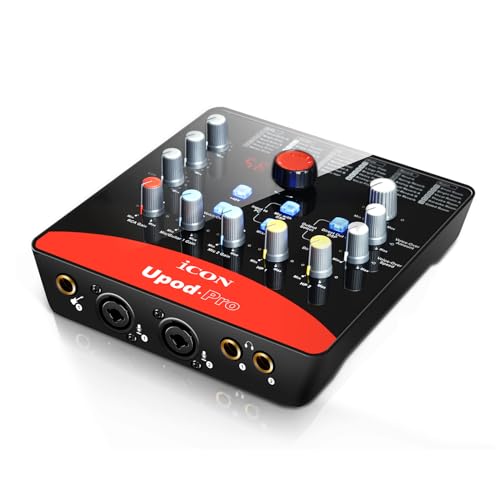
- Built-in ICON 72-DSP effect with top-panel control
- 2 mic inputs plus 1 guitar input for simple recording
- +48V and +5V phantom power with full-duplex 2x2 I/O
Best For: Budget-minded users who want a basic USB recording interface with onboard effects
Portable DSP Studio Hub – Antelope Zen Quadro
If you want audio interfaces with dsp effects for mobile tracking and hybrid creator setups, the Antelope Audio Zen Quadro is built to do a lot from a compact footprint. It combines four Discrete preamps, dual Hi-Z inputs, and Synergy Core real-time processing so you can record with near-zero-latency effects and route audio between modern devices.
Best For: Portable producers, singer-songwriters, and streamers who need onboard FX, flexible routing, and bus-powered convenience.
Pros:
- Four Discrete 6-transistor mic preamps with up to 75 dB of gain.
- 37 included Synergy Core effects, with 90+ available, running on dedicated DSP and FPGA hardware.
- Dual USB-C lets you connect a computer plus phone/tablet or two computers, with loopback for streaming.
- Expandable 14-in/10-out design with ADAT, S/PDIF, two headphone outputs, and standalone presets.
Cons:
- Only one product in this roundup is bus-powered, but the compact design may still feel workflow-focused rather than purely analog.
- Best results depend on using the included Synergy Core ecosystem of effects.
Overall, the Zen Quadro stands out if you want real-time DSP processing plus flexible connectivity in a travel-friendly interface. It is especially appealing when you need to track, stream, and route audio without leaning on host CPU power.
Thunderbolt Quad DSP Tracking – Apollo Twin X QUAD Gen 2
Universal Audio Apollo Twin X QUAD Gen 2 with UAD Analog Classics Thunderbolt 3 Audio Interface
Check Price On AmazonFor buyers comparing audio interfaces with dsp effects, the Universal Audio Apollo Twin X QUAD Gen 2 is a strong desktop choice for tracking through polished analog-style processing. Its Unison preamps and access to 200+ UAD DSP and Native plug-ins make it easy to monitor and record with authentic emulations in realtime over Thunderbolt 3.
Best For: Home studios and project rooms that want premium conversion, realtime UAD processing, and a compact Thunderbolt workflow.
Pros:
- Unison preamps support realtime tracking through emulations of Neve, API, Avalon, Manley, Fender, and more.
- Access to 200+ UAD DSP and Native plug-ins, including Capitol Chambers, Sound City Studios, and EL8 Distressor.
- Thunderbolt 3 connection for a streamlined PC and Mac setup.
- Auto-Gain helps set levels quickly across multiple inputs.
Cons:
- It uses Thunderbolt 3, so it is less universal than USB options.
- The compact desktop format may be limiting if you need a larger input count at the interface itself.
In practice, the Apollo Twin X QUAD Gen 2 is aimed at users who want the UAD ecosystem and high-end tracking tools in a small interface. It is a smart pick if your priority is sound quality and plugin-driven recording over maximum hardware connectivity.
High-Channel DSP Recording Rack – RME Fireface UFX III
The RME Fireface UFX III is a serious option if you need audio interfaces with dsp effects and a very large channel count for professional recording. With 94-in/94-out USB 3.0 connectivity, four mic/line preamps, and digital I/O, it is designed for studios that want expanded routing and onboard processing in a Windows or macOS workflow.
Best For: Studio owners and engineers who need high channel counts, digital expansion, and DSP processing in a rack-style interface.
Pros:
- 94-in/94-out USB 3.0 interface with broad routing potential.
- Includes DSP effects for monitoring and recording workflows.
- Four mic/line preamps plus ADAT and AES/EBU digital I/O.
- Direct USB recording support for flexible capture setups.
Cons:
- The feature set is built for advanced users, so it is more complex than a simple plug-and-play interface.
- Its Windows/macOS studio focus makes it less appealing for mobile or casual use.
For engineers who care about scale and routing as much as processing, the Fireface UFX III is a capable centerpiece. It makes the most sense when you need a large, professional interface that can grow with a more demanding studio.
Premium Multi-Input DSP Interface – Apollo x8p Gen 2
Universal Audio Apollo x8p Gen 2 with UAD Analog Classics Thunderbolt 3 Audio Interface
Check Price On AmazonIf you are shopping audio interfaces with dsp effects for a larger tracking rig, the Universal Audio Apollo x8p Gen 2 brings high-end conversion, UAD plug-in access, and eight XLR inputs in a desktop interface. It is built for sessions where you want realtime processing, quick level setting with Auto-Gain, and broad plugin support in LUNA, Logic Pro, Pro Tools, Cubase, and Ableton Live.
Best For: Recordists and producers who need multiple mic inputs, UAD DSP, and a premium desktop workflow.
Pros:
- Eight XLR inputs for multi-mic recording sessions.
- Access to 200+ UAD DSP and Native plug-ins, including well-known studio effects.
- Auto-Gain speeds up input setup across multiple channels.
- Bass management support helps integrate a subwoofer into your monitor setup.
Cons:
- It is heavier and less portable than smaller desktop interfaces.
- Uses an Ethernet-based connection, which may not match every studio workflow.
The Apollo x8p Gen 2 is best viewed as a premium tracking hub for studios that want many mic inputs and the UAD ecosystem in one unit. It is a compelling fit when sound quality, realtime effects, and monitor control matter more than portability.
Studio-Ready DSP Streaming Hub – Zenith 2 USB-C Audio Interface for Streaming & Podcasting
If you want audio interfaces with dsp effects for streaming, podcasting, and guitar recording, the Antelope Audio Zenith 2 is built to do a lot in a compact USB-C unit. It combines bus-powered, class-compliant operation with onboard processing for vocals, guitars, and monitoring, so you can shape sound without relying on your computer’s CPU.
Best For: Streamers, podcasters, and guitarists who want real-time DSP processing and flexible monitoring in one interface.
Pros:
- Onboard DSP effects for recording and monitoring with zero latency
- Dedicated Smart Vocal Chain plus loopback for streaming and podcast workflows
- Virtual guitar chain with noise gate, compression, distortion, and amp/cab simulations
- Two independent headphone mixes for collaboration or separate monitoring
Cons:
- Optional software control adds extra flexibility, but some functions are easier from the desk setup
- Feature set is broad, so first-time users may need time to learn the controls
This is the most feature-packed option here if your priority is built-in processing rather than a bare-bones recording box. The Zenith 2 stands out for its vocal and guitar DSP tools, plus the ability to monitor and record with effects in real time.
Compact No-Driver Recorder – 2×2 USB-C Interface with Loopback
Among audio interfaces with dsp effects, this 2×2 USB-C model is the simpler choice for creators who mainly want clean recording, easy setup, and loopback support. It is class-compliant for Mac and PC, bus-powered, and built around high-fidelity 24-bit/192kHz conversion with straightforward monitoring features.
Best For: Laptop-based musicians and mobile creators who want a simple interface with loopback and zero-latency monitoring.
Pros:
- Plug-and-play USB-C operation with no drivers required
- 24-bit/192kHz recording for high-fidelity capture
- Two combo inputs with phantom power and Hi-Z support for guitar
- Direct monitor and loopback functions for flexible routing
Cons:
- Does not list onboard DSP effects or channel processing like compressor or EQ
- Headphone output is limited to a standard 3.5mm connection
If you mainly need reliable recording and easy routing instead of heavy onboard processing, this is a practical pick. It keeps the setup minimal while still covering the basics for vocals, guitar, and streaming-friendly loopback.
Voice-Shaping DSP Mixer Interface – Wave XLR MK.2 USB Audio Interface
The Elgato Wave XLR MK.2 is one of the more focused audio interfaces with dsp effects for creators who need strong mic gain and built-in voice control. Its onboard enhancer, compressor, EQ, and Wave FX processing make it a strong fit for streaming or voice work where you want processing in the signal chain without extra gear.
Best For: Streamers and voice-focused creators who want built-in processing, high mic gain, and easy routing through Wave Link.
Pros:
- Massive 80dB gain for demanding XLR microphones
- Built-in voice enhancer, compressor, EQ, and Wave FX processing
- Wave Link software integration for routing, effects, and monitoring
- Touch control with LED feedback for quick muting and level changes
Cons:
- Requires supported software and newer Windows or Apple Silicon Mac systems for Wave Link
- Only a 2-channel interface, so it is not aimed at larger multi-input setups
This is the best fit if you care most about voice shaping and simple creator-focused control. It combines serious mic gain with onboard effects and software routing in a compact desktop-friendly package.
Yamaha URX44C – 6-in/4-out USB-C interface with DSP mixing
If you want audio interfaces with dsp effects for recording, streaming, or mobile setup, the Yamaha URX44C is built around low-latency monitoring and a solid all-in-one I/O layout. It combines 32-bit/192kHz USB-C operation, four D-PRE mic preamps, and onboard DSP tools so you can track with processing without leaning on your computer.
Best For: Musicians and creators who want DSP-powered monitoring, flexible I/O, and cross-platform support.
Pros:
- Latency-free DSP monitoring with REV-X reverb, Channel Strip, and Guitar Amp Classics
- 6-in/4-out layout with 4 XLR/TRS combo inputs, 2 line inputs, and MIDI I/O
- 32-bit / 192 kHz USB 3.0 support for high-resolution recording
- Includes Cubase AI, Steinberg Plus, and dspMixFx software
Cons:
- Only one hardware output pair is described as main outputs, so larger routing needs may be limited
- DSP effects are focused on monitoring and included plug-ins rather than a broad standalone effects library
- May be more interface than casual users need if you only record one mic at a time
This is a strong pick if you care about dependable hardware, onboard processing, and a clear path from recording to monitoring. The URX44C is especially attractive when you want DSP effects built into the interface rather than handled later in software.
BEACN Studio White – USB XLR interface with DSP mic chain
Among audio interfaces with dsp effects, the BEACN Studio is tailored for creators who want fast mic processing and easy multi-device routing. Its on-board DSP covers EQ, compression, expander/gate, noise suppression, and low-frequency enhancement, while the app helps manage where audio comes from and where it goes.
Best For: Streamers, podcasters, and dual-PC users who want simple XLR-to-USB-C control with built-in processing.
Pros:
- On-board DSP includes EQ, compression, expander/gate, noise suppression, and low-frequency enhancement
- Proprietary dual USB technology sends up to 8 channels between computers, consoles, and phones
- BEACN App and BEACN Link App add routing and remote app assignment control
- Built for streaming, gaming, and podcasting with ultra-low-noise preamp support
Cons:
- Focuses heavily on microphone and creator workflows rather than broader studio I/O
- Best experience appears tied to the BEACN app ecosystem and optional accessories
- Details center on XLR/USB-C use, so it may not suit users needing more traditional analog expansion
The BEACN Studio makes the most sense if your priority is voice quality, routing flexibility, and quick DSP adjustments instead of a large mixer-style feature set. It is a practical choice for creators who want modern control without adding extra software steps.
ICON UPod Pro – Compact USB interface with built-in DSP
If you need an affordable entry point into audio interfaces with dsp effects, the iCON UPod Pro keeps things simple with built-in 72-DSP processing and a compact 2-in/2-out USB design. It is aimed at straightforward recording setups for mic and guitar use, with basic phantom power and full-duplex recording support.
Best For: Budget-minded users who want a basic USB recording interface with onboard effects.
Pros:
- Built-in ICON 72-DSP effect with a top-panel control knob
- 2 mic inputs and 1 guitar input for simple recording setups
- +48V and +5V phantom power support
- Full-duplex 2×2 analog I/O for recording and playback
Cons:
- 16-bit / 48 kHz spec is modest compared with newer higher-resolution interfaces
- Only 2-out USB recording support, so it is not built for complex routing
- DSP details are limited in the supplied notes beyond the built-in effect
The UPod Pro is best viewed as a compact, uncomplicated interface for users who mainly want built-in processing and basic input flexibility. It makes sense when simplicity and price matter more than advanced studio features.
How We Picked the Best Audio Interfaces with Dsp Effects
We prioritized Audio Interfaces with Dsp Effects that offer dependable real-time monitoring, useful onboard processing, strong driver stability, and input/output options that match common creator needs. We also looked at connectivity, build quality, and whether the DSP features feel genuinely practical instead of promotional.
Quick Comparison
For simple voice work and streaming, compact USB interfaces with an integrated DSP chain are usually the easiest to live with. For recording bands, larger interfaces with multiple preamps and deeper routing are better. If you need the lowest latency and the most mature software ecosystem, Thunderbolt models are often the premium choice, while USB-C options tend to deliver the best balance of convenience and value.
Key Buying Factors for Audio Interfaces with Dsp Effects
DSP Processing Quality
Not all processing is equal. Look for interfaces that include the effects you actually use, such as compression, EQ, de-essing, amp simulation, monitoring reverb, or voice shaping. Good DSP should be easy to configure and stable during long sessions.
Latency and Monitoring
The main advantage of Audio Interfaces with Dsp Effects is monitoring through processing without noticeable delay. Check whether the interface supports direct monitoring, cue mixes, and low-latency software control for recording, streaming, or podcast production.
I/O and Workflow
Count your inputs carefully. Solo creators may only need one or two mic channels, while bands, hybrid podcasters, and content studios often need more line inputs, MIDI, and flexible outputs. If you use multiple computers or complex routing, look for advanced mixing tools.
Compatibility
Match the interface to your computer and software platform. Thunderbolt models are great when supported, but USB-C is more universal. Also confirm mobile support if you plan to record on iPad or other portable devices.
Who Should Buy Which Audio Interfaces with Dsp Effects?
Choose a compact DSP interface if you mainly record vocals, podcasts, or livestreams and want an easy setup. Choose a midrange multi-input model if you need better routing, more sources, or more polished monitoring while tracking. Choose a flagship studio interface if you want expandable I/O, premium conversion, and a deep feature set for serious production.
If your priority is simply sounding better in real time, Audio Interfaces with Dsp Effects can make a noticeable difference from the first session. The best choice is the one that fits your inputs, computer connection, and workflow today, while leaving room to grow tomorrow.