If you want low-latency tracking, cleaner monitoring, and the ability to use effects without overloading your computer, audio interfaces with DSP processing are worth a close look.
This roundup covers 10 strong options for home studios, streamers, and musicians who want more control from recording to live input processing.
Best 10 Audio Interfaces with Dsp Processing Picks for 2026
Portable DSP Studio Hub

- 4 mic preamps with up to 75 dB gain
- 37 included Synergy Core effects
- Dual USB-C and 14-in/10-out routing
Best For: Mobile creators and small hybrid studios
Streamer Mixer With DSP
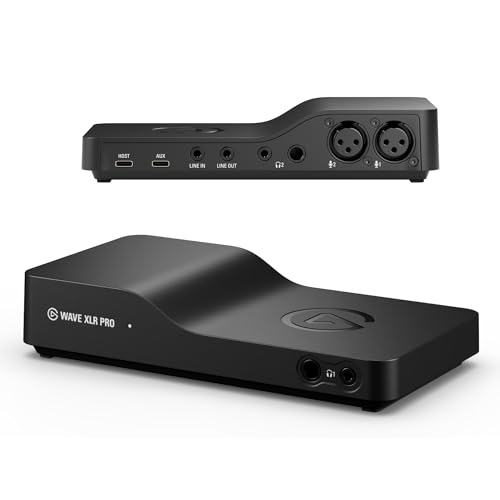
- Dual XLR inputs with 80 dB gain
- Onboard DSP effects plus VST plugin chain
- Up to five hardware mixes and dual USB-C
Best For: Streamers needing flexible routing and DSP effects
Compact 2x2 DSP Interface

- 32-bit/192 kHz USB 3.0 interface
- Latency-free DSP monitoring effects
- Two combo inputs with D-PRE preamps
Best For: Solo recording and small setups needing onboard processing
Premium Thunderbolt DSP Interface

- Unison preamps with classic analog emulations
- 200+ UAD DSP and Native plug-ins
- Monitor correction, Auto-Gain, and bass management
Best For: Producers wanting premium DSP and Thunderbolt workflow
Studio-Ready Routing
MOTU UltraLite-mk5 18x22 USB Audio Interface

- 18x22 I/O with multiple analog and digital connections
- DSP monitor mixing with six separate mix busses
- Built-in reverb, EQ, and dynamics processing
Best For: Flexible small-studio setups needing routing and DSP
Pro Tracking Power
Universal Audio Apollo x4 Gen 2 Thunderbolt 3 Interface
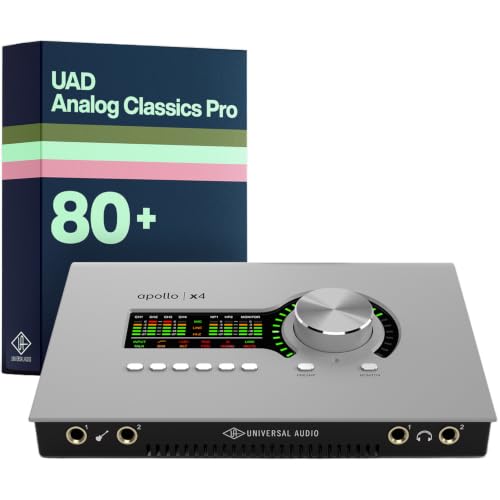
- Thunderbolt 3 interface with 32 channels and 192 kHz support
- Unison preamps for realtime analog-style recording
- Access to 200+ UAD DSP and Native plug-ins
Best For: Engineers wanting premium conversion and DSP plugins
Creator Voice Control
Elgato Wave XLR MK.2 USB Audio Interface

- 80dB gain with a powerful headphone amp
- Built-in voice enhancer, compressor, EQ, and Wave FX DSP
- Ultra-low-latency monitoring with touch mute and LED feedback
Best For: Streamers and podcasters wanting simple DSP voice control
Flagship Apollo Recording Hub
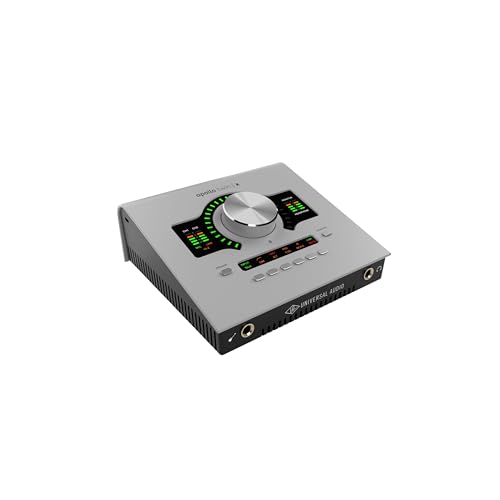
- Wide-dynamic-range conversion with low distortion
- Unison preamps for realtime modeled tracking
- 200+ UAD DSP and Native plug-ins
Best For: Producers wanting desktop DSP tracking and premium Apollo conversion
DSP Expansion Engine

- Adds QUAD DSP for larger plug-in sessions
- Works with Mac and Windows via Thunderbolt 3
- Supports 100+ UAD plug-ins
Best For: Mix engineers who need extra UAD DSP without replacing their interface
Compact Apollo Control Center

- Wide-range conversion with low distortion
- 200+ UAD DSP and Native plug-ins
- Auto-Gain plus bass management
Best For: Small studios needing Apollo DSP and flexible monitor control
Portable DSP Studio Hub – Antelope Zen Quadro
If you want audio interfaces with dsp processing that can also travel, the Antelope Audio Zen Quadro fits a very practical middle ground. It combines four mic preamps, dual Hi-Z inputs, and Synergy Core real-time effects, so you can track vocals, guitars, or small sessions with near-zero-latency processing and no host CPU load.
Best For: Mobile creators and small studio users who want DSP effects, four preamps, and flexible USB-C connectivity.
Pros:
- Four Discrete 6-transistor mic preamps with up to 75 dB of gain
- 37 included real-time effects, with 90+ available through Synergy Core
- Dual USB-C lets you connect a computer plus phone/tablet, or two computers
- Expandable 14-in/10-out routing with ADAT, S/PDIF, dual headphone outs, and loopback
Cons:
- More focused on compact hybrid setups than large channel-count recording
- Advanced routing and standalone features may be more than casual users need
The Zen Quadro stands out for packing serious DSP and flexible connectivity into a bus-powered design. If your setup needs real-time processing, solid conversion, and mobile-friendly routing, it is one of the more versatile options in this category.
Streamer Mixer With DSP – Elgato Wave XLR Pro
Among audio interfaces with dsp processing, the Elgato Wave XLR Pro is built for streaming and creator workflows that need clean routing and hands-on control. It supports two XLR mics with up to 80 dB of gain, adds onboard DSP effects, and uses a flexible mix setup for routing audio across multiple devices.
Best For: Streamers and content creators who want onboard DSP, easy multi-device routing, and multiple hardware mixes.
Pros:
- Two XLR inputs with a high 80 dB of gain each
- Wave FX Processor runs DSP effects and VST plugins in one signal chain
- Dual USB-C supports a second PC, console, or phone
- Up to five independent hardware mixes for complex setups
Cons:
- Best suited to Windows and macOS systems only
- More optimized for streaming/mixing workflows than traditional multi-source studio recording
The Wave XLR Pro is a strong fit if your priority is flexible routing and low-latency processing for live production. Its combination of DSP, multiple mixes, and stream-friendly control makes it especially appealing for creators building a polished desktop setup.
Compact 2×2 DSP Interface – Yamaha URX22C
If you want audio interfaces with dsp processing in a simple two-channel format, the Yamaha URX22C is a straightforward choice. It pairs 32-bit/192 kHz support with D-PRE mic preamps, MIDI I/O, and latency-free DSP monitoring for recording with built-in effects.
Best For: Solo musicians and small-project users who want a rugged 2-in/2-out interface with DSP-powered monitoring.
Pros:
- 32-bit Integer/192 kHz USB 3.0 audio interface with MIDI I/O
- Two combo inputs with Class-A D-PRE preamps and Hi-Z support
- Latency-free DSP monitoring with REV-X reverb, Channel Strip, and Guitar Amp Classics
- Cross-platform support for Windows, macOS, and iOS
Cons:
- Only two analog inputs and two outputs limit larger recording sessions
- Included software suite is oriented toward Steinberg users
The URX22C is best viewed as a compact, durable interface that keeps the signal path simple while still offering useful onboard processing. For users who value low-latency monitoring and reliable core recording features, it covers the essentials well.
Premium Thunderbolt DSP Interface – Apollo Twin X DUO Gen 2
Universal Audio Apollo Twin X DUO Gen 2 with UAD Analog Classics Pro Thunderbolt 3 Audio Interface
Check Price On AmazonFor buyers comparing audio interfaces with dsp processing, the Universal Audio Apollo Twin X DUO Gen 2 is aimed at premium recording and mixing workflows. It gives you Unison preamps for realtime analog-style tracking, access to 200+ UAD DSP and Native plug-ins, and monitoring tools designed to help you make decisions in any room or on headphones.
Best For: Producers and home-studio users who want high-end DSP plug-ins, Unison preamps, and Thunderbolt performance.
Pros:
- Unison preamps let you record through emulations of Neve, API, Avalon, Manley, Fender, and more
- Access to 200+ UAD DSP and Native plug-ins
- Apollo Monitor Correction powered by Sonarworks for speaker or headphone mixing
- Auto-Gain and bass management add workflow convenience and monitor flexibility
Cons:
- Requires Thunderbolt 3, so it is not a universal USB option
- Premium feature set is likely more than basic recording users need
The Apollo Twin X DUO Gen 2 is built for users who want studio-grade tracking and plug-in processing in one interface. If your workflow benefits from realtime tone shaping and advanced monitoring tools, it is a standout choice in the premium tier.
Studio-Ready Routing – MOTU UltraLite-mk5 18×22 USB Audio Interface
MOTU UltraLite-mk5 18x22 USB Audio Interface 3 for Mac, Windows and iOS with mixing and effects
Check Price On AmazonIf you want audio interfaces with dsp processing that can handle both recording and monitoring duties, the MOTU UltraLite-mk5 is built for flexible studio work. It offers 18×22 USB connectivity, six separate mix busses, and onboard reverb, EQ, and dynamics so you can build low-latency cue mixes without leaning on the computer.
Best For: Musicians and producers who need multiple I/O, DSP-powered monitor mixes, and practical effects in a compact interface.
Pros:
- 18×22 I/O with combo inputs, analog outs, S/PDIF, and optical connectivity
- DSP-driven monitor mixing with six separate mix busses
- On-board reverb, 4-channel parametric EQ, and dynamics processing
- High-resolution OLED metering plus CueMix 5 app control
Cons:
- Best suited to users who will actually use the routing and DSP tools
- More complex than a simple plug-and-play 2-channel interface
Overall, the UltraLite-mk5 stands out for users who need serious routing flexibility alongside built-in processing. It balances broad connectivity with low-latency performance, making it a strong fit for small studios and hybrid setups.
Pro Tracking Power – Universal Audio Apollo x4 Gen 2 Thunderbolt 3 Interface
Universal Audio Apollo x4 Gen 2 with UAD Analog Classics Pro Thunderbolt 3 Audio Interface
Check Price On AmazonFor buyers comparing audio interfaces with dsp processing, the Apollo x4 Gen 2 is aimed at users who want premium conversion and realtime plugin workflow. Its Unison preamps, Thunderbolt 3 connection, and access to 200+ UAD DSP and Native plug-ins make it a strong choice for recording and mixing with onboard processing support.
Best For: Engineers and creators who want high-end conversion, Unison preamps, and a large DSP plugin ecosystem.
Pros:
- Thunderbolt 3 interface with 32 channels and 192 kHz support
- Unison preamps for recording through authentic analog-style emulations
- Access to 200+ UAD DSP and Native plug-ins
- Monitor Correction powered by Sonarworks for headphone or room checking
Cons:
- Requires Thunderbolt 3, so compatibility depends on your computer
- Best value comes from users who will use the UAD ecosystem
The Apollo x4 Gen 2 is positioned as a premium interface for serious tracking and mixing workflows. If you want realtime processing, polished conversion, and access to a deep plugin library, it delivers a very capable foundation.
Creator Voice Control – Elgato Wave XLR MK.2 USB Audio Interface
If you need an easy-to-manage option among audio interfaces with dsp processing, the Elgato Wave XLR MK.2 is focused on voice work and streaming. It combines 80dB gain, ultra-low-latency monitoring, and onboard voice enhancement tools with the Wave Link app for routing and control.
Best For: Streamers, podcasters, and solo creators who want simple XLR input handling with built-in voice effects.
Pros:
- 80dB gain for driving XLR microphones clearly
- Built-in voice enhancer, compressor, EQ, and Wave FX processing
- Ultra-low-latency monitoring with 24-bit/48kHz audio resolution
- Touch control with LED feedback for quick mute and level changes
Cons:
- Single XLR input and 2-channel design limit it to simpler setups
- Wave Link support is tied to specific Windows and Apple Silicon Mac requirements
The Wave XLR MK.2 is a practical pick for creators who want strong mic gain and DSP-assisted voice shaping in a streamlined interface. It is not built for complex multi-input recording, but it is well matched to focused streaming and voice production use.
Flagship Apollo Recording Hub – Apollo Twin X QUAD Gen 2
Universal Audio Apollo Twin X QUAD Gen 2 with UAD Analog Classics Pro Thunderbolt 3 Audio Interface
Check Price On AmazonIf you want one of the most capable audio interfaces with dsp processing for tracking and mixing, the Apollo Twin X QUAD Gen 2 is built around UA’s latest conversion, Unison preamps, and onboard UAD power. It is a strong fit for home and project studios that need realtime sound shaping, low-latency monitoring, and a deep plug-in ecosystem in a compact Thunderbolt interface.
Best For: Producers and engineers who want premium conversion, Unison preamps, and DSP-backed tracking in a desktop interface.
Pros:
- Next-generation audio conversion with very wide dynamic range and low distortion
- Unison preamps let you record through authentic emulations of Neve, API, Avalon, Manley, Fender, and more
- Access to 200+ UAD DSP and Native plug-ins, including Capitol Chambers, Sound City Studios, and EL8 Distressor
- Auto-Gain and Apollo Monitor Correction powered by Sonarworks help speed up setup and monitoring
Cons:
- Uses Thunderbolt connectivity, so it is best suited to compatible Mac/Windows setups
- Advanced plug-in workflow is most valuable if you plan to use UAD software
This is a strong choice if you want an interface that does more than just capture audio; it is designed to help you record with processed sound from the start and mix more confidently afterward. The QUAD DSP layout makes it especially appealing for users who rely on UAD processing while tracking.
DSP Expansion Engine – UAD 2 Satellite QUAD
Universal Audio UAD 2 Satellite QUAD Core Thunderbolt 3 DSP Interface MAC or PC
Check Price On AmazonThe UAD 2 Satellite QUAD is one of the more focused audio interfaces with dsp processing for studios that already have an interface and need more plug-in horsepower. It adds Thunderbolt 3 DSP support for running UAD plug-ins on modern Mac and Windows systems, making it a practical way to handle larger mixes without changing your main audio hardware.
Best For: Studio users who need extra UAD plug-in processing for mixing and mastering.
Pros:
- QUAD or OCTO Shark processors deliver a major DSP boost for demanding sessions
- Works with Pro Tools, Logic Pro X, Cubase, Live, and more
- Supports over 100 plug-ins from brands like Ampex, Lexicon, Studer, Neve, Manley, SSL, and EMT
- Dual Thunderbolt 3 ports make daisy-chaining other peripherals easier
Cons:
- It is a DSP expansion unit, not a full standalone recording interface
- Audio input/output details are minimal compared with traditional interfaces
If your main priority is more UAD processing rather than new I/O, this Satellite is a clean add-on. It makes the most sense in an existing Thunderbolt-based setup where you want to run bigger plug-in counts with less strain on the computer.
Compact Apollo Control Center – Apollo x6 Gen 2
Universal Audio Apollo x6 Gen 2 with UAD Analog Classics Thunderbolt 3 Audio Interface
Check Price On AmazonThe Apollo x6 Gen 2 is aimed at users who want audio interfaces with dsp processing plus enough I/O flexibility for small studios. It combines UA’s latest conversion with access to the 200+ plug-in UAD ecosystem, while adding practical tools like Auto-Gain and bass management for more confident monitoring.
Best For: Small studios and producers who want high-end Apollo conversion with DSP plug-ins and flexible monitoring features.
Pros:
- Next-generation conversion with very wide dynamic range and low distortion
- Access to 200+ UAD DSP and Native plug-ins, including Capitol Chambers, Sound City Studios, and EL8 Distressor
- Auto-Gain speeds up multi-input level setup
- Bass management lets you add a subwoofer to your monitor setup
Cons:
- Uses Thunderbolt connectivity, so compatibility depends on your system
- Software and plug-in value are strongest for users already in the UAD workflow
Compared with simpler interfaces, the x6 Gen 2 stands out for its mix of DSP power and monitoring control. It is a smart pick if you want a desktop-friendly Apollo with serious plug-in access and room-tuning features that support both tracking and mixing.
How We Picked These Audio Interfaces with Dsp Processing
We focused on interfaces that offer practical onboard processing, stable drivers, useful I/O, and enough flexibility for real-world recording or streaming. Preference went to models with proven low-latency performance, monitoring tools, and software ecosystems that add value beyond the hardware alone.
Quick Comparison
Use these picks as a fast filter: compact USB models suit simple vocal or creator setups, while Thunderbolt systems and higher-channel options are better for multi-track recording, larger sessions, and more demanding production workflows. If you mainly need a streamer-friendly mic chain, a smaller interface may be the best fit; if you want expandable studio routing and plug-in-grade processing, step up to a desktop or rack unit.
Key Buying Factors for Audio Interfaces with Dsp Processing
Processing Type and Included Effects
Some Audio Interfaces with Dsp Processing focus on basic monitoring tools, while others include channel strips, compressors, EQ, reverbs, or amp-style effects. Check whether the onboard processing is meant for tracking only or can also be used in broader routing and mixing workflows.
Latency and Connection Standard
Thunderbolt models typically deliver the strongest performance for demanding sessions, while USB-C options can be a simpler and more affordable choice. The best option depends on your computer, your track count, and how much real-time responsiveness you need.
I/O, Expandability, and Monitoring
Match the input and output count to your current and near-future setup. If you record vocals and a single instrument, a 2-in/2-out unit may be enough. If you plan to grow into drum tracking, outboard gear, or more complex routing, look for extra line inputs, digital expansion, or flexible cue mixes.
Software and Ecosystem
Many DSP-equipped interfaces rely on companion software for routing, mixing, and effect management. A strong control app can make day-to-day use much easier, especially if you switch between recording, streaming, and remote work.
Who Should Buy Which Audio Interfaces with Dsp Processing?
Choose a compact creator-focused model if you want simple setup and fast vocal monitoring. Pick a midrange desktop interface if you need better sound, more flexibility, and room to expand. Go with a higher-end Thunderbolt unit if you want the most capable recording chain, stronger DSP integration, and a workflow that can scale with professional sessions.
In short, the right choice comes down to how much processing you need, how many inputs you use, and whether portability or studio expansion matters more for your setup.