If you want faster mixing and a more intuitive workflow, a good control surface can make your DAW feel far less mouse-dependent.
From compact single-fader units to larger multi-channel controllers, this roundup highlights the best options for producers, engineers, and home-studio users in 2026.
Best 10 Control Surface for Digital Audio Workstation Picks for 2026
Eight-Fader Studio Control

- Eight motorized touch-sensitive faders
- Scribble strips and Session Navigator
- Native Studio One plus HUI/Mackie support
Best For: Hands-on mixing and navigation in medium-sized DAW setups
Pro Console Control

- Nine touch-sensitive motorized faders
- Eight V-Pots and 50+ buttons
- Proprietary protocol for easy setup
Best For: Engineers who want deep tactile control and classic console-style workflow
Compact Single-Fader Control

- Single touch-sensitive motorized fader
- 24 buttons and 360-degree encoder
- Works with major DAWs via HUI/Mackie emulation
Best For: Desktop producers who need one-fader control for automation and transport
Modular EUCON Surface

- EUCON-enabled control surface
- Connect up to four units for expansion
- Touchscreen, buttons, and dial control
Best For: Windows studios that want an expandable, integrated control surface
Precision Mixing Desk
PreSonus FaderPort 16 DAW Controller

- 16 touch-sensitive motorized faders
- 16 scribble strips for fast channel ID
- Broad Mac/Windows DAW compatibility
Best For: Detailed mixing and editing with a full 16-fader layout
Compact Single-Fader Hub
Behringer X-TOUCH ONE Universal Control Surface

- Touch-sensitive motor fader
- LCD scribble strip for track labels
- HUI and Mackie Control support
Best For: Compact, hands-on DAW control in a small footprint
High-Visibility Control Hub
Solid State Logic UF1 Advanced DAW Controller

- Large 4.3-inch TFT LCD plus second display
- Includes SSL Meter plug-in license
- Controls pans, sends, plug-ins, and virtual instruments
Best For: Compact workflows that need strong visual feedback and SSL integration
Compact Channel Strip Control
Softube Console 1 Channel Mk III

- 27-knob mixing control surface
- Dual smart screens
- USB-C, compact desktop design
Best For: Compact channel-strip control with wide DAW support
Module Expansion Control
Icon Platform B+ Button Module
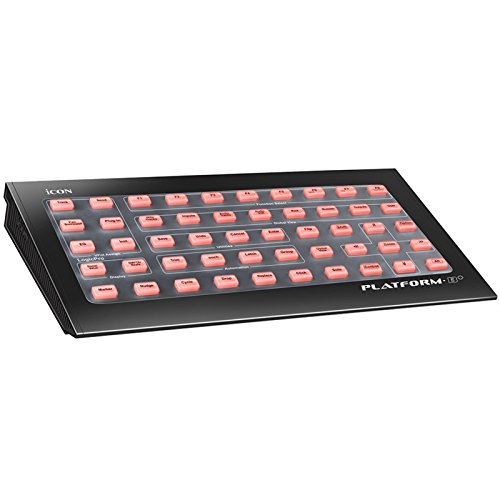
- 50 illuminated function buttons
- Standalone USB or Platform M+ expansion
- Overlay support for many DAWs
Best For: DAW shortcut and navigation control
Motorized Fader Extension
Mackie MC Extender Pro 8-Channel

- 8 touch-sensitive motorized faders
- Mackie protocol with plug-and-play integration
- Meter display with track names and parameters
Best For: Mackie users needing 8-channel expansion
Eight-Fader Studio Control – PreSonus FaderPort 8
If you want a control surface for digital audio workstation use that speeds up mixing without getting in the way, the PreSonus FaderPort 8 is built around hands-on channel control. Its eight touch-sensitive motorized faders, scribble strip displays, and Session Navigator make it easy to move through tracks, markers, automation, and transport tasks from the desk.
Best For: Producers and engineers who want eight motorized faders with strong DAW navigation and Studio One-friendly control.
Pros:
- Eight 100 mm touch-sensitive motorized faders
- Eight high-definition scribble strip displays for track feedback
- Session Navigator for scrolling, zooming, marker navigation, and more
- Supports Studio One natively plus HUI and Mackie Control emulation
Cons:
- USB 2.0 connection only
- Best known for DAW control rather than broader hardware features
Overall, the FaderPort 8 is a practical fit if your priority is fast, tactile mixing and efficient session control. It offers a balanced feature set for users who want more than a single fader but do not need a full-size console.
Pro Console Control – Mackie MCU Pro 8-channel
The Mackie MCU Pro is a serious control surface for digital audio workstation users who want a dedicated hardware layer with minimal setup fuss. Its proprietary communication protocol, motorized touch-sensitive faders, V-Pots, and more than 50 push-buttons are designed to give direct access to mix, plug-in, and transport control.
Best For: Users who want a traditional control-surface workflow with broad DAW compatibility and deep parameter access.
Pros:
- Proprietary Mackie communication protocol for streamlined integration
- Nine 100 mm touch-sensitive motorized faders
- Eight V-Pots for software, plug-in, and instrument control
- More than 50 dedicated push-buttons plus tape-style transport
Cons:
- Heavier and larger than compact single-fader controllers
- Feature set is oriented toward classic control-surface workflows
If you want a robust hands-on surface for mixing and parameter editing, the MCU Pro delivers a lot of direct control in one unit. It is especially appealing for users who value dedicated buttons and protocol-based integration over mapping customizations.
Compact Single-Fader Control – PreSonus FaderPort V2
The PreSonus FaderPort V2 is a compact control surface for digital audio workstation work when you want one high-quality fader and direct access to the most important mix functions. Its touch-sensitive motorized fader, 360-degree encoder, and 24 buttons make it a useful desktop companion for automation, transport, and channel editing.
Best For: Solo producers and editors who want an affordable, compact way to handle automation and transport from the desk.
Pros:
- Single 100 mm touch-sensitive motorized fader for real-time automation
- 24 buttons covering 40 functions, including transport and looping
- Large 360-degree push-button encoder for faster editing
- Compatible with major DAWs via Mackie Control Universal and HUI emulation
Cons:
- Only one fader, so it is less suited to multi-channel hands-on mixing
- Footswitch is supported but not included
For small studios and desktop rigs, the FaderPort V2 focuses on the controls you actually reach for most often. It is a strong choice if you want tactile DAW control without committing to a larger surface.
Modular EUCON Surface – Avid S1
The Avid S1 is a modular control surface for digital audio workstation setups built around EUCON-enabled hardware control. With touchscreen, touch-sensitive buttons, dials, and the ability to connect up to four units, it is aimed at users who want an expandable, integrated mixing surface on Windows.
Best For: Windows-based users who want a compact EUCON surface that can scale into a larger control rig.
Pros:
- EUCON-enabled control surface for integrated workflow
- Supports touchscreen, buttons, and dial input
- Can connect up to four S1 units for expansion
- Compact desktop-friendly design
Cons:
- Windows compatibility only in the supplied details
- Single-unit setup may feel limited compared with a multi-S1 rig
The S1 stands out if you want a modular surface that can grow with your studio. It is a good pick for users who value expandable hardware control and EUCON integration over a fixed all-in-one layout.
Precision Mixing Desk – PreSonus FaderPort 16 DAW Controller
If you want a control surface for digital audio workstation mixing that feels closer to a real console, the PreSonus FaderPort 16 gives you a lot of hands-on control in a compact desktop footprint. Its 16 touch-sensitive motorized faders, scribble strips, and dedicated transport and session controls make it easy to move quickly through large sessions without relying only on a mouse.
Best For: Engineers and producers who want a full-featured 16-fader DAW controller for detailed mixing and editing.
Pros:
- 16 touch-sensitive motorized 100 mm faders for precise mix moves
- 16 Scribble Strip displays help you identify channels at a glance
- Session Navigator adds fast control for scrolling, zooming, and master fader functions
- Works with major DAWs on Mac and Windows through Mackie Control Universal and HUI emulation
Cons:
- Larger than single-fader options, so it needs more desk space
- Footswitch for punch in/out is not included
Overall, this is the strongest pick here if you want a serious tactile mixing surface with broad DAW compatibility and plenty of dedicated controls. It is especially appealing for users who value speed, visibility, and deeper workflow control over minimal size.
Compact Single-Fader Hub – Behringer X-TOUCH ONE Universal Control Surface
The Behringer X-TOUCH ONE is a compact control surface for digital audio workstation users who want essential hands-on control without taking over the desk. With one touch-sensitive motor fader, an LCD scribble strip, and support for HUI and Mackie Control protocols, it covers basic mixing and navigation tasks in a small, portable format.
Best For: Producers who want a small, affordable-style DAW controller focused on core transport and fader control.
Pros:
- Single touch-sensitive motor fader for hands-on level control
- LCD scribble strip improves track visibility during sessions
- Supports HUI and Mackie Control for broad DAW compatibility
- Compact and lightweight at 3.3 pounds
Cons:
- Only one fader, so it is less efficient for large mix sessions
- Fewer controls than multi-fader surfaces
This is a practical choice if you mainly want tactile access to one channel at a time and need something easy to fit beside a keyboard or laptop. It is best viewed as a focused workflow tool rather than a full mixing console replacement.
High-Visibility Control Hub – Solid State Logic UF1 Advanced DAW Controller
The Solid State Logic UF1 is a compact control surface for digital audio workstation workflows that prioritizes screen visibility and deep integration. Its large 4.3-inch TFT LCD, secondary high-resolution display, and SSL 360 software support make it easy to monitor track names, time, metering, and plug-in parameters while controlling pans, sends, plug-ins, and virtual instruments from the surface.
Best For: Users who want a compact DAW controller with strong visual feedback and SSL plug-in integration.
Pros:
- Large 4.3-inch display plus a second high-resolution screen for clear feedback
- Includes SSL Meter plug-in license with extensive metering tools
- Controls pans, sends, plug-ins, and virtual instruments from one compact unit
- Fader Mode lets the 4 V-Pots control 4 track volumes at once
Cons:
- Uses a more specialized SSL software workflow than simpler universal controllers
- Single compact surface means less direct mixing than larger multi-fader units
For users who care about visual feedback as much as tactile control, the UF1 stands out with its displays and SSL Meter integration. It is a strong fit for smaller setups that still need serious control over mix and plug-in work.
Compact Channel Strip Control – Softube Console 1 Channel Mk III
If you want a control surface for digital audio workstation mixing that keeps the layout compact without giving up hands-on control, the Softube Console 1 Channel Mk III is built around focused channel-strip work. It connects over USB-C and supports major DAWs including Logic Pro, Pro Tools, Ableton Live, Cubase, Studio One, FL Studio, Reaper, and more.
Best For: Producers and engineers who want a compact, USB-C channel-strip controller for detailed mixing on a desktop setup.
Pros:
- 27-knob mixing control surface with dual smart screens for quick parameter checks
- Compact footprint makes it easier to fit into smaller studio spaces
- Broad software support across many popular DAWs
- USB 3.0 Type-C connection for straightforward setup
Cons:
- Designed as a channel-focused surface rather than a large multitrack console
- Plastic construction may feel less rugged than metal-bodied alternatives
For buyers who prioritize efficient channel control and compatibility over a sprawling control deck, this model offers a practical middle ground. It is especially appealing if you want fast access to mix parameters in a compact format.
Module Expansion Control – Icon Platform B+ Button Module
Icon Pro Audio Platform B+ - 50-Button Module for Platform M+ DAW Control Surface
Check Price On AmazonThe Icon Pro Audio Platform B+ is a dedicated control surface for digital audio workstation workflows that adds 50 illuminated function buttons to a Platform M+ setup or works as a standalone USB module. It is aimed at faster access to DAW tasks like track, bus, automation, plugin, marker, zoom, and pan control, and it ships with silicone overlays for several popular DAWs.
Best For: Users who want an expandable button module for DAW navigation, editing, and transport-style shortcuts.
Pros:
- 50 illuminated function buttons for broad shortcut access
- Includes silicone overlays for Cubase, Logic Pro, Pro Tools, Reaper, Studio One, Bitwig, Reason, Sonar, Adobe Audition, and Ableton Live
- Can connect to Platform M+ or operate as a standalone USB device
- Supports common workflow tasks such as track, bus, automation, plugin, marker, zoom, and pan control
Cons:
- Button module design offers control depth, but not faders or large hands-on mixing elements
- Primarily focused on workflow shortcuts rather than full-console mixing
This is a strong fit if your priority is speeding up DAW navigation and command access. It is especially useful as an expansion piece when you already use or plan to build around the Platform ecosystem.
Motorized Fader Extension – Mackie MC Extender Pro 8-Channel
The Mackie MC Extender Pro is an 8-channel control surface extension for digital audio workstation mixing, built to add more tactile control to a Mackie Control Universal Pro setup. It uses Mackie’s proprietary communication protocol, so it is designed for deep software integration with plug-and-play operation rather than manual MIDI mapping.
Best For: Mackie Control users who need an 8-channel expansion with motorized faders and detailed mix control.
Pros:
- Eight 100mm touch-sensitive optical Alps motorized faders
- Multi-function V-Pots for panning, effects levels, and related controls
- Full meter display with track names and parameters
- Plug-and-play integration through Mackie’s proprietary protocol
Cons:
- Requires a Mackie Control Universal Pro environment for best use
- Only expands by eight channels, so it is not a full standalone console
If you already work inside the Mackie Control ecosystem, this extender is a practical way to scale up fader access without complicating setup. It is built for users who want more tactile mix control and clear visual feedback during sessions.
How We Picked the Best Control Surface for Digital Audio Workstation
We focused on the features that matter most in a Control Surface for Digital Audio Workstation use: fader count, transport control, software compatibility, build quality, display feedback, and how well each unit fits real-world mixing workflows. We also considered expandability, since many buyers start small and add modules later.
Quick Comparison
Choose a compact controller if you want affordable hands-on control for a single channel or small project studio. Step up to 8- or 16-fader surfaces if you mix larger sessions and want faster access to multiple tracks, automation, and plug-in parameters. If your workflow depends on a specific ecosystem, compatibility matters as much as physical size.
Key Buying Factors for a Control Surface for Digital Audio Workstation
Fader Count and Layout
More faders generally mean faster session navigation and less banking. Single-fader controllers are ideal for focused editing and small desks, while 8- and 16-channel surfaces suit mixing and tracking sessions.
Software Compatibility
Make sure the unit supports your DAW natively or through a widely supported protocol such as Mackie Control or EUCON. A Control Surface for Digital Audio Workstation use should feel integrated, not like a workaround.
Feedback and Precision
Motorized touch-sensitive faders, scribble strips, and clear displays improve recall and reduce mistakes. These features are especially useful when working on complex automation moves.
Workflow and Expandability
Some buyers want simple transport and level control; others need plug-in editing, monitor control, or modular expansion. If you plan to grow, look for systems that can be expanded with additional faders or companion modules.
Desk Space and Studio Fit
Measure your space before buying. Larger surfaces can speed up work, but only if they fit comfortably alongside your keyboard, monitors, and audio interface.
Who Should Buy Which Control Surface for Digital Audio Workstation?
Choose a compact controller if you are a solo producer or writer who wants tactile fader control without taking over the desk. Pick an 8-channel surface if you mix regularly and want the best balance of size and efficiency. Go with a 16-fader or modular option if you handle larger sessions, manage automation-heavy projects, or need a more console-like experience. If you mainly want hands-on plug-in control, a specialized surface may be the smarter fit than a traditional mixer-style unit.
In short, the best Control Surface for Digital Audio Workstation workflows is the one that matches your DAW, your track counts, and the way you actually mix.