A good control surface for music production can speed up mixing, improve automation, and make your DAW feel far more tactile than a mouse and keyboard alone.
From compact MIDI controllers to full-size DAW fader units, the best options in 2026 fit different studios, budgets, and workflows.
Best 10 Control Surface for Music Production Picks for 2026
Compact Hands-On Mixer Control
Korg nanoKONTROL2 Slim-Line USB Control Surface

- Ultra-compact USB controller for tight spaces
- 8-channel layout with track select and marker advance
- Supports major DAW software, including Ableton Live
Best For: basic DAW mixing and navigation in a small setup
Motorized Mixing Workhorse
PreSonus FaderPort 8 DAW Controller

- 8 motorized, touch-sensitive faders for precise mixing
- Scribble Strip displays and Session Navigator improve workflow
- Supports Mackie Control, HUI, and native Studio One
Best For: hands-on DAW mixing with motorized faders and transport control
Portable Wireless MIDI Control
Korg nanoKONTROL Studio Bluetooth/USB MIDI Control Surface

- Bluetooth and USB connectivity for flexible workflows
- Compact, lightweight design for mobile or desktop use
- 8 faders and backlit switches for core DAW control
Best For: mobile production and cable-free control across multiple devices
Full-Size DAW Mixing Desk
PreSonus FaderPort 16 DAW Controller

- 16 motorized faders for large-session mixing
- 89 buttons and 104 functions expand control options
- Scribble Strip displays and Session Navigator aid workflow
Best For: large DAW projects and tactile mixing on a full-size surface
SSL UC1

- Controls SSL 4K B, Channel Strip 2, and Bus Compressor 2
- Includes SSL 360 Link plus core plug-in licenses
- Built around SSL 360 Plug-in Mixer workflow
Best For: SSL-focused producers and engineers who want tactile plug-in control
Akai MIDImix

- 8 faders plus a master fader for mix control
- 24 knobs and 16 buttons for common DAW tasks
- Instant 1:1 mapping with Ableton Live
Best For: Portable, affordable control for basic DAW mixing
SSL UF1
Compact DAW Controller with Displays

- Two high-resolution displays for track and meter feedback
- Controls pans, sends, plug-ins, and virtual instruments
- Includes SSL Meter plug-in license
Best For: Producers who want a compact controller with strong visual feedback
Hybrid DAW + Hardware Control Surface

- Eight faders and 24 endless encoders
- Works with major DAWs and hardware MIDI gear
- Up to 15 custom modes with OLED feedback
Best For: Producers building a hybrid DAW-and-hardware setup
Clip-Launching Pad Controller

- 64 RGB pads for clip launching and visual feedback
- Pre-mapped Ableton Live integration
- Nine assignable faders plus Drum and Note modes
Best For: Ableton Live producers and live performers
High-Resolution Fader Control Surface
EM-12F 12-Channel Fader Controller
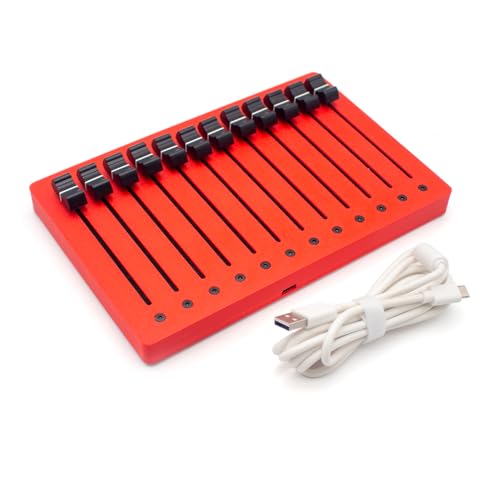
- 12 faders with 12-bit high-precision control
- CC Mode and Pitch Bend Mode
- USB plug-and-play for Windows, macOS, and iOS
Best For: Mixing-focused users who want detailed fader control
Compact Hands-On Mixer Control – Korg nanoKONTROL2 Slim-Line USB Control Surface
If you want a straightforward control surface for music production without taking up much desk space, the Korg nanoKONTROL2 keeps the focus on the essentials. Its slim-line layout gives you quick access to track select, marker advance, and basic mute control, with 8 mixer channels available for compatible DAW workflows.
Best For: Producers who want an ultra-compact USB controller for basic DAW mixing and navigation.
Pros:
- Low-profile design fits easily beside a laptop or compact setup.
- Supports numerous software titles, including Ableton Live.
- 8-channel control layout covers common mixing tasks.
- USB connectivity keeps setup simple.
Cons:
- Does not use motorized faders or scribble-strip displays.
- Button-based design is less hands-on than larger DAW controllers.
For minimal setups, the nanoKONTROL2 is a practical way to add physical control without adding bulk. It is best suited to users who prioritize portability and basic transport, track, and mute functions over deep mixing features.
Motorized Mixing Workhorse – PreSonus FaderPort 8 DAW Controller
The PreSonus FaderPort 8 is a solid control surface for music production if you want tactile mixing with more precision than a button-only controller. Its 8 touch-sensitive, motorized faders, Scribble Strip displays, and Session Navigator make it well suited to active session control, transport work, and detailed automation tasks.
Best For: Producers who want an 8-fader motorized DAW controller for mixing and navigation.
Pros:
- Eight 100 mm motorized, touch-sensitive faders for hands-on mix moves.
- High-definition Scribble Strip displays help identify channels quickly.
- Session Navigator adds fast access to scrolling, marker navigation, zooming, and more.
- Supports Mackie Control and HUI, plus native Studio One control.
Cons:
- Best features are centered around supported DAW workflows.
- Larger than compact desktop controllers.
For users who want a more serious mixing surface, the FaderPort 8 delivers a useful balance of speed, feedback, and control. It is a strong fit when you need motorized faders and clear channel labeling in a compact but capable desk unit.
Portable Wireless MIDI Control – Korg nanoKONTROL Studio Bluetooth/USB MIDI Control Surface
The Korg nanoKONTROL Studio is a compact control surface for music production that adds both Bluetooth and USB connectivity, making it a flexible choice for mobile or desktop workflows. With 8 faders, backlit switches, and support for apps like Ableton Live, Avid Pro Tools, and FL Studio, it’s built for users who want more freedom from cables.
Best For: Mobile producers and desktop users who want a wireless-capable MIDI control surface.
Pros:
- Bluetooth and USB connectivity offer flexible setup options.
- Compact, lightweight design is easy to move between rigs.
- 8-fader mixer channel layout suits common DAW control tasks.
- Supports Ableton Live, Avid Pro Tools, and FL Studio.
Cons:
- Wireless use depends on compatible devices and workflow support.
- Smaller format means fewer physical controls than larger surfaces.
If you need a portable control surface that can work across smartphone, tablet, and computer setups, the nanoKONTROL Studio is a practical option. It focuses on mobility and convenience while still providing the core fader-based control many producers want.
Full-Size DAW Mixing Desk – PreSonus FaderPort 16 DAW Controller
The PreSonus FaderPort 16 is a control surface for music production aimed at users who want a more complete tactile mixing experience. With 16 touch-sensitive motorized faders, 89 buttons, Scribble Strip displays, and session navigation tools, it gives you broad hands-on access to mixing, editing, and automation tasks in supported DAWs.
Best For: Mix engineers and producers who want a 16-fader control surface for large sessions.
Pros:
- 16 motorized, touch-sensitive faders support larger mix sessions.
- 89 buttons cover 104 functions for broad DAW control.
- Scribble Strip displays help keep channels organized at a glance.
- Compatible with major DAWs via Mackie Control Universal and HUI emulation.
Cons:
- Requires more desk space than smaller control surfaces.
- Most advanced workflow features depend on DAW compatibility.
If you want a desk-oriented controller that can handle serious mixing duties, the FaderPort 16 brings a lot of physical control into a single unit. It is especially appealing for users who prefer faders over mouse-based mixing and need quick access to navigation, automation, and channel functions.
SSL UC1 – Hands-On SSL Plugin Mixing
If you want a control surface for music production that is built around SSL plug-in workflows, the UC1 is designed to put channel strip and bus compressor control directly under your hands. It pairs with SSL 360 and includes licenses for SSL 360 Link, 4K B, Channel Strip 2, and Bus Compressor 2, making it a strong fit for focused mix work inside the SSL ecosystem.
Best For: Producers and mix engineers who work with SSL plug-ins and want tactile control over channel strips and compression.
Pros:
- Controls 4K B, Channel Strip 2, and Bus Compressor 2 directly from the surface
- Includes licenses for SSL 360 Link and key SSL plug-ins
- SSL Plug-in Mixer lets you view and control 360-enabled plug-ins from one screen
- UC1 display shows which channel strip or compressor is currently focused
Cons:
- Most useful if you already use SSL 360-enabled plug-ins
- Heavier and larger than a compact MIDI controller
Overall, the UC1 is a specialized control surface for music production that favors depth over general-purpose flexibility. If your mixing workflow centers on SSL plug-ins, it offers a very direct and integrated hands-on experience.
Akai MIDImix – Compact DAW Mixer Control
The Akai MIDImix is a compact control surface for music production that emphasizes simple mixer-style hands-on control. With 8 faders, a master fader, 24 knobs, and 16 buttons, it is built to map easily to DAW mixer settings and works especially smoothly with Ableton Live.
Best For: Budget-minded producers who want a lightweight, portable MIDI mixer for basic DAW control and Ableton Live integration.
Pros:
- 8 channel faders plus 1 master fader for mix control
- 24 assignable knobs for EQ, sends, instruments, and effects
- 16 buttons provide mute, solo, and record-arm functions
- Instant 1:1 mapping with Ableton Live, with Live Lite included
Cons:
- Noisy hardware features are not the focus here; it is a basic mixer controller
- Smaller feature set than more advanced DAW control surfaces
For straightforward mixing, the MIDImix covers the essentials without taking up much space. It is a practical entry-level choice if you want physical faders and knobs more than deep display-driven control.
SSL UF1 – Compact DAW Controller with Displays
If you want a control surface for music production with more visual feedback, the SSL UF1 combines compact hardware with two high-resolution displays, including a large 4.3-inch TFT LCD. It is designed for DAW control, giving you access to track names, parameters, time display, plug-ins, virtual instruments, and SSL Meter functions from the surface.
Best For: Producers who want a compact DAW controller with displays and broad hands-on control.
Pros:
- Two high-resolution displays improve visual feedback while working
- Controls DAW pans, sends, plug-ins, and virtual instruments
- Includes SSL Meter plug-in license with detailed metering tools
- Fader Mode lets the 4 V-Pots control 4 track volumes at once
Cons:
- Smaller footprint means fewer physical controls than larger surfaces
- Included software focus is centered on SSL Meter and 360 workflow
The UF1 is a smart middle ground if you want a control surface for music production that stays compact but still adds informative displays. It is well suited to producers who value seeing track and meter information while staying hands-on.
Hybrid DAW + Hardware Control Surface – Launch Control XL 3
If you want a control surface for music production that can handle both software and hardware, the Novation Launch Control XL 3 is built for flexible hybrid workflows. Its eight faders, 24 endless encoders, 16 assignable buttons, and OLED display make it practical for hands-on mixing, plugin tweaking, and custom MIDI mapping across supported DAWs and external gear.
Best For: Producers who want deep DAW integration plus hardware MIDI control in one compact surface.
Pros:
- Deep integration with Ableton Live, Logic Pro, FL Studio, Cubase, HUI, and more.
- MIDI In, Out, and Out2/Thru ports support hardware synths and effects without a computer.
- Eight faders, 24 endless encoders, and 16 assignable buttons cover a lot of mixing and mapping tasks.
- Up to 15 Custom Modes help you tailor the layout for different workflows.
Cons:
- It is centered on control and mapping rather than pads or keys.
- Best value comes if you actually use DAW plus hardware integration.
Overall, this is a strong pick if you need one surface that can bridge software and outboard gear. The OLED feedback and custom modes make it especially useful for producers who like to build a personalized control layout.
Clip-Launching Pad Controller – APC Mini MK2
The Akai Professional APC Mini MK2 is a compact control surface for music production centered on clip launching and Ableton Live workflow. With 64 RGB pads, nine assignable faders, and pre-mapped integration for Ableton 11.2.7 and later, it is designed for fast loop triggering, mixer control, and hands-on performance.
Best For: Ableton Live users who want a portable clip-launching and mixing controller.
Pros:
- 64 RGB pads provide clear visual feedback for clip launching.
- Pre-mapped for 1-to-1 integration with Ableton Live 11.2.7 and onward.
- Nine faders, including one master fader, support mixer and device control.
- Drum Mode and Note Mode add useful performance and melody options.
Cons:
- Its control focus is tied closely to Ableton Live.
- It is more specialized for clips and pads than full mixing duties.
If your workflow lives in Ableton and you want immediate, tactile control, this is a straightforward choice. The compact, USB-powered design also makes it easy to move between studio and stage setups.
High-Resolution Fader Control Surface – EM-12F 12-Channel Fader Controller
The EM-12F is a straightforward control surface for music production focused on precise fader work. Its 12-channel layout, 10cm high-precision faders, and dual MIDI modes make it useful for controlling MIDI CC data, expression, host volume, and even pitch bend with extended resolution.
Best For: Producers who want a simple, high-resolution fader bank for detailed mixing and MIDI control.
Pros:
- 12 faders give you a wide hands-on control layout.
- High-precision 12-bit resolution supports smooth, accurate movement.
- CC Mode and Pitch Bend Mode add flexible MIDI control options.
- USB plug-and-play compatibility works with Windows, macOS, and iOS.
Cons:
- It appears focused mainly on faders, not buttons or pads.
- No driver installation is convenient, but the feature set is fairly specialized.
This is a good choice if your priority is accurate physical control over levels and MIDI data. It is less about performance extras and more about giving you a clean, direct fader workflow.
How We Picked the Best Control Surface for Music Production
We focused on practical studio value: fader quality, knob and button layout, DAW compatibility, transport controls, automation access, connectivity, and whether the layout actually helps you work faster. We also considered portability, power requirements, and how well each unit fits different production styles, from beat-making to detailed mix work.
Quick Comparison
Smaller units are best for simple mixing, clip launching, and travel-friendly setups. Midrange controllers usually offer the best balance of hands-on control and desk space. Larger fader surfaces are better for engineers and producers who want a more console-like workflow, while plugin-focused controllers are ideal for users who spend a lot of time shaping dynamics, EQ, and inserts.
Key Buying Factors for a Control Surface for Music Production
Fader Count and Size
More faders usually mean faster level balancing and better access to multiple tracks at once. If you mix large sessions, 8- or 16-fader models can save time. If space is tight, a compact 1- to 8-fader unit may be enough.
DAW and Software Compatibility
Make sure the controller supports your main DAW without awkward setup. Native mapping and transport integration are important if you want plug-and-play convenience.
Workflow Controls
Buttons for mute, solo, record arm, banking, and transport make a big difference in daily use. Endless encoders, assignable knobs, and display feedback can also improve editing speed and precision.
Connection Type and Power
USB-powered units are simple and portable. Bluetooth can help reduce cable clutter, while larger professional controllers may benefit from more stable wired connections in fixed studio setups.
Build Quality and Surface Feel
For a Control Surface for Music Production, smooth faders, solid knobs, and a stable chassis matter because they affect both comfort and long-term reliability.
Who Should Buy Which Control Surface for Music Production?
Choose a compact controller if you want affordable hands-on control for home studios, mobile rigs, or basic track mixing. Go with an 8- or 16-fader surface if you regularly mix multitrack sessions and want faster automation editing. Pick a plugin-centric controller if your work is heavy on mixing, processing, and detailed parameter control. If you produce in Ableton Live or perform clips live, a pad-based controller may fit better than a traditional mixer-style surface.
In short, the right pick depends on whether you prioritize portability, fader density, or deeper integration with your software. Matching the hardware to your workflow is the easiest way to get lasting value from a control surface.