Choosing the right monitor controller with headphone amplifier can make a small studio feel far more efficient. The best units simplify speaker switching, improve level control, and keep headphone monitoring easy to manage.
Below, we focus on practical options for home studios, project setups, and more advanced control rooms, with an eye on routing, connectivity, and everyday usability.
Best 10 Monitor Controller with Headphone Amplifier Picks for 2026
Compact Desktop Monitor Controller

- Adds Bluetooth to studio or media monitors
- Balanced analog inputs plus 1/8-inch TRS output
- Compact tabletop design with simple controls
Best For: Small studios needing wireless playback and basic monitor/headphone control
Ultra-Compact Personal Mixer
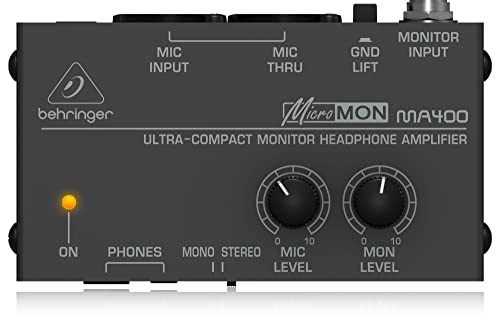
- Mixes mic and monitor signals for personal monitoring
- High-power headphone output with 1/4-inch and 1/8-inch jacks
- Ultra-compact design for studio or stage use
Best For: Players who want a small personal monitor mixer with headphone output
Full Studio Control Center

- Four stereo input pairs plus S/PDIF digital input
- Four headphone amps with independent source selection
- Talkback mic and three speaker output pairs
Best For: Studios needing multiple sources, multiple speakers, and several headphone feeds
Balanced Desktop Monitor Controller
McONE Active Monitor Controller

- Three balanced inputs and three balanced outputs
- Dedicated sub output with separate off switch
- Cue feed and talkback support headphone monitoring
Best For: Compact studios needing source switching, sub control, and cue monitoring
Portable Personal Monitor Amp
Donner EM1 Portable Headphone Amplifier

- High-power output for pro headphones
- XLR/TRS input with locking connector
- Up to 12 hours of rechargeable use
Best For: Portable in-ear or on-ear monitoring
Desktop Monitor Controller
Audient Nero Monitor Controller

- 4 headphone outputs with flexible routing
- 3 stereo speaker outputs plus cue mix input
- Dim, Cut, Mono, and Polarity controls
Best For: Desktop studios needing multi-output monitor control
Personal IEM Amp
Behringer POWERPLAY P1 Monitor Amplifier

- Dual XLR inputs for mono or stereo use
- Level and balance/mix controls
- High-power output for personal monitoring
Best For: Rugged stage use and personal in-ear monitoring
Radial Pick
Studio Monitor Controller with Dual Headphone Amps

- Dual stereo input sources
- Independent headphone amplifiers
- Steel enclosure, low-distortion operation
Best For: Studios needing dual-source monitoring and separate headphone amplification
Precision Passive Pick
Large Knob Stereo Monitor Controller
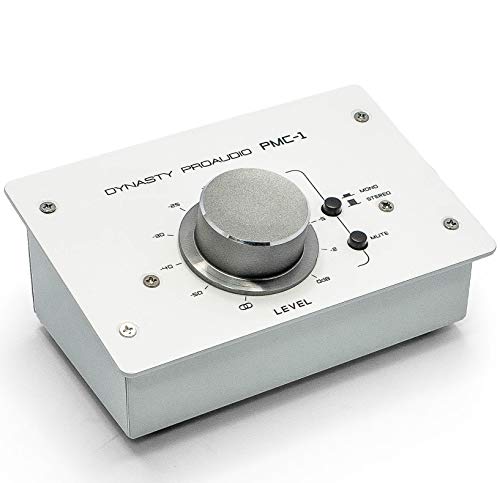
- Large rotary knob for precise level control
- Balanced XLR/TRS inputs and TRS outputs
- Metal chassis with passive, transparent design
Best For: Transparent passive level control with balanced connections
Routing Flex Pick
2 In 4 Out Passive Monitor Controller

- 2 input / 4 output routing
- 100% passive, no power required
- Mute button and unbalanced 1/4-inch jacks
Best For: Simple passive switching with multiple output paths
Compact Desktop Monitor Controller – PreSonus MicroStation BT 2.1
If you want a monitor controller with headphone amplifier features in a small desktop box, the PreSonus MicroStation BT is built for simple 2.1-style setups. It adds Bluetooth to studio or media reference monitors, while keeping balanced analog inputs and a stereo headphone/aux output for everyday monitoring and playback.
Best For: Small studios and home setups that want Bluetooth input, speaker control, and headphone/aux monitoring in one compact unit.
Pros:
- Stereo Bluetooth input adds wireless playback to compatible speakers.
- Balanced 1/4-inch TRS and stereo 1/8-inch TRS inputs support pro and consumer gear.
- Stereo 1/8-inch TRS headphone/aux output adds flexible monitoring and streaming options.
- Compact tabletop design keeps the footprint small.
Cons:
- Designed around 2.1 monitoring rather than a full multi-source control center.
- Headphone connectivity is via a stereo 1/8-inch output rather than a dedicated large-format jack.
The MicroStation BT is a practical pick if you want straightforward desktop control with Bluetooth and headphone support without taking up much space. It is less feature-heavy than larger studio controllers, but it covers the basics cleanly for simple monitoring workflows.
Ultra-Compact Personal Mixer – Behringer MICROMON MA400
The Behringer MICROMON MA400 is a tiny monitor controller with headphone amplifier functionality aimed at personal monitoring. It mixes a mic and monitor signal so you can hear both through headphones, which makes it useful when you need a simple “more me” setup for studio or stage use.
Best For: Musicians and performers who need a compact personal monitor mixer with headphone output.
Pros:
- Mixes mic and monitor signals for a personal monitoring blend.
- High-power headphone output with both 1/4-inch and 1/8-inch connectors.
- Mic in and mic through XLR connectors support flexible routing.
- Ground lift switch and monitor level control add basic routing convenience.
Cons:
- Focused on one-person monitoring rather than full studio speaker control.
- Minimal control set compared with larger desktop monitor controllers.
If you need an affordable, ultra-compact monitor controller with headphone amplifier duties, the MA400 keeps the feature set targeted and practical. It is best suited to personal monitoring tasks rather than broader source and speaker management.
Full Studio Control Center – PreSonus Monitor Station V2
The PreSonus Monitor Station V2 is a more complete monitor controller with headphone amplifier capabilities for desktop studio work. It combines multiple input pairs, selectable speaker outputs, cue control, and four headphone amplifiers, making it suitable when you need one hub for monitoring and communication.
Best For: Project studios that need multiple sources, several speaker pairs, talkback, and multiple headphone feeds.
Pros:
- Four stereo input pairs plus one S/PDIF digital input provide flexible source selection.
- Three selectable speaker output pairs with level controls support multiple monitor sets.
- Four stereo headphone amplifiers each have volume controls and independent source selection.
- Built-in talkback microphone adds communication control for sessions.
Cons:
- Larger desktop footprint than compact monitor controllers.
- May be more system than needed for very simple setups.
For studios that want a true control center, the Monitor Station V2 offers a lot of routing and headphone flexibility in one unit. It is a strong fit when your monitoring setup includes multiple sources, speakers, and people.
Balanced Desktop Monitor Controller – McONE Active Monitor Controller
The McONE Active Monitor Controller is designed for straightforward desktop routing with headphone monitoring support. It offers three balanced stereo inputs, three balanced stereo outputs, a dedicated sub output, and a cue feed for artist headphone monitoring, making it a useful monitor controller with headphone amplifier features for compact production setups.
Best For: Desktop studios that want simple source switching, subwoofer control, and a headphone cue feed.
Pros:
- Three balanced stereo inputs and three balanced stereo outputs keep routing simple.
- Dedicated sub output includes a separate off switch for mix checking.
- Cue feed supports artist headphone monitoring and carries talkback mic signal.
- Talkback mic and dim/mono/mute functions add practical monitoring control.
Cons:
- Uses a compact feature set compared with larger multi-source control centers.
- Headphone monitoring is centered on the cue feed rather than a highly expanded headphone section.
The McONE keeps the layout focused on switching, sub management, and cue monitoring without overcomplicating the workflow. It suits users who want a practical desktop monitor controller with headphone amplifier support and talkback handling.
Portable Personal Monitor Amp – Donner EM1 Portable Headphone Amplifier
If you need a monitor controller with headphone amplifier features in a compact pack, the Donner EM1 is aimed at personal in-ear and on-ear monitoring. It offers high power for high-impedance headphones, XLR/TRS input options with a locking mechanism, and a stereo/mono source switch for flexible signal feeding.
Best For: Performers or engineers who want a portable personal monitor amp for in-ear or on-ear listening.
Pros:
- High-power output is designed for high-impedance professional headphones.
- XLR and TRS input connectors with a locking mechanism.
- Stereo/mono source switch helps match different cable setups.
- Rechargeable design can run up to 12 hours per charge.
Cons:
- Does not support microphone use.
- Focused on personal monitoring rather than full desktop control.
- Single-output style is less versatile than multi-speaker monitor controllers.
The EM1 makes sense if your priority is clean, portable headphone monitoring rather than a full studio control hub. Its battery life and belt-pack portability make it practical for long sessions and noisy environments.
Desktop Monitor Controller – Audient Nero Monitor Controller
The Audient Nero is a desktop monitor controller with headphone amplifier capabilities built for flexible studio routing. It provides four stereo analogue sources, multiple line and speaker outputs, and four headphone outputs, making it a strong fit when you need centralized control over monitors and headphones.
Best For: Desktop studios that need a monitor controller with multiple speaker paths and several headphone outs.
Pros:
- 4 stereo analogue sources plus 2 line level inputs.
- 3 stereo speaker outputs for flexible monitor switching.
- 4 headphone outputs with flexible routing.
- Monitor functions include Dim, Cut, Mono, and Polarity.
Cons:
- Designed for desktop use, so it is not portable.
- More controller-focused than a simple headphone amp.
- May be more feature-rich than needed for basic single-listener setups.
If you want one unit to manage speakers, cue mixes, and headphone monitoring, Nero covers a lot of ground. Its routing and control features make it especially useful in small studios with multiple listening needs.
Personal IEM Amp – Behringer POWERPLAY P1 Monitor Amplifier
The Behringer POWERPLAY P1 is a personal in-ear monitor amplifier built for simple stage monitoring. It uses dual XLR inputs for mono or stereo operation and includes level and balance/mix controls, so it works well when you want a straightforward monitor controller with headphone amplifier functionality on the go.
Best For: Musicians and drummers who need a rugged personal in-ear monitor amp with simple stereo/mono control.
Pros:
- Dual XLR inputs support 2-channel mono or stereo operation.
- Switchable stereo/mono mode with mix function.
- Level and balance/mix controls are easy to use.
- High-power headphone output is built for personal monitor applications.
Cons:
- Limited to personal monitoring rather than full studio routing.
- Does not offer speaker switching or desktop control features.
- Less feature-packed than larger monitor controllers.
The P1 is a practical choice when you need reliable in-ear monitoring without extra complexity. Its compact, rugged design and simple controls make it well suited to performance-focused setups.
Radial Pick – Studio Monitor Controller with Dual Headphone Amps
If you want a monitor controller with headphone amplifier features in a sturdy desktop unit, the Radial Nuance Select is built around practical studio switching and low-distortion operation. It combines dual stereo input sources with independent headphone amplifiers, making it a strong fit for small control rooms where you need flexible monitoring and personal cue listening.
Best For: Studios that want dual-source monitor control plus separate headphone amplification in a steel enclosure.
Pros:
- Dual stereo input sources for flexible monitoring setups
- Independent headphone amplifiers for separate listening needs
- Low-distortion operation aimed at clean signal handling
- Steel/stainless steel enclosure for durable desktop use
Cons:
- No detailed output-count or routing options listed in the supplied notes
- Heavier and larger than compact passive controllers
Overall, this is the most feature-forward option here for buyers who specifically want monitor controller with headphone amplifier functionality in one robust unit. Its strength is the combination of dual inputs, independent headphone sections, and a solid metal build.
Precision Passive Pick – Large Knob Stereo Monitor Controller
The DYNASTY PROAUDIO PMC-1 is a passive stereo monitor controller focused on precise level adjustment between analog sources and active speakers or amplifiers. If you mainly need a monitor controller with headphone amplifier support elsewhere in your chain, this unit is better understood as a clean, straightforward volume controller with balanced connections and a very large knob for fine control.
Best For: Users who want a transparent passive monitor volume controller with balanced I/O and a large precision knob.
Pros:
- Large rotary knob for precise volume control
- Balanced XLR/TRS inputs and TRS outputs for cleaner signal handling
- 3.5mm mini-jack connections add flexibility
- Metal chassis built for durable everyday use
Cons:
- No headphone amplifier is listed in the supplied product details
- Passive design means no powered features or active processing
As a monitoring controller, the PMC-1 is about transparent attenuation and easy level changes rather than extra processing. It makes sense for setups that value balanced connectivity and simple, tactile control over their speakers.
Routing Flex Pick – 2 In 4 Out Passive Monitor Controller
The StudioMan M04 is a passive monitor controller designed for simple source and output switching in a desktop studio setup. While it is not a monitor controller with headphone amplifier features, it does offer 2 inputs and 4 outputs, making it useful when you want quick routing changes without repeated cable swaps.
Best For: Studios, podcasts, and streaming setups that need passive source switching and multiple outputs.
Pros:
- 2 input / 4 output routing reduces frequent plugging and unplugging
- 100% passive design requires no power supply or battery
- One-click mute button for fast audio cutoffs
- Unbalanced 1/4-inch jacks for straightforward desktop connections
Cons:
- No headphone amplifier is included in the supplied notes
- Unbalanced connections may be less suited to long cable runs than balanced designs
The M04 stands out for flexible passive routing rather than advanced monitoring extras. If your priority is quick switching between sources and outputs with a simple mute function, it covers that job cleanly.
How We Picked the Best Monitor Controller with Headphone Amplifier
We prioritized monitoring tools that offer clear level control, useful input/output flexibility, and headphone support that fits real studio workflows. We also favored designs that are easy to place on a desk, simple to operate, and suitable for either casual tracking or more precise mixing.
For this roundup, the most important factors were signal path quality, switching options, cue and talkback-style convenience where applicable, and whether the unit made monitoring faster rather than more complicated.
Quick Comparison
Some models lean toward desktop convenience and all-in-one control, while others are more compact or passive. Active controllers typically add more features and easier gain handling, while passive units appeal to users who want straightforward volume control with minimal coloration. Personal headphone amp-style products are best for individual monitoring, not full speaker management.
Key Buying Factors for a Monitor Controller with Headphone Amplifier
Routing and I/O
Check how many speaker pairs, sources, and headphone feeds you need. If you regularly switch between nearfields, a sub, or alternate playback devices, choose a controller with enough inputs and outputs to avoid workarounds.
Headphone Performance
A good Monitor Controller with Headphone Amplifier should provide enough clean level for your headphones without hiss or strain. If you use high-impedance headphones or track musicians loudly, output power matters.
Control Layout
Large knobs, dedicated mute/dim buttons, mono switching, and clear source selection save time during sessions. A logical front-panel layout is especially helpful if you monitor while recording.
Passive Vs. Active Design
Passive controllers are simple and transparent, but they depend more on the quality of your interface or amp chain. Active models are usually more flexible and may offer stronger drive and broader monitoring features.
Desktop Footprint and Build
Since this is often a hands-on studio tool, size and knob feel matter. Compact units suit tight desks, while heavier desktop controllers tend to feel more stable and precise.
Who Should Buy Which Monitor Controller with Headphone Amplifier?
Choose a compact or personal headphone amplifier if your main goal is improving in-ear monitoring for one performer. Go with a desktop studio controller if you need speaker switching, mute/dim functions, and better workflow control. If you want the simplest setup, a passive option may be enough. If you need broader routing and day-to-day convenience, an active controller is usually the better fit.
In short, the best Monitor Controller with Headphone Amplifier is the one that matches your studio size, headphone demands, and routing needs without adding unnecessary complexity.