A great podcast setup should make recording feel simple, not technical. The right podcast recording kit with mixer can bring together your mic, monitoring, and level control in one creator-friendly package.
Below, we focus on kits that suit different show sizes, budgets, and recording styles so you can choose a setup that fits your workflow from day one.
Best 10 Podcast Recording Kit with Mixer Picks for 2026
Gaming Stream Bundle

- Dynamic XLR/USB mic with included gaming audio mixer
- USB mode adds mute, gain, monitoring, and RGB controls
- Suitable for podcasting, voice-over, and game streaming
Best For: Streamers and gamers who want simple mixer control with USB/XLR flexibility
All-in-One Voice Kit
BM-800 Studio Bundle with Sound Card

- Includes mic, arm stand, shock mount, pop filter, and live sound card
- Cardioid condenser design focuses on voice in front of the mic
- Compatible with PC, Mac, smartphones, tablets, and game consoles
Best For: Beginners who want a full starter bundle for podcasts and livestreams
Studio Mic With Arm
FIFINE K688 Dynamic Podcast Kit

- USB/XLR dynamic mic works with mixers or direct USB setup
- Boom arm, shock mount, and windscreen reduce vibration and noise
- USB mode includes mute, gain, headphone jack, and volume control
Best For: Podcasters and voice-over creators who want a sturdy USB/XLR mic kit
Soundboard Starter

- All-in-one mixer station with included mic and accessories
- Built-in and recordable sound effects support live creativity
- Supports real-time monitoring, denoise, and multi-device streaming
Best For: Live streamers and creators who want an easy all-in-one mixer
4-Person Starter Kit
Movo 4-Person Podcast Equipment Bundle
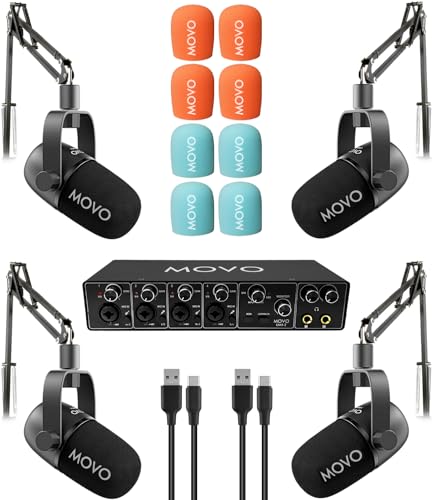
- 4-channel USB audio interface for team recording
- Includes 4 dynamic mics and 4 boom arms
- USB-C plug-and-play with direct monitoring
Best For: Teams wanting a complete four-person podcast setup
Mixer With Streaming Controls
FIFINE AmpliGame SC3 Audio Mixer

- One XLR mic input with 48V phantom power
- Independent controls for mic, line in, headphone, and line out
- Mute, monitor, RGB, and voice effects included
Best For: Solo streamers and podcasters using one XLR microphone
Dual Creator Bundle
tenlamp G10 Dual Microphone Podcast Kit

- Includes mixer, two condenser mics, stands, and cables
- Two-channel setup with independent gain and monitoring
- Noise reduction plus voice changer and sound effects
Best For: Two-host podcasts, duos, and collaborative streaming
Two-Mic Creator Bundle
Podcast Equipment Bundle for 2

- Two dynamic mics included
- Built-in recording with 8GB card
- Stereo mode and voice effects
Best For: Two-person podcasting and beginner creator setups
All-in-One Live Audio Kit
Podcast Microphone Bundle with Sound Board

- Mixer and condenser mic included
- Noise reduction with live controls
- Follow singing mode for performances
Best For: Live streamers and singers who want easy real-time audio control
RGB XLR/USB Creator Set
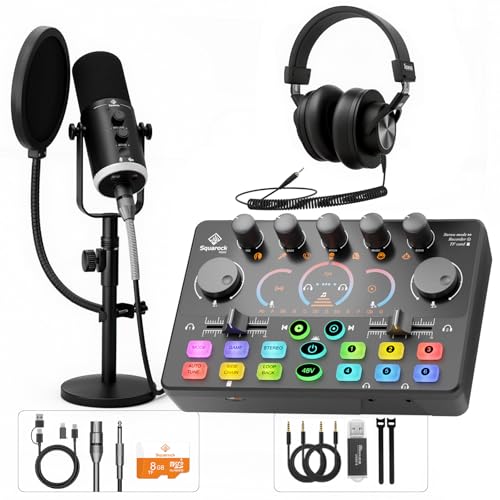
- XLR and USB mic connectivity
- Mixer with mute and headphone monitoring
- RGB lighting for desktop setups
Best For: Desktop creators who want flexible mic connections and simple mixer control
Gaming Stream Bundle – FIFINE KS5W XLR/USB Mixer Kit
If you want a podcast recording kit with mixer that also fits gaming and streaming, this FIFINE bundle is built around quick, hands-on control. It pairs a dynamic XLR/USB microphone with a PC mixer, slider faders, gain control, mute, monitoring, and RGB effects for a setup that is easy to manage during live use.
Best For: Streamers, gamers, and podcasters who want simple mixer control plus USB/XLR flexibility.
Pros:
- Includes both a dynamic microphone and a gaming audio mixer.
- USB mode adds gain control, mute, headphone monitoring, and RGB lighting.
- Slider faders make volume adjustments more intuitive during streams.
- Works for podcasting, voice-over, dubbing, and game chat.
Cons:
- Mic function keys are not available when using XLR connection.
- Headphone monitoring is only available over USB.
- Designed for one channel, so it is not a multi-mic mixer.
This is a practical pick if you want a compact all-in-one starter for voice work and live content, with more tactile control than a basic standalone mic. The added RGB and function buttons make it more suited to streaming rooms than plain studio desks.
All-in-One Voice Kit – BM-800 Studio Bundle with Sound Card
This podcast recording kit with mixer is aimed at beginners who want a complete studio-style package in one box. It combines a BM-800 condenser microphone, suspension arm, shock mount, pop filter, foam cap, and live sound card for podcasting, streaming, and recording on a laptop, PC, or phone.
Best For: Beginners who want a full starter bundle for podcasting, livestreams, and social video.
Pros:
- Comes with a large accessory set, including arm stand, shock mount, pop filter, and sound card.
- Cardioid condenser mic is designed to capture voice detail directly in front of the microphone.
- Broad device compatibility includes Windows, Mac, smartphones, tablets, PS4, Xbox, and Switch.
- Voice-changing and sound-effect features add flexibility for live content and short videos.
Cons:
- Requires charging before first use.
- Package notes say no software is required, but also indicate the bundle is based on its included sound card rather than advanced studio routing.
- Single-channel setup limits it to one mic source at a time.
As a starter-focused bundle, this one emphasizes convenience and extras over a modular studio build. It is a solid choice if you want an easy first step into recording without buying each accessory separately.
Studio Mic With Arm – FIFINE K688 Dynamic Podcast Kit
If you are shopping for a podcast recording kit with mixer support in a more studio-like format, this FIFINE K688 kit is built around flexibility and cleaner voice capture. It includes a USB/XLR dynamic microphone, boom arm, windscreen, and shock mount, with onboard controls that help keep recording sessions simple over USB and compatible with external mixers or interfaces over XLR.
Best For: Podcasters, streamers, and voice-over creators who want a sturdy mic kit with USB/XLR options.
Pros:
- USB and XLR connections let you choose plug-and-play or mixer/interface use.
- Metal boom arm and shock mount help reduce bumps and vibrations.
- Tap-to-mute, gain knob, headphone jack, and volume control are available in USB mode.
- Cardioid pickup and included windscreen support cleaner vocal recording.
Cons:
- All mic function buttons are disabled when used over XLR.
- Best input range is close-mic use, roughly 2 to 6 inches away.
- Desk clamp only fits desks under 2 inches thick.
This kit is a strong middle-ground option if you want a dependable microphone setup that can grow with a mixer or audio interface later. It focuses on practical recording control and noise reduction rather than extra soundboard effects.
Soundboard Starter – MAONO Maonocaster Lite AM200
This podcast recording kit with mixer is best thought of as an all-in-one soundboard for live content and simple production. The MAONO Maonocaster Lite combines an audio mixer station, included microphone, monitoring, voice changes, and built-in effects so you can start recording from a phone or PC with minimal setup.
Best For: Live streamers and creators who want built-in effects and an easy all-in-one mixer.
Pros:
- All-in-one mixer station with included microphone and accessory set.
- Built-in and user-recordable sound effects add creative options.
- Supports up to 2 people, 4 devices, and 4 platforms for simultaneous streaming.
- Real-time monitoring and denoise button help manage live audio.
Cons:
- Only supports 3.5mm microphone input and does not support phantom power.
- Connecting instruments may require an additional adapter that is not included.
- Users may need to manually select the device in PC sound settings after connecting.
If your priority is a compact mixer-first setup with fun effects, this bundle keeps the workflow straightforward. It is especially attractive for creators who want live voice changes and instant sound cues without building a more complex studio.
4-Person Starter Kit – Movo 4-Person Podcast Equipment Bundle
If you want a podcast recording kit with mixer for a full panel setup, this Movo bundle keeps the buying process simple. It combines a 4-channel USB audio interface, four dynamic microphones, and four boom arms, so a team can start recording together without piecing everything out separately.
Best For: Groups that need an all-in-one four-person podcast setup with direct monitoring and USB-C plug-and-play convenience.
Pros:
- Includes a 4-channel USB audio interface plus 4 dynamic microphones and 4 boom arms
- 48V phantom power, zero-latency direct monitoring, and loopback support on the interface
- Dynamic mics are designed for speech and do not require phantom power
- USB-C connectivity with macOS plug-and-play and Windows 10+ ASIO support
Cons:
- Built specifically for four-person setups, so it may be more than some creators need
- Windows support requires ASIO driver mode rather than the simplest out-of-box path
Overall, this is a practical bundle for teams that want a straightforward, professional-sounding podcast recording kit with mixer-style control built in. The included stands and interface features make it a solid all-in-one choice for shared desks and collaborative recording.
Mixer With Streaming Controls – FIFINE AmpliGame SC3 Audio Mixer
This podcast recording kit with mixer is a strong pick if you want more hands-on control for a single XLR microphone. The FIFINE SC3 combines phantom power, a volume fader, mute and monitor buttons, and extra effects in a compact mixer made for streaming, recording, and voice work.
Best For: Solo creators who want an XLR mixer with simple physical controls, phantom power, and fun streaming features.
Pros:
- One XLR mic input with built-in 48V phantom power for condenser microphones
- Individual control over microphone, line in, headphone, and line out levels
- Front mute and monitor buttons for easier live control
- Includes sound effects, voice-changing modes, and RGB lighting
Cons:
- Designed around a single XLR mic input, not a multi-mic podcast studio
- XLR cable is not included
- Not compatible with USB microphones
For creators who want a mixer-first workflow, the SC3 offers useful tactile control without a complicated setup. It is best suited to solo podcasting, streaming, or vocal recording where XLR support and easy front-panel access matter more than multi-host expansion.
Dual Creator Bundle – tenlamp G10 Dual Microphone Podcast Kit
If you need a podcast recording kit with mixer for two hosts, this tenlamp bundle is built around that exact use case. It pairs the G10 live sound board with two condenser microphones, stands, and cables, giving duos a compact way to record podcasts, stream, sing, or game together.
Best For: Two-person podcast teams and creator duos who want a bundled mixer setup with voice effects and monitoring.
Pros:
- Includes the G10 sound board, two condenser microphones, stands, and cables
- Designed for two creators with independent gain control and zero-latency headphone monitoring
- Built-in noise reduction, voice changer, auto-tune, and reverb effects
- Works with PC, Mac, iPhone, and Android with plug-and-play setup
Cons:
- Only two channels, so it is not aimed at larger panels
- 3.5mm condenser mic design is less expandable than XLR-based systems
This bundle is a good fit if you want a ready-made two-person setup with more creative controls than a basic interface. It keeps the workflow simple while adding the kind of monitoring and effects that help duo podcasts and live sessions feel polished.
Two-Mic Creator Bundle – Podcast Equipment Bundle for 2
This podcast recording kit with mixer is built as an all-in-one setup for two people, pairing dual dynamic microphones with a mixer that includes built-in recording, RGB lighting, and voice effects. It’s a practical option if you want a plug-and-play bundle for podcasting, streaming, gaming, or voice-over work without assembling separate gear.
Best For: Two-person podcasting, beginner streamers, and creators who want recording plus live sound effects in one kit.
Pros:
- Includes two dynamic microphones, stands, shock mounts, foam covers, and cables for a fuller starter package.
- Built-in recorder with 8GB memory card support helps store and review recordings directly from the card.
- Stereo mode adds left/right channel separation for a more immersive sound image.
- Custom sound buttons, 7 voice-changing modes, and 5 RGB lighting modes add creative flexibility.
Cons:
- Playback support is tied to recordings stored on the included memory card.
- Bluetooth is for accompaniment only, not full wireless microphone use.
- Some advanced features may be more than a basic starter needs.
Overall, this bundle stands out if you want a feature-packed podcast recording kit with mixer functions and two-mic support in one package. It balances convenience, effects, and built-in storage for creators who want to start recording quickly.
All-in-One Live Audio Kit – Podcast Microphone Bundle with Sound Board
If you want a podcast recording kit with mixer that leans into streaming and live performance, this bundle combines a condenser microphone with a live sound board in one setup. It’s designed for clean vocal capture, simple plug-and-play use, and real-time control over the sound you send to your audience.
Best For: Streamers, singers, and podcasters who want a compact all-in-one audio setup with live control.
Pros:
- Includes an audio mixer, condenser microphone, and core accessories for a complete starter system.
- Built-in noise reduction helps keep vocals clear and balanced.
- Follow singing mode lets you monitor the original track privately while the audience hears your mix.
- Real-time controls for bass, treble, reverb, pitch, voice changes, and sound effects support interactive sessions.
Cons:
- The mic is a 3.5mm condenser design, which may not suit users specifically looking for XLR-only setups.
- Feature-rich controls may be more than needed for very simple recording tasks.
- Battery-powered operation may require more attention than purely bus-powered gear.
This is a flexible choice for creators who want one bundled system for recording, singing, and streaming control. It focuses on convenience and live performance features rather than a stripped-down studio-only approach.
RGB XLR/USB Creator Set – Podcast Equipment Bundle
This podcast recording kit with mixer is aimed at creators who want a clean, flexible desktop setup for podcasting, voice work, and gaming. With a dynamic XLR/USB microphone, RGB lighting, and a mixer with direct controls, it’s built to simplify everyday recording and streaming tasks.
Best For: Podcasters, gamers, and streamers who want dual-connection flexibility and easy mixer controls.
Pros:
- Dynamic microphone supports both XLR and USB use for flexible setup options.
- Mixer includes mute buttons, headphone monitoring, and volume faders for quick control.
- RGB lighting adds a visible gaming/streaming aesthetic.
- Works across podcast recording, live streaming, and general content creation.
Cons:
- When the mic is connected by XLR, the microphone RGB and onboard mic controls do not function.
- It’s geared more toward desktop creator workflows than portable use.
- Some users may prefer a bundle with included recording storage or more accessories.
For users who want a straightforward, control-focused bundle, this kit delivers useful mixer features and a flexible mic connection. It’s especially appealing if you value quick adjustments and a polished desktop look.
How We Picked the Best Podcast Recording Kit with Mixer
We looked for a Podcast Recording Kit with Mixer that balances audio quality, ease of setup, and useful creator features. Strong picks typically include dependable microphones, clear gain control, headphone monitoring, and connection options that work with PCs, laptops, and in some cases phones or cameras. We also considered whether a kit is better for solo recording, two hosts, or multi-person sessions.
Quick Comparison
Before you choose, match the kit to your show format. Solo creators usually benefit from compact bundles with one mic and simple controls. Two-person setups need cleaner channel separation and enough inputs for both voices. Groups and interview-based shows should prioritize more channels, sturdy boom arms, and a mixer or interface that can handle multiple mic sources without constant adjustment.
Key Buying Factors for a Podcast Recording Kit with Mixer
Mic Type and Connectivity
Dynamic microphones are often a safer choice for untreated rooms because they help reduce background noise. USB is easier for plug-and-play use, while XLR gives more flexibility if you want to upgrade your gear later. Some bundles offer both, which is a practical option for creators who want room to grow.
Mixer Controls and Monitoring
Look for gain knobs, mute buttons, headphone monitoring, and separate channel controls. These features make it much easier to manage volume during live sessions or interviews. If you stream or record live, onboard effects, sound pads, and voice controls may be useful, but they should not replace core audio quality.
Show Size and Expansion
A Podcast Recording Kit with Mixer should match the number of voices you plan to record. One-person and two-person kits keep things compact, while four-channel systems are better for panels, co-hosts, or rotating guests. If you expect to expand later, choose a mixer or interface with extra headroom.
Build Quality and Accessories
Bundles are often cost-effective because they include boom arms, cables, stands, and pop-filter-style extras. Check that the included accessories are sturdy enough for frequent use. A good kit saves money only if the accessories hold up in regular recording sessions.
Who Should Buy Which Podcast Recording Kit with Mixer?
Solo podcasters and streamers should look for an easy-to-use kit with one good mic, simple controls, and reliable monitoring. Two-host shows are best served by bundles with dual mics and a mixer that keeps each voice under control. For teams, classrooms, or interview panels, a multi-input kit is the smarter choice because it reduces setup friction and keeps the session organized. If you want maximum flexibility, choose a USB/XLR hybrid kit so your gear can evolve with your show.
In short, the best option is the one that fits your recording space, your number of speakers, and how hands-on you want your workflow to be.