Choosing the right rackmount audio interface for studio work can make tracking faster, cleaner, and far more flexible. The best options balance low-latency performance, enough inputs for your sessions, and dependable driver stability.
Whether you are building a full recording room or upgrading a hybrid setup, this roundup focuses on interfaces that deliver serious studio connectivity without wasting rack space.
Best 10 Rackmount Audio Interface for Studio Picks for 2026
Rackmount Multitrack Workhorse

- 16 inputs for larger tracking sessions
- Eight Ultra-HDDA preamps with 56dB gain
- DSP mixer with EQ and compression
Best For: Windows studios recording bands, drums, and other multi-source sessions
Desktop Connectivity Hub

- 8 analog inputs with 4 DiscretePRO preamps
- ADAT, MIDI, and word clock support
- Bluetooth, phono preamp, and USB-C
Best For: Mac studios wanting a flexible, feature-packed desktop interface
Dante-Ready Pro Engine

- 16 x 16 Dante I/O with Thunderbolt 3
- HEXA Core processing for low-latency UAD mixing
- Word clock and AES I/O for pro setups
Best For: Pro studios needing Dante networking and UAD plug-in power
High-Channel Studio Favorite
Focusrite Scarlett 18i20 4th Gen

- 18 inputs and 20 outputs for multitrack work
- Eight mic preamps with 24-bit/192kHz conversion
- Auto Gain and Clip Safe for easier level control
Best For: Recording studios and creators needing high I/O with simple workflow tools
Rack-Mount DJ Recording Hub
Behringer VMX1000USB 7-Channel Mixer

- 7-channel ultra-low-noise mixer
- Built-in USB recording and playback
- Includes software for recording and podcasting
Best For: DJs and home users needing rack-mount USB recording
Compact Studio Favorite
Scarlett 2i2 4th Gen USB Interface

- 2 mic preamps and 2 Hi-Z inputs
- 24-bit/192kHz with 120dB dynamic range
- Auto Gain, Clip Safe, and Air modes
Best For: Solo creators and small studios
High-Channel Studio Control Center
Arturia AudioFuse 16Rig Bundle

- 16 analog inputs and 12 outputs
- Dual ADAT I/O, MIDI, and word clock
- Standalone mixers with immersive monitoring support
Best For: Larger studios needing extensive routing and monitoring
Rack-Ready Premium Pick
Universal Audio Volt 876 24x28 USB Audio Interface
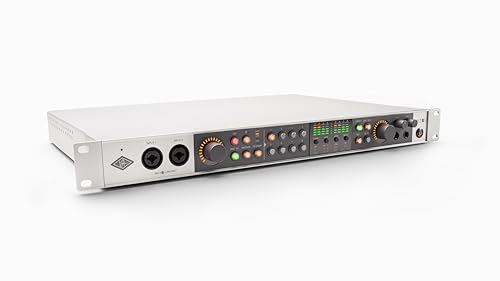
- 24x28 USB interface in a rack-mount style design
- Eight Vintage preamps plus classic compressor modeling
- 32-bit/192 kHz conversion with UAD Console features
Best For: Studio owners wanting premium rack-style recording with expandability
Portable Starter Option
M-AUDIO M-Track Duo USB Audio Interface

- Two combo inputs with phantom power
- 48 kHz recording and zero-latency monitoring
- Compact desktop design for Mac or PC
Best For: Solo recording, streaming, and podcasting on a simple setup
Budget Metal-Build Choice
Pyle USB Audio Interface for Recording

- 24-bit/192 kHz with pro-grade preamps
- Rugged aluminum chassis in a compact form
- 2-in/2-out layout with phantom power
Best For: Budget-conscious users needing a durable compact interface
Rackmount Multitrack Workhorse – Tascam US-16×08
If you need a rackmount audio interface for studio tracking with lots of simultaneous inputs, the Tascam US-16×08 is built for bigger sessions. It offers 16 channels of input, eight Ultra-HDDA mic preamps, and onboard DSP mixing to keep monitor paths controlled while recording.
Best For: Windows-based studios that need a high-input-count rack interface for bands, drums, and multitrack recording.
Pros:
- 16 total inputs for capturing larger sessions
- Eight Ultra-HDDA mic preamps with up to 56dB gain
- Eight balanced line outputs for studio monitoring
- DSP mixer with 4-band EQ and compression for low-latency monitor mixes
Cons:
- Windows compatibility only, which limits cross-platform use
- Included labor warranty is only 90 days
Overall, this is a practical pick when input count and monitoring flexibility matter more than desktop extras. It suits a studio that wants a straightforward rack solution for recording multiple sources at once.
Desktop Connectivity Hub – Arturia AudioFuse Studio
For a rackmount audio interface for studio workflows that still values deep connectivity and hands-on control, the Arturia AudioFuse Studio brings a lot to the table in a desktop format. It combines 8 analog inputs, 4 DiscretePRO preamps, ADAT expansion, MIDI, word clock, Bluetooth, and USB-C for flexible recording and routing.
Best For: Mac-based studios that want a feature-rich interface with strong connectivity, expansion, and creative extras.
Pros:
- 8 analog inputs with 4 DiscretePRO mic/instrument preamps
- ADAT, MIDI, and word clock support for expanded studio setups
- Built-in phono preamp and Bluetooth streaming
- USB-C connectivity plus included creative software bundle
Cons:
- Designed as a desktop interface rather than a rackmount unit
- MacOS support is listed, so platform fit should be checked carefully
This is a strong choice if your studio needs versatile I/O and useful utility features in one unit. It stands out most for producers who want an interface that can serve as a central hub for recording and monitoring.
Dante-Ready Pro Engine – Universal Audio Apollo x16D
Universal Audio Apollo x16D Essentials+ 18 x 20 Audio Interface with Dante I/O and UAD DSP
Check Price On AmazonIf your rackmount audio interface for studio work needs to live in a professional digital networked setup, the Universal Audio Apollo x16D is aimed squarely at that environment. It pairs 16 x 16 Dante networking with Thunderbolt 3, onboard HEXA Core processing, and 24-bit/192 kHz performance for high-end routing and mixing.
Best For: Pro studios and live-to-studio rigs that rely on Dante networking, UAD plug-ins, and low-latency monitoring.
Pros:
- 16 x 16 Dante I/O with Thunderbolt 3 connectivity
- HEXA Core Processing for near-zero-latency UAD plug-in mixing
- Word clock I/O and stereo AES I/O for pro integration
- 24-bit/192 kHz resolution with Dual-Crystal Clocking
Cons:
- More specialized than a simple all-purpose studio interface
- Requires a workflow that can take advantage of Dante and UAD ecosystem features
In practice, this is a premium routing and processing solution rather than a basic recording box. It makes the most sense when your studio already leans on network audio and professional external hardware.
High-Channel Studio Favorite – Focusrite Scarlett 18i20 4th Gen
The Focusrite Scarlett 18i20 4th Gen is a rackmount audio interface for studio users who want a strong blend of inputs, modern converters, and easy workflow tools. With 18 inputs and 20 outputs, eight mic preamps, dual ADAT, S/PDIF, MIDI, and word clock, it is designed for serious multitrack recording.
Best For: Recording studios, producers, and podcasters who want a modern high-I/O interface with helpful automatic gain tools.
Pros:
- 18-in/20-out layout with eight mic preamps and two Hi-Z inputs
- 24-bit/192kHz converters and 122dB dynamic range
- Auto Gain and Clip Safe help simplify level management
- Dual ADAT, S/PDIF, MIDI, and word clock for expanded studio routing
Cons:
- At 1.83 inches tall, it is a rack-friendly unit but still relatively shallow compared with full rack gear
- Feature-rich operation may be more than casual home setups need
For studios that want a dependable centerpiece with strong connectivity and useful guardrails, this model is easy to recommend. It balances professional features with workflow-friendly tools that help keep sessions moving.
Rack-Mount DJ Recording Hub – Behringer VMX1000USB 7-Channel Mixer
If you want a rackmount audio interface for studio-style recording and DJ mixing in one unit, the Behringer VMX1000USB is built around a 7-channel ultra-low-noise mixer with a built-in USB interface. It focuses on simple PC or Mac connectivity, recording and playback of digital music files, and practical DJ features rather than pure studio preamp work.
Best For: DJs or home users who need a rack-mountable mixer with easy USB recording and playback.
Pros:
- Built-in USB interface for recording and playback with no driver setup required
- Seven-channel design with ultra-low-noise operation and state-of-the-art phono preamps
- Includes a software bundle for recording, vinyl restoration, and podcasting
- Dual BPM counter adds useful workflow support for DJ mixing
Cons:
- More of a DJ mixer than a dedicated studio audio interface
- USB recording focus is basic compared with modern multi-input studio interfaces
- Bulkier at 8.2 pounds, so it is less portable than compact interfaces
As a rack-mountable USB mixer, this model makes the most sense when you want straightforward digital capture and live mixing in the same hardware. It is a practical choice if your studio setup leans toward DJ work, podcasting, or simple stereo recording rather than higher-end multitrack interface features.
Compact Studio Favorite – Scarlett 2i2 4th Gen USB Interface
The Focusrite Scarlett 2i2 4th Gen is a strong pick if you need a rackmount audio interface for studio use in a compact desktop format, though it is not rack-mounted itself. It offers two mic preamps, two Hi-Z instrument inputs, 24-bit/192kHz recording, and a 120dB dynamic range, making it a straightforward interface for recording vocals, guitars, streaming, and podcasting.
Best For: Solo creators and small studios that want polished sound, simple controls, and reliable USB recording.
Pros:
- 120dB dynamic range and 24-bit/192kHz recording for studio-quality capture
- Auto Gain and Clip Safe help set levels and avoid clipping
- Air mode adds presence and harmonic drive to vocals and guitars
- Includes Pro Tools Intro+, Ableton Live Lite, Cubase LE, and Hitmaker Expansion
Cons:
- Only two channels, so it is not built for larger tracking sessions
- Desktop form factor, not a rack-mount unit
- Best suited to basic recording setups rather than expansive studio I/O needs
This interface stands out for its ease of use and strong feature set in a small package. If your studio workflow centers on vocals, instruments, or streaming with minimal fuss, the Scarlett 2i2 delivers the essentials without adding complexity.
High-Channel Studio Control Center – Arturia AudioFuse 16Rig Bundle
If your goal is a rackmount audio interface for studio routing, the Arturia AudioFuse 16Rig is the most expansive option here. It provides 16 TRS analog inputs, 12 analog outputs, dual ADAT I/O, MIDI, and word clock, plus standalone mixer functionality for advanced studio and monitoring setups.
Best For: Larger studios that need serious input/output flexibility and advanced routing.
Pros:
- 16 analog inputs and 12 outputs give it a true studio-control focus
- Dual ADAT I/O, MIDI, and word clock support broad integration
- Standalone mixers work without a computer and support immersive monitoring layouts
- Uses ESS and Cirrus Logic converters for 24-bit/192kHz recording
Cons:
- Far more interface than a simple two-channel home setup needs
- Bundle includes a mic isolation shield, which may be unnecessary for some buyers
- Large feature set can be overkill if you only need basic recording
This bundle is aimed at serious routing and monitoring needs, not just simple capture. For producers building a complex studio, the 16Rig offers the kind of connectivity and standalone control that can anchor a central workstation.
Rack-Ready Premium Pick – Universal Audio Volt 876 24×28 USB Audio Interface
If you want a rackmount audio interface for studio work with a more premium feature set, the Universal Audio Volt 876 is built for serious recording, production, and mobile studio use. It combines 24×28 USB connectivity, eight Vintage preamps, classic-style compression, and 32-bit/192 kHz conversion in a rack-mount style chassis.
Best For: Engineers and producers who want a rack-style USB interface with UA tone, flexible monitoring, and expandability.
Pros:
- Eight onboard Vintage preamps and classic compressors inspired by UA’s 610 tube console and 1176 limiter
- Professional 32-bit / 192 kHz conversion on Mac, PC, iPad, and iPhone
- UAD Console app features Assistive Auto-Gain, session recall, and two low-latency cue mixes with talkback
- Can expand by combining up to three Volt 876 interfaces or integrating with Apollo and ADAT-equipped gear
Cons:
- Designed as a higher-end studio interface, so it may be more than a simple starter setup needs
- USB 2.0 connection may not appeal to users seeking the newest high-speed interface standard
For studio users who want rack-style hardware with UA’s recording tools and included software ecosystem, the Volt 876 stands out as a feature-rich option. Its combination of preamps, cue mixes, recall, and expandability makes it especially well suited to multichannel studio sessions.
Portable Starter Option – M-AUDIO M-Track Duo USB Audio Interface
The M-AUDIO M-Track Duo is a compact choice if you’re shopping for a rackmount audio interface for studio use but don’t actually need a rack-sized unit. It keeps the setup simple with two combo XLR/Line/Instrument inputs, 48 kHz recording, and straightforward monitoring for recording, streaming, and podcasting.
Best For: Solo creators who want an easy-to-use dual-input interface for recording or streaming.
Pros:
- Two combo XLR/Line/Instrument inputs with phantom power for flexible tracking
- 48 kHz audio resolution for clean recording on Mac or PC
- Zero-latency monitoring via USB/Direct switch
- Includes MPC Beats software for getting started quickly
Cons:
- Only two inputs, so it is not built for larger studio sessions
- 48 kHz resolution is more basic than higher-end studio interfaces
- Portable desktop form factor, not a rackmount unit
As a budget-friendly interface, the M-Track Duo makes sense when simplicity matters more than channel count or rack installation. It’s a practical pick for basic home studio recording, podcasting, and live streaming.
Budget Metal-Build Choice – Pyle USB Audio Interface for Recording
The Pyle USB Audio Interface is a compact 2-in/2-out option for anyone who wants an affordable rackmount audio interface for studio-adjacent recording, streaming, or podcasting needs. It offers 24-bit/192 kHz resolution, 48V phantom power, a rugged metal chassis, and compatibility with Windows and Mac.
Best For: Beginners and budget buyers who want a durable, compact interface with high-resolution audio.
Pros:
- 24-bit/192 kHz audio with pro-grade preamps for detailed recording
- 2-in/2-out layout keeps setup simple for music and podcast work
- Rugged aluminum case for durability and portability
- Can be powered by DC 5V or USB for flexible use
Cons:
- Only two inputs and two outputs, so it is limited for larger sessions
- Compact desktop format rather than a true rackmount chassis
- Feature set is basic compared with more studio-focused interfaces
This model is best viewed as a straightforward, durable interface for small setups rather than a full-featured studio centerpiece. If you value portability, simple connectivity, and high-resolution support, it covers the essentials well.
How We Picked the Best Rackmount Audio Interface for Studio Use
We prioritized real studio utility: input/output count, converter quality, monitoring options, expansion potential, and the ability to handle demanding sessions without adding friction. Rackmount-friendly design mattered most for permanent installs, but we also considered models that make sense in compact control rooms.
Quick Comparison
If you need simple tracking, a smaller interface may be enough. If you regularly record drums, bands, or multiple hardware sources, look for more mic preamps, line inputs, and flexible routing. For larger studios, digital expansion and higher channel counts are often worth the extra cost.
Key Buying Factors for a Rackmount Audio Interface for Studio
Channel Count and I/O
Match the interface to your sessions. Solo creators and podcasters can get by with a few inputs, while full-band recording usually calls for 8 or more mic preamps, plus additional line outputs for outboard gear and monitor mixes.
Connection Type and Driver Support
USB works well for most studios, while Thunderbolt can offer lower latency and more headroom for high-track-count projects. Stable drivers and reliable software control are just as important as raw specs.
Monitoring and Routing
Direct monitoring, cue mixes, loopback, and flexible routing can save time every day. These features are especially valuable in a Rackmount Audio Interface for Studio environments where multiple performers need independent headphone mixes.
Sound Quality and Preamps
Look for clean gain, plenty of headroom, and converters that preserve detail at both low and high volumes. If you use condenser mics or passive ribbons, phantom power and gain range matter too.
Studio Workflow and Expansion
Consider whether you may add ADAT, Dante, MIDI, or external preamps later. A good interface should support your current rig and leave room to grow.
Who Should Buy Which Rackmount Audio Interface for Studio?
Choose a higher-channel rack unit if you record live drums, ensembles, or multi-mic sessions. Pick a more compact interface if you mainly track vocals, instruments, or podcasts and want a simpler setup. If your studio depends on hardware integration, prioritize routing, synchronization, and expansion options over bundled software.
In short, the best choice is the one that matches your input needs, workflow, and long-term studio plans—not just the biggest spec sheet.