The right speaker bracket can free up desk space, improve monitor positioning, and help create a more consistent listening setup. This roundup compares 10 options for desktop and wall-mounted studio monitors, from compact clamp stands to heavy-duty adjustable brackets.
Before choosing, check your monitor’s weight, dimensions, mounting style, and ideal listening angle. The best fit depends as much on your room and desk or wall construction as on the bracket itself.
Best 10 Speaker Brackets for Studio Monitors Picks for 2026
Best Clamp-On Value
Gator Frameworks Desktop Monitor Stands

- Clamp-on design saves desktop space
- 0–15° tilt and adjustable height
- EVA padding with 60-pound capacity
Best For: Adjustable, protected desktop monitor placement
Best Full-Motion Wall Mounts
Mount-It! Speaker Wall Brackets

- Supports up to 55 pounds per listed specifications
- 180° swivel and 7.5° downward tilt
- Padded side-clamp design with cable management
Best For: Wall-mounted speakers needing broad directional adjustment
Best Budget Desktop Clamps
Vondynote Short Monitor Stands

- Four height positions from 9 to 14 inches
- Desk clamp fits surfaces up to 2.6 inches
- Supports monitors up to 50 pounds
Best For: Compact, adjustable desktop monitor setups
Best Wide-Angle Wall Mounts

- Supports up to 55 pounds
- ±15° tilt and ±90° swivel adjustment
- Cable management and padded clamp design
Best For: Flexible wall-mounted speaker positioning
Desk-Saving Pick
Adjustable Clamp Monitor Stands

- 0–12° adjustable tilt
- 10.4–15.4-inch height range
- Supports up to 60 pounds
Best For: Desktop studios needing adjustable, space-saving speaker positioning
Flexible Wall-Mount Pick
suptek Adjustable Speaker Mounts

- ±7.5° tilt and 45° swivel
- 55-pound capacity per mount
- Fits 5.5–11-inch-wide speakers
Best For: Wall-mounted bookshelf and surround speakers in studios or media rooms
Secure Cable-Managed Pick
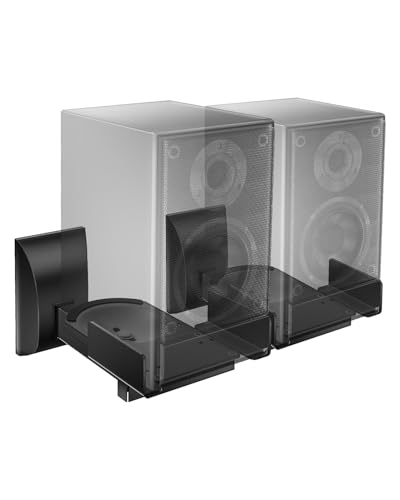
- ±7.5° tilt and 45° swivel
- Supports speakers up to 55 pounds
- Integrated cable routing and anti-slip pads
Best For: Wall-mounted setups needing stable positioning and organized cables
Best Heavy-Duty Mount
Gator Frameworks Studio Speaker Wall Mount

- 100-pound maximum capacity
- Fits 35 mm and 38 mm mounts
- Rubberized surface helps prevent scratches
Best For: High-capacity single-speaker wall mounting
Best Long-Arm Pair
Pyle Adjustable Speaker Wall Brackets

- 12.5-inch distance from the wall
- Supports up to 80 pounds
- Sold as a pair with safety pins
Best For: Heavy-duty paired installations needing extra clearance
Best Clamp-On Value – Gator Frameworks Desktop Monitor Stands
For a compact desktop setup, these speaker brackets for studio monitors clamp directly to the desk and keep the speakers elevated without using much surface area. Their adjustable height and 0–15° tilt help you refine placement for listening and sound projection.
Best For: Studio owners who want sturdy, adjustable desktop monitor stands with built-in surface protection.
Pros:
- Clamp-on design saves desktop space and provides a secure hold.
- Height adjusts from 10.13 to 13.5 inches, with 0–15° angle adjustment.
- EVA padding helps protect speakers and reduce unwanted resonance.
- Supports up to 60 pounds and includes a three-year warranty.
Cons:
- Designed for desktop clamping rather than wall installation.
- At 9.5 pounds per listed product details, the pair may be heavier than minimalist alternatives.
The combination of a high load capacity, adjustable positioning, and EVA-lined surfaces makes this a practical choice when you need flexible monitor placement without sacrificing desk stability.
Best Full-Motion Wall Mounts – Mount-It! Speaker Wall Brackets
These wall-mounted speaker brackets for studio monitors are built for speakers between 5.38 and 11.13 inches wide. The side clamps, padded base, and full-motion adjustment make them useful for directing speakers from a wall or corner position.
Best For: Medium to large bookshelf speakers, satellite speakers, or studio monitors that need wall-mounted positioning.
Pros:
- Pair of steel wall mounts supports speakers up to 55 pounds.
- Tilts 7.5° downward and swivels 180° left or right.
- Side clamps and a padded base help secure and protect speakers.
- Includes cable management and a lifetime warranty.
Cons:
- Speaker width must fall within the stated 5.38–11.13-inch range.
- Places speakers about 11 inches from the wall, which may not suit tight installations.
Choose this pair when wall placement and broad directional adjustment matter more than keeping monitors on the desktop. Confirm speaker width and mounting location before installation.
Best Budget Desktop Clamps – Vondynote Short Monitor Stands
These short speaker brackets for studio monitors use desk clamps to save surface space while keeping speakers at a selectable 9, 10.6, 12.3, or 14-inch height. The 9-by-9-inch top plates and anti-skid pads are designed for monitors and other desktop equipment.
Best For: Compact desktop setups that need adjustable height, broad desk compatibility, and support for monitors up to 50 pounds.
Pros:
- Four fixed height positions range from 9 to 14 inches.
- Clamps fit desks up to 2.6 inches thick and include EVA protection.
- 9-by-9-inch top plates include anti-skid padding to help limit vibration.
- Supports up to 50 pounds and includes installation hardware and an Allen key.
Cons:
- Short-stand design may not provide enough elevation for every listening position.
- Height is selectable at fixed positions rather than continuously adjustable.
This pair is a sensible space-saving option for users who want straightforward desk installation and multiple height choices. Check the clamp range and speaker footprint before ordering.
Best Wide-Angle Wall Mounts – Perlegear Speaker Wall Mounts
Perlegear’s speaker brackets for studio monitors provide wall-mounted placement with expandable clamps for speakers 5.12 to 11.81 inches wide and up to 13.78 inches deep. Their steel construction, padding, and broad tilt and swivel range support flexible positioning.
Best For: Wall-mounted bookshelf, surround, or studio speakers where wide adjustment and cable organization are priorities.
Pros:
- Supports up to 55 pounds and is designed for concrete, wood studs, and brick walls.
- Offers ±15° tilt and ±90° swivel for directing sound.
- Rubber padding and a clip-on cover help limit sliding and vibration.
- Integrated cable management and labeled hardware simplify installation.
Cons:
- Should not be installed on drywall alone.
- Listed as a one-count unit, although the included components specify two brackets; verify package contents.
- Includes a one-year warranty, shorter than some competing options.
This mount is a strong fit for installations that require flexible aiming and a clean wall-mounted appearance. Pay particular attention to wall construction, speaker dimensions, and the package contents before installation.
Desk-Saving Pick – Adjustable Clamp Monitor Stands
If you need speaker brackets for studio monitors without sacrificing desk space, these clamp-on stands offer a practical solution. Their 0–12° tilt adjustment, 10.4–15.4-inch height range, and 60-pound capacity accommodate many monitor-speaker setups.
Best For: Desktop studios that need adjustable positioning and a compact footprint.
Pros:
- Adjustable top plate tilts from 0° to 12°.
- Height adjusts to four locked positions between 10.4 and 15.4 inches.
- Desk clamps fit surfaces up to 2.6 inches thick and include EVA padding.
- Supports speakers or other equipment weighing up to 60 pounds.
Cons:
- Requires a compatible desktop edge for clamp installation.
- Its 9-by-12-inch top plate may not suit every speaker shape.
Choose this pair when elevation, tilt control, and reclaimed desk space matter more than wall installation. The locking hardware and padded surfaces add useful stability for a desktop monitoring setup.
Flexible Wall-Mount Pick – suptek Adjustable Speaker Mounts
For a wall-mounted approach to speaker brackets for studio monitors, the suptek mounts provide broad positioning control and support for larger bookshelf-style speakers. Each mount handles up to 55 pounds and fits speakers 5.5 to 11 inches wide.
Best For: Home studios or media rooms using wall-mounted bookshelf or surround speakers.
Pros:
- Offers ±7.5° tilt and 45° left/right swivel for sound aiming.
- Supports up to 55 pounds per mount.
- Installs on wood studs, concrete, brick, or stone walls.
- All-metal construction, cable management, and included hardware support a tidy installation.
Cons:
- Designed for speakers 5.5 to 11 inches wide, so compatibility should be checked first.
- These are wall mounts rather than desktop brackets.
This pair is a strong fit when you want to clear floor and shelf space while retaining swivel and tilt adjustment. Its stated compatibility excludes soundbars, so confirm your monitor dimensions before installation.
Secure Cable-Managed Pick – WALI Swivel-Tilt Wall Mounts
The WALI SWM201 is a useful option among speaker brackets for studio monitors when you want wall placement with flexible aiming. Its side-clamping design supports speakers up to 55 pounds and includes routing for a cleaner cable run.
Best For: Home theater or studio setups that need sturdy wall mounting and adjustable speaker orientation.
Pros:
- Adjusts through ±7.5° of tilt and 45° swivel in either direction.
- Fits most speakers 5.5 to 11 inches wide and supports up to 55 pounds.
- Anti-slip pads help prevent speaker shifting.
- Can mount to studs, concrete, or brick/stone walls and includes cable routing.
Cons:
- Compatibility is based on speaker width, so larger monitors may not fit.
- Wall installation requires suitable mounting surfaces and hardware placement.
Consider this model if secure side clamping and cable organization are priorities. Its wide angle range helps direct sound toward the listening area, while the metal supports are intended to provide a stable, vibration-free setup.
Best Adjustable Fit – Yibracki Speaker Wall Mounts
These Yibracki brackets are a flexible choice for anyone comparing speaker brackets for studio monitors and bookshelf speakers. The adjustable dual-clamp design fits speakers from 5 to 11 inches wide, while swivel and tilt controls help you aim the sound toward the listening area.
Best For: Home studios, stereo systems, and surround setups using compatible bookshelf speakers or studio monitors.
Pros:
- Adjustable 5–11-inch speaker fit works with many popular monitor and bookshelf speaker models.
- Supports up to 55 pounds with a reinforced steel frame and solid wall plate.
- ±90° swivel and ±10° tilt provide useful positioning flexibility.
- Foam padding helps protect speaker finishes and reduce rattling.
Cons:
- Designed for bookshelf speakers, studio monitors, and rear speakers—not subwoofers.
- Wall installation is required, so placement depends on suitable mounting surfaces.
With broad compatibility, cable ties, and included hardware, this pair offers a tidy way to mount compatible monitors while keeping positioning adjustable.
Best Heavy-Duty Mount – Gator Frameworks Studio Speaker Wall Mount
The Gator Frameworks GFW-SPK-WM100 is a heavy-duty option among speaker brackets for studio monitors, with a stated 100-pound capacity. Its adjustable wall-mount design and multi-angle positioning can help place compatible speakers securely for more controlled sound projection.
Best For: Larger compatible speakers and installations where high weight capacity is a priority.
Pros:
- Supports speakers weighing up to 100 pounds.
- Adjustable base helps create a tight, stable fit.
- Multi-angle adjustment supports more precise speaker placement.
- Rubberized mounting surfaces help protect speakers from scratches.
Cons:
- Sold as a single mount rather than a pair.
- Compatibility is specified for 35 mm and 38 mm speaker mounts, so verify your speaker connection first.
This is a sensible pick when load capacity and secure adjustment matter most, particularly for a single-speaker installation using the specified mount sizes.
Best Long-Arm Pair – Pyle Adjustable Speaker Wall Brackets
Pyle’s PSTNDW15 pair is built for installations needing extra clearance from the wall. These speaker brackets for studio monitors provide a 12.5-inch arm, adjustable 90°–30° tilt, and rotation adjustment, making them useful when speaker positioning and wall clearance are key concerns.
Best For: Pair installations that need extended wall clearance and heavy-duty support.
Pros:
- 12.5-inch arm keeps speakers away from the wall.
- Supports up to 80 pounds per stated specifications.
- 90°–30° tilt and rotation adjustment help direct sound.
- Solid-steel safety pin helps prevent the bracket from collapsing.
Cons:
- The extended arm may project farther into the room than shorter mounts.
- Maximum stated speaker cabinet depth is 30 inches; check dimensions before installation.
- Permanent wall mounting requires careful placement and suitable hardware.
For buyers who want a matched pair with generous wall clearance, this reinforced-steel design combines useful adjustment with a built-in safety stop.
How We Picked These Speaker Brackets for Studio Monitors
We selected these brackets based on the features that matter most in real studio, office, and home-recording setups: mounting compatibility, weight capacity, adjustability, installation style, footprint, and useful positioning controls. The list includes both desktop clamp stands and wall-mounted designs so you can match the bracket to your available space.
We also considered practical details such as padded contact surfaces, dual-clamp security, tilt and swivel adjustment, distance from the wall, and compatibility with popular bookshelf and studio monitor sizes. Always verify the manufacturer’s specifications before installation, particularly for heavier speakers.
Quick Comparison
| Bracket Type | Best For | Main Advantage | Check Before Buying |
|---|---|---|---|
| Desktop clamp stand | Renters and compact desks | Easy repositioning without drilling | Desk thickness and available clearance |
| Wall mount with clamps | Permanent, space-saving setups | Clears the entire desktop | Speaker width, wall strength, and weight |
| Adjustable wall bracket | Precise aiming | Tilt, swivel, or rotation control | Adjustment range and locking hardware |
| Heavy-duty mount | Larger monitors or speakers | Higher load capacity | Anchor type and installation surface |
Key Buying Factors for Speaker Brackets for Studio Monitors
Weight Capacity and Stability
Choose a bracket with a published load rating comfortably above the speaker’s actual weight. Do not rely on the rating alone: drywall, studs, masonry, desk clamps, and fasteners all affect final stability. A secure mount should not flex, wobble, or gradually loosen during use.
Fit and Mounting Method
Measure speaker width, depth, and height before ordering. Clamp-style shelves must open wide enough to hold the cabinet without blocking controls or ports. For desktop models, confirm that the clamp fits your desk and that the stand will not interfere with cable routing or monitor arms.
Adjustment and Listening Position
Look for tilt or swivel adjustment if your monitors cannot sit at ear level or must aim toward a listening position. Fixed platforms can be more stable, while adjustable brackets provide better flexibility. Keep the left and right speakers symmetrical whenever possible.
Installation and Wall Construction
Wall-mounted speaker brackets require appropriate anchors and a suitable mounting point. Studs or masonry are generally preferable for heavier loads. Follow the included hardware instructions, keep cables supported, and avoid mounting where vibration or accidental contact could pull the bracket loose.
Isolation and Vibration Control
Padded surfaces can protect speaker cabinets and reduce slipping, but a bracket is not automatically an acoustic isolation platform. If low-frequency vibration reaches the desk or wall, consider compatible isolation pads and maintain enough clearance around rear ports.
Who Should Buy Which Speaker Brackets for Studio Monitors?
Choose Desktop Clamp Stands If You Rent or Rearrange Often
Gator Frameworks-style and similar clamp-on stands are practical when you want elevated monitors without drilling into a wall. They suit smaller desks, temporary studios, and users who need to adjust placement frequently.
Choose Universal Wall Mounts for Maximum Desk Space
Side-clamping wall brackets from brands such as Mount-It!, Perlegear, suptek, or WALI work well when the speakers fit the stated width and weight limits. They are especially useful for compact workstations and surround-sound layouts.
Choose Heavy-Duty Adjustable Brackets for Larger Monitors
Gator Frameworks and Pyle options are worth considering when you need stronger construction, greater wall clearance, or more positioning control. Confirm the mounting surface and use suitable anchors rather than depending on drywall alone.
Choose Model-Specific Compatibility When Available
If you use Yamaha HS-series monitors, Klipsch speakers, or another known model, a bracket listing that explicitly names compatible dimensions can simplify selection. Still compare the actual cabinet measurements and weight with the bracket specifications before installing.