If you want a straightforward USB microphone that trims setup friction, the HyperX SoloCast 2 is aimed at that exact use case.
This HyperX SoloCast 2 review focuses on the features that matter most for streamers, callers, and home recordists who want clean voice capture without a complicated desk rig.
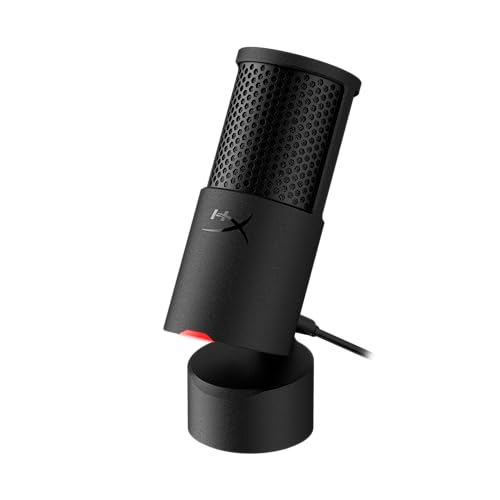
SoloCast 2 Review Summary
The HyperX SoloCast 2 makes sense for buyers who value simplicity, a compact footprint, and built-in features that reduce the need for add-ons.
Based on the listing alone, it is best understood as a desk-friendly cardioid USB condenser mic that tries to deliver a practical balance of clarity, convenience, and setup speed rather than a heavily customizable studio package.
Buy it if: you want a plug-and-play mic with built-in pop filtering, internal shock isolation, and easy USB-C to USB-A connection.
Skip it if: you need multi-pattern recording, multiple input options, or a microphone that is clearly built around external accessories and deep studio routing.
Review Scorecard
| Category | Score | Why it earns that score |
|---|---|---|
| Ease of setup | 9/10 | USB-C to USB-A plug-and-play design keeps the process simple. |
| Desk-friendliness | 9/10 | Compact tiltable stand and weighted base suit small setups well. |
| Voice focus | 8/10 | Cardioid pattern and built-in filters are aimed at centered vocal capture. |
| Noise control | 8/10 | Internal suspension, pop filter, and filter options all target unwanted noise. |
| Flexibility | 7/10 | Mounting threads and software tuning help, but it is still a simple single-mic design. |
| Creator value | 8/10 | Strong feature set for basic streaming, calls, and voice recording. |
Key Features and Specifications of SoloCast 2
The headline feature set is unusually complete for a compact desktop mic.
HyperX lists a built-in pop filter, internal shock-mount-style suspension, tap-to-mute with LED status, a cardioid pickup pattern, and customizable audio filters through HyperX NGENUITY.
The mic records at 24-bit depth and 96kHz sampling, which positions it as a capable voice capture option for creators who care about detail more than gimmicks.
The physical design also matters.
The stand is tiltable, the base is weighted for stability, and the mic includes both 3/8-inch and 5/8-inch threads for mounting on compatible arms.
That makes it more adaptable than a fixed desktop mic, while still keeping the default setup compact and uncluttered.
| Feature | What the listing says |
|---|---|
| Mic type | USB condenser microphone |
| Pickup pattern | Cardioid |
| Connection | USB-C to USB-A |
| Recording spec | 24-bit / 96kHz |
| Noise-focused design | Built-in pop filter and internal suspension |
| Controls | Tap-to-mute with LED indicator |
| Software | HyperX NGENUITY filter customization |
| Mounting | 3/8-inch and 5/8-inch threads |
| Stand | Compact, tiltable, weighted base |
From a buyer perspective, the most important thing is not the individual spec sheet numbers but the way the feature set is stacked.
The SoloCast 2 is designed to solve common beginner and mid-level desk audio problems without making you buy extra hardware immediately.
Pros and Cons of SoloCast 2
Pros
- Simple setup: the USB connection and built-in hardware keep the first-use experience low-friction.
- Compact footprint: the included stand is meant to fit tight desk setups.
- Noise reduction features are built in: pop filtering and internal suspension reduce the need for immediate upgrades.
- Useful mute control: tap-to-mute with LED feedback is practical for calls and streaming.
- Mounting flexibility: the standard threads help if you later move to a mic arm.
Cons
- Single-purpose design: this is still a focused vocal mic, not a full studio multitool.
- Software dependence for deeper tuning: the NGENUITY filters help, but they are still software-based extras.
- Less flexible than broader interfaces: there is no indication of the kind of advanced routing or input variety found in more complex audio gear.
- Best for one-person voice capture: the cardioid pattern is a plus for isolation, but it is not a multi-speaker solution.
Who Should Buy SoloCast 2?
The SoloCast 2 is a good fit for people who want to upgrade from a mediocre built-in laptop or headset microphone without entering a complicated audio workflow.
It is also a sensible pick for streamers, remote workers, podcasters, and casual YouTube or voiceover users who want a clean, compact setup with obvious day-to-day conveniences.
It should also appeal to buyers who like the idea of getting a usable desk mic out of the box and only adding extras later if needed.
The tiltable stand, weighted base, and included mounting threads make that progression easy.
You should probably skip it if your priorities are advanced multi-source recording, multiple pickup modes, or a more obviously studio-centric microphone ecosystem.
The listing supports a streamlined creator mic, not a large production tool.
Voice Capture and Desk Use Cases
Built for Front-Facing Speech
The cardioid polar pattern is the key technical clue here.
It is designed to favor sound from the front while reducing pickup from the sides and rear, which is exactly what most buyers want when the mic sits on a desk near a keyboard, monitor, or noisy room background.
For solo voice use, that is the right tradeoff.
Why the Internal Suspension Matters
HyperX explicitly says the mic is engineered to reduce unwanted noise from vibration.
In practical terms, that means the mic is trying to handle some of the common issues that come from desk bumps, typing, and general movement.
You are not relying entirely on a separate shock mount to get stable results.
Tap-to-Mute Is More Useful Than It Sounds
Mute controls are one of those features that sound minor until you use them daily.
A tap control with a visible LED indicator is easier to trust than software mute alone, especially when you are jumping between calls, recordings, and live sessions.
A Compact Base Changes How the Mic Fits a Room
The included stand is not just a placeholder.
A tiltable, weighted base makes the mic easier to place in a small setup, and it helps the SoloCast 2 feel like a finished product rather than a bare capsule that needs immediate extras.
That matters if you want a clean desk and minimal cable clutter.
Alternatives to SoloCast 2
If you want to compare similar Amazon-friendly options, start with the Blue Yeti search for a more feature-heavy desktop mic line, or the HyperX QuadCast search if you want to stay within the HyperX ecosystem and compare creator-focused designs.
Another common comparison point is the Razer Seiren Mini search, which targets compact desk setups with a simpler footprint.
These alternatives are worth checking if you want a different balance of size, controls, and upgrade path.
The SoloCast 2 stands out most when you want a tidy, practical mic that does not ask for much from your desk or your time.
Is SoloCast 2 Worth It?
Yes, if your priority is a compact USB microphone that keeps setup simple while still baking in useful voice-focused hardware. The SoloCast 2 looks well aimed at buyers who want cleaner audio, a small footprint, and enough convenience features to avoid a pile of accessories on day one.
It is less compelling if you already know you need a more advanced recording workflow.
But for straightforward voice capture, this HyperX mic presents a sensible mix of usability, desk appeal, and creator-oriented features.
If that matches your needs, it is worth serious consideration.