The Upgraded Wireless HDMI Transmitter and 2 Receivers is for buyers who want a simpler way to mirror one source to multiple displays without running a long cable.
It leans on plug-and-play setup, a status LED, and broad adapter support rather than advanced networking features.
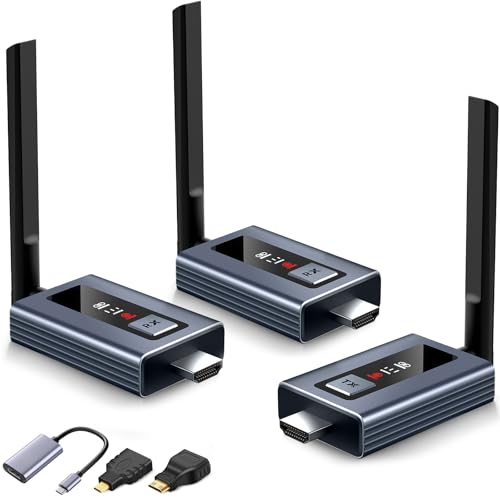
Wireless HDMI Transmitter Review Summary
If you are comparing a wireless HDMI kit for meetings, classroom use, camera monitoring, or a living-room multi-screen setup, this one has a clear pitch: fast setup, visible connection status, and support for more than one receiver.
The listing is aimed at people who value convenience and flexible screen placement more than absolute broadcast-grade precision.
Verdict: it looks best for buyers who need a practical wireless HDMI bridge for indoor environments where a quick link matters more than deep configuration.
It is less convincing if you need long-distance performance through walls or if your use case depends on low-level control and pro AV routing.
Review Scorecard
| Category | Score | Rationale |
|---|---|---|
| Setup simplicity | 9/10 | The listing emphasizes no app, Bluetooth, or Wi-Fi setup and a roughly 5-second connection workflow. |
| Multi-display flexibility | 9/10 | It is designed to stream to 2 displays and claims support for up to 6 screens with additional receivers. |
| Status visibility | 8/10 | The upgraded LED display shows connection, signal, output, and power status at a glance. |
| Range confidence | 7/10 | The claimed 165 ft line-of-sight range is strong, but the listing also warns that walls reduce performance. |
| Device compatibility | 8/10 | Included HDMI, USB-C/Type-C, mini HDMI, and micro HDMI adapters broaden the source-device range. |
| Buyer fit for AV use | 8/10 | The use cases listed for classrooms, presentations, bars, churches, and home theater are realistic matches. |
| Value of the package | 7/10 | The adapter bundle and warranty are meaningful, but the listing does not prove how it compares against established brands. |
Key Features and Specifications of Wireless HDMI Transmitter
This kit is built around a wireless transmitter/receiver design that aims to replace a direct HDMI cable run.
The listing describes 1080P HD output, 4K input support, 5.8GHz wireless transmission, and a stable link target for indoor multi-screen use.
- LED display for connection status, signal strength, output status, and power status
- Plug-and-play connection with no app, Bluetooth, or Wi-Fi setup required
- Streams video and audio to 2 displays and claims support for up to 6 screens total with extra receivers
- Claimed 165 ft / 50 m range in line of sight
- 4K input with true 1080P@60Hz HD output
- Dual-band 2.4G and 5G chip design with external antennas
- Included adapters for HDMI to USB-C/Type-C, mini HDMI, and micro HDMI sources
- 24-month warranty and replacement support mentioned in the listing
For buyers, the most useful detail is that this is not positioned as a generic wireless dongle.
It is framed as a multi-screen HDMI extender for spaces where one source needs to feed several displays or where a display must be placed away from the source device.
Pros and Cons of Wireless HDMI Transmitter
Pros
- Very low setup friction for users who want wireless mirroring without installing software.
- Useful status feedback from the LED screen, which should help when troubleshooting signal or power issues.
- Flexible source compatibility thanks to the included HDMI, mini HDMI, micro HDMI, and USB-C/Type-C conversion pieces.
- Good fit for multi-display environments such as meeting rooms, classrooms, bars, churches, and projectors.
- Reasonable indoor range target if the signal path stays relatively open.
Cons
- Wall penetration is limited, so the headline range is not the whole story.
- 1080P output only may be a limitation for buyers who want the display side to stay at higher resolution.
- Up to 6 screens is conditional on adding receivers, so the full setup is more than a basic two-piece kit.
- The listing is marketing-heavy, so practical performance still depends on the room and source equipment.
Who Should Buy Wireless HDMI Transmitter?
Buy this if you want a straightforward wireless HDMI solution for home entertainment, presentations, teaching, or a small business display setup.
It makes the most sense when the source and receiver can stay in a relatively open path and when you want to avoid installing a long cable run.
It should also appeal to users who need to connect different source types.
The included adapters make it easier to work with laptops, PCs, HDMI cameras, Blu-ray players, and devices that use mini HDMI or micro HDMI outputs.
Skip it if you need a system that must work reliably through multiple solid walls, if you want higher-than-1080P output on the receiving side, or if your installation needs professional AV integration rather than a simple wireless bridge.
Wireless HDMI Setup and Use Case Fit
The strongest part of this product is not raw novelty but practical fit.
The listing repeatedly focuses on speed, visibility, and easy mirroring, which tells you exactly who it is meant for: users who want to get a picture on a distant screen with minimal setup.
Plug-and-Play Connection
The advertised workflow is simple: connect the transmitter and receiver, wait a few seconds, and start mirroring.
That is valuable because a wireless HDMI product becomes frustrating very quickly if it needs software, pairing steps, or network management just to start.
LED Status Readout
The upgraded LED display is a meaningful design choice rather than a cosmetic extra.
When a wireless AV link fails, the most useful thing is clear feedback about signal and power, and this unit claims to surface that information directly on the hardware.
Multi-Screen Scenarios
The ability to stream to two displays at once, with support for more receivers, is what moves this beyond a simple point-to-point extender.
That makes it relevant for shared viewing, teaching spaces, storefronts, and venues where one source needs to reach several screens.
Alternatives to Wireless HDMI Transmitter
If this model does not fit your room layout or resolution needs, these Amazon search alternatives are worth checking:
- Hollyland wireless HDMI transmitter
- YEOBox wireless HDMI extender
- IOGEAR wireless HDMI kit
- J-Tech Digital wireless HDMI extender
These are the kinds of products buyers usually compare when they want more established branding, different range claims, or a more specialized AV setup.
The right choice depends on whether you care most about price, room layout, input compatibility, or multi-screen expansion.
Is Wireless HDMI Transmitter Worth It?
Yes, if your priority is a practical wireless HDMI link with quick setup, visible status information, and the option to feed more than one screen.
The feature set is well aligned with presentation, teaching, home theater, and simple multi-display use.
It is not the best pick if you need the most robust signal through walls or if you are trying to build a high-end AV system with stricter performance expectations.
For buyers who want a straightforward, adapter-friendly wireless HDMI kit, this one is worth considering.