Choosing among MIDI interfaces under 300 can make a big difference in how smoothly your keyboards, drum machines, and software talk to each other. The best models keep timing tight, connections simple, and setup frustration low.
Below, we focus on practical options for home studios, live rigs, and hybrid hardware setups, with an eye on real-world connectivity, compatibility, and value.
Best 10 Midi Interfaces Under 300 Picks for 2026
Audio-first MIDI combo
Behringer U-PHORIA UMC404HD 4x4 Audio/MIDI Interface
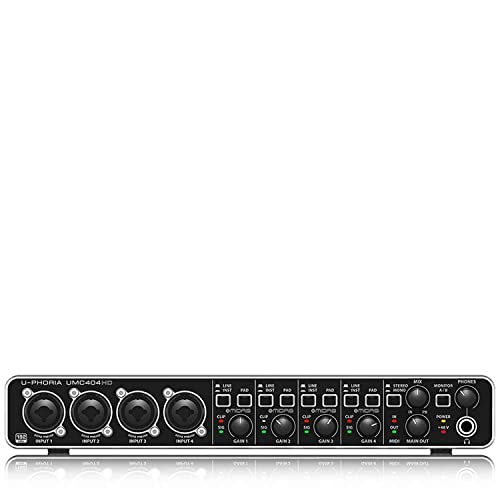
- 4x4 USB audio with 1x MIDI I/O
- 24-bit/192 kHz recording support
- 4 MIDAS-designed mic preamps
Best For: Users who want an affordable all-in-one audio and MIDI interface
Dedicated MIDI router
CME U6MIDI Pro 3-in-3-out MIDI Interface

- 3-in-3-out MIDI with standalone routing
- USB-C plug-and-play on major OS platforms
- Supports merge, split, thru, and filtering
Best For: Users who need a compact, dedicated MIDI routing interface
Compact recording interface
Focusrite Scarlett 2i2 4th Gen USB-C Audio Interface

- 120 dB dynamic range and 4th Gen mic pres
- Auto Gain and Clip Safe simplify recording
- Includes major DAW and plugin software
Best For: Solo recordists who want a simple premium USB-C audio interface
Advanced MIDI network hub
iConnectivity mioXM 4x4 DIN MIDI Interface

- 4x4 DIN MIDI plus 4 USB host ports
- Ethernet RTP-MIDI networking support
- Stores up to four recallable presets
Best For: Users building complex MIDI setups across DIN, USB, and network
Compact Songwriter Interface
Focusrite Scarlett Solo 4th Gen

- 120dB dynamic range and updated converters
- Improved Air mode for vocals and guitar
- Includes major starter DAW/software bundles
Best For: Solo musicians recording vocals and guitar in a compact setup
Hardware MIDI Router Pick

- Standalone USB host mode for class-compliant MIDI gear
- USB-C client mode with virtual MIDI ports
- Routing, filtering, mapping, and presets via software
Best For: Hybrid MIDI setups that bridge USB controllers and 5-pin hardware
Best All-Round USB Interface

- 5-pin MIDI in/out plus audio recording
- Built-in USB hub for extra gear convenience
- Includes Ableton Live Lite and other software
Best For: Beginners and small studios needing audio plus MIDI in one box
Network MIDI Hub
iConnectivity mioXM USB MIDI Interface

- 4 in/4 out 5-pin DIN ports
- 4 USB-MIDI host ports
- Ethernet RTP-MIDI with 12 virtual network ports
Best For: multi-device studios and complex MIDI routing
High-Channel Audio Desk
Behringer UMC1820 18x20 USB Audio/MIDI Interface

- 18x20 USB 2.0 audio/MIDI interface
- Eight MIDAS-designed mic preamps
- 24-bit/96 kHz resolution with ADAT I/O
Best For: larger home studios needing audio expansion and MIDI
Compact DSP Interface
Yamaha URX22C USB-C Audio/MIDI Interface

- 2 x 2 analog I/O with MIDI I/O
- 32-bit integer/192 kHz USB 3.0 support
- DSP monitoring with reverb and amp effects
Best For: small studios and solo musicians needing compact MIDI plus audio
Audio-first MIDI combo – Behringer U-PHORIA UMC404HD 4×4 Audio/MIDI Interface
If you’re comparing midi interfaces under 300 and also need a full audio interface, the Behringer U-PHORIA UMC404HD is built for flexible home or project-studio use. It combines 4×4 USB audio with 1x MIDI I/O, 24-bit/192 kHz conversion, and MIDAS-designed mic preamps in a rugged metal chassis.
Best For: Musicians who want one interface for microphones, instruments, and basic MIDI connectivity.
Pros:
- 4×4 USB audio plus 1x MIDI I/O for broader studio routing.
- 24-bit/192 kHz support for high-resolution recording.
- Includes 4 MIDAS-designed mic preamps with +48 V phantom power.
- Metal chassis is designed to be impact-resistant.
Cons:
- Larger and heavier than compact MIDI-only interfaces.
- Primarily an audio interface, so MIDI features are basic compared with dedicated MIDI routers.
This is a practical pick if your priority is a single box for recording and MIDI rather than a specialized MIDI management hub. Its strength is versatility, not ultra-advanced MIDI routing.
Dedicated MIDI router – CME U6MIDI Pro 3-in-3-out MIDI Interface
Among midi interfaces under 300, the CME U6MIDI Pro stands out if your focus is clean MIDI routing rather than audio recording. It offers 3-in-3-out MIDI, USB-C plug-and-play operation, and standalone routing tools for split, thru, merge, and filtering tasks.
Best For: Keyboardists, producers, and live setups that need a dedicated MIDI interface with routing control.
Pros:
- 3-in-3-out MIDI interface with standalone routing features.
- Supports split, thru, merge, and message filtering.
- Compatible with major OS platforms, including macOS, Windows, iOS, Android, Linux, and Chrome OS.
- Near-zero latency with support for notes, clock, sysex, timecode, and MPE.
Cons:
- MIDI only, so it does not handle audio recording.
- Advanced routing depends on the included software tool for setup.
If you need a dedicated MIDI box with modern connectivity and flexible routing, this is one of the most capable choices here. It is especially appealing for users who want to manage several MIDI devices from a single compact interface.
Compact recording interface – Focusrite Scarlett 2i2 4th Gen USB-C Audio Interface
If you’re shopping midi interfaces under 300 but also need a polished USB-C audio interface, the Focusrite Scarlett 2i2 4th Gen is designed for straightforward recording. It focuses on two channels of high-quality audio with 4th Gen mic pres, Auto Gain, Clip Safe, and Air mode for vocals and instruments.
Best For: Solo artists and small setups that want a simple, high-quality audio interface with basic studio workflow tools.
Pros:
- 120 dB dynamic range with the same converters used in Focusrite’s flagship interfaces.
- Auto Gain helps set levels automatically and Clip Safe helps prevent clipping.
- Air mode adds presence and harmonic drive to vocals and guitars.
- Includes Pro Tools Intro+, Ableton Live Lite, Cubase LE, and Hitmaker Expansion.
Cons:
- Only 2 channels, so it is not ideal for larger multi-input sessions.
- MIDI connectivity is not part of the listed features.
This is a strong choice if your priority is recording quality and ease of use rather than MIDI routing. It fits best for creators who want a compact interface with helpful gain control and bundled software.
Advanced MIDI network hub – iConnectivity mioXM 4×4 DIN MIDI Interface
For buyers comparing midi interfaces under 300, the iConnectivity mioXM is a serious routing hub built for complex rigs. It combines 4 in x 4 out 5-pin DIN-MIDI ports, 4 USB-MIDI host ports, and Ethernet RTP-MIDI support so multiple devices and computers can share a flexible MIDI network.
Best For: Studio and live users who need advanced MIDI routing across DIN, USB, and network connections.
Pros:
- 4 in x 4 out 5-pin DIN ports plus 4 USB-MIDI host ports.
- Ethernet RTP-MIDI networking expands routing options across devices.
- Class-compliant, plug-and-play USB computer connection with no drivers required.
- Up to four user-definable presets can be stored and recalled.
Cons:
- More complex than a basic MIDI interface, so setup may take more time.
- Needs configuration software to build and save routing presets.
This is the most expandable option in the group if your workflow involves multiple MIDI devices and computers. It is best suited to users who want routing, merging, and network connectivity in one central box.
Compact Songwriter Interface – Focusrite Scarlett Solo 4th Gen
If you want one of the most straightforward midi interfaces under 300 for a simple recording setup, the Scarlett Solo 4th Gen is built for vocals and guitar rather than a full multi-device MIDI rig. It focuses on clean USB-C recording, high dynamic range, and an improved Air mode that can add presence to voice and instruments.
Best For: Solo creators who need a compact, high-quality USB audio interface for mic and guitar recording.
Pros:
- 120dB dynamic range with Focusrite’s newer converters
- Improved Air mode adds presence and harmonic drive
- Includes Pro Tools Intro+, Ableton Live Lite, and Cubase LE
- Works with Mac, Windows, and iPad setups
Cons:
- Only one XLR mic preamp and one Hi-Z instrument input
- No dedicated MIDI I/O
- Better suited to small setups than larger hardware rigs
Overall, this is a strong pick if your priority is polished recording quality in a tiny footprint. It is not the right choice for hardware MIDI routing, but it delivers a very capable all-in-one starter interface for songwriter workflows.
Hardware MIDI Router Pick – CME H2MIDI Pro
For buyers comparing midi interfaces under 300, the CME H2MIDI Pro is the most clearly MIDI-focused option in this group. It connects USB class-compliant MIDI gear to 5-pin DIN hardware without a computer, and it also works as a USB-C MIDI client with virtual ports for hybrid studio or live rigs.
Best For: Musicians who need flexible MIDI routing between modern USB gear and legacy 5-pin hardware.
Pros:
- Standalone USB host mode with no computer required
- USB-C client mode with 2-in/2-out virtual MIDI ports
- Supports routing, filtering, mapping, and splitting with HxMIDI Tools
- Compact, lightweight design with dual power mode
Cons:
- It is a MIDI interface, not an audio interface
- Advanced setup may be more than casual users need
- Best value comes from using multiple MIDI devices or routing needs
This is the best fit if your main goal is controlling and connecting MIDI hardware rather than recording audio. Its host capability, flexible modes, and preset-based workflow make it especially useful for hybrid setups.
Best All-Round USB Interface – Arturia MiniFuse 1
The Arturia MiniFuse 1 is a practical choice if you want one of the most versatile midi interfaces under 300 for a compact home or portable studio. It combines audio recording, 5-pin MIDI in/out, a USB hub, and beginner-friendly software, so it can handle synths, controllers, vocals, and guitar in one small unit.
Best For: Beginners and compact studio users who want audio recording plus basic MIDI connectivity.
Pros:
- Includes 5-pin MIDI input and output connections
- Built-in USB hub adds extra convenience for gear
- Comes with Ableton Live Lite and other creative software
- Backed by a 5-year warranty
Cons:
- Only one audio channel
- More focused on simple recording than large setups
- Best fit is a compact studio rather than a multi-input rack
MiniFuse 1 stands out as a flexible entry point because it covers both audio and MIDI without feeling overly complex. If you want a small interface that can support a growing home setup, it offers a strong mix of features and software extras.
Network MIDI Hub – iConnectivity mioXM USB MIDI Interface
iConnectivity mioXM USB MIDI Interface with 2x MIDI Cable Male to Male Cable 10' Bundle
Check Price On AmazonIf you need one of the more flexible midi interfaces under 300, the iConnectivity mioXM is built for routing and expansion rather than just basic computer connectivity. It combines 4 in/4 out 5-pin DIN MIDI, 4 USB-MIDI host ports, an Ethernet RTP-MIDI network port, and a USB computer connection, making it a strong choice for setups with multiple hardware and computer devices.
Best For: Players and studios that need to connect several MIDI devices, computers, or mobile devices through one central interface.
Pros:
- 4 in/4 out 5-pin DIN-MIDI ports for hardware routing
- 4 USB-MIDI host ports support multiple class-compliant USB-MIDI devices
- Ethernet RTP-MIDI support with 12 virtual network ports
- USB computer port works with Mac and Windows
Cons:
- More complex than a simple two-port interface
- Best suited to multi-device setups rather than minimal rigs
This is the kind of interface that makes sense when your MIDI setup keeps growing. If you want broad routing, network-ready features, and support for both DIN and USB gear, the mioXM stands out as a versatile hub.
High-Channel Audio Desk – Behringer UMC1820 18×20 USB Audio/MIDI Interface
Among midi interfaces under 300, the Behringer UMC1820 is a better fit if you also need serious audio I/O for recording. It offers 18×20 USB 2.0 audio/MIDI connectivity, ADAT I/O, 24-bit/96 kHz resolution, and eight MIDAS-designed mic preamps, so it is aimed at larger recording setups rather than compact desktop use.
Best For: Home and project studios that want a multi-input audio interface with MIDI and ADAT expansion.
Pros:
- 18 inputs and 20 outputs for larger recording sessions
- Eight MIDAS-designed mic preamps with +48V phantom power
- 24-bit/96 kHz audio resolution
- Compatible with popular software like Pro Tools, Ableton Live, and Cubase
Cons:
- Much larger than a basic MIDI-only interface
- Overkill if you only need a few MIDI connections
If your priority is expanding a recording rig with both audio and MIDI support, the UMC1820 brings a lot of channel count for the money. It is less about portability and more about giving a studio plenty of room to grow.
Compact DSP Interface – Yamaha URX22C USB-C Audio/MIDI Interface
If you want a modern desktop option in the midi interfaces under 300 category, the Yamaha URX22C keeps the feature set focused and current. It pairs 2 x 2 analog I/O with MIDI I/O, 32-bit integer/192 kHz support, USB 3.0 connectivity, and DSP-powered monitoring tools, making it a practical choice for small recording and production setups.
Best For: Solo musicians and small studios that want a compact interface with MIDI, high-resolution audio, and onboard monitoring effects.
Pros:
- 2 x 2 analog I/O with MIDI I/O
- 32-bit integer/192 kHz USB 3.0 audio support
- DSP-powered monitoring with REV-X reverb, Channel Strip, and Guitar Amp Classics
- Cross-platform compatibility for Windows, macOS, and iOS
Cons:
- Only two analog inputs, so it is not built for larger tracking sessions
- Best suited to compact setups rather than multi-mic recording
The URX22C is a straightforward pick if you want clean specs, modern connectivity, and useful onboard effects in a small footprint. It is especially appealing when you do not need a lot of channels but still want solid MIDI and audio support.
How We Picked These Midi Interfaces Under 300
We prioritized reliable MIDI performance, useful port counts, and strong compatibility with modern DAWs and common hardware. Value mattered too: the best picks balance price with features you can actually use, rather than loading in extras that inflate cost without improving workflow.
We also looked for interfaces that suit different setups, from simple one-keyboard rigs to multi-device studios, plus options that add audio I/O when you need a more flexible recording hub.
Quick Comparison
When comparing Midi Interfaces Under 300, the biggest differences usually come down to MIDI port count, USB host support, audio inputs and outputs, and whether you need DIN MIDI, USB MIDI, or both. A compact interface may be ideal for one controller and a laptop, while a larger unit fits better if you’re syncing several synths, drum machines, and outboard gear.
Key Buying Factors for Midi Interfaces Under 300
Port Count and Routing
Think about how many devices you need connected today, then add room for one or two more. If you use multiple hardware synths, look for interfaces with several DIN ports and strong routing tools. For a single keyboard or controller, a simpler interface may be the smarter buy.
USB, DIN, and Host Support
Some setups only need traditional 5-pin DIN MIDI, while others benefit from USB MIDI support or host mode for class-compliant controllers. If you work with modern gear and older hardware together, flexibility is key.
Audio Capability
Many Midi Interfaces Under 300 are paired with audio inputs and outputs, which can be helpful if you record vocals, instruments, or external synth audio. If you only need MIDI, don’t pay extra for audio features you won’t use.
Latency, Stability, and Software Support
Stable drivers and dependable timing matter more than flashy specs. Choose a model with a strong reputation for plug-and-play use on your operating system and DAW, especially if you plan to perform live.
Who Should Buy Which Midi Interfaces Under 300?
Buy a compact two-channel or host-capable interface if you mainly connect one keyboard, one controller, or a mobile rig. Choose a multi-port model if you run several pieces of hardware and want cleaner cable management and better routing control. If you also record audio, a combo audio/MIDI interface gives you more value and keeps your desk setup simpler.
In short, the best choice depends on whether your priority is portability, expandability, or a full recording centerpiece. Match the interface to your current gear first, then make sure it leaves enough room for future upgrades.