If you need a straightforward way to pull audio out of an HDMI chain, the 4K@60Hz HDMI Audio Extractor is built around that exact job.
This 4K@60Hz HDMI Audio Extractor review focuses on what the listing actually supports and where the device makes sense in a real setup.
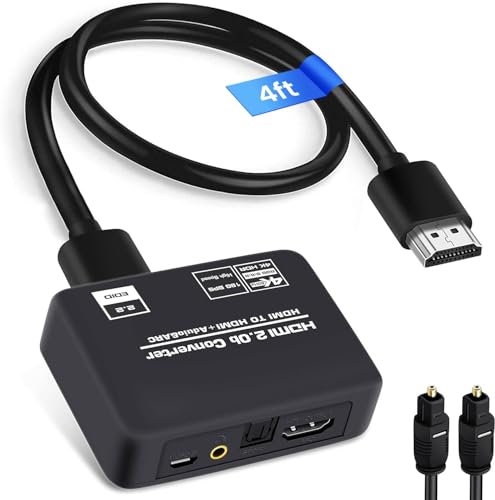
4K HDMI Extractor Review Summary
The 4K@60Hz HDMI Audio Extractor is best for buyers who want to keep video on a TV, monitor, or projector while sending audio to a soundbar, amplifier, speaker system, or analog output.
It is a practical fit for mixed home theater setups, especially if you need ARC/eARC-style routing support, optical SPDIF, and a 3.5mm stereo output in one compact adapter.
What stands out most is flexibility.
The listing describes three audio modes – TV, 2.0CH, and 5.1CH – plus support for HDCP 2.2, 4Kx2K at 60Hz, HDR10, and up to 18 Gbps bandwidth.
That makes it more appealing than a bare-bones splitter for people who care about keeping modern HDMI compatibility while still feeding older audio gear.
If your setup is simple and your display already handles audio perfectly, this may be unnecessary.
If your gear is mismatched, it is much more useful.
Review Scorecard
| Category | Score | Editorial rationale |
|---|---|---|
| HDMI video compatibility | 8/10 | Supports 4K at 60Hz and HDCP 2.2, which covers many modern source-to-display setups. |
| Audio routing flexibility | 9/10 | Offers HDMI ARC support, optical SPDIF, and 3.5mm stereo output in one device. |
| Setup convenience | 8/10 | The included HDMI cable, optical cable, USB power adapter, and manual reduce friction. |
| Legacy device support | 9/10 | The 3.5mm output and optical path help with older speakers, amps, and soundbars. |
| Format handling | 8/10 | The listing explicitly mentions PCM, Dolby Digital, Dolby True HD, DTS-HD, and DTS support. |
| Buyer specificity | 8/10 | Strong fit for mixed AV systems, but overkill if your TV or receiver already handles everything cleanly. |
Bottom line: this is a sensible purchase for buyers who need a bridge between HDMI video and multiple audio output types, not for people looking for a simple pass-through accessory.
Key Features and Specifications of 4K HDMI Extractor
The listing positions the 4K@60Hz HDMI Audio Extractor as an HDMI-to-audio adapter for extracting sound from a digital HDMI signal and routing it separately to audio equipment.
The stated use case includes TVs, monitors, projectors, amplifiers, soundbars, speakers, and other sound systems.
Key listed facts:
- Video support: up to 4Kx2K at 60Hz
- HDR support: HDR10
- Content protection: HDCP 2.2
- Bandwidth: up to 18 Gbps
- Audio outputs: HDMI ARC, optical SPDIF/Toslink, and 3.5mm stereo
- Audio modes: TV, 2.0CH, and 5.1CH
- Stereo output: 3.5mm output supports 2CH PCM/LPCM
- Optical output: supports 2CH PCM, 5.1CH Dolby Digital, Dolby True HD, DTS-HD, and DTS
- Included items: extractor unit, optical cable, USB power adapter, HDMI cable, and user manual
The listing also says the device works with a range of HDMI sources such as Blu-ray/DVD players, Fire TV, PlayStation, Xbox, and PC or laptop connections.
That broad compatibility matters because these extractors are usually bought to solve a specific mismatch, not to replace a full receiver.
For buyers comparing products in this category, the important detail is not just that the unit extracts audio.
It is that it tries to do so while preserving modern HDMI video features and giving you a few different ways to route sound depending on the rest of your system.
Pros and Cons of 4K HDMI Extractor
Pros
- Three output paths make it easier to match different audio systems.
- 4K60 and HDCP 2.2 support make it a better fit for modern sources than older extractor boxes.
- Optical and 3.5mm outputs help when the display or receiver does not handle audio the way you need.
- Included cables and power adapter reduce the chance of extra accessory purchases.
- ARC support adds another routing option for TV-based setups.
Cons
- It is still a specialized adapter, so many buyers will not need all of its features.
- The listing is focused on specs and modes, not on a detailed setup experience.
- 3.5mm output is limited to stereo, so buyers expecting full surround sound from that jack will not get it.
- If your TV, soundbar, or receiver already handles HDMI audio correctly, the benefit may be small.
The strongest advantage is versatility.
The biggest drawback is the same thing: the device is built for complex audio routing, which means it adds value only when your system genuinely needs that flexibility.
Who Should Buy 4K HDMI Extractor?
Buy the 4K@60Hz HDMI Audio Extractor if you are trying to connect an HDMI source to a modern display while sending audio elsewhere.
It is a good match for people using a TV with a soundbar, a projector with external speakers, or an older amplifier that still depends on optical or analog input.
It is also a sensible choice if you keep running into compatibility issues between HDMI video and audio gear.
The supported output modes and bundled cables suggest a product aimed at reducing setup friction for people who want something that works without assembling a pile of separate adapters.
Skip it if your AV chain is already settled.
If your TV, receiver, and source devices already pass audio and video correctly, you probably do not need a dedicated extractor.
This is most valuable when you are solving a routing problem, not when you are shopping for a general upgrade.
Audio Routing and Setup Notes for 4K HDMI Extractor
When ARC matters
ARC support is the feature that makes this device more interesting than a basic HDMI splitter.
If your TV is part of the audio path and you want sound sent back out to an external system, that routing option can simplify a messy setup.
Why optical still matters
Optical SPDIF is still relevant for many soundbars and receivers, especially older ones that do not need HDMI audio management.
Having that option built in makes the extractor more adaptable than HDMI-only solutions.
Where the 3.5mm output fits
The 3.5mm jack is not the headline feature, but it is useful for desktop speakers, small amps, and other stereo-only gear.
The limitation to 2CH PCM/LPCM is important, though, so this is a compatibility output, not a surround-sound solution.
What the bundled accessories suggest
The included HDMI cable, optical cable, USB power adapter, and manual point to a product meant for immediate setup.
That does not guarantee a perfect installation, but it does reduce the chance that you will discover a missing cable after opening the box.
Alternatives to 4K HDMI Extractor
If you want a similar product with a slightly different feature mix, the most relevant alternatives are other HDMI audio extractors and switchers from established AV brands.
Examples include J-Tech Digital HDMI audio extractor, OREI HDMI audio extractor, and Monoprice HDMI audio extractor.
If your setup is more about a receiver than a standalone adapter, it may also make sense to compare broader HDMI audio management products from Kinivo or Tendak.
The right alternative depends on whether you care more about ARC, optical output, stereo analog output, or simple 4K pass-through.
Is 4K HDMI Extractor Worth It?
The 4K@60Hz HDMI Audio Extractor is worth it if you specifically need HDMI video plus separate audio routing in one box.
Its mix of 4K60 support, HDCP 2.2 compatibility, ARC, optical, and 3.5mm output makes it a strong fit for mixed home theater or projector setups.
If you are looking for a general-purpose HDMI accessory, it is probably more than you need.
If you are solving an audio-output problem, this is the kind of adapter that can remove several compatibility headaches at once.