A well-chosen patch bay can make a studio easier to reconfigure, troubleshoot, and expand. Instead of reaching behind racks or repeatedly unplugging equipment, you can manage common signal paths from one accessible panel.
These 10 patch bays cover balanced TRS and XLR setups, compact installations, and larger studio routing needs. Use the buying guide below to narrow your choice by format, point count, normalization, and connectivity.
Best 10 Patch Bays Picks for 2026
Flexible Routing

- 48 balanced 1/4-inch points
- Normalled, half-normalled, and thru modes
- 1U rack-mountable metal design
Best For: Studios needing flexible front-panel signal routing
Gold-Plated Connectivity
Black Lion Audio PBR TRS Patchbay

- 48-point patchbay layout
- 96 gold-plated TRS connectors
- Stainless-steel black-anodized construction
Best For: TRS-based studio and rack audio setups
Multi-Mode Routing
Behringer ULTRAPATCH PRO PX3000

- 48-point balanced patchbay
- Parallel, half-normalled, normalled, and open modes
- Rugged construction with versatile connector support
Best For: Studios needing varied signal-routing configurations
Rack-Mount Simplicity

- 48 front and 48 rear 1/4-inch jacks
- Helps simplify equipment rerouting
- Rugged 1U metal rack-mount design
Best For: Straightforward studio patching and rack organization
Rugged XLR Routing

- 16 channels with 32 XLR connectors
- Shielded 19-inch, 1U steel enclosure
- PCB wiring and reversible rack ears
Best For: Rack-based balanced XLR systems
High-Capacity Studio Routing

- 48-point XLR patchbay format
- Fully shielded rack-mount construction
- Suitable for studio, PA, AV, and live sound
Best For: Complex audio systems needing extensive XLR patching
Gold-Plated XLR Connections

- 16-point layout with 32 XLR connectors
- Gold-plated connectors for patching
- Aluminum construction with 2-year warranty
Best For: Compact studio and live-sound XLR routing
Flexible Balanced Routing
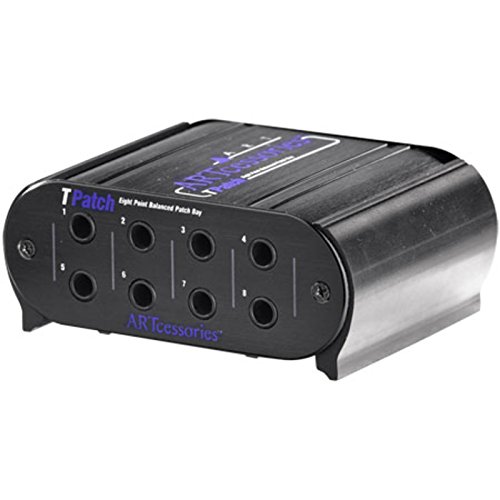
- Eight balanced signal points
- Switchable half-normal and normal modes
- Rugged aluminum case with TRS jacks
Best For: Compact balanced TRS studio racks
Front-Access XLR Convenience

- 12-point reversible XLR design
- One-unit rack chassis
- Steel construction with limited lifetime warranty
Best For: Racks needing accessible XLR mixer inputs
Modular 16-Channel Expansion

- Four modular blocks with flexible channel layouts
- Gold-plated XLR pins and steel chassis
- Reversible rack ears for flexible installation
Best For: Expandable studio and live-sound XLR systems
Flexible Routing – Samson S-Patch Plus
Samson S-Patch Plus Balanced 48-Point 1/4" Patch Bay | 1/4 Inch Phone Connections
Check Price On AmazonThe Samson S-Patch Plus is a practical choice for patch bays when you need balanced 1/4-inch connectivity and quick front-panel configuration. Its 48-point layout and selectable operating modes help centralize studio connections while reducing the need to reach behind rack equipment.
Best For: Home and project studios that need flexible, rack-mounted signal routing.
Pros:
- Provides 48 balanced 1/4-inch connections on the front and rear.
- Front-panel switches select normalled, half-normalled, or thru operation.
- 1U rack-mountable metal construction with a clearly finished blue panel.
Cons:
- Its many configuration options may require careful setup.
- Uses 1/4-inch phone connections rather than a mix of connector types.
The S-Patch Plus stands out among patch bays for combining balanced connections with convenient front-panel mode switches. It is especially useful when routing flexibility and easier rack access matter more than a minimal feature set.
Gold-Plated Connectivity – Black Lion Audio PBR TRS Patchbay
The Black Lion Audio PBR is a straightforward option for patch bays, offering 48 points through 96 gold-plated TRS connectors. Its black-anodized stainless-steel construction is suited to organized studio or rack-based audio setups.
Best For: Users who want a 48-point TRS patchbay with gold-plated connectors.
Pros:
- Offers 48 patchbay points and 96 TRS connectors.
- Uses gold-plated connectors.
- Features a black-anodized stainless-steel build.
Cons:
- The supplied notes do not specify selectable routing modes.
- Its listed dimensions and 4.31-pound weight may require checking available rack or workspace clearance.
The PBR keeps its feature set focused on TRS connectivity and robust materials. Consider it when connector quantity and gold-plated construction are your main patchbay priorities.
Multi-Mode Routing – Behringer ULTRAPATCH PRO PX3000
Behringer ULTRAPATCH PRO PX3000 Multi-Functional 48-Point 3-Mode Balanced Patchbay
Check Price On AmazonThe Behringer ULTRAPATCH PRO PX3000 is one of the more configurable patch bays in this group. Its 48-point balanced design provides selectable routing functions, helping organize connections and reduce cable clutter in a studio.
Best For: Studios that need multiple routing modes from a balanced 48-point patchbay.
Pros:
- Provides 48 points with 96 high-quality jack connectors.
- Supports parallel, half-normalled, normalled, and open functions.
- Uses rugged construction and supports TRS, TS, XLR, and MIDI connectivity according to the supplied specifications.
Cons:
- The range of available modes may make configuration less immediate for beginners.
- The supplied notes do not identify a specific front-panel switching layout.
The PX3000 is a strong fit when routing flexibility is central to your patchbay decision. Its selectable functions give it an advantage for more varied studio wiring needs.
Rack-Mount Simplicity – dbx PB-48 Point Patch Bay
The dbx PB-48 is a simple, practical choice for patch bays when you want clear access to audio connections. It places 48 quarter-inch jacks on the front and 48 on the rear, making it easier to reroute equipment while reducing wear on the original device jacks.
Best For: Studio users seeking a straightforward 1U patchbay for quick equipment access.
Pros:
- Provides 48 quarter-inch front-panel jacks and 48 rear-panel jacks.
- Offers convenient access for rerouting mixer and other audio gear connections.
- Uses rugged metal construction in a 1U rack-mountable format.
Cons:
- The supplied notes do not list selectable routing modes.
- Its connectivity is limited to quarter-inch jacks.
The PB-48 favors dependable, uncomplicated access over extensive configuration features. It is a sensible pick for a rack where basic patching and durable construction are the priorities.
Rugged XLR Routing – ART P16
The ART P16 is a straightforward choice when you need dependable XLR patch bays for a rack-mounted audio setup. Its 16 channels, shielded steel enclosure, and PCB wiring suit organized signal routing in studio or live environments.
Best For: Rack-based systems that need 16 channels of balanced XLR connectivity.
Pros:
- Provides 32 XLR connectors, with 16 female connectors on the front and 16 male connectors on the rear.
- Uses reliable PCB wiring for internal connections.
- Rugged, fully shielded steel enclosure fits a 19-inch, 1U rack space.
- Reversible rack ears and a 3-year warranty add installation flexibility and support.
Cons:
- Offers XLR connectivity only, so it is not suited to setups requiring other connector formats.
- Its 16-channel layout may be more capacity than smaller systems need.
Choose the P16 if your priority is a compact, durable XLR patchbay with conventional front-to-rear connections and rack-friendly construction.
High-Capacity Studio Routing – ART P48
The ART P48 is a high-capacity option for patch bays in recording studios, installed audio systems, and live sound rigs. Its 48-point format helps centralize connections while reducing wear on equipment connectors.
Best For: Professional or home studios and AV systems that need extensive XLR patching.
Pros:
- Offers 48 points for managing a large number of audio connections.
- Fully shielded construction helps organize cables in a rack-based installation.
- Designed for professional recording, home recording, PA, AV, home theater, and live sound applications.
- Can help reduce wear and tear on the connectors of connected audio equipment.
Cons:
- The supplied specifications identify XLR connectivity, limiting compatibility with non-XLR patching needs.
- Its large point count may be unnecessary for compact or simple setups.
The P48 makes the most sense when you need many XLR connection points and want a dedicated rack-mounted solution for keeping a complex audio system organized.
Gold-Plated XLR Connections – Black Lion Audio PBR XLR
The Black Lion Audio PBR XLR is a compact 16-point choice for patch bays in recording or live sound studios. It combines 32 gold-plated XLR connectors with an aluminum outer body for direct, organized signal routing.
Best For: Studio and live-sound users who want a 16-point XLR patchbay with gold-plated connectors.
Pros:
- Provides 16 patch points and 32 gold-plated XLR connectors.
- Uses male-to-female XLR connectivity for audio signal routing.
- Designed for easy patching in recording or live sound studios.
- Includes a 2-year warranty and an aluminum outer material.
Cons:
- Its XLR-only design does not accommodate patching formats outside XLR.
- With 16 points, it offers less capacity than larger patch bays such as 48-point models.
The PBR XLR is a focused option for users who need standard XLR routing in a studio or live environment and value gold-plated connectors in a compact format.
Flexible Balanced Routing – Art Pro Audio TPatch
The Art Pro Audio TPatch is a compact choice for patch bays when you need balanced 1/4-inch TRS connections and flexible routing modes. Its eight-point layout suits smaller studio or rack setups, while switchable half-normal and normal operation supports different signal-flow requirements.
Best For: Home studios and compact racks using balanced TRS equipment.
Pros:
- Provides eight points of balanced direct signals.
- Offers four linked input/output pairs.
- Switchable half-normal and normal modes include through-type connections.
- Uses a rugged extruded aluminum case and supports sample rates up to 192 kHz.
Cons:
- Its eight-channel capacity is smaller than the XLR patch bays in this roundup.
- Uses 1/4-inch TRS connections rather than XLR.
Choose the TPatch if your setup centers on balanced TRS lines and you value configurable normaling in a straightforward, compact enclosure. It is less suitable when your system requires front-panel XLR access or more than eight points.
Front-Access XLR Convenience – Hosa PDR-369 XLR Patchbay
The Hosa PDR-369 is a practical XLR option among patch bays, bringing hard-to-reach mixer inputs to the front of a rack. Its 12-point, reversible design uses male-to-female XLR connections in a single rack chassis for straightforward access to compatible audio equipment.
Best For: Audio mixers, interfaces, and microphone preamps that use XLR connections.
Pros:
- Provides 12 channels in a one-unit rack chassis.
- Uses reversible XLR patchbay connections.
- Brings hard-to-reach XLR mixer inputs to the front of the rack.
- Steel construction and a limited lifetime warranty support long-term use.
Cons:
- Designed for XLR rather than 1/4-inch TRS patching.
- The supplied notes do not identify normaling or switching modes.
The PDR-369 makes the most sense when front-panel XLR access is the main priority. Its 12-channel layout gives you more connection points than the TPatch, but it is a focused solution for XLR-based systems rather than a general-purpose TRS bay.
Modular 16-Channel Expansion – AP16 16-Channel XLR Patchbay
The AP16 is a 16-channel XLR patchbay built for organized studio and live-sound routing. Its four factory-assembled modular blocks can be configured in 4-, 8-, 12-, or 16-channel arrangements without cutting, while reversible rack ears and a full-steel chassis make installation more adaptable.
Best For: Professional racks needing high-capacity, modular XLR routing and maintenance.
Pros:
- Offers four independent modular blocks with 4/8/12/16-channel configuration options.
- Supports zone-based cabling and individual module replacement.
- Uses 24K gold-plated XLR pins and a dual-layer PCB designed to reduce interference.
- Full-steel construction and reversible rack ears suit studio or live installations.
Cons:
- At 3.08 pounds, it is heavier than the smaller patch bays listed here.
- Its feature set may be more than needed for a small, fixed XLR setup.
- The supplied notes do not specify normaling or signal-routing modes.
The AP16 stands out when capacity, clean cable management, and serviceability matter more than minimal size. Its modular architecture is particularly useful for systems that may grow or require zone-by-zone maintenance.
How We Picked These Patch Bays
We focused on Patch Bays that suit recording studios, project rooms, broadcast spaces, and live-production rigs. The selection includes TRS and XLR models, compact eight- and 12-point units, and larger 48-point panels. We considered connection format, balanced signal support, routing flexibility, build practicality, and how easily each unit can fit into a typical rack-based workflow.
Because patch bay layouts vary significantly, there is no single best option for every setup. A model designed for quarter-inch TRS connections may be ideal for outboard gear, while an XLR panel can be more convenient for microphone lines and stage connections.
Quick Comparison
| Best For | Recommended Type | What to Look For |
|---|---|---|
| Large recording rigs | 48-point balanced TRS patch bay | High channel count and flexible normalization |
| Microphone and stage connections | XLR patch bay | Secure connectors and clear labeling |
| Small project studios | Eight- or 12-point unit | Compact size and straightforward routing |
| Mixed routing requirements | Multi-mode patch bay | Selectable normal, half-normal, and thru operation |
Key Buying Factors for Patch Bays
Connector Type
Choose TRS if most of your equipment uses balanced quarter-inch line connections, such as compressors, equalizers, interfaces, and mixers. Choose XLR when you need convenient access to microphone inputs, preamp connections, or stage lines. Avoid assuming that an adapter-heavy setup will be convenient; matching the patch bay to your existing cabling usually reduces clutter and troubleshooting.
Point Count and Rack Space
Count the connections you expect to use now, then allow room for expansion. A 48-point panel is useful for a larger studio, but a compact eight- or 12-point model may be more practical for a focused rack or desktop setup. Confirm the unit’s rack width and mounting requirements before ordering.
Normalization and Routing Modes
Normalled connections can pass a signal through a default path without a patch cable, while inserting a plug can reroute or interrupt that path depending on the design. Half-normal and thru modes offer different levels of flexibility. If your routing changes often, selectable modes can be worth prioritizing.
Balanced Signal Support and Labeling
Balanced Patch Bays are generally the right choice for professional line-level equipment because they help preserve noise-resistant connections. Look for clearly marked channels and a labeling area that remains readable after installation. Good documentation and an accessible rear panel can save considerable setup time.
Who Should Buy Which Patch Bays?
Choose a large 48-point TRS model if you route multiple pieces of rack gear, console inserts, or interface outputs. Choose an XLR patch bay if your priority is quick access to microphones, preamps, or stage wiring. Choose a compact eight- or 12-point unit for a small studio, rehearsal space, or dedicated signal path. Choose a multi-mode design if you want to experiment with normalled, half-normalled, and thru configurations as your system grows.
Before buying, map your inputs and outputs, confirm whether each connection is balanced, and decide which routes should remain connected by default. That simple planning step will help you select a patch bay that improves access without creating unnecessary cable changes.