Long hours in front of a screen can make monitor comfort just as important as resolution or refresh rate. The best computer monitors with eye care technology combine practical features such as flicker reduction, low-blue-light modes, anti-glare surfaces, and adjustable stands.
We compared 10 Full HD displays from BenQ, Philips, Dell, and ASUS, including affordable office monitors, height-adjustable models, USB-C options, and faster screens for casual gaming. Use the guide below to match the right display to your workspace and viewing habits.
Best 10 Computer Monitor with Eye Care Technology Picks for 2026
Balanced Eye-Care Workhorse
BenQ GW2780 27-inch IPS Monitor

- 27-inch Full HD IPS display
- Brightness Intelligence and low blue light
- HDMI, DisplayPort, VGA, and speakers
Best For: Home offices, study, and everyday productivity
High-Contrast Reading Pick
Philips 271V8LB 27-inch Monitor

- 27-inch Full HD VA panel
- 3000:1 contrast and 100Hz refresh rate
- EasyRead, flicker-free, and blue-light features
Best For: Office documents, reading, and media viewing
Adjustable High-Refresh Choice

- 144Hz refresh rate with AMD FreeSync
- Height, pivot, swivel, and tilt adjustment
- TÜV-certified eye comfort and built-in speakers
Best For: Mixed work, gaming, and entertainment
Simple Large-Screen Comfort
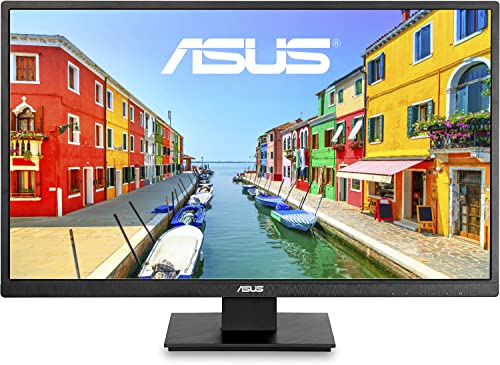
- 27-inch Full HD display
- Flicker-free and low-blue-light Eye Care
- HDMI, VGA, anti-glare, and VESA support
Best For: Basic office work, education, and personal use
Best Overall Value
ASUS VA279QG 27-Inch Eye Care Monitor

- 27-inch IPS Full HD display with 99% sRGB
- 120Hz refresh and 1ms MPRT for smoother motion
- Flicker-Free and Low Blue Light eye care features
Best For: Home offices, multitasking, streaming, and casual gaming
Best for USB-C Workspaces
BenQ GW2790TC Eye-Care Monitor

- USB-C provides video, data, and power delivery
- 144Hz refresh rate supports smoother office work
- Flicker-Free, Low Blue Light, and Visual Optimizer features
Best For: Home offices, laptop users, and extended productivity
Best Compact Choice
ASUS VA249QG 24-Inch Eye Care Monitor

- Compact 24-inch IPS Full HD panel with 99% sRGB
- 120Hz refresh and 1ms MPRT support smooth motion
- Flicker-Free and Low Blue Light eye care technology
Best For: Compact desks, dorms, dual-monitor setups, and everyday use
Best for USB-C Productivity
BenQ GW2790C 27-inch IPS Monitor

- Flicker-Free and Low Blue Light features
- USB-C supports video, data, and power
- 144Hz refresh rate for smoother motion
Best For: Home offices, laptop users, and business workstations
Best for Ergonomic Office Setups

- Certified Flicker-Free and Low Blue Light
- Height, pivot, swivel, and tilt adjustments
- USB hub, speakers, HDMI, and DisplayPort
Best For: Adjustable office and study workstations
Best for Slim, Smooth Viewing
ASUS VZ27EHF 27-inch Eye Care Monitor

- TÜV-certified Flicker-Free and Low Blue Light
- 100Hz Adaptive-Sync with 1ms MPRT
- Ultra-slim 6.5mm frameless profile
Best For: Minimalist desks, work, and casual gaming
Balanced Eye-Care Workhorse – BenQ GW2780 27-inch IPS Monitor
The BenQ GW2780 is a practical computer monitor with eye care technology for home offices, study spaces, and everyday entertainment. Its 27-inch IPS display delivers Full HD resolution, while Brightness Intelligence, low blue light, flicker-free viewing, and an anti-glare design support more comfortable extended use.
Best For: Home-office work, studying, general productivity, and casual gaming.
Pros:
- 27-inch IPS panel with 1920 x 1080 resolution and 178-degree viewing angles.
- Eye-care features include low blue light, flicker-free viewing, and adaptive brightness.
- Includes DisplayPort, HDMI, VGA, built-in speakers, and a slim-bezel design.
Cons:
- The 60Hz refresh rate is less suited to fast-paced gaming.
- The stand offers tilt adjustment but not height, swivel, or pivot adjustment.
- It has only one HDMI port.
Choose the GW2780 if comfortable everyday viewing and broad connectivity matter more than high refresh rates or extensive stand adjustment. Its IPS panel and adaptive brightness make it a well-rounded desk monitor.
High-Contrast Reading Pick – Philips 271V8LB 27-inch Monitor
The Philips 271V8LB is a computer monitor with eye care technology designed for clear office work and media viewing. Its 27-inch Full HD VA panel provides a 3000:1 contrast ratio, while EasyRead mode, flicker-free viewing, and a blue-light filter can make longer reading sessions more comfortable.
Best For: Document-heavy office work, multitasking, streaming, and simple multi-monitor setups.
Pros:
- VA panel offers a 3000:1 contrast ratio with deeper blacks and brighter whites.
- 100Hz refresh rate provides smoother motion than a standard 60Hz display.
- EasyRead mode, eye-care features, and a three-sided virtually bezel-free design support comfortable workflows.
Cons:
- Connectivity is limited to HDMI and VGA.
- The stand is VESA-compatible, but supplied notes do not indicate ergonomic stand adjustments.
- The glossy screen finish may reflect surrounding light.
The 271V8LB stands out for contrast and reading comfort rather than advanced gaming features. It is a sensible choice for users who want a spacious screen, smoother 100Hz performance, and an easy-to-read office display.
Adjustable High-Refresh Choice – Dell S2425HSM 24-inch Monitor
The Dell S2425HSM combines eye comfort with responsive performance in a compact Full HD display. This computer monitor with eye care technology features a 144Hz refresh rate, 1ms MPRT, AMD FreeSync, flicker-free viewing, and reduced blue-light emissions, making it suitable for both work and gaming.
Best For: Users who want one adjustable monitor for productivity, gaming, and entertainment.
Pros:
- 144Hz refresh rate, 1ms MPRT, and AMD FreeSync support smoother gaming visuals.
- Four-way ergonomic adjustment includes height, tilt, pivot, and swivel.
- 4-star TÜV-certified eye comfort features, matte anti-glare finish, and integrated 2 x 3W speakers.
Cons:
- The 23.8-inch screen is smaller than the 27-inch alternatives in this roundup.
- Connectivity is limited to HDMI.
- Its native resolution is Full HD rather than a higher-resolution format.
The S2425HSM is the strongest fit when smooth motion and ergonomic positioning are priorities. Its eye-comfort features and built-in speakers also help it function as a versatile all-purpose desk monitor.
Simple Large-Screen Comfort – ASUS VA279HAE 27-inch Monitor
The ASUS VA279HAE is a straightforward computer monitor with eye care technology for business, education, and personal use. Its 27-inch Full HD screen offers 178-degree viewing angles, while ASUS Eye Care combines flicker-free viewing, low blue light, and an anti-glare design to support more comfortable daily use.
Best For: Basic office work, online learning, and users seeking a large, uncomplicated display.
Pros:
- Large 27-inch Full HD display with wide 178-degree viewing angles.
- ASUS Eye Care includes flicker-free and low-blue-light technologies.
- Thin bezels, VESA mounting, HDMI, and VGA provide flexible desk and installation options.
Cons:
- The 60Hz refresh rate is aimed at everyday use rather than fast gaming.
- The supplied notes do not list built-in speakers.
- Stand adjustment details are not specified beyond VESA mountability.
The VA279HAE makes sense for buyers who want a roomy screen and eye-care basics without prioritizing high refresh rates or advanced gaming functions. Its HDMI and VGA inputs also suit older and newer devices.
Best Overall Value – ASUS VA279QG 27-Inch Eye Care Monitor
If you want a computer monitor with eye care technology for work, streaming, and casual gaming, the ASUS VA279QG combines a roomy 27-inch IPS screen with 120Hz motion and certified Flicker-Free and Low Blue Light features. Its 1080p resolution, broad connectivity, and 99% sRGB coverage make it a practical all-purpose choice.
Best For: Home offices, students, streaming, multitasking, and casual gaming.
Pros:
- 27-inch Full HD IPS display with 178-degree viewing angles and 99% sRGB coverage
- 120Hz refresh rate, 1ms MPRT, and Adaptive-Sync support smoother motion
- ASUS Eye Care technology includes Flicker-Free and Low Blue Light features
- HDMI, DisplayPort, VGA, built-in speakers, VESA mounting, and a three-year warranty
Cons:
- 1080p resolution is less detailed than a higher-resolution monitor at this screen size
- Its 27-inch footprint may be larger than needed for compact desks
The VA279QG is a well-rounded pick when comfort features matter as much as everyday versatility. Choose it over a smaller display if you value extra screen area and flexible device support.
Best for USB-C Workspaces – BenQ GW2790TC Eye-Care Monitor
The BenQ GW2790TC is a computer monitor with eye care technology aimed at extended work sessions. Its IPS Full HD panel pairs with Flicker-Free, Low Blue Light, and Visual Optimizer features, while USB-C provides a convenient one-cable connection for compatible laptops.
Best For: Home offices, laptop users, corporate workstations, and long productivity sessions.
Pros:
- IPS Full HD display with matte finish and eye-care-focused picture enhancements
- USB-C supports video, data, and power delivery through one cable
- 144Hz refresh rate helps make scrolling and multitasking smoother
- Height and tilt adjustment, pivot support, slim bezels, and a three-year warranty
Cons:
- USB-C convenience depends on a compatible laptop and cable setup
- Its 5ms response time is not as fast on paper as the ASUS gaming-oriented models
- The supplied information lists a 24-inch description in one bullet despite the 27-inch product title and specifications
For a productivity-focused desk, the GW2790TC stands out for USB-C simplicity and ergonomic adjustment. It is the stronger fit for users who prioritize laptop connectivity and workplace comfort over gaming-focused response times.
Best Compact Choice – ASUS VA249QG 24-Inch Eye Care Monitor
For smaller desks or dual-monitor setups, the ASUS VA249QG is a computer monitor with eye care technology in a compact 24-inch format. It delivers Full HD IPS visuals, 120Hz motion, 99% sRGB color, and ASUS Flicker-Free and Low Blue Light features for everyday work, entertainment, and casual gaming.
Best For: Dorm rooms, compact home offices, dual-monitor arrangements, and general-purpose use.
Pros:
- Compact 24-inch IPS Full HD display with 178-degree viewing angles
- 120Hz refresh rate, 1ms MPRT, and Adaptive-Sync help reduce choppy motion and tearing
- Frameless design, built-in speakers, VESA mounting, and flexible HDMI, DisplayPort, and VGA inputs
- ASUS Eye Care technology includes Flicker-Free and Low Blue Light features
Cons:
- Smaller screen area than the 27-inch alternatives
- 1080p resolution is suited to everyday use but not higher-resolution detail work
The VA249QG is a sensible space-saving option with a useful mix of comfort features and connectivity. It is particularly appealing when you need a modern display that fits a compact workstation or complements a second monitor.
Best for USB-C Productivity – BenQ GW2790C 27-inch IPS Monitor
If you need a computer monitor with eye care technology for extended work sessions, the BenQ GW2790C combines an IPS Full HD screen with Flicker-Free and Low Blue Light features. Its USB-C connection can carry video, data, and power through one cable, while the 144Hz refresh rate makes scrolling and multitasking feel smoother.
Best For: Home offices, laptop users, and business workstations that value USB-C convenience and smooth everyday performance.
Pros:
- Flicker-Free and Low Blue Light technologies support more comfortable viewing.
- USB-C, HDMI, and DisplayPort connectivity offers flexible setup options.
- 144Hz refresh rate and 2ms response time suit work, multitasking, and gaming.
- Includes a three-year manufacturer warranty and energy-efficient design.
Cons:
- Full HD resolution is less detailed than higher-resolution 27-inch displays.
- The supplied notes list one HDMI port and one USB port.
The GW2790C is a practical choice when eye-care features and one-cable laptop connectivity matter as much as display smoothness. It is especially appealing for desk setups shared between productivity and casual gaming.
Best for Ergonomic Office Setups – ASUS VA27EQSB 27-inch Monitor
The ASUS VA27EQSB is a computer monitor with eye care technology designed for comfortable office, education, and personal use. Its IPS Full HD panel provides 178-degree viewing angles, while certified Flicker-Free and Low Blue Light technologies help support longer viewing sessions. The stand also offers extensive height, tilt, swivel, and pivot adjustments.
Best For: Office users who want an adjustable stand, built-in speakers, and broad connectivity in a 27-inch display.
Pros:
- TÜV Rheinland-certified Flicker-Free and Low Blue Light technologies.
- Height, tilt, swivel, and pivot adjustments support ergonomic positioning.
- Includes HDMI, DisplayPort, D-sub, and a USB hub.
- Built-in speakers and Adaptive-Sync add convenience for everyday use.
Cons:
- The 75Hz refresh rate is more modest than faster gaming-focused models.
- Full HD resolution may offer limited sharpness for detailed 27-inch work.
Choose the VA27EQSB if adjustability is a priority. Its eye-care features, USB hub, speakers, and flexible stand make it well suited to a conventional office or study workstation.
Best for Slim, Smooth Viewing – ASUS VZ27EHF 27-inch Eye Care Monitor
For a streamlined computer monitor with eye care technology, the ASUS VZ27EHF pairs a 27-inch IPS Full HD display with TÜV Rheinland-certified Flicker-Free and Low Blue Light features. Its 100Hz refresh rate, 1ms MPRT response time, frameless design, and ultra-slim 6.5mm profile make it a flexible fit for work or casual gaming.
Best For: Users seeking a lightweight, minimalist monitor with smoother motion and simple HDMI connectivity.
Pros:
- Certified Flicker-Free and Low Blue Light technologies support comfortable viewing.
- 100Hz refresh rate with Adaptive-Sync helps deliver smoother motion.
- Ultra-slim, frameless design saves visual and desktop space.
- VESA wall mounting and a three-year warranty add installation and support flexibility.
Cons:
- Connectivity is limited to a single HDMI input.
- The monitor lacks the stand adjustment range listed for the ASUS VA27EQSB.
- Full HD is the maximum resolution, even at the 27-inch screen size.
The VZ27EHF is a strong fit for compact desks and uncluttered setups. It favors a thin, lightweight design and responsive everyday viewing over extensive ports or advanced ergonomic stand adjustments.
How We Picked the Best Computer Monitor with Eye Care Technology
We focused on monitors that explicitly include eye-comfort features rather than relying on resolution alone. Each selected model offers at least one useful technology, such as flicker-free operation, low blue light, adaptive brightness, anti-glare treatment, or adaptive synchronization. We also considered screen size, panel type, refresh rate, connectivity, ergonomic adjustment, built-in speakers, and suitability for office work, studying, entertainment, or gaming.
Because all ten options are primarily Full HD monitors, the biggest differences are in stand flexibility, motion smoothness, ports, and comfort controls. Specifications can vary by seller or revision, so confirm the listing before purchase.
Quick Comparison
| Best For | Features to Prioritize |
|---|---|
| Everyday office work | IPS panel, anti-glare coating, adjustable stand, and low-blue-light mode |
| Small desks | 24-inch display, slim bezels, VESA support, and simple HDMI connectivity |
| Multitasking | 27-inch screen, height adjustment, pivot or swivel movement, and comfortable brightness control |
| Casual gaming | 100Hz or higher refresh rate, 1ms response time, and Adaptive-Sync |
| Modern laptops | USB-C connectivity with video support and, ideally, charging capability |
Key Buying Factors for a Computer Monitor with Eye Care Technology
Eye-Comfort Features
Look for flicker-free dimming and low-blue-light settings that can be adjusted without making the image excessively warm. An anti-glare finish helps reduce reflections, while adaptive brightness can be useful in changing room light. These features support more comfortable viewing, but regular breaks and sensible screen positioning still matter.
Panel, Size, and Resolution
IPS panels generally offer wide viewing angles and consistent color, while VA panels can provide deeper contrast. A 24-inch 1080p display is sharp enough for routine productivity and fits compact desks. A 27-inch 1080p monitor gives you more physical workspace, though text may look slightly less dense than on a higher-resolution panel.
Stand and Connectivity
Height, tilt, swivel, and pivot adjustment make it easier to position the top of the screen near eye level. VESA compatibility adds mounting flexibility. Check whether you need HDMI, DisplayPort, USB-C, speakers, or a headphone connection before buying; USB-C features are not identical on every model.
Refresh Rate and Synchronization
Refresh rates from 100Hz to 144Hz make scrolling and motion look smoother than 60Hz. Adaptive-Sync can reduce tearing in compatible games. For spreadsheets and documents, these features are optional; for gaming and frequent video use, they are worthwhile upgrades.
Who Should Buy Which Computer Monitor with Eye Care Technology?
Choose a 24-inch ASUS model if you want an affordable, space-conscious monitor for studying or everyday office use. A 27-inch ASUS or Philips display suits buyers who prefer a larger screen for documents, streaming, and general home computing. BenQ’s GW2780 and GW2790 series are strong choices for buyers prioritizing eye-care settings, IPS viewing angles, or ergonomic features.
For smoother gaming and scrolling, consider the 120Hz or 144Hz ASUS, Dell, or BenQ options. The Dell is especially appealing if you want a fast refresh rate, built-in speakers, and a more adjustable stand. Choose a USB-C BenQ model when laptop connectivity and a cleaner desk setup matter most. Finally, verify dimensions, stand adjustments, port requirements, and return coverage before ordering.