A good monitor controller helps you hear mixes more accurately and work faster. It simplifies volume control, speaker switching, mute, dim, and mono checks without reaching for your interface.
Below, we focus on practical options for different home-studio setups, from simple passive controllers to desktop units with extra routing and connectivity.
Best 10 Monitor Controller for Home Studio Picks for 2026
Passive Precision

- Fully passive, no power needed
- Mono, mute, and dim controls
- Switches 2 sources and 2 monitor pairs
Best For: Simple home studio monitoring with clean, basic control
Full Control Hub

- 4 stereo inputs plus S/PDIF
- 3 speaker outputs with level control
- 4 headphone amps and talkback mic
Best For: Busy home studios needing flexible routing and headphone control
Clean Passive Routing
ESI MoCo Passive Monitor Controller

- Passive design, no power required
- Two inputs and two outputs
- Mono, mute, and L/R flip buttons
Best For: Small home studios wanting simple passive control and clean routing
USB Monitoring Center

- 2x2 USB interface at 192 kHz/24-bit
- Two Onyx mic preamps with phantom power
- 3 sources, 2 monitor pairs, dual headphone outs
Best For: Home studios wanting monitor control and USB interface features
Desktop Control for Flexible Studio Routing
Audient Nero Desktop Monitor Controller

- 4 stereo analogue sources and 3 speaker outputs
- 4 headphone outputs with flexible routing
- Dim, Cut, Mono, Polarity, and talkback input
Best For: Home studios needing advanced routing and multiple monitoring options
All-in-One USB Monitor Hub

- 4 sources and 3 monitor pairs with big knob control
- 192kHz/24-bit USB interface with playback and recording
- Two Onyx mic preamps plus front-panel 1/8" input
Best For: Home studios wanting monitor control and USB audio in one unit
Compact Bluetooth Monitor Add-On

- Stereo Bluetooth input for wireless monitoring
- Balanced 1/4" TRS and 1/8" TRS connections
- Compact 2.1 controller with headphone/aux output
Best For: Small studios needing Bluetooth and simple subwoofer support
Best with Extra Features
DYNASTY PROAUDIO PMC-2 Premium Passive 2 x 2
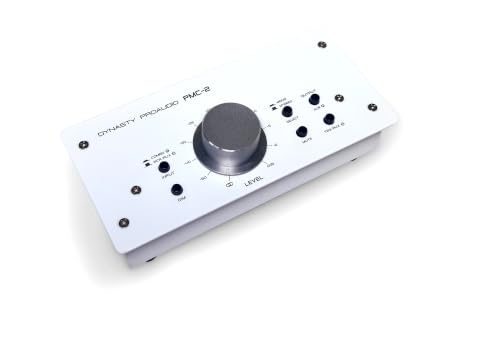
- Passive analog volume control with large rotary knob
- Balanced XLR/phone, RCA, and 3.5mm connections
- Mute, mono, and DIM switches for monitoring control
Best For: Home studios needing simple, transparent level control
Flexible Routing Choice
StudioMan M04 Passive Monitor Controller

- 2-in/4-out passive routing for multiple sources and speakers
- Mute button and smooth volume knob for quick control
- No power required and no cable replugging
Best For: Studios that switch between several monitors or sources
Balanced Compact Option
DYNASTY PROAUDIO PMC-1 Premium Passive Stereo
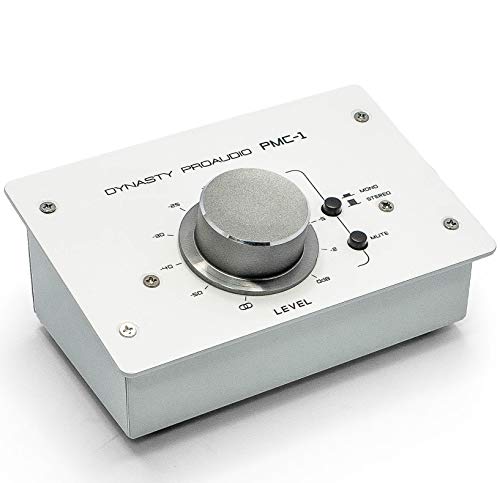
- Passive stereo controller with large precision knob
- Balanced XLR/TRS inputs and TRS outputs help keep signals clean
- Compact metal build with 3.5mm mini jack support
Best For: Small home studios wanting balanced, hands-on stereo control
Passive Precision – Mackie Big Knob Passive
If you want a no-frills monitor controller for home studio use, the Mackie Big Knob Passive keeps the signal path simple and clean. It gives you basic source and speaker switching, along with mono, mute, and dim controls, in a sturdy desktop box designed for studio and editing suite applications.
Best For: Home studio setups that value simple switching and pristine passive monitoring control.
Pros:
- Fully passive design with no external power required
- Mono, mute, and dim buttons for quick monitoring checks
- Switches between two sources and two monitor pairs
- Built-like-a-tank metal enclosure for desktop use
Cons:
- No built-in headphone amps or talkback features
- Limited to basic monitor-controller functions
- Passive design may be too minimal for larger routing needs
For straightforward speaker management, this Big Knob model stays focused on core monitoring duties without adding extra complexity. It is a solid fit when clean attenuation and reliable switching matter more than advanced studio routing.
Full Control Hub – PreSonus Monitor Station V2
The PreSonus Monitor Station V2 is a feature-rich monitor controller for home studio users who want more than basic speaker switching. It combines multiple stereo inputs, selectable speaker outputs, headphone amps, and talkback in a desktop control center built for flexible monitoring workflows.
Best For: Home studios that need multiple inputs, headphone monitoring, and talkback in one unit.
Pros:
- 4 stereo input pairs plus one S/PDIF digital input
- 3 selectable stereo speaker outputs with level controls
- 4 headphone amplifiers with independent source selection
- Built-in talkback microphone with gain control and button
Cons:
- Larger desktop footprint than simpler passive controllers
- More features than a basic setup may require
- Best suited to users who will use the extra routing options
This is the most complete control center in the group, especially if your home studio needs source switching, monitor selection, cue control, and headphone distribution. It is a practical upgrade when you want a central command point for the room.
Clean Passive Routing – ESI MoCo Passive Monitor Controller
The ESI MoCo is a passive monitor controller for home studio owners who want clean, uncolored monitoring and simple operation. With two stereo inputs, two stereo outputs, and dedicated control buttons, it covers the essentials without needing external power.
Best For: Compact home studio rigs that need passive switching and straightforward monitor control.
Pros:
- Fully passive design with no external power required
- Large knob for fast, precise volume adjustment
- Switches inputs and outputs, plus mono, mute, and left/right flip
- Flexible connectivity with TRS, RCA, 1/8″, XLR, and 1/4″ options
Cons:
- No headphone amps or talkback features
- Plastic enclosure is less rugged than metal alternatives
- Limited to a straightforward 2-in/2-out monitoring layout
As a monitor controller for home studio use, the MoCo keeps things compact and practical while still offering useful monitoring tools. It is a good choice if you want simple passive control and flexible analog connectivity in a small footprint.
USB Monitoring Center – Mackie Big Knob Studio
Mackie Big Knob Series, 3x2 Studio Monitor Controller 192kHz USB I/O (BIG KNOB STUDIO)
Check Price On AmazonThe Mackie Big Knob Studio is a monitor controller for home studio setups that also need an audio interface. It combines source and speaker selection with 192 kHz/24-bit USB recording and playback, two Onyx mic preamps, and dual headphone outputs for a more integrated desk setup.
Best For: Home studios that want monitor control plus built-in USB interface features.
Pros:
- 2×2 USB interface with 192 kHz/24-bit recording and playback
- Two Onyx mic preamps with phantom power for condenser mics
- Chooses between 3 sources and 2 monitor pairs
- Dual headphone outs with independent level control
Cons:
- More complex than a dedicated passive monitor controller
- Requires USB workflow to take advantage of the full feature set
- May be more than needed if you only want simple speaker switching
If your home studio needs both monitoring control and recording connectivity, this Big Knob model covers a lot of ground in one unit. It is a strong fit for users who want a desk-friendly center for sources, monitors, headphones, and USB audio.
Desktop Control for Flexible Studio Routing – Audient Nero Desktop Monitor Controller
If you want a monitor controller for home studio use with lots of routing flexibility, the Audient Nero is built for exactly that kind of desk setup. It offers 4 stereo analogue sources, 3 stereo speaker outputs, 4 headphone outputs, and dedicated monitor controls like Dim, Cut, Mono, and Polarity, so you can manage a more involved listening chain without clutter.
Best For: Home studio owners who need multiple speakers, several headphones, and customizable monitor control.
Pros:
- 4 stereo analogue sources plus 2 line level inputs for flexible system routing
- 3 stereo speaker outputs and 4 headphone outputs for multi-monitor listening
- Dim, Cut, Mono, and Polarity controls for practical mix checks
- External talkback input and Smart Touchpoints for added customization
Cons:
- May be more controller than a simple two-speaker desktop setup needs
- Designed for desk use, so it takes up more space than compact inline boxes
The Nero stands out when you need a monitor controller for home studio workflows that go beyond basic volume control. Its strength is flexibility, making it a smart fit for users who switch between sources, speakers, and headphones often.
All-in-One USB Monitor Hub – Mackie Big Knob Studio Plus
Mackie Big Knob Series, 4x3 Studio Monitor Controller 192kHz USB I/O (BIG KNOB STUDIO PLUS)
Check Price On AmazonThe Mackie Big Knob Studio Plus is a monitor controller for home studio users who want their desktop monitor control and audio interface in one box. It combines 4-source/3-monitor selection with 192kHz/24-bit USB recording and playback, plus two Onyx mic preamps and phantom power for condenser mics. The front-panel 1/8″ input is also handy for quickly checking a phone or portable source.
Best For: Home studios that want a monitor controller with built-in USB recording and playback.
Pros:
- 4 sources and 3 monitor pairs with classic Big Knob volume control
- Built-in 2×4 USB interface with 192kHz/24-bit recording and playback
- Two Onyx mic preamps with phantom power for condenser microphones
- Front-panel 1/8″ input for quick connection of a smartphone or similar device
Cons:
- More feature-rich than a basic monitor controller, so it may be overkill for simple setups
- USB-centric design may not be ideal if you only need passive speaker switching
For a monitor controller for home studio work that also handles interface duties, this Mackie model is a strong utility pick. It suits users who want source switching, monitor selection, and recording features in one desktop unit.
Compact Bluetooth Monitor Add-On – PreSonus MicroStation BT 2.1
The PreSonus MicroStation BT is a compact monitor controller for home studio setups that need a small footprint and Bluetooth playback. It adds stereo Bluetooth input to any speaker system, includes balanced 1/4″ TRS and stereo 1/8″ TRS connections, and gives you a simple way to switch between Bluetooth and analog sources. It also supports a subwoofer for a basic 2.1 monitoring setup.
Best For: Small home studios that want Bluetooth input and simple 2.1 monitor control.
Pros:
- Stereo Bluetooth input for wireless playback from phones or tablets
- Balanced 1/4″ TRS and stereo 1/8″ TRS inputs for pro and consumer gear
- Bluetooth on/off and pairing buttons for straightforward source switching
- Compact desktop size with headphone/aux output and subwoofer support
Cons:
- Only a 2.1-style controller, so it is not built for multiple speaker pairs
- Best suited to simpler monitoring needs rather than advanced studio routing
This is a practical pick if you want a monitor controller for home studio use without adding much desk clutter. It is especially useful for creators who want quick Bluetooth access alongside basic analog monitoring.
Best with Extra Features – DYNASTY PROAUDIO PMC-2 Premium Passive 2 x 2
If you want a monitor controller for home studio use that keeps level changes simple and transparent, the DYNASTY PROAUDIO PMC-2 is built around passive analog attenuation and a large rotary knob for precise fingertip control. It sits between your interface or PC sound card and powered monitors, with balanced and unbalanced connectivity that makes it easy to integrate into a small studio.
Best For: Home studios that need a straightforward passive volume controller with flexible analog inputs and outputs.
Pros:
- Passive design requires no power supply
- Balanced XLR/phone and RCA plus 3.5mm inputs for flexible hookup
- Mute and mono/DIM switches add practical monitoring control
- Metal chassis is built for durable home or mobile use
Cons:
- No active features or built-in signal processing
- 2 x 2 layout may be basic for more complex monitor setups
The PMC-2 makes sense if your priority is clean, hands-on monitor level control without adding color or complexity. Its passive signal path and broad connector support keep the setup simple while staying focused on monitoring essentials.
Flexible Routing Choice – StudioMan M04 Passive Monitor Controller
For a monitor controller for home studio setups with multiple speakers or sources, the StudioMan M04 focuses on routing flexibility. Its passive 2-in/4-out design lets you switch between two inputs and four outputs without repeatedly plugging and unplugging cables, which is useful when you want faster monitor changes during mixing, recording, or streaming.
Best For: Home studios that need passive switching between multiple audio sources and speaker outputs.
Pros:
- 2 input / 4 output routing reduces cable swapping
- 100% passive design needs no power supply
- One-click mute button is handy for quick cutoffs
- Unbalanced 1/4-inch jacks keep the setup simple
Cons:
- Unbalanced connectors may be less suited to longer runs
- No balanced input or output options listed
- Fewer monitoring extras than more advanced controllers
The M04 is a practical choice if your studio needs easy speaker switching more than premium monitoring features. It stays focused on low-loss passive control and everyday workflow convenience.
Balanced Compact Option – DYNASTY PROAUDIO PMC-1 Premium Passive Stereo
If you need a monitor controller for home studio work and prefer a compact passive unit, the DYNASTY PROAUDIO PMC-1 keeps the focus on precise stereo level adjustment. It connects between a PC sound card or audio interface and monitor speakers, and its balanced XLR/TRS inputs and TRS outputs are designed to help keep the signal clean over longer cable runs.
Best For: Small studios that want a compact passive stereo controller with balanced connections.
Pros:
- Passive volume control for transparent attenuation
- Balanced XLR/TRS input and TRS output support
- 3.5mm mini jack connections add extra flexibility
- Metal enclosure adds durability for home use
Cons:
- Stereo 1×1 layout is simpler than larger monitor controllers
- No power or active processing features
- Monitoring tools are limited to basic mute and stereo/mono selection
The PMC-1 is a strong fit if you want a no-frills monitor controller that prioritizes clean analog level control. It keeps the setup compact while still offering the balanced connections many home studios need.
How We Picked the Best Monitor Controller for Home Studio
We prioritized models that make everyday monitoring easier in a home studio: dependable volume control, straightforward signal paths, useful monitoring functions, and the right number of inputs and outputs for typical desktop setups. We also weighed passive versus active designs, connector compatibility, and whether a unit fits a basic two-speaker rig or a more complex setup with multiple sources or subwoofer integration.
Quick Comparison
If you want the simplest path, a passive controller is usually the cleanest and most affordable choice. If you need extra features such as speaker switching, multiple inputs, headphone control, Bluetooth, or integrated USB audio, a powered desktop model is more flexible. For a Monitor Controller for Home Studio use, the right pick depends less on specs alone and more on how many sources and speaker pairs you actually use every day.
Key Buying Factors for Monitor Controller for Home Studio
Passive Vs. Active
Passive units can be transparent and simple, with no need for power, but they usually offer fewer features. Active models add convenience such as level buffering, metering, headphone amps, and richer switching options.
Inputs, Outputs, and Routing
Choose based on your real workflow. A 2×2 controller suits a basic interface-and-monitors setup, while 3×2, 4×3, or multi-output designs make sense if you switch between several speakers, a subwoofer, or multiple audio sources.
Monitoring Tools
Useful controls include mono, mute, dim, talkback, and dedicated speaker select buttons. These features help you check balances quickly and protect your ears and monitors during session work.
Connectivity and Form Factor
Desktop controllers should be easy to reach without cluttering your desk. Also confirm whether you need balanced TRS or XLR connections, unbalanced 1/4-inch connections, Bluetooth, or USB audio.
Who Should Buy Which Monitor Controller for Home Studio?
If you want the most minimal signal path and only need volume plus basic switching, a passive controller is often enough. If you want a more polished control surface for a busy production desk, a feature-rich desktop unit is a better fit. If you play back music from phones or tablets as well as your DAW, consider a model with Bluetooth or multiple digital and analog inputs.
For most buyers, the best Monitor Controller for Home Studio use is the one that matches your monitor count, source count, and preferred workflow without adding unnecessary complexity.