A well-chosen patch bay can make a podcast studio easier to route, troubleshoot, and expand. The right model keeps microphones, interfaces, mixers, processors, and monitoring gear accessible without repeatedly reaching behind racks.
This roundup compares 10 options, from compact XLR panels to balanced TRS patch bays, so you can match your connection type and workflow to your recording setup.
Best 10 Patch Bays for Podcasting Picks for 2026
Best Flexible Rack Workflow

- 48 balanced 1/4-inch connections
- Three selectable routing modes
- 1U rack-mountable metal chassis
Best For: Growing podcast racks with balanced studio gear
Best Portable USB Hub
Cubilux CB5 USB Audio Interface

- Five-in-one USB audio connectivity
- Bus-powered portable design
- Supports multi-track recording
Best For: Mobile podcasting and computer-based recording
Best Rugged Routing Value
Behringer ULTRAPATCH PRO PX3000

- 48-point balanced patch bay
- Four selectable channel functions
- Rugged studio-oriented construction
Best For: Fixed podcast studios with multiple signal paths
Best Gold-Contact Simplicity

- 48-point TRS patch bay
- 96 gold-plated connectors
- Three-way mode switch
Best For: Permanent podcast racks using TRS connections
Compact Balanced Routing
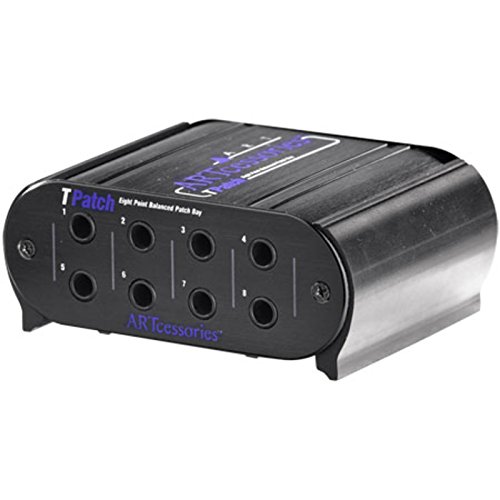
- Eight balanced points for TRS routing
- Switchable normal and half-normal modes
- Rugged aluminum case with two-year warranty
Best For: Compact podcast racks using balanced 1/4-inch TRS gear
Professional XLR Routing

- 16-point layout with 32 XLR connectors
- Gold-plated three-pin XLR connections
- Aluminum construction and two-year warranty
Best For: XLR-centered podcast and recording studios
Flexible Rackmount XLR Hub

- 16 reversible male/female XLR ports
- Steel rackmount chassis with included screws
- Balanced wiring for low-interference routing
Best For: Rack-mounted podcast and broadcast systems using XLR cables
Versatile TRS Routing
Black Lion Audio PBR TRS Patchbay

- 48-point patchbay with 96 TRS connectors
- Gold-plated connectors and stainless steel construction
- Designed for broad TRS-compatible setups
Best For: Podcast studios using multiple TRS-connected devices
Modular XLR Organization

- Four modular blocks support 4–16 channels
- 24K gold-plated XLR pins
- Reversible rack ears and full-steel chassis
Best For: XLR-based podcast racks needing flexible maintenance
Illuminated TRS Control

- 48-point patchbay with 96 gold-plated TRS connectors
- Customizable LED displays for routing visibility
- 48 x 3-way variable operation switch
Best For: TRS-based studios wanting visible routing control
Best Flexible Rack Workflow – Samson S-Patch Plus
Samson S-Patch Plus Balanced 48-Point 1/4" Patch Bay | 1/4 Inch Phone Connections
Check Price On AmazonThe Samson S-Patch Plus is one of the more adaptable patch bays for podcasting when your rack includes balanced studio gear. Its 48 front and 48 rear 1/4-inch connections create a central routing point, while front-panel switches let you choose Normalled, Half-normalled, or Thru operation.
Best For: Podcasters building a rack-based setup with multiple balanced processors, mixers, or recording devices.
Pros:
- Fully balanced 48-point design helps keep connections organized.
- Front switches support Normalled, Half-normalled, and Thru configurations.
- 19-inch, 1U rack-mountable metal chassis offers a clean installation.
- Reduces the need to reach behind rack equipment.
Cons:
- Its 1/4-inch TRS format may be more capability than a simple podcast setup needs.
- Designed for rack integration rather than a compact desktop workflow.
Choose the S-Patch Plus when flexible routing and convenient front-panel access matter more than keeping the system minimal. The selectable modes make it a strong long-term option for a growing podcast rack.
Best Portable USB Hub – Cubilux CB5 USB Audio Interface
The Cubilux CB5 is a compact alternative for creators who need practical connectivity rather than a traditional rack patch bay. For podcasting on a computer, it combines two stereo microphone jacks, line input, line output, and a headphone jack in a bus-powered USB design.
Best For: Mobile podcasters and streamers who need a small Windows or macOS audio connection hub.
Pros:
- Provides five useful connection functions in a compact device.
- Bus-powered design does not require an external power source.
- Supports multi-track recording through independent device names.
- Offers recording support up to 96 kHz/24-bit and DAC output up to 192 kHz/32-bit.
Cons:
- It is an audio interface, not a conventional 48-point rack patch bay.
- Line-out and audio output cannot be used simultaneously.
- Its compact connector layout may not suit larger studio wiring systems.
The CB5 makes sense when “patch bays for podcasting” means quickly connecting microphones, headphones, instruments, and computer audio in a portable setup. It is less appropriate for routing multiple pieces of permanently installed rack gear.
Best Rugged Routing Value – Behringer ULTRAPATCH PRO PX3000
Behringer ULTRAPATCH PRO PX3000 Multi-Functional 48-Point 3-Mode Balanced Patchbay
Check Price On AmazonThe Behringer ULTRAPATCH PRO PX3000 is a 48-point balanced patch bay built to bring order to a studio rack. Its selectable channel functions include Parallel, Half-normalled, Normalled, and Open, giving podcasters several ways to organize signal paths and reduce cable clutter.
Best For: Studio-based podcast systems needing flexible routing across multiple balanced connections.
Pros:
- Offers 48 points with high-quality jack connectors.
- Provides Parallel, Half-normalled, Normalled, and Open functions.
- Rugged construction is intended for long-term studio use.
- Helps centralize connections and improve rack organization.
Cons:
- The broad routing options may require more setup knowledge.
- Its 3.9-pound chassis is less suitable for lightweight mobile rigs.
- It is primarily intended for indoor studio use.
The PX3000 is a sensible choice for podcasters who want a conventional, expandable studio patch bay with unusually flexible channel modes. It is especially useful when a fixed rack contains several processors or signal sources.
Best Gold-Contact Simplicity – Black Lion Audio PBR TRS3
The Black Lion Audio PBR TRS3 offers a straightforward 48-point patch bay layout for podcast studios using TRS connections. Its 96 gold-plated connectors and three-way mode switch provide a practical foundation for organizing microphones, instruments, speakers, computers, and other compatible gear.
Best For: Podcasters who want a simple TRS patch bay with gold-plated connectors and selectable routing.
Pros:
- Provides 48 patch points through 96 gold-plated TRS connectors.
- Three-way mode switch supports flexible signal organization.
- Works with a range of listed devices, including microphones, guitars, speakers, and computers.
- Includes a two-year warranty.
Cons:
- The supplied notes do not specify the exact functions of the three switch positions.
- Its TRS-focused design may require adapters for other connector formats.
- No portability features are indicated for mobile podcasting.
The PBR TRS3 is a clean fit for a permanent podcast rack where TRS connectivity is standard. Its simpler feature description makes it easier to evaluate than highly configurable models, though buyers should confirm the switching modes for their intended wiring.
Compact Balanced Routing – Art Pro Audio TPatch
The Art Pro Audio TPatch is a compact option for podcasting setups that need balanced 1/4-inch TRS routing. Its eight points, linked input/output pairs, and selectable normal or half-normal operation make it useful for organizing connections between studio hardware.
Best For: Podcasters using balanced TRS equipment who want flexible routing in a compact unit.
Pros:
- Provides eight points of balanced direct signal routing.
- Offers four linked input/output pairs.
- Supports switchable half-normal and normal modes, including through-type connections.
- Uses a rugged extruded aluminum case and includes a two-year warranty.
Cons:
- Uses 1/4-inch TRS connections rather than XLR.
- Its eight-point layout may be limiting for larger routing systems.
Choose the TPatch when your podcast rack is built around balanced TRS connections and you want straightforward routing flexibility without a larger patchbay footprint.
Professional XLR Routing – Black Lion Audio PBR XLR
The Black Lion Audio PBR XLR is a 16-point patchbay for podcast studios built around XLR microphones, preamps, mixers, or other audio hardware. Its 32 gold-plated XLR connectors provide a dedicated format for routing balanced signals in recording or live-sound environments.
Best For: XLR-based podcast studios and recording setups that need 16-point signal routing.
Pros:
- Provides 16 patch points with 32 gold-plated XLR connectors.
- Uses male-to-female, three-pin XLR connections.
- Designed for audio signal routing in recording or live sound studios.
- Features an aluminum build and a two-year warranty.
Cons:
- Its XLR-only design is less suitable for setups centered on 1/4-inch TRS connections.
- It is intended for indoor use.
For a podcasting workflow that relies on XLR connections, the PBR XLR offers more routing points than a small TRS patchbay and keeps the connection format consistent throughout the rack.
Flexible Rackmount XLR Hub – 16 Port XLR Patchbay
This 16 Port XLR Patchbay is a practical choice for podcasting rooms, broadcast carts, and live-oriented setups that need a rack-mounted XLR distribution point. Reversible male/female connectors, balanced three-pin wiring, and included mounting screws support flexible installation and clean signal routing.
Best For: Rack-mounted podcast, broadcast, and live-sound systems using standard XLR cabling.
Pros:
- Offers 16 XLR ports with reversible male/female connectors.
- Uses a heavy-duty steel chassis with black powder coating.
- Includes hardware for standard 19-inch rack installation.
- Balanced three-pin wiring is designed to minimize noise and interference.
Cons:
- Uses XLR connections rather than 1/4-inch TRS connections.
- Its steel construction may be less convenient for highly portable setups than a lighter design.
The reversible connectors make this patchbay particularly adaptable when configuring or changing a podcast rack, while its 16-port layout provides room for microphones, preamps, mixers, and recorders.
Versatile TRS Routing – Black Lion Audio PBR TRS Patchbay
The Black Lion Audio PBR TRS Patchbay is a straightforward option for patch bays for podcasting when you need broad, organized TRS connectivity. Its 48-point layout and 96 gold-plated TRS connectors provide plenty of connection points for routing compatible studio equipment.
Best For: Podcast studios and recording setups that use multiple TRS-connected devices.
Pros:
- Provides 48 patchbay points and 96 TRS connectors.
- Gold-plated connectors support durable, reliable connections.
- Compatible with all devices according to the supplied product details.
- Stainless steel construction offers a sturdy chassis.
Cons:
- Its TRS connector format may not suit setups centered on XLR connections.
- The 4.31-pound chassis and listed dimensions may require careful rack or desk planning.
Choose this model if your podcasting workflow depends on a large number of TRS connections and you want a simple, substantial patchbay. Confirm available space and connector compatibility before buying.
Modular XLR Organization – AP16 XLR Patchbay
The AP16 XLR Patchbay is a practical choice among patch bays for podcasting if your setup relies on balanced XLR connections. Its four factory-assembled modular blocks allow configurations from four to 16 channels without cutting or modifying a traditional PCB.
Best For: Rack-based podcast and recording systems that need flexible XLR routing and easier maintenance.
Pros:
- Four independent blocks support 4-, 8-, 12-, or 16-channel configurations.
- Modular sections can be assigned to different system zones and replaced individually.
- 24K gold-plated XLR pins are designed for corrosion resistance and low signal loss.
- Full-steel chassis and reversible rack ears support flexible installation.
Cons:
- It is built around XLR connections, so it may be less suitable for TRS-only workflows.
- The supplied notes do not specify included cables or detailed front-to-rear routing options.
For XLR-heavy podcast rooms, the AP16 stands out for its modular approach and serviceability. It is especially useful when different channels need to be organized into separate zones or when rack mounting arrangements may change.
Illuminated TRS Control – Black Lion Audio PBR TRS3 LIT
The Black Lion Audio PBR TRS3 LIT adds customizable LED displays to a 48-point TRS patchbay, making it an appealing option for patch bays for podcasting when visible routing status matters. It also provides 96 gold-plated TRS connectors and a 48 x 3-way variable operation switch.
Best For: Podcast and studio setups that want high TRS capacity with customizable visual monitoring.
Pros:
- Offers 48 patchbay points and 96 gold-plated TRS connectors.
- Customizable LED displays can improve visibility during routing changes.
- Includes a 48 x 3-way variable operation switch for flexible operation.
- Supports macOS and Windows according to the supplied product notes.
Cons:
- Its added LED functionality may be unnecessary for a simple podcast routing setup.
- The supplied notes do not detail the specific software or setup process for macOS and Windows.
- Its listed 22.6-inch length may require more installation space than expected.
This model is a strong fit when your podcast studio benefits from more visible patchbay operation rather than basic connectivity alone. Review the available rack or desk space and confirm how the LED controls fit your workflow.
How We Picked the Best Patch Bays for Podcasting
We focused on connection format, channel capacity, balanced signal support, routing flexibility, rack compatibility, and practical studio use. The lineup includes TRS patch bays for line-level equipment, XLR panels for microphone and balanced connections, and compact options for smaller podcast rooms. We also considered whether each design supports normalization, channel reversal, or other routing configurations that can reduce cable changes.
For podcasting, reliability and ease of access matter as much as raw channel count. A patch bay should simplify your signal path rather than introduce unnecessary adapters or confusion.
Quick Comparison
| Type | Best For | Typical Advantage |
|---|---|---|
| TRS patch bay | Interfaces, mixers, compressors, and other line-level gear | Flexible balanced routing in a rack-friendly format |
| XLR patch bay | Microphones, preamps, and stage or studio connections | Convenient front-panel access for XLR cabling |
| Compact balanced patch bay | Small podcast studios and focused signal paths | Lower space and cost requirements |
| Multi-mode patch bay | Studios needing configurable routing | More control over normalled and through connections |
Key Buying Factors for Patch Bays for Podcasting
Choose the Correct Connector Type
TRS models are generally suited to balanced line-level connections between an audio interface, mixer, headphone amplifier, compressor, or other processor. XLR models are more appropriate when you need convenient access to microphone, preamp, or balanced equipment connections. Avoid choosing by channel count alone; the connectors must match your existing cables and equipment.
Check Normalization and Routing Options
Normalled connections can send a signal to a default destination until you insert a plug to reroute it. This is useful when your microphones normally feed an interface but occasionally need to pass through an external preamp or mixer. Through connections may be simpler for setups where you want every front and rear jack to remain directly available.
Match Capacity to Your Rack and Workflow
A 48-point unit offers room for larger studios, while an eight-point or 16-channel model may be easier to understand and install in a compact podcast room. Leave some spare capacity if you expect to add outboard processing, additional microphones, or a second recording chain.
Prioritize Balanced, Durable Connections
Balanced cabling helps reject interference over longer runs, especially near computers, power supplies, and lighting equipment. Look for solid jacks, clear labeling, dependable switching or normalization, and a chassis that fits your rack or desktop plan.
Who Should Buy Which Patch Bays for Podcasting?
- Choose a TRS patch bay if your podcast setup centers on an audio interface, mixer, and line-level processors.
- Choose an XLR patch bay if you frequently connect microphones, preamps, or rack-mounted XLR equipment.
- Choose a compact model if you have a small studio, a limited number of signal paths, or minimal rack space.
- Choose a high-capacity or configurable model if you run multiple hosts, guests, recording chains, or outboard effects.
Before buying, draw your current signal flow and label each input and output. That simple step makes it easier to select the right format and prevents buying a patch bay that requires a maze of adapters.