The best portable RAID enclosures make it easier to expand storage, protect important files, and move large projects between computers without committing to a full NAS.
This roundup compares 10 two- and four-bay models, including SATA and NVMe options, hardware RAID designs, tool-free drive bays, cooling systems, and USB-C connectivity.
Best 10 Portable Raid Enclosures Picks for 2026
Best Overall
TERRAMASTER D2-320 2-Bay USB RAID Enclosure

- 10Gbps USB 3.2 Gen 2 connection
- RAID 0, 1, JBOD, and Single modes
- Supports up to 44TB across two drives
Best For: Flexible two-drive desktop storage and backups
Best Aluminum Design
CENMATE 2-Bay 10Gbps RAID Enclosure

- USB 3.2 Gen 2 with USB-A/C cables
- Four RAID modes for flexible storage
- Aluminum body with built-in cooling fan
Best For: Mixed-system users wanting a durable two-bay enclosure
Best Four-Bay Option
QNAP TR-004 USB-C Hardware RAID DAS

- Four lockable 3.5-inch drive bays
- Supports RAID 0, 1, 5, JBOD, and individual disks
- USB-C DAS for computers and compatible QNAP NAS devices
Best For: Expanded storage and four-drive RAID configurations
Best for NVMe SSDs
NEWQ Dual-Bay M.2 RAID Enclosure

- 20Gbps USB 3.2 data transfer
- RAID 0, 1, JBOD, and offline Clone modes
- Compact aluminum enclosure for two M.2 2280 NVMe SSDs
Best For: Fast portable NVMe storage and drive cloning
Best High-Capacity Choice
MAIWO Dual-Bay 3.5-Inch RAID Enclosure

- Supports two 3.5-inch SATA HDDs up to 48TB total
- Offers RAID 0, 1, JBOD, and Normal modes
- Includes adjustable fan and 48W power supply
Best For: High-capacity desktop HDD storage
Best Tool-Free DAS
CENMATE Dual-Bay Drive Enclosure

- Supports both 2.5-inch and 3.5-inch SATA drives
- Tool-free trays and hot-swapping simplify drive changes
- USB 3.0 connectivity with daisy-chain expansion
Best For: Simple non-RAID storage expansion and drive swapping
Compact RAID Flexibility
MAIWO Dual-Bay 2.5-Inch RAID Enclosure
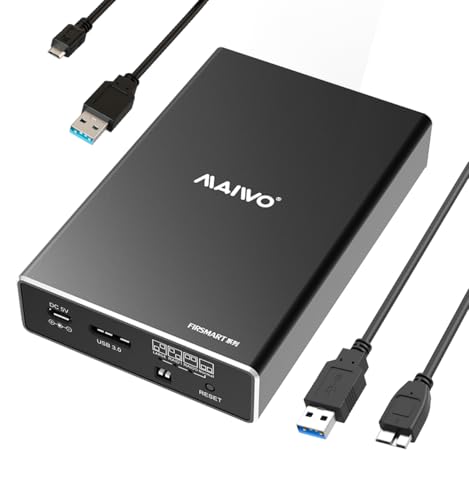
- Four RAID modes for flexible storage setups
- USB 3.0 with UASP and up to 5Gbps bandwidth
- Compact aluminum enclosure supports up to 12TB
Best For: Portable 2.5-inch SATA storage and simple RAID switching
High-Capacity Desktop RAID
CENMATE Four-Bay 2.5/3.5-Inch Enclosure

- Four bays support 2.5- and 3.5-inch SATA drives
- Up to 80TB capacity with eight RAID modes
- USB A/C 3.0 and eSATA connectivity included
Best For: Large desktop storage systems and multi-drive RAID configurations
Simple 16TB Dual-Bay Storage
MAIWO Tool-Free 2.5-Inch Enclosure

- Four RAID modes support speed, mirroring, or combined capacity
- Two bays provide up to 16TB total storage
- Tool-free, compact design with USB 3.0 connectivity
Best For: Easy dual-drive storage for personal files, business data, or photography
Best Overall – TERRAMASTER D2-320 2-Bay USB RAID Enclosure
For shoppers comparing portable raid enclosures, the TERRAMASTER D2-320 is a capable two-bay DAS with USB 3.2 Gen 2 connectivity, hardware RAID, and support for both 2.5-inch and 3.5-inch SATA drives. It is diskless, so you can configure the storage capacity and RAID level yourself.
Best For: Users who want a flexible two-drive enclosure with high-capacity support, hardware RAID, and tool-free installation.
Pros:
- USB 3.2 Gen 2 supports data transfer up to 10Gbps.
- Supports RAID 0, RAID 1, JBOD, and Single modes.
- Accepts two drives up to 22TB each, for up to 44TB total.
- Tool-free trays and temperature-controlled fan simplify installation and cooling.
Cons:
- This is a direct-attached storage device, not a NAS.
- Drives are not included.
The D2-320 stands out as a well-rounded portable raid enclosure for desktop backups, mirrored storage, or faster striped performance. Its broad SATA compatibility and simple tray design make it easy to adapt as your storage needs change.
Best Aluminum Design – CENMATE 2-Bay 10Gbps RAID Enclosure
The CENMATE is a practical option among portable raid enclosures, combining a two-bay design with USB 3.2 Gen 2, USB-A and USB-C cables, and an aluminum-alloy enclosure. Its ASM1352R chip is designed for stability and compatibility across Windows, Mac, and Linux systems.
Best For: Users who want a two-drive aluminum enclosure with multiple USB connection options and straightforward RAID modes.
Pros:
- 10Gbps USB 3.2 Gen 2 interface with USB-A and USB-C connectivity.
- Supports RAID 0, RAID 1, Normal, and JBOD modes.
- Works with 2.5-inch and 3.5-inch SATA HDDs and SSDs up to 20TB per drive.
- Aluminum construction and a built-in fan help manage heat.
Cons:
- The fan is rated around 40–50 decibels and may be noticeable.
- Resetting the RAID array requires holding the Reset button for five seconds.
- The notes indicate that Mac OS does not provide RAID software support.
With its aluminum body and broad drive compatibility, the CENMATE is a sensible choice for users who value physical durability and flexible host connections. Be sure to account for the stated fan noise and follow the RAID reset procedure carefully.
Best Four-Bay Option – QNAP TR-004 USB-C Hardware RAID DAS
QNAP TR-004 4 Bay USB Type-C Direct Attached Storage (DAS) with hardware RAID (Diskless)
Check Price On AmazonIf you need more drive bays than most portable raid enclosures provide, the diskless QNAP TR-004 offers four 3.5-inch SATA bays and hardware RAID through USB Type-C. It works as direct-attached storage for Windows, macOS, and Linux, and can also be used for external storage with a QNAP NAS.
Best For: Users who need four drive bays for expanded storage, backups, or RAID 5 capability.
Pros:
- Four lockable 3.5-inch drive bays provide room for expansion.
- Hardware RAID supports RAID 0, RAID 1, RAID 5, JBOD, and individual disks.
- Includes a USB Type-C to Type-A cable for computer connections.
- Can serve as external storage or expand the capacity of a compatible QNAP NAS.
Cons:
- Uses a 5Gbps USB connection rather than 10Gbps or 20Gbps.
- It is diskless, so drives must be purchased separately.
- QNAP NAS compatibility has specific model and QTS-version limitations.
The TR-004 is the strongest fit here when capacity and bay count matter more than maximum interface speed. Its four-bay layout and RAID 5 support make it suitable for larger personal or small-business storage setups, provided your NAS model is compatible.
Best for NVMe SSDs – NEWQ Dual-Bay M.2 RAID Enclosure
The NEWQ dual-bay enclosure takes a different approach to portable raid enclosures by using two M.2 2280 NVMe SSDs instead of SATA hard drives. It combines 20Gbps USB 3.2 connectivity with RAID modes, offline cloning, tool-free installation, and a compact aluminum design.
Best For: Professionals and enthusiasts who need portable NVMe storage, drive duplication, or high-speed dual-SSD workflows.
Pros:
- 20Gbps data transfer is suited to large files and demanding backups.
- Supports RAID 0, RAID 1, JBOD, and Clone modes.
- Tool-free access makes SSD installation and replacement convenient.
- Aluminum construction offers a compact, lightweight design with heat dissipation.
Cons:
- It is compatible with M.2 2280 NVMe SSDs rather than 2.5-inch or 3.5-inch SATA drives.
- The enclosure is limited to two SSDs.
- An auxiliary USB-C input may be needed for stable operation with two high-capacity drives.
For users already invested in NVMe drives, the NEWQ offers the fastest listed interface and adds useful offline cloning. Its compact form makes it especially appealing for mobile workflows, though drive compatibility should be confirmed before buying.
Best All-Flash Pick – ORICO 4-Bay Portable RAID Enclosure
For shoppers comparing portable raid enclosures, the ORICO all-flash model stands out for its compact 2.5-inch drive design, multiple RAID options, and expansion-focused connectivity. It supports up to four 2.5-inch SSDs or HDDs, with USB-C connectivity and transfer rates of up to 10Gbps when paired with a suitable PSSD.
Best For: Video editors, photographers, and mobile workflows that need flexible RAID storage and memory-card access.
Pros:
- Supports RAID 0, 1, 3, 5, 10, JBOD, and CLEAR modes.
- Compact, lightweight 2.5-inch design with solid-state construction and improved shock resistance.
- Includes two 10Gbps USB ports plus SD and TF card slots.
- Supports up to 40TB across four bays and daisy-chaining for expanded storage.
Cons:
- Designed for 2.5-inch drives only; 3.5-inch drives are not supported.
- Drives and storage media are not included.
This is the most versatile option here for creators who prioritize portability, fast file handling, and extensive RAID configuration. Its smaller drive format makes it easier to carry than traditional 3.5-inch enclosures.
Best High-Capacity Choice – MAIWO Dual-Bay 3.5-Inch RAID Enclosure
If your portable raid enclosures shortlist favors large mechanical drives, the MAIWO dual-bay unit offers substantial capacity, hardware RAID modes, and active cooling. It accepts two 3.5-inch SATA HDDs, supports up to 24TB per drive, and connects through USB Type-C.
Best For: Desktop users who need high-capacity HDD storage, selectable RAID modes, and fan-assisted cooling.
Pros:
- Supports RAID 0, RAID 1, JBOD, and Normal modes.
- Handles up to 48TB total capacity with compatible 3.5-inch drives.
- Adjustable cooling fan and aluminum-alloy construction help manage heat.
- Includes a 48W power supply for running both drives and the RAID controller.
Cons:
- Primarily designed for 3.5-inch HDDs; 2.5-inch drives require a separate bracket.
- Mechanical-drive speeds may be below the enclosure’s advertised 10Gbps interface bandwidth.
- Larger and less travel-friendly than a 2.5-inch all-flash enclosure.
The MAIWO is a practical capacity-first choice. Its fan and independent power supply make it better suited to sustained desktop use than lightweight, battery-free travel setups.
Best Tool-Free DAS – CENMATE Dual-Bay Drive Enclosure
For buyers seeking portable raid enclosures but not requiring RAID, the CENMATE provides a straightforward dual-bay DAS setup. It supports 2.5- and 3.5-inch SATA HDDs or SSDs, offers tool-free installation, and connects through USB 3.0 with both USB-A and USB-C cable support.
Best For: Users who want simple removable storage, hot swapping, and broad drive-format compatibility without RAID or NAS features.
Pros:
- Accepts both 2.5-inch and 3.5-inch SATA drives, up to 20TB per drive.
- Tool-free trays and hot-swapping simplify drive changes.
- Aluminum-alloy housing and a built-in cooling fan support heat management.
- Supports USB 3.0 speeds up to 5Gbps and daisy-chain expansion.
Cons:
- This is a DAS enclosure with no RAID or NAS functionality.
- The fan operates around 40–50 decibels and may be noticeable in quiet spaces.
- USB 3.0 offers less bandwidth than the faster USB 3.1/3.2 options in the other enclosures.
The CENMATE is best viewed as an accessible external drive dock rather than a true RAID solution. Its tool-free design and dual-size drive support make it convenient for routine storage expansion and drive swapping.
Compact RAID Flexibility – MAIWO Dual-Bay 2.5-Inch RAID Enclosure
This compact option among portable raid enclosures supports two 2.5-inch SATA HDDs or SSDs and offers four selectable RAID modes. Its aluminum case, tool-free installation, and USB 3.0 connection make it practical for portable storage, though it requires separate power.
Best For: Users who need a small dual-drive enclosure for 2.5-inch SATA storage and straightforward RAID switching.
Pros:
- Supports RAID 0, RAID 1, JBOD, and NORMAL/PM modes.
- USB 3.0 with UASP provides up to 5Gbps bandwidth.
- Tool-free setup, hot swapping, and a compact aluminum design.
- Supports up to 12TB total capacity across two bays.
Cons:
- Requires additional power through the included Micro USB power cable.
- Only supports 2.5-inch SATA drives; drives are not included.
The MAIWO K25272 is a sensible portable RAID enclosure for laptops and compact workspaces. Its four modes cover common mirroring, speed, and combined-capacity needs, while the separate power requirement should be planned for in a mobile setup.
High-Capacity Desktop RAID – CENMATE Four-Bay 2.5/3.5-Inch Enclosure
For shoppers comparing portable raid enclosures with larger desktop units, this CENMATE model prioritizes capacity and drive compatibility. It accepts four 2.5- or 3.5-inch SATA drives, includes USB A/C and eSATA connectivity, and supports up to 80TB, but its 4.2-pound design is less travel-friendly.
Best For: Users who need a high-capacity, four-drive enclosure for desktop or enterprise-style external storage.
Pros:
- Supports four 2.5- or 3.5-inch SATA HDDs or SSDs.
- Offers up to 80TB total capacity, with up to 20TB per drive.
- Provides eight modes, including RAID 0/1/3/5/10, CLONE, LARGE, and NORMAL.
- Includes USB A/C 3.0 and eSATA cables, a 12V power adapter, and cooling fans.
Cons:
- Fan noise is rated around 40–50 decibels.
- Hot swapping is not supported.
- eSATA multi-bay access depends on RAID support from the computer’s eSATA port.
This CENMATE enclosure is best viewed as a capacity-focused desktop DAS rather than a lightweight travel accessory. Its broad drive support and numerous RAID modes are useful, but RAID changes require a specific power-off and reset procedure, and changing modes may cause data loss.
Simple 16TB Dual-Bay Storage – MAIWO Tool-Free 2.5-Inch Enclosure
This MAIWO model is one of the more approachable portable raid enclosures for two 2.5-inch SATA drives. It combines tool-free installation, four RAID modes, and USB 3.0 connectivity in a lightweight ABS case, making it convenient for personal data, business files, or photography storage.
Best For: Users seeking an easy-to-set-up dual-bay enclosure for 2.5-inch SATA SSDs or HDDs with up to 16TB of capacity.
Pros:
- Supports RAID 0, RAID 1, JBOD/LARGE, and NORMAL/PM modes.
- Each bay supports up to 8TB, for 16TB total capacity.
- Tool-free installation with plug-and-play operation.
- Compact, lightweight design includes hot swapping and LED indicators.
Cons:
- Supports only 2.5-inch SATA drives; storage drives are not included.
- Requires the included USB power cable in addition to the data connection.
- USB performance depends on compatible hardware and UASP support.
The K25682 emphasizes convenience over rugged construction, using a high-strength ABS plastic enclosure with a sliding closure. It is a practical fit for users who want flexible RAID options and a 16TB ceiling without managing a larger four-bay desktop unit.
How We Picked These Portable Raid Enclosures
We focused on enclosure design, supported drive types, RAID flexibility, connection standards, capacity, cooling, and everyday usability. The selection includes compact two-bay models for portable workspaces, four-bay units for larger storage pools, and NVMe enclosures for users who prioritize speed and cloning.
Because many enclosures are sold diskless, the drive compatibility and RAID-management details matter as much as the advertised transfer rate. We also considered tool-free installation, hot-swapping, fan placement, included cables, and whether a model works with both Windows and macOS workflows.
Quick Comparison
- Best for flexible desktop storage: Four-bay SATA enclosures offer more capacity and RAID options than compact two-bay designs.
- Best for portability: Two-bay units generally use less space and are easier to move between workstations.
- Best for high-speed SSD workflows: NVMe enclosures with USB 3.2 Gen 2 or faster interfaces can handle demanding transfers, though real-world speed depends on the host port and drives.
- Best for simple mirroring: RAID 1 duplicates data across two drives, reducing usable capacity but improving protection against a single drive failure.
- Best for maximum usable capacity: JBOD or individual-drive modes preserve separate volumes, while RAID 0 combines drives for speed but provides no redundancy.
Key Buying Factors for Portable Raid Enclosures
Drive Type and Bay Layout
Check whether the enclosure accepts 2.5-inch SATA drives, 3.5-inch SATA hard drives, or M.2 NVMe SSDs. A four-bay model is more adaptable for growing libraries, while a dual-bay enclosure is usually easier to transport.
RAID Modes and Data Protection
RAID 1 is the safest choice for important working files, but it does not replace an independent backup. RAID 0 can improve throughput, yet one failed drive can make the entire array inaccessible. JBOD and normal modes are useful when you want each drive managed separately.
Interface, Cooling, and Compatibility
USB-C labeling can be confusing, so verify the actual USB generation and rated speed. Look for UASP support, included USB-A and USB-C cables, active cooling for 3.5-inch drives, and clear operating-system support. A fast enclosure cannot exceed the limits of its computer port or installed drives.
Capacity and Installation
Confirm the maximum supported capacity per bay and whether the enclosure supports mixed drive sizes. Tool-free trays and hot-swappable bays simplify maintenance, but drives should still be backed up before changing RAID settings.
Who Should Buy Which Portable Raid Enclosures?
Choose a compact two-bay SATA enclosure if you need portable backups, mirrored photos, or a straightforward external storage setup. Pick a four-bay model if you need more total capacity, multiple RAID configurations, or room to expand over time. NVMe models are the better fit for video editing, large software builds, and rapid cloning when your computer supports the required USB standard.
For general backup, prioritize RAID 1, reliable cooling, and easy drive replacement over peak benchmark numbers. For scratch storage and temporary project files, RAID 0 may be worthwhile, but keep the original data elsewhere. Whichever enclosure you select, use a separate backup strategy for irreplaceable files.