The best SSD enclosures for Windows make it easy to reuse an internal drive as fast, portable storage for backups, file transfers, upgrades, and troubleshooting. The right model depends on your SSD type, USB port, desired speed, and how often you travel with it.
We compared 10 popular enclosures covering NVMe and SATA drives, from compact tool-free readers to higher-speed and water-resistant cases. Use the guide below to match the enclosure to your drive and Windows setup.
Best 10 SSD Enclosures for Windows Picks for 2026
Best Overall

- 10Gbps USB 3.2 Gen 2 performance
- Tool-free support for four M.2 sizes
- Includes USB-C and USB-A cables
Best For: Windows users with M.2 NVMe SSDs
Best Budget-Friendly Pick
Xiaobi Tool-Free NVMe Enclosure
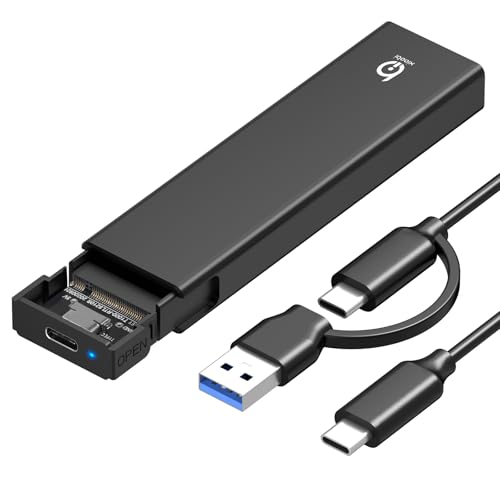
- Up to 10Gbps USB 3.2 Gen 2
- Tool-free plug-and-play installation
- Supports four standard M.2 sizes
Best For: Budget-conscious Windows NVMe users
Fastest Option
UGREEN 20Gbps NVMe/SATA Enclosure

- Up to 20Gbps USB 3.2 Gen 2x2
- Supports NVMe and SATA NGFF M.2 drives
- Cooling-focused aluminum design
Best For: Windows users with a USB 3.2 Gen 2x2 port
Best for 2.5-Inch Drives
SABRENT USB 3.0 SATA Enclosure

- Fits standard 2.5-inch SATA drives
- Tool-free plug-and-play setup
- Up to 5Gbps USB 3.0 transfers
Best For: Windows users with 2.5-inch SATA SSDs or HDDs
Versatile Pick
SSK M.2 NVMe/SATA SSD Enclosure

- Supports compatible NVMe and SATA M.2 drives.
- 10Gbps USB 3.2 Gen 2 with UASP and TRIM.
- Includes USB-C, USB-A, thermal pads, and screwdriver.
Best For: Windows users needing broad M.2 drive compatibility
Tool-Free Choice
SABRENT Tool-Free NVMe/SATA Enclosure

- Installs and removes M.2 SSDs without tools.
- Supports NVMe and SATA drives in three lengths.
- USB 3.2 Type-C reaches up to 10Gbps.
Best For: Quick drive swaps and portable M.2 storage
NVMe Specialist

- Supports NVMe M-Key and M+B Key drives.
- Fits 2230, 2242, 2260, and 2280 sizes.
- Tool-free design with USB 3.2 Gen 2 connectivity.
Best For: NVMe-only users needing compact size flexibility
Premium NVMe/SATA Pick

- 10Gbps USB-C performance
- Supports NVMe and SATA M.2 drives
- Tool-free design with IP55 protection
Best For: Fast, durable M.2 storage transfers on Windows
Best 2.5-Inch Value

- Fits 2.5-inch SATA SSDs and HDDs
- Includes USB-C and USB-A cables
- Tool-free installation and 18-month warranty
Best For: Repurposing 2.5-inch SATA drives on Windows
Best Transparent Design

- Clear case shows the installed drive
- Supports 2.5-inch SATA drives up to 6TB
- Tool-free setup with UASP support
Best For: Simple, visible 2.5-inch SATA storage on Windows
Best Overall – UGREEN 10Gbps NVMe Enclosure
For shoppers comparing ssd enclosures for windows, the UGREEN USB-C M.2 enclosure is a versatile NVMe option with 10Gbps USB 3.2 Gen 2 performance, tool-free installation, and broad M.2 size support. It works with Windows without requiring drivers and includes both USB-C and USB-A cables.
Best For: Windows users who want a portable, tool-free enclosure for M.2 NVMe SSDs.
Pros:
- Supports USB 3.2 Gen 2 speeds up to 10Gbps with a suitable cable and port.
- Fits M-Key and B+M Key NVMe drives in 2230, 2242, 2260, and 2280 sizes.
- Includes thermal padding, silicone protection, UASP/TRIM support, and safety protections.
- Works with Windows, macOS, Linux, Android, and iOS systems.
Cons:
- Does not support SATA NGFF or mSATA SSDs.
- Reaching 10Gbps requires a compatible USB-C 3.2 Gen 2 data connection.
This is a well-rounded choice for Windows users with an NVMe drive, especially if you value simple installation and included cable flexibility. Confirm your SSD protocol before buying.
Best Budget-Friendly Pick – Xiaobi Tool-Free NVMe Enclosure
The Xiaobi M.2 enclosure offers a straightforward way to use an NVMe SSD externally with Windows. Its USB 3.2 Gen 2 interface supports transfers up to 10Gbps, while the tool-free design and included thermal pad keep setup simple.
Best For: Windows users seeking an affordable, plug-and-play enclosure for standard M.2 NVMe drives.
Pros:
- Supports transfer rates up to 10Gbps over USB 3.2 Gen 2.
- Accepts M-Key and B+M Key NVMe SSDs in 2230, 2242, 2260, and 2280 formats.
- Tool-free installation requires no drivers or software.
- Aluminum and silicone thermal-pad construction helps manage heat during transfers.
Cons:
- Not compatible with SATA NGFF, mSATA, or SSDs with heatsinks.
- Actual speed depends on the SSD, USB port, system, and NVMe type.
- Its warranty is listed as 12 months.
This enclosure covers the essentials for a Windows-based external NVMe setup. It is a practical fit when compatibility with a standard bare M.2 drive matters more than premium extras.
Fastest Option – UGREEN 20Gbps NVMe/SATA Enclosure
For buyers who want higher potential throughput, this UGREEN enclosure supports both PCIe NVMe and SATA NGFF M.2 SSDs. Its USB 3.2 Gen 2×2 interface is rated for up to 20Gbps, making it a strong candidate among ssd enclosures for windows when the computer has a matching port.
Best For: Windows users who need one enclosure for compatible NVMe and SATA M.2 drives.
Pros:
- Supports both PCIe NVMe and SATA NGFF SSDs in 2230, 2242, 2260, and 2280 sizes.
- Offers up to 20Gbps through USB 3.2 Gen 2×2.
- Aluminum housing, thermal pad, and silicone cover help with cooling and protection.
- Supports UASP/TRIM and includes over-current and short-circuit protection.
Cons:
- 20Gbps requires a USB 3.2 Gen 2×2 interface; other connections may run at lower speeds.
- Does not support mSATA drives.
- Uses one screw to secure the SSD rather than a fully tool-free installation.
This is the most flexible and speed-focused option in the group, but its headline performance depends on the host computer’s USB protocol. It is especially useful for users with both NVMe and SATA M.2 drives.
Best for 2.5-Inch Drives – SABRENT USB 3.0 SATA Enclosure
The SABRENT EC-UASP is designed for standard 2.5-inch SATA SSDs and hard drives rather than M.2 modules. For Windows users with a notebook-size SATA drive, it provides tool-free installation, plug-and-play operation, and USB 3.0 connectivity up to 5Gbps.
Best For: Windows users converting a 2.5-inch SATA SSD or hard drive into an external drive.
Pros:
- Fits standard 2.5-inch SATA and SATA II notebook drives.
- Tool-free, hot-swappable, plug-and-play design requires no drivers.
- Supports USB 3.0 speeds up to 5Gbps and UASP for SATA III SSDs.
- Also works with USB 2.0 and USB 1.1 connections.
Cons:
- Does not support M.2 NVMe or M.2 SATA form factors.
- USB 2.0 connections are limited to up to 480Mbps.
- The enclosure uses a plastic housing.
If your drive is a 2.5-inch SATA model, this is a simpler and more appropriate choice than an M.2 enclosure. Check the drive’s physical form factor before ordering.
Versatile Pick – SSK M.2 NVMe/SATA SSD Enclosure
If you need one of the more flexible ssd enclosures for windows, the SSK SHE-C325 PRO supports both NVMe PCIe and SATA M.2 drives in 2242, 2260, and 2280 sizes. Its USB 3.2 Gen 2 connection can reach 10Gbps, while the included cables make it easier to connect with either USB-C or USB-A ports.
Best For: Windows users who want one enclosure for compatible NVMe and SATA M.2 SSDs.
Pros:
- Supports M-Key and B+M Key NVMe PCIe or SATA M.2 SSDs.
- USB 3.2 Gen 2 provides up to 10Gbps transfer speeds and supports UASP and TRIM.
- Includes USB-C and USB-A cables, thermal pads, and a screwdriver.
- Aluminum construction helps with heat dissipation and portability.
Cons:
- Does not support M.2 PCIe AHCI drives, mSATA SSDs, Wi-Fi cards, or other non-M.2 devices.
- The SSD is not included and may need formatting before use.
This is a practical choice when drive compatibility and connection flexibility matter. Confirm that your SSD uses a supported M.2 interface before buying.
Tool-Free Choice – SABRENT Tool-Free NVMe/SATA Enclosure
The SABRENT EC-SNVE is a straightforward option among ssd enclosures for windows, especially if you regularly swap bare M.2 drives. Its tool-free installation, USB 3.2 Type-C interface, and support for both NVMe and SATA formats make it convenient for laptop bags and quick upgrades.
Best For: Users who want quick, screwdriver-free access to bare 2242, 2260, or 2280 M.2 SSDs.
Pros:
- Tool-free design lets you install or remove an SSD in seconds.
- Supports M.2 NVMe and SATA SSDs in 2242, 2260, and 2280 sizes.
- USB 3.2 Type-C supports up to 10Gbps and is backward compatible with USB 3.1 and USB 3.0.
- Compact aluminum-and-ABS construction includes a thermal pad.
Cons:
- There is no clearance for an SSD with a pre-installed heatsink.
- Includes a Type-C-to-Type-C cable, so a USB-A connection may require another cable or adapter.
- Does not support 2.5-inch SATA drives or mSATA SSDs.
Choose this enclosure if convenience is more important than heatsink clearance. It is also a good fit for users who frequently move compatible M.2 drives between systems.
NVMe Specialist – FIDECO M.2 NVMe SSD Enclosure
For Windows systems using NVMe drives, the FIDECO M210 is a focused choice among ssd enclosures for windows. It supports M-Key and M+B Key NVMe SSDs from 2230 through 2280, with a tool-free sandwich design and USB 3.2 Gen 2 connectivity rated for up to 10Gbps.
Best For: Windows users with NVMe-only M.2 SSDs who want tool-free installation and broad size support.
Pros:
- Supports M-Key and M+B Key NVMe SSDs in 2230, 2242, 2260, and 2280 sizes.
- Tool-free sandwich design simplifies installation and helps the thermal pad contact the drive.
- USB 3.2 Gen 2 and UASP support speeds up to 10Gbps in theory.
- Includes a USB-C cable with an attached USB-A adapter.
Cons:
- Does not support M.2 SATA SSDs.
- A new SSD must be initialized before the computer can recognize it.
This enclosure makes sense when you have an NVMe drive and want support for several compact M.2 lengths. Avoid it if your drive is SATA-based, even if it uses the M.2 form factor.
Premium NVMe/SATA Pick – ASUS Cobble M.2 SSD Enclosure
For shoppers comparing SSD enclosures for Windows, the ASUS Cobble is a versatile M.2 option with USB-C 10Gbps connectivity. It supports both NVMe and SATA M.2 drives, accepts sizes from 2230 to 2280, and adds tool-free installation plus IP55 water and dust resistance.
Best For: Windows users who need a fast, durable enclosure for NVMe or SATA M.2 SSDs and cross-device transfers.
Pros:
- USB 3.2 Gen 2 provides up to 10Gbps data transfer.
- Supports both NVMe and legacy SATA M.2 SSDs.
- Tool-free Q-Latch design enables quick drive swaps.
- IP55 water and dust resistance adds protection in demanding environments.
Cons:
- Designed for M.2 drives, not 2.5-inch SATA SSDs.
- USB-C connectivity may require an adapter for older Windows PCs.
The ASUS Cobble is the strongest choice here for modern M.2 storage, especially when speed, broad device support, and physical protection matter more than the lowest price.
Best 2.5-Inch Value – BENFEI SATA SSD Enclosure
The BENFEI enclosure is a practical choice among SSD enclosures for Windows when you are working with a 2.5-inch SATA drive. Its tool-free design supports SATA I, II, and III drives, includes USB Type-C and Type-A cabling, and works with UASP for improved transfer performance.
Best For: Windows users repurposing a 2.5-inch SATA SSD or hard drive for external storage and file transfers.
Pros:
- Supports 2.5-inch SATA I/II/III SSDs and HDDs up to 6TB.
- Includes both USB Type-C and Type-A cable connections.
- Tool-free, plug-and-play installation requires no driver.
- Backed by an 18-month warranty.
Cons:
- Limited to 2.5-inch drives rather than M.2 SSDs.
- Its stated 6Gbps rate reflects the SATA interface, not 10Gbps USB performance.
Choose the BENFEI if compatibility with standard 2.5-inch SATA drives and flexible Windows connectivity are your priorities. It is especially useful for upgrading or accessing an older internal drive.
Best Transparent Design – ORICO 2.5-Inch SATA Enclosure
The ORICO 2139U3 is a straightforward option among SSD enclosures for Windows, built for 2.5-inch SATA SSDs and hard drives. Its transparent case lets you see the installed drive, while tool-free installation, UASP support, and a USB 3.0 connection keep setup simple.
Best For: Windows users who want an affordable, visible enclosure for a 2.5-inch SATA drive.
Pros:
- Transparent housing makes the installed drive easy to identify.
- Supports 2.5-inch 7mm and 9.5mm SATA drives up to 6TB.
- Tool-free, plug-and-play installation with hot-swapping.
- UASP support can improve performance over traditional USB 3.0 operation.
Cons:
- USB 3.0 interface is rated up to 5Gbps.
- Uses a USB-A cable, which may need an adapter for USB-C-only computers.
- No warranty is specified in the supplied details.
The ORICO is a good fit for basic external storage, drive transfers, and users who appreciate its clear enclosure. It offers broad 2.5-inch SATA compatibility without requiring tools or drivers.
How We Picked the Best SSD Enclosures for Windows
We focused on compatibility, interface speed, installation convenience, heat management, construction, and everyday Windows usability. The selection includes enclosures for M.2 NVMe drives, M.2 SATA drives, and 2.5-inch SATA SSDs, so you can choose a case that matches the drive you already own.
We also considered practical features such as tool-free installation, USB-C connectivity, UASP support, controller reliability, portability, and protection against dust or water. Advertised transfer rates are theoretical maximums; real-world performance depends on the SSD, USB port, cable, file sizes, and Windows configuration.
Quick Comparison
| Best For | Recommended Type | What to Look For |
|---|---|---|
| Fast everyday transfers | 10Gbps NVMe enclosure | USB 3.2 Gen 2 and efficient heat dissipation |
| Maximum external speed | 20Gbps NVMe/SATA enclosure | USB 3.2 Gen 2×2 support on both enclosure and PC |
| Reusing an older M.2 drive | Dual-protocol M.2 enclosure | Support for NVMe and SATA, plus M-key and B+M-key layouts |
| 2.5-inch SATA SSD | 2.5-inch SATA-to-USB enclosure | USB 3.0 or faster, UASP, and a secure tool-free latch |
| Travel and field use | Rugged NVMe enclosure | Protective shell, cooling, and water or dust resistance |
Key Buying Factors for SSD Enclosures for Windows
Drive Compatibility
Check both the physical format and protocol. M.2 drives can use NVMe over PCIe or SATA, and the two are not interchangeable unless the enclosure explicitly supports both. Also verify the key type: M-key and B+M-key drives are common, while some enclosures support only one arrangement. A 2.5-inch SATA enclosure is designed for a different drive size and connector.
USB Speed and Connector
A 10Gbps enclosure is a strong balance for most Windows computers. A 20Gbps model can be faster, but only when connected to a compatible USB 3.2 Gen 2×2 port. USB-C describes the connector shape, not necessarily the speed, so check the full specification and included cable.
Cooling and Sustained Performance
NVMe SSDs can become hot during long transfers. Aluminum bodies, thermal pads, ventilation, and heatsinks help maintain performance. For occasional file copying, basic cooling may be sufficient; for video work, cloning, or frequent backups, prioritize better heat dissipation.
Installation and Portability
Tool-free designs are convenient for swapping drives, while a screw-secured enclosure may provide a firmer fit. Confirm that the case accepts your SSD length, such as 2230, 2242, 2260, or 2280. A short, durable cable and a secure closure matter when carrying the enclosure in a laptop bag.
Who Should Buy Which SSD Enclosures for Windows?
- Choose a 10Gbps NVMe enclosure for a modern M.2 PCIe SSD and everyday backups, gaming storage, or file transfers.
- Choose a 20Gbps model if your Windows desktop or laptop has a matching high-speed port and you regularly move large files.
- Choose a dual NVMe/SATA M.2 enclosure if you are unsure which protocol your spare drive uses or want flexibility for future upgrades.
- Choose a 2.5-inch SATA enclosure for an older laptop SSD or 2.5-inch hard drive. These models are usually affordable and simple to use.
- Choose a rugged enclosure if you travel frequently, work in less controlled environments, or want additional protection from dust and splashes.
Before buying, confirm your SSD type, Windows computer’s available USB standard, and the enclosure’s included cable. Those three checks prevent most compatibility and performance surprises.