Choosing among USB duplicators under $1,000 means balancing port count, copying speed, drive compatibility, and data-erasure features. The right unit can simplify software deployment, media distribution, backups, or secure device preparation.
We compared 10 standalone duplicators and related disc-copying systems to help you find the best fit for occasional office use, portable workflows, or higher-volume production.
Best 10 USB Duplicators Under 1000 Picks for 2026
Best High-Capacity Pick
Vinpower 1-to-11 USB Duplicator

- 11 target ports for larger duplication jobs
- Standalone Smart Copy and Raw Mode
- Supports external HDDs, SSDs, and secure erase
Best For: High-volume business and media duplication
Best Warranty Coverage

- Copies up to seven drives simultaneously
- Up to 2GB per minute transfer rate
- Includes lifetime technical support
Best For: Desktop duplication with extended support
Best Optical Disc Alternative
Vinpower 1-to-5 DVD/CD Duplicator

- Five-target standalone disc duplication
- Writes DVDs up to 24x and CD-Rs up to 52x
- Supports M-Disc archival media
Best For: DVD and CD production workflows
Best Portable Pick
EZ Dupe 1-to-4 Mini USB Plus MK II
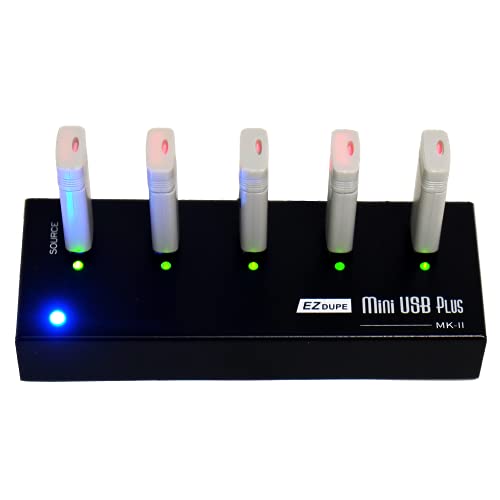
- Compact 12.8-ounce standalone design
- Copies up to four drives asynchronously
- Supports USB 1.0, 2.0, and 3.0 media
Best For: Portable small-batch flash-drive duplication
Most Versatile
Vinpower 1-to-7 USB Duplicator

- Copies up to seven USB drives without a PC
- Includes Smart, Raw, and error-skip copy modes
- Adds DoD erasing and daisy-chain expansion
Best For: Portable business, IT, and event duplication
Best Compact Pick
EZ Dupe 1-to-7 Mini USB Plus MK III

- Copies up to seven drives simultaneously
- Standalone operation with no computer required
- Compact design and support for multiple USB generations
Best For: Simple, portable flash-drive batch copying
Best for Small Batches
Vinpower 1-to-3 USB Duplicator
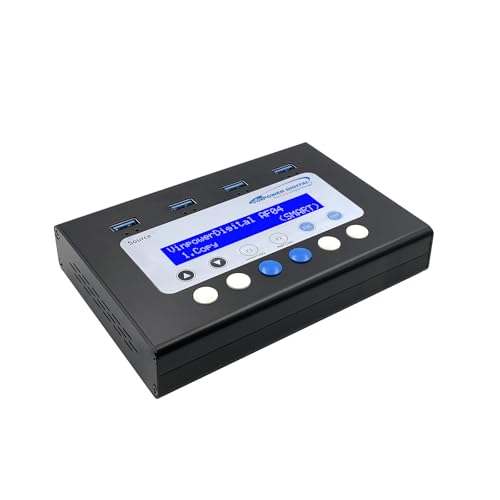
- Duplicates up to three USB drives standalone
- Offers Smart, Raw, and error-skip copy modes
- Includes DoD-standard secure erasing
Best For: Small office and professional duplication runs
Best with Extra Features

- Copies one source to up to 23 targets
- Stand-alone LCD-guided operation
- Supports flash drives, HDDs, and SSDs
Best For: Large-scale USB duplication and bootable-drive distribution
Versatile IT Pick

- Clones and erases up to five USB drives
- Supports sector-by-sector copying
- Includes verification and overwrite modes
Best For: Technicians handling duplication and secure drive sanitation
Flexible Bulk Copier

- Duplicates up to 23 targets independently
- Offers Smart Copy and bit-by-bit Raw Mode
- Securely erases USB, HDD, and SSD devices
Best For: High-volume copying with flexible modes and secure erasure
Best High-Capacity Pick – Vinpower 1-to-11 USB Duplicator
For buyers comparing USB duplicators under 1000, the Vinpower USBShark-11T-BK is a substantial standalone option with 11 target ports. It can duplicate USB flash drives, external hard drives, and SSDs without a computer, while asynchronous operation helps keep multiple jobs moving independently.
Best For: Business, gaming, and other workflows that need to duplicate many USB devices at once.
Pros:
- Operates independently without a PC or software.
- Supports asynchronous copying for independent target jobs.
- Offers Smart Copy and bit-by-bit Raw Mode.
- Can securely erase USB-connected external HDDs and SSDs.
Cons:
- Its 12-pound weight makes it less convenient to move frequently.
- The listed USB 1.1 hard-disk interface may limit transfer performance compared with newer interfaces.
The USBShark-11T-BK stands out when throughput capacity and flexible copy modes matter more than portability. Its secure erase function is also useful for organizations reusing storage devices.
Best Warranty Coverage – Systor 1-to-7 USB Duplicator
The Systor SYS-USBD-7 is a practical choice among USB duplicators under 1000 for users who want seven target ports and standalone operation. It copies at up to 2GB per minute, with the stated speed maintained as more drives are loaded.
Best For: Business and personal users needing repeatable seven-drive copying with strong support coverage.
Pros:
- Requires no computer or software.
- Supports synchronous and asynchronous copy modes.
- Performs bit-by-bit duplication from the source drive.
- Includes one-year parts, three-year labor, and lifetime technical support.
Cons:
- USB Type-C drives require an adapter.
- The 10-pound desktop form factor is not especially portable.
With seven targets, hot-swappable operation, and a detailed support package, the SYS-USBD-7 is a balanced desktop duplicator. It is especially appealing when after-sale assistance is an important purchasing factor.
Best Optical Disc Alternative – Vinpower 1-to-5 DVD/CD Duplicator
Vinpower Digital Standard 1 to 5 Target 24x DVD CD Disc Duplicator Tower SATA Optical Drives - Black
Check Price On AmazonAlthough it is not a USB model, the Vinpower Econ-S5T-DVD-BK is worth considering alongside USB duplicators under 1000 if your work still involves optical media. This standalone tower handles five target discs, supports up to 24x DVD and 52x CD-R writing, and requires no PC.
Best For: Businesses and individuals producing multiple DVD or CD copies, including archival M-Disc projects.
Pros:
- Duplicates discs without a computer.
- Supports up to 24x DVD and 52x CD-R write speeds.
- Recognizes common CD formats and special features such as CD-TEXT and over-burning.
- Supports M-Disc DVD media for long-term archival recording.
Cons:
- It duplicates optical discs rather than USB storage.
- It will not copy encrypted discs.
- At 17 pounds, it is the heaviest product in this selection.
The Econ-S5T-DVD-BK is a specialized choice rather than a direct USB alternative. Choose it when disc production or archival media is the priority, not flash-drive duplication.
Best Portable Pick – EZ Dupe 1-to-4 Mini USB Plus MK II
The updated EZ Dupe Mini USB Plus MK II is a compact option for shoppers comparing USB duplicators under 1000. It copies up to four USB flash drives simultaneously, reaches a stated maximum of 2.5GB per minute, and runs without a computer or traditional desktop setup.
Best For: Portable copying of USB 1.0, 2.0, and 3.0 flash drives in small business or personal workflows.
Pros:
- Compact 6-by-2.3-by-0.8-inch design weighing 12.8 ounces.
- Supports asynchronous copying to up to four drives.
- Works with USB 1.0, 2.0, and 3.0 flash media.
- Can use a power bank or USB power source.
Cons:
- External USB storage devices need their own power source.
- Its four-target capacity is lower than the larger duplicators here.
- Actual speed depends on the connected drives’ read and write performance.
The Mini USB Plus MK II is the most travel-friendly choice in this group. Its small footprint and flexible power options make it useful for field work, while four asynchronous targets cover modest duplication runs.
Most Versatile – Vinpower 1-to-7 USB Duplicator
For shoppers comparing usb duplicators under 1000, the Vinpower 1-to-7 model stands out for combining standalone copying, secure erasing, and recovery-oriented features. It can duplicate up to seven USB drives without a PC and supports both Smart Copy and bit-by-bit Raw Copy modes.
Best For: IT teams, businesses, schools, event organizers, and field-service users who need flexible, portable USB duplication.
Pros:
- Copies up to seven USB drives without a computer or software.
- Smart Copy, Raw Copy, and Read Error Skip support different duplication and recovery needs.
- DoD 5220.22-M erasing and optional USB-C PD power-bank operation add practical versatility.
- Compatible units can be daisy-chained for expanded capacity.
Cons:
- Daisy-chain cable is not included.
- Its broader feature set may be more than needed for occasional basic copying.
This is a strong all-around choice when you want a portable USB duplicator that also handles secure erasure and difficult source drives. Its seven-target capacity and expansion option make it especially useful for recurring deployments.
Best Compact Pick – EZ Dupe 1-to-7 Mini USB Plus MK III
Among usb duplicators under 1000, the EZ Dupe Mini USB Plus MK III is a compact plug-and-use option for copying multiple flash drives at once. Its standalone design supports asynchronous duplication to as many as seven USB drives, with an advertised maximum copy speed of 2.5GB per minute depending on the media.
Best For: Users who want a lightweight, straightforward duplicator for USB flash drives and compatible externally powered USB storage.
Pros:
- Duplicates up to seven USB flash drives simultaneously without a computer.
- Updated version claims 25% faster copying than the original model.
- Supports USB 1.0, 2.0, and 3.0 flash drives, plus external storage with its own power source.
- Compact 12-ounce design with indication lights.
Cons:
- External USB hard drives must have their own power source.
- Actual speed depends on the read and write performance of the connected drives.
The EZ Dupe is a sensible choice when capacity and simplicity matter more than advanced erasing or recovery functions. Its seven-port asynchronous operation can help keep batches moving without requiring a PC.
Best for Small Batches – Vinpower 1-to-3 USB Duplicator
For buyers seeking usb duplicators under 1000 without paying for more target ports than they need, this Vinpower model offers standalone duplication for up to three USB drives. It pairs Smart Copy and Raw Copy with secure erasing and Read Error Skip for a practical small-batch workflow.
Best For: Offices, schools, healthcare organizations, legal teams, and businesses that regularly duplicate or securely retire a few USB drives at a time.
Pros:
- Copies up to three USB drives without a PC.
- Smart Copy and Raw Copy support both faster file duplication and bit-by-bit cloning.
- DoD 5220.22-M erasing helps prepare drives for reuse or disposal.
- Read Error Skip can bypass damaged sectors to recover readable data.
Cons:
- Three target ports provide less batch capacity than 1-to-7 models.
- The supplied notes do not specify a copy-speed rating.
This model is well suited to regular but modest duplication workloads. It keeps the convenience and data-management features of a professional standalone unit while using a smaller three-drive format.
Best with Extra Features – DupliM 1:23 USB Duplicator
DupliM 1:23 USB Flash Drive Duplicator Stand-Alone Burner Cloner Copier (1 to 23)
Check Price On AmazonIf you need USB duplicators under 1000 for larger duplication runs, this DupliM stand-alone model can copy one source drive to up to 23 targets without a computer. Its LCD-guided three-step workflow and support for USB 2.0/3.0 flash drives make it suited to repeatable bulk copying.
Best For: IT teams, technicians, and organizations duplicating bootable USB drives or distributing data to many targets.
Pros:
- Copies from one source to up to 23 target drives.
- Stand-alone operation with a simple three-step LCD process.
- Supports USB flash drives plus external 2.5-inch hard drives and SSDs.
- Works with FAT, FAT32, NTFS, HFS, Ext2, Ext3, and Ext4 file systems.
Cons:
- Its 7-pound size and 23-slot capacity may be excessive for occasional home use.
- Maximum supported hard-drive capacity is listed as under 2TB.
With broad file-system support, bootable-drive copying, and a high target count, the DupliM is a practical choice when throughput volume matters more than portability.
Versatile IT Pick – StarTech 1:5 USB Duplicator
Among USB duplicators under 1000, the StarTech 1:5 model stands out for combining duplication, verification, and drive-erasing functions in a compact stand-alone unit. It supports system-and-file copying, sector-by-sector cloning, and several erase modes without requiring a computer.
Best For: Technicians and IT professionals who need to clone, verify, sanitize, and manage smaller batches of USB drives.
Pros:
- Duplicates or erases up to five USB drives without a computer.
- Offers file-system copying and sector-by-sector copying for broader compatibility.
- Includes quick erase, single-pass, and three-pass overwrite modes.
- LCD monitoring, error scanning, and Copy & Compare help with quality checks.
Cons:
- Its five-drive capacity is lower than the larger 1:23 models in this roundup.
- Asynchronous copying is limited to source content under 64MB.
The StarTech is the most feature-focused option here for smaller production or service workflows, especially when secure erasure and verification are as important as duplication.
Flexible Bulk Copier – Vinpower USBShark 1:23
This Vinpower model is one of the USB duplicators under 1000 designed for high-volume, stand-alone copying. Its 1:23 layout supports asynchronous duplication, while Smart Copy and Raw Mode let you choose between copying accessible content quickly or duplicating data bit by bit.
Best For: Businesses, gaming operations, and production environments that need flexible bulk copying or secure USB and external-drive erasure.
Pros:
- Copies one master to up to 23 targets without a PC.
- Asynchronous duplication handles different target completion times independently.
- Smart Copy and Raw Mode provide two duplication approaches.
- Supports secure erasure of USB devices and external HDDs or SSDs.
Cons:
- At 16 pounds, it is substantially less portable than compact duplicators.
- The supplied specifications list a USB 1.1 hard-disk interface.
The USBShark-23T-BK is a strong fit when a high port count and flexible copying modes are priorities, particularly for users who also need a thorough drive-erasure function.
How We Picked the Best USB Duplicators Under 1000
We focused on standalone systems that can copy or erase multiple USB drives without requiring a computer. Our comparison considered the number of target ports, stated transfer speed, support for flash drives and external USB storage, standalone operation, display and controls, portability, and the intended workload.
The selection includes compact four- and seven-target models, higher-capacity 11- and 23-target systems, dedicated erasers and cloners, and one optical-disc tower for buyers whose workflow includes CDs or DVDs. Because advertised performance depends on source media, target drives, file size, and data type, treat speed ratings as useful benchmarks rather than guaranteed results.
Quick Comparison
- Small batches: Three- to five-target models take up less space and can be more practical for occasional copying.
- Regular office or IT deployment: Seven-target systems offer a useful balance between throughput and footprint.
- High-volume production: Eleven- and 23-target duplicators reduce the number of repeated cycles.
- Secure reuse: Choose a model with dedicated erasing or sanitizing functions when drives will be redeployed.
- Mixed media workflows: A system supporting both USB flash drives and USB hard drives may be more versatile than a flash-only unit.
Key Buying Factors for USB Duplicators Under 1000
Target Count and Physical Space
A higher 1-to-n ratio increases batch capacity, but it also requires more desk or rack space. Match the number of target ports to your normal workload rather than paying for unused capacity.
Copying and Erasing Performance
Check the advertised transfer rate, then consider whether your source material contains many small files or a single large image. For sensitive data, verify that the erasure modes meet your organization’s requirements and that completion reports are clear.
Drive and File Compatibility
Confirm support for the USB drive types, capacities, partition layouts, and file systems you use. If you need to clone bootable media or external hard drives, look for explicit support instead of assuming every USB duplicator handles those tasks.
Controls, Verification, and Reliability
LCD guidance, automatic detection, copy verification, and error reporting make repetitive jobs easier to manage. Also check warranty coverage, replacement parts, and whether the manufacturer provides firmware or technical support.
Who Should Buy Which USB Duplicators Under 1000?
Occasional home or small-office users should favor a compact three- to five-target unit. IT departments and support teams will usually benefit from seven-target capacity and erasing features. Schools, installers, event teams, and media distributors may save time with 11- or 23-target systems when batches are frequent. Organizations handling sensitive data should prioritize a dedicated sanitizer or eraser with documented overwrite behavior. Finally, buyers producing optical media should choose a DVD/CD duplicator rather than a USB-only model.