Choosing a broadcast microphone with audio interface support can make a huge difference in voice clarity, gain control, and overall ease of use.
Whether you are building a podcast setup, upgrading your streaming rig, or want a more polished desktop recording chain, the best options balance sound quality, connectivity, and simple operation.
Best 10 Broadcast Microphone with Audio Interface Picks for 2026
Pro Broadcast Pick
RØDE PodMic Dynamic Broadcast Mic

- XLR-only mic needs an audio interface or mixer.
- Cardioid dynamic design helps reject room noise.
- Built-in swing-mount, pop filter, and shock mount.
Best For: Podcast and streaming setups that already use XLR gear.
Dual-Mode Gaming Mic
FIFINE AM8 USB/XLR Dynamic Microphone

- USB and XLR connectivity for flexible setups.
- Cardioid dynamic capsule helps cut off-axis noise.
- USB mode includes mute, RGB, gain, and headphone jack.
Best For: Gamers and streamers who want easy USB use with XLR upgradeability.
Most Versatile Choice
RØDE PodMic USB Broadcast Microphone

- XLR and USB-C support interface or computer setups.
- Internal DSP adds APHEX-style processing via RØDE Central.
- USB mode includes zero-latency headphone monitoring.
Best For: Podcasters and streamers who want maximum connection flexibility.
Studio Kit Value Pick
MAONO A04 Gen2 XLR/USB Condenser Mic

- USB and XLR support computers, interfaces, and mixers.
- Includes arm stand, shock mount, pop filter, and windscreen.
- USB software offers gain, EQ, noise reduction, and dynamics control.
Best For: Home podcasters and creators who want an all-in-one condenser kit.
Gaming Bundle Pick

- XLR dynamic mic plus gaming mixer in one bundle.
- USB mode adds mute, gain, monitoring, and headphone control.
- RGB lighting and fader controls suit streaming desks.
Best For: Gamers and streamers who want flexible XLR/USB control
Feature-Packed Kit
TONOR E7 Mic and Audio Interface Kit
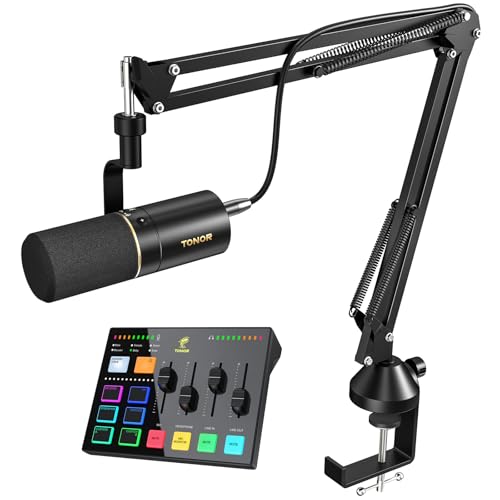
- Includes mic, audio interface, and boom arm in one kit.
- Independent sliders and mute button simplify live control.
- RGB modes and voice effects add streaming extras.
Best For: Creators who want an all-in-one podcast and streaming setup
Streamlined Streaming Pick
TONOR USB Mixer Bundle with XLR Mic

- XLR dynamic mic paired with a USB mixer.
- Separate sliders and mute buttons simplify control.
- Plug-and-play support for Mac, Windows, PS4, and PS5.
Best For: Streamers who want a simpler mixer bundle with dynamic mic support
Streaming-Ready Dynamic Kit
FIFINE AM8T USB/XLR Gaming Mic Set

- USB and XLR support for flexible setups
- Cardioid dynamic mic helps reject background noise
- Includes boom arm, mute, gain, and monitoring jack
Best For: Gamers and streamers wanting a complete starter kit
Compact Podcast XLR Mic
MAONO PD100 Studio Dynamic Mic

- XLR mic for audio interfaces and mixers
- Built-in pop filter helps control plosives
- Compact metal design with stable desktop base
Best For: Podcasting and streaming with an existing interface
Dual-Mode Desktop Mic
MAONO HD300T USB/XLR Dynamic Mic

- USB and XLR outputs for flexible workflows
- Cardioid dynamic capsule helps cut background noise
- Includes shock mount, pop filter, and headphone jack
Best For: Users who want a starter mic that can grow with their setup
Pro Broadcast Pick – RØDE PodMic Dynamic Broadcast Mic
If you want a broadcast microphone with audio interface support, the RØDE PodMic is a straightforward XLR-only option built for podcasting, streaming, and voice work. It does not connect directly to a computer over USB, so you’ll need a RØDECaster, AI-1, AI-Micro, or another compatible audio interface or mixer to use it.
Best For: Creators who already use an XLR audio interface and want a rugged, broadcast-style dynamic mic.
Pros:
- Cardioid dynamic capsule helps reject room noise and background sound.
- Integrated swing-mount and internal pop filter reduce the need for extra accessories.
- Broadcast-grade build with internal shock mount and rich, balanced voice tone.
Cons:
- XLR connection only, so it requires an audio interface or mixer.
- Not a plug-and-play USB mic for direct computer use.
For a classic broadcast setup, the PodMic makes the most sense when paired with an interface you already trust. It’s a focused vocal mic rather than an all-in-one solution, but that’s part of why it fits serious podcast and streaming rigs so well.
Dual-Mode Gaming Mic – FIFINE AM8 USB/XLR Dynamic Microphone
The FIFINE AM8 is a broadcast microphone with audio interface support if you want XLR flexibility, but it also works as a USB mic for easier setup. That makes it a practical choice for gaming, streaming, and podcasting when you want one mic that can start simple and later move into a more advanced interface-based setup.
Best For: Streamers and beginners who want USB convenience now and XLR upgrade flexibility later.
Pros:
- USB and XLR connectivity give you two ways to use the same mic.
- Cardioid dynamic design helps reject unwanted off-axis noise.
- USB mode adds tap-to-mute, RGB lighting, gain control, and headphone monitoring.
Cons:
- XLR use requires a separate audio interface or mixer and cable.
- RGB and function keys are inactive in XLR mode.
This is a good fit if you want a microphone that can serve as a simple USB desktop mic today and a more traditional interface-based mic later. Just keep in mind that several of the convenience features are USB-only.
Most Versatile Choice – RØDE PodMic USB Broadcast Microphone
The RØDE PodMic USB is a versatile broadcast microphone with audio interface compatibility thanks to its dual XLR and USB-C outputs. If you’re building a podcast, streaming, or content creation setup and want one mic that works with both a computer and a traditional interface or mixer, this model is built for that job.
Best For: Creators who want one broadcast mic that can work with either USB or an XLR audio interface.
Pros:
- XLR and USB-C connectivity supports both interfaces and direct computer use.
- Internal DSP with APHEX Aural Exciter and Big Bottom via RØDE Central.
- Headphone port with zero-latency monitoring and dedicated volume control in USB mode.
Cons:
- Premium feature set may be more than needed for a basic setup.
- Some advanced functions are tied to USB use and RØDE Central.
If you want flexibility without giving up broadcast-style voice capture, this is the strongest all-around option in the group. It’s especially useful when you may switch between a computer-only workflow and an interface-based studio setup.
Studio Kit Value Pick – MAONO A04 Gen2 XLR/USB Condenser Mic
The MAONO A04 Gen2 is a broadcast microphone with audio interface support that also works over USB for plug-and-play recording. It’s a condenser mic rather than a dynamic model, so it’s aimed at clear, detailed vocal capture for podcasting, content creation, voiceover, and similar home-studio work.
Best For: Home creators who want a feature-rich condenser kit with both USB convenience and XLR flexibility.
Pros:
- Dual USB/XLR connectivity works with interfaces, mixers, computers, and phones.
- Includes a full accessory kit with arm stand, shock mount, pop filter, and windscreen.
- USB mode adds software control for gain, noise reduction, EQ presets, compressor, and limiter.
Cons:
- XLR mode requires phantom power for some device connections.
- XLR cable is not included.
This is the most all-in-one package here if you want a condenser mic and accessories in the box. It’s a practical pick for users who want to record straight away while still leaving room to use an audio interface later.
Gaming Bundle Pick – FIFINE XLR/USB Mic Mixer Set
If you want a broadcast microphone with audio interface that can do double duty for gaming, streaming, and podcast-style voice work, this FIFINE bundle is built around flexibility. You get an XLR dynamic mic plus a gaming mixer with quick-access controls, RGB lighting, and real-time monitoring through USB mode.
Best For: Streamers and gamers who want an all-in-one mic and mixer setup with both XLR and USB options.
Pros:
- XLR dynamic microphone for a natural conversation-style vocal sound.
- USB mode adds mute, gain, monitoring, and headphone volume controls.
- Mixer includes individual mute control, headphones monitoring, and a volume fader.
- RGB lighting with multiple effects to match a gaming desk setup.
Cons:
- All function keys and RGB features are not available when using XLR connection.
- Designed more for streaming and gaming workflows than simple plug-and-play use.
Overall, this bundle makes sense if you want a practical starter package with interface-style control and the option to move between USB convenience and XLR connection quality. It is especially appealing for users who want one setup for gaming voice, streaming, and basic podcasting.
Feature-Packed Kit – TONOR E7 Mic and Audio Interface Kit
This broadcast microphone with audio interface is aimed at creators who want a complete USB mixer and mic kit with plenty of control. The TONOR E7 combines an XLR/USB dynamic microphone, boom arm, and mixer features like volume slider control, real-time monitoring, RGB lighting, and voice effects for streaming and recording.
Best For: Content creators who want a feature-rich podcast and streaming kit with mixer controls and included boom arm.
Pros:
- All-in-one kit includes microphone, audio interface mixer, and boom arm.
- Independent controls for mic, line-in, headphone, and line-out channels.
- Real-time mic monitoring and a quick mute button for live use.
- Supports RGB lighting, voice-changing modes, reverb, and music mixing.
Cons:
- Bulkier setup than a standalone mic due to the bundled interface and arm.
- Feature set may be more than needed for simple voice capture.
If you want a single package that covers podcasting, live streaming, and general content creation, the E7 offers a lot of built-in flexibility. Its wide connectivity and channel controls make it a strong fit for users who want hands-on audio management.
Streamlined Streaming Pick – TONOR USB Mixer Bundle with XLR Mic
For shoppers looking for a broadcast microphone with audio interface that stays focused on streaming essentials, this TONOR bundle keeps the setup straightforward. It pairs an XLR dynamic microphone with a USB mixer that offers channel sliders, mute buttons, RGB lighting, and multiple sound-effect controls for gaming and content creation.
Best For: Streamers and gamers who want a simple USB-connected mixer bundle with dynamic mic support.
Pros:
- XLR dynamic microphone is built for studio-style sound and background noise cancellation.
- Separate sliders and four mute buttons make channel control easy.
- 11 RGB lighting modes plus voice transformation and custom sound buttons.
- USB plug-and-play compatibility with Mac OS, Windows, PS4, and PS5.
Cons:
- Listed as a 1-channel unit, so it is less expansive than larger mixer bundles.
- Designed mainly around streaming workflows rather than advanced studio routing.
This bundle is a good fit if you want the core benefits of a mic-and-interface package without a more complicated console-style layout. It gives you the basics for live voice work, plus enough effects and controls to support casual streaming and gaming use.
Streaming-Ready Dynamic Kit – FIFINE AM8T USB/XLR Gaming Mic Set
If you want a broadcast microphone with audio interface flexibility for gaming, streaming, or recording, the FIFINE AM8T is built around that use case. It offers USB plug-and-play for quick PC setup and XLR compatibility for use with a mixer or sound card, while the included boom arm makes desktop positioning easy.
Best For: Gamers, streamers, and home creators who want a ready-to-use mic kit with both USB convenience and XLR upgrade options.
Pros:
- USB/XLR connectivity supports both simple PC use and more advanced audio setups.
- Dynamic cardioid design helps reduce background noise for clearer voice capture.
- Includes boom arm, mute button, gain knob, headphone jack, and headphone volume control.
- RGB lighting can be customized or turned off directly from the mic.
Cons:
- XLR cable is not included.
- Desk clamp is only suitable for desktops under 2 inches thick.
The AM8T is a practical bundle if you want one mic kit that covers streaming, podcasting, voice-over, and vocal recording without extra assembly work. Its feature set leans toward convenience and control, especially for desktop creators who want monitoring and positioning tools in one package.
Compact Podcast XLR Mic – MAONO PD100 Studio Dynamic Mic
The MAONO PD100 is a straightforward broadcast microphone with audio interface support aimed at podcasting, streaming, and voice recording. Its XLR-only design is meant for use with an audio interface or mixer, and the built-in dynamic core plus inner double-layer pop filter are designed to improve plosive control and deliver a clean, mellow voice sound.
Best For: Podcasters and streamers who already use an audio interface or mixer and want a compact XLR mic with a desktop stand.
Pros:
- XLR connection works with audio interfaces, mixers, and the Maonocaster AME2.
- Dynamic core and inner double-layer pop filter help reduce plosives.
- Compact metal body is durable and easy to place on a desk.
- Includes desktop stand, rod extender, heavy base, and XLR cable.
Cons:
- XLR-only, so it does not plug directly into a computer without extra gear.
- Best results depend on already having an interface or mixer available.
For creators building a basic home studio, the PD100 keeps things simple: a solid desk setup, focused vocal pickup, and clear compatibility with pro-style audio gear. It is a sensible choice if you want broadcast-oriented sound without paying for extra USB features you may not need.
Dual-Mode Desktop Mic – MAONO HD300T USB/XLR Dynamic Mic
The MAONO HD300T is a broadcast microphone with audio interface support that covers both beginner and more advanced workflows. Its USB mode is plug and play for PC or Mac, while the XLR output connects to mixers, audio interfaces, or PA systems, making it a versatile choice for recording, streaming, and vocal work.
Best For: Creators who want one dynamic mic that can start on USB and later move into an interface-based setup.
Pros:
- USB/XLR dual outputs add flexibility for computer and interface use.
- Cardioid dynamic capsule helps reduce room noise and reverb.
- Includes headphone jack for zero-latency monitoring in USB mode.
- Comes with a shock mount, pop filter, stand, and both USB and XLR cables.
Cons:
- Headphone volume control only works in USB mode.
- Monitoring and control features are more limited when using XLR.
The HD300T stands out as the most flexible of the three because it can serve as a simple desktop USB mic today and a fuller interface-based setup later. If you want one mic kit that grows with your workflow, this bundle offers a practical path without forcing an immediate upgrade.
How We Picked the Best Broadcast Microphone with Audio Interface
For this roundup, we focused on microphones and kits that pair well with an audio interface and make sense for real-world creator setups. Priority went to clear vocal performance, reliable build quality, sensible feature sets, and compatibility with both XLR and USB where applicable. We also looked at whether each Broadcast Microphone with Audio Interface support is beginner-friendly or better suited to users who already have a mixer, interface, or streaming chain.
Quick Comparison
The main split is between pure XLR broadcast mics, hybrid USB/XLR models, and full bundles that include an interface or mixer. XLR-only microphones usually offer the cleanest upgrade path if you already own an interface. Hybrid models are the most flexible because they can start simple over USB and grow into a more advanced setup later. Bundles are the easiest choice if you want one purchase that covers more of the signal chain.
Key Buying Factors for a Broadcast Microphone with Audio Interface
Connection Type
Check whether you need XLR, USB, or both. If you want the most control and future upgrade options, XLR is the most traditional broadcast route. If you prefer plug-and-play convenience, USB can be a strong starting point.
Mic Type and Voice Rejection
Dynamic microphones generally handle room noise better than condensers, which is helpful in untreated spaces. A cardioid pattern is often the best fit for solo speaking, since it concentrates on the voice in front of the mic.
Interface Features
When choosing a Broadcast Microphone with Audio Interface compatibility, look at gain structure, headphone monitoring, mute controls, and whether the interface adds useful mixer functions. These features can make setup easier and help you monitor audio without guesswork.
Workflow and Accessories
Consider whether you need a stand, boom arm, shock mount, or bundled mixer. A complete kit may save time and money, but a simpler mic-only option can be better if you already have your preferred accessories.
Who Should Buy Which Broadcast Microphone with Audio Interface?
Choose an XLR-only mic if you already own a solid interface and want a classic broadcast chain. Pick a USB/XLR hybrid if you want flexibility and an easier transition from beginner setup to more advanced recording. Go for a bundle if you want the fastest path to a working stream or podcast desk with fewer separate purchases.
If your priority is clean spoken-word audio, controlled pickup, and a setup that can grow with your needs, a well-chosen Broadcast Microphone with Audio Interface support is one of the smartest upgrades you can make.