If you want faster track browsing, clearer waveforms, and a more performance-focused workflow, a dj controller with screens can make a big difference.
From compact portable options to pro-grade club-style models, this roundup highlights the best choices for different budgets, setups, and skill levels in 2026.
Best 10 Dj Controller with Screens Picks for 2026
Battle-Ready Scratch Pick
Pioneer DJ DDJ-REV5 2-Channel Scratch DJ Controller

- On-jog displays show playback position
- Full-size jog wheels suit scratch play
- Includes rekordbox and Serato DJ Pro support
Best For: Scratch DJs and open-format performers who want on-jog feedback.
Standalone Touchscreen Booth
Denon DJ SC LIVE 4 Standalone DJ Controller Black

- 7-inch touchscreen for browsing and mixing
- Standalone Engine DJ OS requires no laptop
- Built-in speakers improve portability
Best For: Mobile and streaming DJs who want a laptop-free, all-in-one setup.
Portable Screen-Based Mixer
Numark Mixstream Pro+ DJ Controller

- 7-inch touchscreen with adjustable brightness
- Standalone Engine DJ OS supports laptop-free use
- Built-in speakers and Wi-Fi streaming add portability
Best For: DJs who want a portable standalone controller with touchscreen control and onboard speakers.
Club Workflow Display Pro
Pioneer DJ DDJ-FLX10 4-Channel DJ Controller

- Multicolor on-jog displays show track details
- Track Separation enables live remixing
- 4-channel layout fits club-style workflows
Best For: DJs who want club-style controls, track separation, and visual feedback on the jog wheels.
Portable Standalone Power
Denon DJ PRIME GO+ portable standalone controller
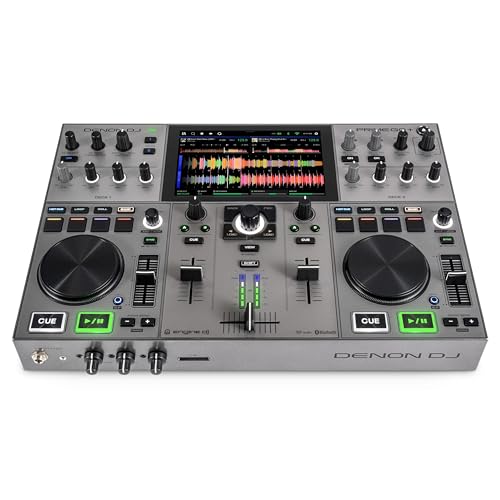
- Battery-powered standalone operation
- Built-in Wi-Fi with supported streaming access
- 26 main FX plus Touch FX and onboard analysis
Best For: Mobile DJs who need laptop-free portability
Easy First Mixes
Pioneer DJ DDJ-FLX4 beginner-friendly 2-channel controller

- Smart Fader simplifies blending tracks
- 16 pads for Hot Cues, Pad FX, and more
- USB or Bluetooth connection to multiple devices
Best For: Beginners learning on a simple, flexible controller
Screen-Driven Portable Set
Numark Mixstream Pro Go touchscreen standalone controller

- 7-inch touchscreen with standalone control
- Built-in speakers and battery power
- Wi-Fi streaming plus SD, USB, and Dropbox support
Best For: Mobile DJs who want screen-based standalone mixing
Learn-Friendly All-Rounder

- Simple 2-channel layout for easy learning
- Smart Fader supports genre blending
- Works with PC, Mac, iPhone, iPad, and Android
Best For: Learners and improvers who want a straightforward controller for streaming and practice
Screen-Equipped Serato Pick

- 6-inch jog wheels include color displays
- Serato DJ Lite and 4-deck control included
- Built-in audio interface with plug-and-play USB
Best For: DJs who want visual track feedback and an easy Serato setup
Advanced Performance Flagship

- 7-inch motorized platters with display feedback
- OLED pad mode displays and stem controls
- Pro-grade metal build with extensive connections
Best For: Experienced DJs who want premium control, visual feedback, and Serato Pro tools
Battle-Ready Scratch Pick – Pioneer DJ DDJ-REV5 2-Channel Scratch DJ Controller
If you want a dj controller with screens that keeps your focus on the music, the Pioneer DJ DDJ-REV5 is built around that idea. Its on-jog displays show playback position, while the battle-style 2-channel layout and full-size jog wheels are aimed at scratch DJs and open-format performers who want a club-style workflow.
Best For: Scratch DJs and open-format performers who want on-jog feedback and a battle layout.
Pros:
- On-jog displays show playback position for easier track awareness
- Full-size jog wheels support scratch-style performance
- Ships with rekordbox and Serato DJ Pro
- DJM-style controls and effects give it a pro feel
Cons:
- Only a 2-channel layout, so it is less suited to larger multi-deck sets
- Designed for laptop use with supported DJ software
This is a strong fit if you value visual track feedback and a performance-focused control surface over extra channels. It balances battle-style handling with software flexibility, making it a practical pick for scratch-oriented DJs.
Standalone Touchscreen Booth – Denon DJ SC LIVE 4 Standalone DJ Controller Black
The Denon DJ SC LIVE 4 is a compelling dj controller with screens if you want to perform without a laptop. Its 7-inch touchscreen, Engine DJ OS, and standalone 4-channel design let you browse, load, and mix tracks directly on the unit, while built-in speakers make it especially convenient for mobile use.
Best For: Mobile and streaming DJs who want a laptop-free, all-in-one setup.
Pros:
- 7-inch touchscreen for browsing libraries and selecting tracks
- Standalone Engine DJ OS means no computer is required
- Built-in speakers add portability and easy practice
- Supports Wi-Fi streaming and multiple media inputs
Cons:
- Built-in speakers are convenient, but not a replacement for a full PA
- More features can mean a larger footprint than basic controllers
If you want a controller that can handle performances, streaming, and practice from one box, this model is highly practical. The screen-driven workflow and standalone operation make it a strong choice for DJs who want fewer cables and faster setup.
Portable Screen-Based Mixer – Numark Mixstream Pro+ DJ Controller
The Numark Mixstream Pro+ is a compact dj controller with screens built for fast, portable sets. Its 7-inch touchscreen, built-in speakers, and Engine DJ OS let you mix without a laptop, while Wi-Fi streaming and multiple media sources keep track loading flexible.
Best For: DJs who want a portable standalone controller with touchscreen control and onboard speakers.
Pros:
- 7-inch touchscreen with adjustable brightness
- Standalone Engine DJ OS supports laptop-free performance
- Built-in speakers make it easy to practice or play on the go
- Works with streaming services plus SD, USB, and Dropbox sources
Cons:
- Two-deck design is less expansive than larger 4-channel units
- Best suited to portable use rather than a full club-style booth
This model is a smart pick if you want screen-based control in a smaller, travel-friendly footprint. It combines touchscreen browsing with standalone playback, making it useful for quick setups, practice sessions, and mobile gigs.
Club Workflow Display Pro – Pioneer DJ DDJ-FLX10 4-Channel DJ Controller
If you are shopping for a dj controller with screens that leans toward serious performance features, the Pioneer DJ DDJ-FLX10 stands out. Its large jog wheels with multicolor on-jog displays show waveforms, artwork, and the parts you are playing, while Track Separation adds live remix options for vocals, drums, and instruments.
Best For: DJs who want club-style controls, track separation, and visual feedback on the jog wheels.
Pros:
- Multicolor on-jog displays show waveforms, artwork, and active parts
- Track Separation supports live mashups and remixing
- 4-channel layout mirrors a club-standard workflow
- Works with both rekordbox and Serato DJ Pro
Cons:
- Feature-rich design is aimed more at experienced users than casual beginners
- Large, performance-focused layout may take more space than compact controllers
For DJs who want a display-driven controller that feels close to club gear, this model checks a lot of boxes. The mix of visual feedback, four channels, and track separation makes it especially appealing for open-format sets and creative live transitions.
Portable Standalone Power – Denon DJ PRIME GO+ portable standalone controller
If you want a dj controller with screens-style workflow in a compact, battery-powered package, the Denon DJ PRIME GO+ is built for portable, laptop-free sets. It combines Engine DJ OS, onboard song analysis, Wi-Fi streaming, and a performance-focused layout so you can prep, browse, and play without bringing a computer.
Best For: Mobile DJs who want standalone performance, streaming access, and serious FX in a highly portable unit.
Pros:
- Battery-powered standalone design with built-in Wi-Fi and Engine DJ OS
- Access to 100+ million tracks through supported streaming services
- Strong performance features, including 26 main FX, Sweep FX, and Touch FX
- Useful media options like SD card and USB playback, plus balanced XLR and booth outputs
Cons:
- No built-in speaker system mentioned
- Standalone stems require pre-rendering in Engine DJ Desktop
- Premium feature set may be more than casual users need
The PRIME GO+ stands out if you value true portability without giving up advanced control or streaming convenience. Its screen-based, standalone approach is best for DJs who want to travel light but still perform with pro-level tools.
Easy First Mixes – Pioneer DJ DDJ-FLX4 beginner-friendly 2-channel controller
The Pioneer DJ DDJ-FLX4 is a straightforward choice if you want a dj controller with screens-like ease of use, but in a simple plug-and-play format. Its beginner-friendly layout, Smart Fader, and 16 performance pads make it easy to start mixing and grow into more advanced techniques.
Best For: Beginners and casual DJs who want an easy, portable controller for learning, streaming, and first mixes.
Pros:
- User-friendly 2-channel layout inspired by pro Pioneer DJ gear
- Smart Fader helps blend tracks by adjusting volume, bass, and BPM automatically
- 16 pads support Hot Cues, Pad FX, Beat Jump, and Sampler functions
- Works with PC, Mac, iPhone, iPad, or Android via USB or Bluetooth
Cons:
- No built-in screen
- Not a standalone controller; it depends on connected devices
- 2-channel layout leaves less room for advanced deck expansion
For new DJs, the DDJ-FLX4 focuses on simplicity and flexibility rather than deep standalone hardware. It is a solid pick when you want an affordable learning path with streaming support and an easy transition into more polished mixes.
Screen-Driven Portable Set – Numark Mixstream Pro Go touchscreen standalone controller
The Numark Mixstream Pro Go is a strong fit if you want a dj controller with screens that can handle full standalone sets anywhere. Its 7-inch touchscreen, built-in speakers, and battery-powered design make it especially practical for mobile use, while Engine DJ OS keeps the workflow laptop-free.
Best For: Mobile DJs who want a touchscreen standalone controller with built-in speakers and streaming support.
Pros:
- 7-inch touchscreen with adjustable brightness for standalone control
- Battery-powered with built-in speakers for true grab-and-go use
- Wi-Fi streaming support across major services, including Amazon Music Unlimited, Apple Music, TIDAL, Beatport, Beatsource, and SoundCloud Go+
- Engine DJ OS supports SD, USB, Dropbox, wireless lighting control, and standalone stems
Cons:
- Heavier than ultra-compact portable controllers
- Built-in speakers may not replace a full PA system for larger gigs
- One-time software license purchase applies for stems
If you want a portable controller that centers its workflow around the screen, the Mixstream Pro Go is one of the most versatile options here. It combines standalone control, media flexibility, and onboard speakers in a way that suits casual gigs, practice, and mobile performances.
Learn-Friendly All-Rounder – Pioneer DJ DDJ-FLX4 White
If you want a DJ controller with screens in the roundup sense of a beginner-friendly, modern setup, the Pioneer DJ DDJ-FLX4 is a practical place to start. It does not have onboard display screens, but it gives you a clean 2-channel layout, Smart Fader blending, and 16 performance pads, making it easy to learn on and grow into.
Best For: Learners and improvers who want a simple, multi-device controller for streaming and everyday mixing.
Pros:
- Simple, user-friendly layout inspired by Pioneer DJ’s pro gear
- Smart Fader helps blend genres without needing beatmatching skills
- 16 performance pads cover Hot Cues, Pad FX, Beat Jump, and Sampler
- Works with PC, Mac, iPhone, iPad, Android, and supports streaming sources
Cons:
- Only 2-channel, 2-deck control
- No built-in screen display listed in the supplied specs
- Designed more for learning and versatility than advanced performance depth
The DDJ-FLX4 is a strong all-round starter controller if you value simplicity, cross-device compatibility, and streaming-friendly features. It is especially appealing if you want an approachable setup before moving to more advanced gear.
Screen-Equipped Serato Pick – Numark Mixtrack Platinum FX
The Numark Mixtrack Platinum FX is a strong choice if you’re shopping for a dj controller with screens, because its 6-inch jog wheels include high-resolution color displays. Those displays show BPM, platter position, beats remaining, and pitch adjustment or key, which makes it easier to keep your mix organized while using Serato DJ Lite.
Best For: DJs who want visual feedback on the jog wheels and a ready-to-go Serato system for home or mobile use.
Pros:
- 6-inch capacitive-touch jog wheels with color displays for mix information
- Includes Serato DJ Lite and offers 4 decks of control
- Built-in 24-bit audio interface with plug-and-play USB connectivity
- Lots of practical controls, including FX paddles, loop controls, pads, and 3-band EQ
Cons:
- Display information is embedded in the jog wheels rather than a full standalone screen
- Build and feature set are geared more toward accessible performance than premium club hardware
This controller stands out for buyers who want visible track feedback without jumping to a much larger setup. It balances screen-based guidance, Serato compatibility, and useful performance controls in one affordable-feeling package.
Advanced Performance Flagship – RANE PERFORMER 4-Channel
If you want a premium dj controller with screens and advanced performance tools, the RANE PERFORMER is built for serious sets. It features 7″ motorized platters with build-in displays for song info and waveforms, plus OLED pad mode displays, so you get plenty of visual feedback while using Serato DJ Pro.
Best For: Experienced DJs who want motorized platters, on-controller displays, and deep Stem and FX control.
Pros:
- 7″ motorized high-torque platters with display feedback
- OLED pad mode displays and advanced FX/stem control options
- Strong Serato DJ Pro integration, including Apple Music and TIDAL access
- Robust metal construction with pro-level outputs and inputs
Cons:
- Large and heavy compared with entry-level controllers
- More feature-rich than most casual users need
- Best suited to a full performance setup rather than portability-first use
The PERFORMER is the most advanced option here, aimed at DJs who want tactile control and extensive on-device information. Its combination of motorized platters, screen-based feedback, and professional connectivity makes it the clear performance-focused choice.
How We Picked the Best Dj Controller with Screens
We focused on controllers that improve visibility and workflow, not just gear with a display for marketing appeal. Priority went to screen usefulness, layout quality, performance features, software compatibility, portability, and overall value.
We also considered whether each model suits home practice, mobile gigs, livestreaming, or more advanced performance work. The best Dj Controller with Screens should help you mix faster without adding unnecessary setup complexity.
Quick Comparison
In general, standalone and all-in-one units offer the most independence, while laptop-based controllers often deliver the best value and software flexibility. Larger four-channel options tend to suit experienced DJs who want more layering and creative control, while smaller two-channel models are usually easier for beginners and traveling performers.
Key Buying Factors for a Dj Controller with Screens
Screen Type and Usefulness
Look beyond screen size. A useful display should clearly show waveforms, BPM, playback position, track info, and browsing details. On-jog displays can be helpful for quick visual checks, while larger built-in screens are better if you want to minimize laptop dependence.
Channels and Workflow
Two-channel controllers are simpler and often easier to learn. Four-channel models are better if you mix longer sets, layer acapellas and instrumentals, or want more flexibility for advanced routines.
Standalone Vs. Laptop-Based
Standalone models are ideal if you want to perform with less gear and fewer cables. Laptop-based controllers can be a smarter choice if you already rely on specific DJ software or want a lower entry price.
Portability and Power
If you travel often or play mobile gigs, check size, weight, and power options carefully. Battery-powered and compact units are easier to move, but larger controllers may offer better controls and more stable performance features.
Performance Features
Pads, stems or track separation tools, effects controls, jog feel, and mixer layout all affect how natural a controller feels in real use. Choose the feature set that matches your style rather than paying extra for functions you may never touch.
Who Should Buy Which Dj Controller with Screens?
Beginners usually do best with a straightforward two-channel model that keeps learning simple. Streamers and mobile DJs may prefer an all-in-one controller with a screen for quick access and reduced laptop reliance. Scratch DJs and advanced performers should look for responsive jogs, strong build quality, and performance tools that support more expressive mixing.
If you want the most balanced setup, pick a Dj Controller with Screens that matches your space, your software, and how often you actually perform. The right display can speed up your workflow, but the best overall choice is the one that fits your mixing habits day to day.