Choosing the right control surface for Ableton Live can make your sessions faster, more tactile, and far less dependent on the mouse. The best options help you launch clips, shape mixes, and perform with more confidence.
Below, we focus on ten standout controllers for producers, performers, and hybrid studio users, with a mix of pad-based performance tools, fader surfaces, and full-featured control rigs.
Best 10 Control Surface for Ableton Live Picks for 2026
APC Clip-Launching Control
Akai Pro APC40 Ableton Controller

- Designed in partnership with Ableton
- Multicolor clip matrix shows clip status
- USB plug-and-play for Mac and PC
Best For: Ableton Live users focused on clip launching and session control
Single-Fader Mix Control

- Motorized 100 mm touch-sensitive fader
- 24 buttons cover 40 functions
- Works with Ableton Live via MCU/HUI
Best For: Producers who want compact automation and transport control
Expressive Pad Workstation
Ableton Push 3 Desktop Controller

- 64 MPE pads with XY sensing
- Built-in audio interface with 2 inputs and 2 outputs
- Works as a hub for Live and external gear
Best For: Expressive Live users who want pads, recording, and hardware integration
Bundle-Friendly Fader Control
PreSonus FaderPort V2 Ableton Bundle

- Motorized 100 mm touch-sensitive fader
- Works with Ableton Live via MCU/HUI
- Bundle includes headphones and microphones
Best For: Buyers who want a compact Live controller plus extra studio accessories
Deep Integration Grid
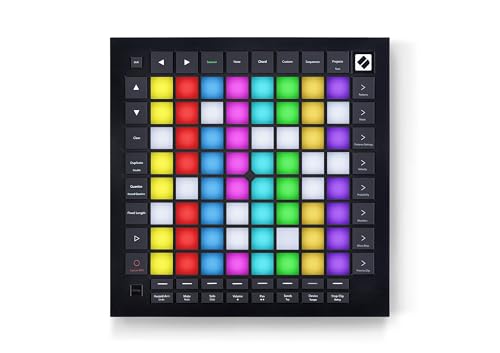
- Deep Ableton Live clip, scene, mixer, and transport control
- 64 pressure-sensitive RGB pads for expressive play
- 4-track 32-step sequencer with scale and chord modes
Best For: Ableton producers who want sequencing and expressive grid performance
Mixing-Focused DAW Surface

- 16 touch-sensitive motorized faders for hands-on mixing
- 16 scribble strips and Session Navigator improve workflow
- Works with Ableton Live via Mackie Control/HUI emulation
Best For: Mixing and automation control in Ableton Live
Compact Clip Launcher
Akai Professional APC Mini MK2

- 64 RGB pads for clip launching with visual feedback
- 9 assignable faders for mixer or device control
- Drum and Note modes support performance workflows
Best For: Portable Ableton clip launching and light mixer control
Console-Style Mixing Bundle
8-Fader DAW Control Surface for Ableton Live
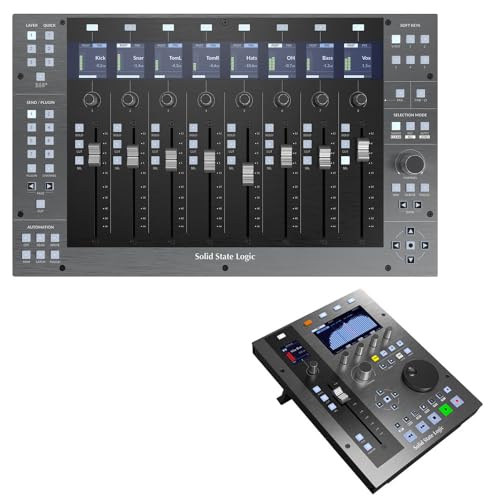
- 8 motorized 100mm faders
- Expandable track banking up to 32 channels
- Hi-res LCDs and RGB controls
Best For: mixing-focused Ableton Live users who want tactile fader control
Clip Launch Performance Controller
Ableton Live Clip Control Surface

- 5x8 clip matrix with status feedback
- 16 knobs for track and device control
- Simple USB setup with Ableton integration
Best For: live performers and clip-launching workflows in Ableton Live
Portable Pad Launcher
Compact Ableton Live Grid Controller

- 64-pad RGB grid
- Compact, portable design
- Customizable with Novation Components
Best For: portable clip launching and pad performance in Ableton Live
APC Clip-Launching Control – Akai Pro APC40 Ableton Controller
If you want a dedicated control surface for Ableton Live, the Akai Pro APC40 is built around clip launching and hands-on session control. Its unique multicolor clip matrix shows current clip status at a glance, and the bidirectional communication with Live helps the hardware stay closely tied to what is happening in your set. It also connects by USB for plug-and-play use on Mac or PC.
Best For: Players who want a Live-focused controller for launching clips and managing sessions.
Pros:
- Designed in partnership with Ableton for tight Live integration
- Multicolor clip matrix displays current clip status
- Bidirectional communication with Ableton Live
- USB plug-and-play connection for Mac and PC
Cons:
- Built specifically around Ableton Live workflows, so it is less general-purpose than some DAW controllers
- Heavier metal construction may be less portable than smaller controllers
The APC40 makes sense if your main priority is direct, tactile Ableton Live control rather than a do-everything studio surface. It is especially appealing for session-based performance and clip launching where visual feedback matters.
Single-Fader Mix Control – PreSonus FaderPort V2
The PreSonus FaderPort V2 is a compact control surface for Ableton Live users who want precise automation and transport control without taking up much desk space. It centers on a touch-sensitive, motorized 100 mm fader, plus a large encoder and dedicated buttons for common mixing and navigation tasks. It connects over USB and also works with Ableton Live through Mackie Control Universal and HUI emulation.
Best For: Producers who want one-fader hands-on control for writing automation and managing a DAW.
Pros:
- Touch-sensitive, motorized 100 mm fader for real-time automation
- 24 buttons cover 40 different functions
- Session Navigator speeds up mixing and DAW control
- Compatible with Ableton Live through MCU and HUI emulation
Cons:
- Single-fader layout is limited for users who want a full mixer-style surface
- Best-known native support is for Studio One rather than Ableton Live
This is a practical pick if you mainly want one high-quality fader and fast access to transport and automation functions. It fits well in smaller setups where a full control surface would be overkill.
Expressive Pad Workstation – Ableton Push 3 Desktop Controller
The Ableton Push 3 Desktop is a deep control surface for Ableton Live users who want to play, sequence, and record without leaving the hardware. It needs to be connected to a computer running Live, but it gives detailed control over the software plus 64 MPE pads with XY sensing for expressive performance. The built-in audio interface and expandability options make it more than just a pad controller.
Best For: Ableton Live creators who want expressive pads and a hub for recording and hardware integration.
Pros:
- 64 MPE-enabled pads with XY sensing for expressive playing
- Built-in audio interface with two inputs and two outputs
- Supports connecting guitars, microphones, turntables, and synths
- ADAT, MIDI, and CV/Gate options expand a larger setup
Cons:
- Tethered design requires connection to a computer running Ableton Live
- More complex and feature-heavy than simpler control surfaces
Push 3 is the most performance-oriented option here, especially if you value expressive pad playing and a central hardware hub. It is a strong fit for users building around Live as the core of their studio.
Bundle-Friendly Fader Control – PreSonus FaderPort V2 Ableton Bundle
This PreSonus FaderPort V2 package is a control surface for Ableton Live that centers on the same single-fader layout, but it is sold as a bundle that also includes headphones and microphones. The controller itself offers a touch-sensitive motorized fader, a large encoder, transport buttons, and Session Navigator controls, with Ableton Live support through MCU and HUI emulation. If you want the hardware plus extra studio accessories in one purchase, this bundle stands out.
Best For: Buyers who want a compact Ableton Live control surface bundled with starter studio gear.
Pros:
- Single touch-sensitive, motorized 100 mm fader
- Transport, looping, automation, and channel control buttons
- Compatible with Ableton Live via Mackie Control Universal and HUI emulation
- Bundle includes headphones and handheld microphones
Cons:
- Only one fader, so it is not ideal for larger mixing workflows
- Bundle adds accessories some users may not need
As a control surface, this is still a focused one-fader solution for automation and transport work. The bundle format mainly makes sense if you also want the included accessories rather than just the controller.
Deep Integration Grid – Novation Launchpad Pro MK3
If you want a control surface for Ableton Live that goes beyond basic clip launching, the Launchpad Pro MK3 is built for deep hands-on workflow. It gives you access to clips, scenes, mixer, device, and transport controls, plus quantize, duplicate, and double functions, so you can stay in the session without reaching for the mouse.
Best For: Ableton users who want expressive pad performance, sequencing, and deep session control in one compact grid controller.
Pros:
- Deep Ableton Live integration with clip, scene, mixer, device, and transport control
- 64 RGB pads are velocity- and pressure-sensitive for expressive playing
- Built-in four-track, 32-step sequencer with polyphony, chaining, and probability/mutation tools
- Scale, chord, and Dynamic Note modes make melodic and drum work easier
Cons:
- No traditional keys, so piano-style players may prefer a keyboard controller
- Best features are centered on Ableton and Logic workflows rather than universal DAW control
Overall, this is the most performance-focused option in the group if your priority is an Ableton Live controller that combines clip launching, sequencing, and expressive pad play. It is especially strong for producers who want to build ideas directly from the grid.
Mixing-Focused DAW Surface – PreSonus FaderPort 16
The FaderPort 16 is a practical control surface for Ableton Live if your main job is mixing rather than clip launching. Its 16 touch-sensitive motorized faders, scribble strip displays, and dedicated navigation controls make it a strong fit for hands-on level riding, automation, and session management.
Best For: Mix engineers and producers who want fast tactile control over faders, automation, and navigation in Ableton Live and other DAWs.
Pros:
- 16 motorized 100 mm faders for precise mix control
- 16 scribble strip displays help identify channels quickly
- Session Navigator speeds up scrolling, zooming, and master fader control
- Compatible with Ableton Live via Mackie Control Universal and HUI emulation
Cons:
- Larger desktop footprint than compact pad controllers
- Less focused on clip launching or finger-drumming than Ableton-style grid devices
In practice, this is the strongest choice here for tactile mixing inside Ableton Live. If you want real faders, direct automation control, and a layout built for editing, it offers a more traditional control-surface experience than a pad-based controller.
Compact Clip Launcher – Akai Professional APC Mini MK2
If you need a compact control surface for Ableton Live, the APC Mini MK2 is built around clip launching and fast mixer access. Its 8×8 RGB pad matrix, nine assignable faders, and pre-mapped Ableton integration make it a straightforward choice for home studio use and live sets.
Best For: Ableton users who want a small, portable clip-launching controller with simple hands-on mixer control.
Pros:
- 64 RGB pads provide visual clip-launch feedback
- Pre-mapped for 1-to-1 Ableton Live integration from version 11.2.7 onward
- 9 assignable faders support mixer control, including volume, pan, or device control
- Drum and Note modes add useful performance and melody workflow options
Cons:
- No motorized faders or screen feedback
- Smaller control layout may feel limited for deeper mixing tasks
For a portable Ableton-focused setup, this controller hits a strong balance of simplicity and usefulness. It is best when you want fast clip launching, basic mix moves, and a lightweight footprint rather than a full-scale mixing surface.
Console-Style Mixing Bundle – 8-Fader DAW Control Surface for Ableton Live
If you want a serious control surface for Ableton Live, the SSL UF8 bundle is built for hands-on mixing and session navigation. With 8 motorized 100mm faders, RGB buttons, hi-res LCDs, and support for Ableton Live through HUI/MCU, it’s aimed at users who want more than basic clip launching.
Best For: Producers and mixers who want tactile fader control and expandable session management in Ableton Live.
Pros:
- 8 touch-sensitive 100mm motorized faders for detailed mixing.
- Track banks can expand coverage up to 32 channels.
- Hi-res TFT LCDs and RGB buttons improve visual feedback.
- Works with Ableton Live and other HUI/MCU-supported DAWs.
Cons:
- Designed more for mixing than for clip-style performance control.
- Requires compatible HUI/MCU DAW support for full use.
- More elaborate than a compact controller if you only need simple triggering.
This is a strong choice if your workflow in Ableton Live centers on detailed mix control, banked track access, and a more console-like feel. The bundle format also adds the UF1, making it a better fit for users building out a modular control setup.
Clip Launch Performance Controller – Ableton Live Clip Control Surface
The AKAI APC40SE is a classic control surface for Ableton Live if you want immediate clip launching and direct session feedback. Its 5×8 clip matrix, 16 knobs, and Ableton Live integration make it a practical option for performance and hands-on control without complicated setup.
Best For: Live performers and session users who want fast clip launching and simple Ableton control.
Pros:
- Direct Ableton Live integration with two-way communication.
- 5×8 clip matrix provides clear clip status and launch access.
- 16 knobs cover track control and device control tasks.
- USB setup is straightforward with no driver installation mentioned.
Cons:
- Best suited to clip and knob control rather than fader-based mixing.
- Limited to the control layout and banks described in the notes.
- Less compact than smaller pad-only controllers.
If your Ableton Live workflow revolves around launching scenes, checking clip states, and tweaking parameters on the fly, this controller stays focused on those tasks. It’s especially appealing for users who want a dedicated Ableton surface with minimal setup friction.
Portable Pad Launcher – Compact Ableton Live Grid Controller
Novation Launchpad Mini MK3 Grid Controller for Ableton Live | 3.0 4 Port USB HUB
Check Price On AmazonThe Novation Launchpad Mini MK3 is a compact control surface for Ableton Live centered on pad-based launching and quick session access. Its RGB grid, seamless Ableton integration, and easy setup make it a strong fit for users who want portability and straightforward control in a small footprint.
Best For: Portable Ableton Live users who want a lightweight grid controller for launching clips and playing parts.
Pros:
- 64-button grid with bright RGB pads for session visibility.
- Seamless Ableton Live integration for launching sounds and clips.
- Compact and portable design suits laptop-based setups.
- Customizable through Novation Components and Drums/Keys modes.
Cons:
- Does not include faders or knobs for mixing-style control.
- Smaller layout means fewer hands-on controls than larger surfaces.
- Best for launching and playing rather than full console-style workflow.
This controller makes sense if you want a simple, mobile Ableton Live surface that gets you into your session quickly. It’s a good choice for sketching ideas, launching clips, and building a pad-based workflow without taking up much space.
How We Picked the Best Control Surface for Ableton Live
We looked for controllers that integrate well with Ableton Live, offer dependable build quality, and improve common workflows like clip launching, mixing, arranging, and hands-on parameter control. We also favored models with clear strengths for different types of users, from compact portable surfaces to larger studio controllers.
Quick Comparison
If your priority is performance and clip launching, pad grids like the Launchpad and APC-style controllers are the easiest fit. If you want more traditional mixing control, motorized or touch-sensitive fader surfaces are better suited to track level, pan, and plugin control. Ableton Push 3 stands apart as the most integrated workstation-style option for deeper Live control.
Key Buying Factors for a Control Surface for Ableton Live
Workflow Focus
Start with what you do most in Ableton. Live performers usually benefit from pads and clip control, while mix-heavy producers may prefer faders, encoders, and transport controls.
Size and Portability
Compact controllers are easier to travel with and work well in small setups. Larger surfaces give you more simultaneous hands-on control, but they take up more desk space.
Pad Feel and Fader Quality
For a Control Surface for Ableton Live, responsive pads matter for launching clips and triggering scenes, while smooth, accurate faders are important for mixing and automation.
Integration Depth
Look for native Ableton support, clear session view mapping, and flexible MIDI behavior. Better integration reduces setup time and keeps the controller feeling like a true extension of the software.
Expansion and Connectivity
Consider whether you need MIDI out, USB-only simplicity, hands-on plugin control, or audio interface features. Your ideal setup depends on whether the controller is part of a live rig, studio desk, or both.
Who Should Buy Which Control Surface for Ableton Live?
Choose a pad-based controller if you want clip launching, beat-making, and performance control in a compact format. Pick a fader surface if mixing and automation are your main priorities. Go for a premium all-in-one option if you want deeper control and a more integrated Ableton Live experience. If you are building a flexible home studio, matching the controller to your workspace and workflow matters more than chasing the largest feature list.