Choosing among guitar effects processors for beginners can be overwhelming when pedals combine amp modeling, effects, presets, looping, and recording tools in very different ways.
This roundup compares 10 practical options, from compact practice units to feature-rich processors, so you can find the right balance of simplicity, sound variety, and long-term value.
Best 10 Guitar Effects Processors for Beginners Picks for 2026
Best Practice Companion

- 71 effects and 13 amp models
- 30-second looper and 68 rhythms
- Integrated expression pedal
Best For: Practice-focused beginners wanting creative tools
Best Compact Pro-Style Option

- GT-series amps and effects
- Easy Select and Easy Edit controls
- Up to seven hours on four AA batteries
Best For: Portable practice and growing tone-shaping skills
Best Straightforward Multi-Effects Value
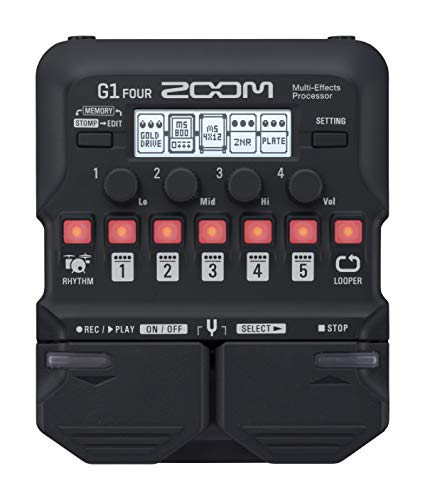
- 65 effects and 13 amp models
- Looper, tuner, and 68 rhythms
- Aux, headphone, and amp outputs
Best For: First-time users wanting core effects and practice features
Versatile Starter

- 66 effects across eight modules
- 80 preset and 80 user patch slots
- Looper, drum machine, tuner, and expression pedal
Best For: Beginners wanting many sounds and built-in practice tools
Smart Practice Pick
AME-100 Multi-Effects Processor

- 147 effects with IR and ADT support
- AI tone companion through the companion app
- USB-C recording, Bluetooth, looper, and drum machine
Best For: Tech-focused beginners who practice and record
Performance-Ready Choice
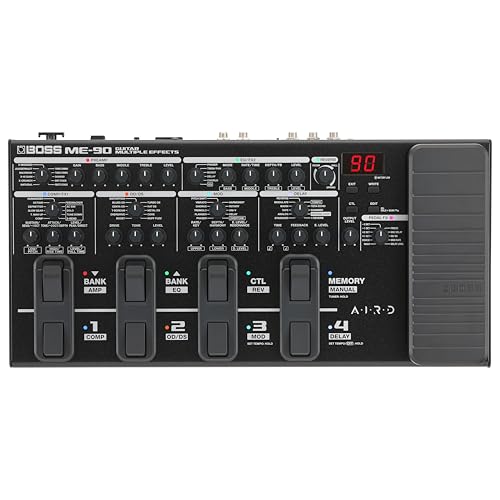
- 60 effects and 11 AIRD amp models
- Eight footswitches plus expression pedal
- Effects loop, IR loading, and Tone Studio support
Best For: Beginners planning to practice and perform live
Versatile Practice-to-Stage Pick

- 200 presets with extensive amp, cab, and effect options
- Four footswitches plus expression pedal
- Looper, drums, USB-C, AUX, and headphone connections
Best For: Beginners seeking broad features for practice and live playing
Portable Learning Companion

- Ultra-light 120-gram design with up to seven hours of battery life
- 80 presets and six customizable effect modules
- Bluetooth, headphones, IR loading, and USB OTG recording
Best For: Mobile practice, silent playing, and travel
Touchscreen Tone-Building Choice
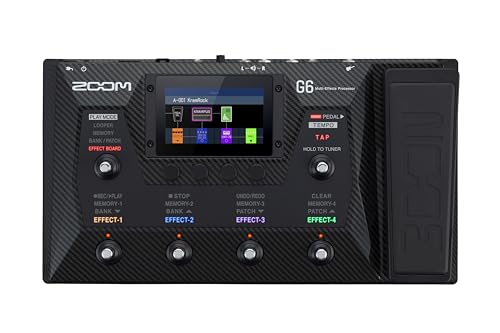
- 4.3-inch touchscreen with 240 patches and four play modes
- Seven effects plus amp modeling and expandable IR storage
- Two-hour looper, rhythms, SD storage, and USB DAW recording
Best For: Visual learners building tones and recording at home
Best Practice Companion – Zoom G1X Four
For beginners comparing guitar effects processors for beginners, the Zoom G1X Four offers a hands-on way to explore tones while practicing. Its built-in expression pedal, looper, rhythm patterns, tuner, and headphone support make it useful for both focused practice and creative experimentation.
Best For: Beginners who want guided practice tools, amp modeling, and an integrated expression pedal.
Pros:
- Includes 71 effects and 13 amp models for broad tone exploration.
- 30-second looper and 68 rhythm patterns support practice and songwriting.
- Aux input, headphone or amp output, battery operation, and Guitar Lab software add flexibility.
Cons:
- Its many effects and editing options may take time for a complete beginner to learn.
- The looper is limited to 30 seconds.
The G1X Four is a particularly approachable choice when practice features matter as much as effects variety. Choose it over a simpler unit if the included expression pedal and rhythm section fit your learning style.
Best Compact Pro-Style Option – BOSS GT-1
The BOSS GT-1 is a strong contender among guitar effects processors for beginners who want a compact unit with a broad selection of amps and effects. Its streamlined controls, Easy Select and Easy Edit functions, and onboard expression pedal help reduce the learning curve.
Best For: Beginners seeking portable BOSS tones with room to grow into patch editing and live control.
Pros:
- Provides a powerful GT-series sound engine with numerous amps and effects.
- Easy Select and Easy Edit support quick patch changes and adjustments.
- Four AA batteries provide up to seven hours of playing time, according to the supplied notes.
- Includes an assignable control switch, expression pedal, USB, and optional patch downloads through BOSS Tone Central.
Cons:
- The wide range of sounds and controls may feel more advanced than a basic single-effect pedal.
- It uses four AA batteries rather than a built-in rechargeable battery.
The GT-1 balances portability with a feature set designed for continued exploration. Its interface is beginner-friendly, while the patch management and real-time controls can remain useful as your playing develops.
Best Pocket-Sized Feature Set – SONICAKE QME-10 Pocket Master
For beginners looking at guitar effects processors for beginners, the SONICAKE QME-10 packs an unusually broad feature set into a pocket-sized digital unit. It supports guitar, bass, and acoustic effects, with a color display, rechargeable battery, drum rhythms, looper, and mobile-friendly USB audio functions.
Best For: Mobile players who want extensive effects, rechargeable operation, and direct device connectivity.
Pros:
- Offers more than 100 built-in effects, 20 amp models, 99 drum rhythms, and 100 presets.
- Supports up to nine simultaneous effect blocks with an adjustable signal chain.
- Includes a rechargeable battery, color LCD, USB audio, OTG support, and Bluetooth audio connection.
- Supports third-party IRs and NAM A2 files with compatible software and available user slots.
Cons:
- The extensive editing and file-support options may be more than a first-time user needs.
- The supplied warranty description is 90 days.
The QME-10 is compelling when portability and connectivity are priorities. Its large feature count offers plenty of room to experiment, though beginners should expect a busier setup than with a more basic multi-effects pedal.
Best Straightforward Multi-Effects Value – Zoom G1 Four
The Zoom G1 Four is a practical entry point for shoppers comparing guitar effects processors for beginners. It combines 65 built-in effects, 13 amp models, a looper, rhythm patterns, tuner, and headphone or amp output in a compact, battery-powered format.
Best For: Beginners who want essential multi-effects and practice tools without an integrated expression pedal.
Pros:
- Provides 65 effects and 13 amp models for experimenting with different sounds.
- 30-second looper and 68 rhythm patterns make practice more engaging.
- Aux input supports external audio, while amp and headphone outputs allow flexible monitoring.
- Zoom Guitar Lab software enables patch management and editing on Mac or Windows.
Cons:
- It does not include the expression pedal found on the G1X Four.
- The looper is limited to 30 seconds.
The G1 Four keeps the core practice and tone-shaping features of a beginner-oriented multi-effects unit while leaving out the expression pedal. It is a sensible choice if you prefer a straightforward setup and do not need pedal-based real-time control.
Versatile Starter – MOOER GE100
The MOOER GE100 is a practical choice for beginners seeking guitar effects processors for beginners with a broad selection of sounds and simple physical controls. Its 66 effects, expression pedal, tuner, looper, drum machine, and learning features give new players plenty to explore without requiring a computer.
Best For: Beginners who want extensive preset storage, practice tools, and an integrated expression pedal.
Pros:
- Includes 66 effect types across eight effect modules.
- Offers 80 preset patches and 80 user patches for saving custom tones.
- Features a 180-second looper, 40 drum rhythms, tuner, and headphone output.
- Can run from a 9V adapter or four AA batteries.
Cons:
- Its 9.06-inch length may take more space than a compact pedal.
- The learning functions are basic scale and chord reference tools rather than a complete lesson system.
The GE100 balances a large sound library with beginner-friendly practice features. Its adjustable output mode and headphone connection also make it flexible for home practice and direct playing.
Smart Practice Pick – AME-100 Multi-Effects Processor
The AME-100 stands out among guitar effects processors for beginners by combining 147 effect models with app connectivity, AI-assisted tone creation, and portable practice features. It is designed for players who want to experiment with tones, record directly, and use wireless or USB connections.
Best For: Tech-oriented beginners practicing, recording, livestreaming, and exploring customizable signal chains.
Pros:
- Provides 147 effect models across nine built-in modules.
- Supports third-party IRs and official ADT files with 20 storage slots.
- Includes a 20-second looper, unlimited overdubbing, 40 drum styles, and 10 metronome types.
- Supports Bluetooth audio, USB-C OTG recording, and optional BLE-MIDI footswitch expansion.
Cons:
- The AI Tone Companion requires login through the AUDOTA STUDIO app.
- Its advanced app, IR, and signal-chain features may feel less immediate than a simple stompbox-style interface.
With its rechargeable-battery option, compact design, and recording connectivity, the AME-100 is especially adaptable for modern practice setups. The app-dependent AI feature is an added attraction for beginners comfortable using software.
Performance-Ready Choice – BOSS ME-90
BOSS ME-90 Guitar Multi-Effects Guitar Processor | All-In-One Guitar Processor
Check Price On AmazonThe BOSS ME-90 is a strong option for beginners seeking guitar effects processors for beginners that can remain useful as their playing develops. Its knob-based interface, dedicated amp section, 60 effects, eight footswitches, and expression pedal support hands-on tone shaping for practice and performance.
Best For: Beginners who want straightforward controls and a processor suited to live playing as well as home use.
Pros:
- Offers 60 effects, 11 AIRD amp models, IR loading, and an effects loop.
- Provides eight multifunction footswitches and an expression pedal with toe switch.
- Includes 36 preset patches and 36 user patches for ready-made and custom sounds.
- Supports BOSS Tone Studio for editing and swapping amp and effect types.
Cons:
- Bluetooth audio and MIDI require an optional adaptor.
- It is a larger floor unit, measuring 21.35 inches long.
- The listed power source is corded electric, so it is less convenient for battery-powered practice.
The ME-90 emphasizes familiar stompbox-style control rather than menu-heavy editing. Its robust foot control, amp models, effects loop, and sound-editing software make it a sensible long-term choice for players who expect to perform.
Versatile Practice-to-Stage Pick – MOOER GE150 Pro
For beginners comparing guitar effects processors for beginners, the MOOER GE150 Pro offers a broad feature set without requiring separate pedals for core effects, amp sounds, looping, and rhythm practice. Its four footswitches, expression pedal, and clear collection of connections make it suitable for learning at home and developing a live-performance setup.
Best For: Beginners who want extensive tone options, built-in practice tools, and room to grow into live use.
Pros:
- Includes 200 presets, 55 amp models, 26 cabinet simulations, and 20 AMP and CAB sample slots.
- Four multifunction footswitches and an expression pedal support hands-on patch and parameter control.
- Includes an 80-second stereo looper, 40 drum rhythms, tuner, AUX input, headphone output, and USB-C recording features.
Cons:
- The standard version is corded rather than battery powered.
- Its large number of effects and controls may take time for a complete beginner to learn.
The GE150 Pro is a strong all-rounder when flexibility matters more than simplicity. It can support basic practice now while providing enough routing, presets, and recording options for more ambitious playing later.
Portable Learning Companion – SK17 Multi Effects Processor
The SK17 is a compact choice for beginners exploring guitar effects processors for beginners, especially if portability and straightforward practice features are priorities. It combines amp modeling, customizable effects, Bluetooth backing-track playback, headphone practice, and USB recording in a 120-gram rechargeable unit.
Best For: Beginners who practice on the move, want silent playing, or need a small processor for travel and casual recording.
Pros:
- ANN modeling, 80 presets, six effect modules, and 40 built-in effect types provide flexible starting points.
- Built-in rechargeable battery offers up to seven hours of continuous performance.
- Supports third-party IR files, Bluetooth audio input, 1/8-inch headphones, and USB OTG recording at 44.1 kHz/24-bit.
Cons:
- Its compact control layout may be less immediate than a larger floor processor with multiple footswitches.
- The listed design centers on knob control rather than a full expression-pedal setup.
The SK17 is particularly appealing when convenience outweighs a traditional pedalboard format. Its portable design and built-in battery make it easy to keep nearby for daily practice, while the presets and IR support leave room for experimentation.
Touchscreen Tone-Building Choice – Zoom G6
For beginners who prefer a visual interface, the Zoom G6 makes guitar effects processors for beginners easier to explore through a 4.3-inch touchscreen and dedicated play modes. It provides substantial room for building signal chains, practicing with rhythms and loops, and recording directly to a computer.
Best For: Beginners who want a larger, screen-guided processor for tone building, looping, and home recording.
Pros:
- Supports up to seven effects plus amp modeling simultaneously, with 70 included IRs and space for 100 more.
- The touchscreen provides access to 240 patches and four play modes.
- Offers up to two hours of looped audio saved to an SD card, 68 rhythm patterns, USB DAW recording, and an included expression pedal.
Cons:
- Its larger 2,908-gram form factor is less portable than compact processors.
- The extensive patch, effect, and looper options may feel more involved than a simple beginner pedal.
The G6 is a good fit for learners who expect to spend time shaping sounds rather than simply selecting presets. Its touchscreen, looping system, and computer connectivity make it especially useful for practice and recording projects as skills develop.
How We Picked the Best Guitar Effects Processors for Beginners
We focused on processors that make it reasonably easy to create usable guitar tones without requiring a large collection of separate pedals. Our comparisons consider control layout, preset organization, built-in effects, amp and cabinet modeling, expression-pedal functionality, looping, connectivity, and portability.
Beginner value also matters. A processor can offer hundreds of sounds yet be frustrating if menus are confusing or editing requires constant reference to a manual. We therefore looked for a useful mix of accessible controls and features that remain valuable as your playing develops.
Quick Comparison
| What to prioritize | Best suited to |
|---|---|
| Compact size and simple practice features | Bedroom players and beginners on a budget |
| Expression pedal and flexible preset control | Players who want hands-free effects changes |
| More amp models, IR support, and deeper editing | Players planning to record or build complex patches |
| Touchscreen or streamlined modern interface | Players who prefer visual navigation |
| Portable battery-powered operation | Travel, lessons, rehearsals, and casual practice |
Key Buying Factors for Guitar Effects Processors for Beginners
Controls and Learning Curve
Look for clearly labeled knobs, footswitches that are easy to understand, and a display that shows what each patch is doing. More effects are not automatically better if changing sounds takes too many steps.
Effects, Amp Models, and Signal Chains
At minimum, useful starter coverage includes distortion, overdrive, delay, reverb, modulation, compression, and tuner functions. Amp and cabinet modeling is especially helpful when connecting directly to headphones, an interface, powered speakers, or a mixer.
Connectivity and Practice Tools
Check for a headphone output, auxiliary or USB connectivity, and a looper if silent practice or backing tracks matter to you. USB can also make recording and firmware updates more convenient, but confirm compatibility with your computer and preferred software.
Size, Power, and Expansion
Small units are easier to carry, while larger boards usually provide more foot control and editing access. Consider whether you need an expression pedal, external footswitch support, rechargeable or battery operation, and enough preset storage for future use.
Who Should Buy Which Guitar Effects Processors for Beginners?
Choose a compact processor if your priority is practicing quietly, learning effects, and keeping costs and setup time low. A model with an integrated expression pedal is a strong choice for players who want wah, volume, or pitch effects without buying another accessory.
Choose a midrange unit with broader amp modeling, impulse-response support, and USB connectivity if you expect to record, play with headphones, or create more detailed tones. These features can extend the processor’s useful life as your skills improve.
Players who want maximum control for rehearsals, live performance, or complex presets should consider a larger processor with more footswitches, deeper routing, and generous preset capacity. Before buying, confirm that its interface feels comfortable; the most powerful option is not the best choice if it slows down everyday practice.