A great MIDI controller keyboard with motorized controls can speed up mixing, automate smoother transitions, and keep your hands on the session instead of the mouse. For producers who want tactile control that follows the DAW, the right model can make a noticeable difference.
In this roundup, we focus on practical workflow benefits, real control features, and the best options for different studio setups, from compact desktop rigs to deeper command-surface style controllers.
Best 10 MIDI Controller Keyboard with Motorized Controls Picks for 2026
Studio Command Hub
Yamaha CC1 USB Controller for Elgato Stream Deck and DAWs

- 12 assignable LCD keys
- 100 mm touch-sensitive motorized fader
- Full transport section and Stream Deck compatibility
Best For: DAW users who want a programmable control surface with motorized fader movement
Motorized Knob Rig
Melbourne Instruments ROTO-CONTROL DAW and MIDI Controller Bundle

- 8 touch-sensitive motorized knobs
- 9 high-res LCD displays with haptic feedback
- USB-C and 5-pin DIN MIDI connectivity
Best For: Ableton Live and hybrid setups needing tactile motorized knob control
Mixing Surface Classic
Behringer X-TOUCH Universal Control Surface

- 9 touch-sensitive motorized faders
- 8 LCD scribble strips for track labeling
- Supports HUI, Mackie Control, Ethernet, USB, and MIDI
Best For: Studio and live mixing with universal motorized-fader control
Keyboard Production Workhorse
Arturia KeyLab Essential 61 mk3 MIDI Controller

- 61-key hybrid-feel keybed
- 9 encoders, 9 faders, and 8 pads
- Includes software suite and transport controls
Best For: Producers who want a full-size MIDI keyboard with extensive hands-on controls
Motorized Precision for Plugin Tweakers
Roto-Control Motorized MIDI Controller with 8 Touch-Sensitive Knobs

- 8 touch-sensitive motorized knobs
- Haptic feedback and instant recall
- USB connection for supported DAWs
Best For: Compact motorized knob control in Ableton Live, Bitwig Studio, or Logic Pro
FL Studio Performance Keyboard
Novation FLkey 2 61 USB MIDI Controller Keyboard

- 61 semi-weighted keys with pitch/mod wheels
- 16 pads, 8 knobs, and 9 faders
- Built for FL Studio workflow and mapping
Best For: FL Studio producers who want keys, pads, and hands-on mix control
Pro DAW Surface with Motorized Faders
iCON Pro Audio V1-M USB MIDI DAW Control Surface

- 8 touch-sensitive motorized faders
- 7-inch customizable touchscreen display
- Works with major DAWs and expands to 64 channels
Best For: Professional mixing and DAW navigation across multiple software platforms
Portable Beat-Maker Starter
Akai MPK Mini MK3 25-Key Controller

- 25 velocity-sensitive mini keys
- 8 MPC pads and 8 assignable knobs
- Includes MPC Beats and NKS support
Best For: Beat makers and home studio producers who need a compact, portable controller
Hands-On Studio Workhorse
M-AUDIO Oxygen 61 MKV Controller
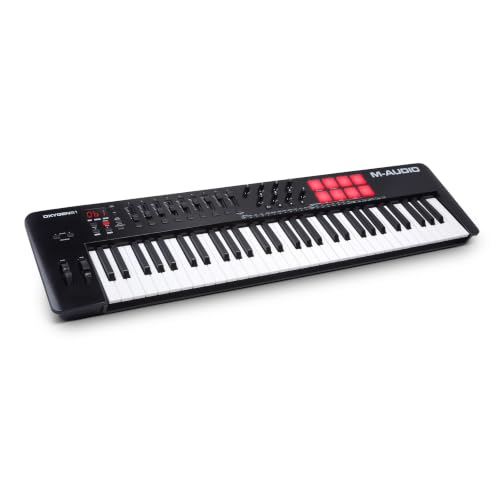
- 61 full-size velocity-sensitive keys
- 8 pads, 8 knobs, and 9 faders
- Includes auto-mapping and software bundle
Best For: Producers wanting full-size keys and mixer-style control
Hybrid Sequencing Pick
Akai MPK Mini Plus 37-Key Controller

- 37 keys with 3 full octaves
- 64-step sequencer for standalone ideas
- MIDI I/O plus CV/Gate for external gear
Best For: Beat makers who want sequencing and synth connectivity in a compact controller
Studio Command Hub – Yamaha CC1 USB Controller for Elgato Stream Deck and DAWs
If you want a MIDI controller keyboard with motorized controls feel in a compact desktop command surface, the Yamaha CC1 is built around hands-on DAW control rather than piano keys. It combines 12 assignable LCD keys, a 100 mm touch-sensitive motorized fader, push-and-turn knobs, and a full transport section for streamlined session work.
Best For: Producers and editors who want a flexible DAW control hub with motorized fader movement and deep Stream Deck compatibility.
Pros:
- 12 full-assignable LCD keys for customizable control
- 100 mm touch-sensitive motorized fader for precise moves
- Four push-and-turn knobs plus full transport section
- Works with Elgato Stream Deck software and Cubase support
Cons:
- Not a traditional piano-style keyboard controller
- Best suited to DAW workflow control rather than note playing
Overall, the CC1 is a strong choice if your priority is physical, programmable control over your production software. It is more of a studio command surface than a performance keyboard, but the motorized fader and LCD workflow make it highly practical for mixing and navigation.
Motorized Knob Rig – Melbourne Instruments ROTO-CONTROL DAW and MIDI Controller Bundle
The Melbourne Instruments ROTO-CONTROL is a strong pick if you want a MIDI controller keyboard with motorized controls-style workflow focused on tactile parameter editing. Instead of keys, it centers on 8 touch-sensitive motorized knobs, high-res displays, and haptic feedback for hands-on control of software and hardware setups.
Best For: Ableton Live users and hybrid hardware/software setups that benefit from motorized knobs and fast parameter recall.
Pros:
- 8 touch-sensitive motorized knobs for tactile control
- 9 high-res LCD displays for clear parameter feedback
- Haptic feedback and one-touch learn for quick mapping
- USB-C plus 5-pin DIN MIDI in/out/thru for flexible routing
Cons:
- No keyboard keys for playing melodies or chords
- Geared more toward control than traditional performance input
The ROTO-CONTROL is best viewed as a precision control surface for producers who want responsive movement and strong visual feedback. If your workflow depends on automation, mix tweaks, and hardware integration, its motorized knobs and haptics make it stand out.
Mixing Surface Classic – Behringer X-TOUCH Universal Control Surface
The Behringer X-TOUCH is a practical choice when you want a MIDI controller keyboard with motorized controls features translated into a full-size control surface for mixing. It offers 9 touch-sensitive 100 mm motorized faders, scribble strips, and broad protocol support for software integration in studio or live use.
Best For: Engineers and producers who need a universal motorized-fader surface for compatible DAWs and live control.
Pros:
- 9 fully automated touch-sensitive 100 mm motorized faders
- 8 LCD scribble strips for track and parameter labeling
- Supports HUI and Mackie Control protocols
- Ethernet, USB, and MIDI interface options
Cons:
- Not a note-playing keyboard controller
- Focused on control surface duties rather than instrument performance
If your goal is direct fader automation with familiar DAW compatibility, the X-TOUCH delivers a proven layout. Its strength is workflow speed and mix visibility, especially when you want physical control across multiple software platforms.
Keyboard Production Workhorse – Arturia KeyLab Essential 61 mk3 MIDI Controller
If you need a MIDI controller keyboard with motorized controls-style studio workflow, the Arturia KeyLab Essential 61 mk3 focuses on playable keys and hands-on DAW command access. It pairs a 61-key hybrid-feel keybed with 9 encoders, 9 faders, transport switches, performance pads, and a display for practical production work.
Best For: Music producers who want a full-size MIDI keyboard with lots of physical controls and bundled software.
Pros:
- 61-key hybrid-feel keybed for playing and composing
- 9 encoders, 9 faders, and 6 transport switches
- 8 performance pads plus display and contextual buttons
- Includes a substantial software package for production
Cons:
- Faders are not motorized
- Best suited to general production control rather than advanced motorized automation
The KeyLab Essential 61 mk3 is the most keyboard-centered option in this group, making it a sensible choice if you want both playing space and controller functions. Its controls are broad and workflow-friendly, but users specifically seeking motorized movement should note that this model uses standard faders.
Motorized Precision for Plugin Tweakers – Roto-Control Motorized MIDI Controller with 8 Touch-Sensitive Knobs
Melbourne Instruments Roto-Control Motorized MIDI Controller with 8 Touch-Sensitive Knobs
Check Price On AmazonIf you want a MIDI controller keyboard with motorized controls-style workflow focused on hands-on parameter movement, the Roto-Control is built for fast recall and tactile editing. Its 8 touch-sensitive motorized knobs with haptic feedback are designed to snap to stored positions, making it useful when you need accurate control over automation and plugin parameters in supported DAWs.
Best For: Producers who want compact, motorized knob control for Ableton Live, Bitwig Studio, or Logic Pro.
Pros:
- 8 touch-sensitive motorized knobs with haptic feedback
- Instant parameter recall for supported software workflows
- USB connectivity keeps setup simple
- Works with Ableton Live, Bitwig Studio, and Logic Pro
Cons:
- Focuses on knobs rather than piano keys
- Supported software list is limited in the notes
- Best suited to DAW control, not full keyboard performance
This is a strong choice if your priority is precise, motorized control instead of a full keyboard surface. It fits best in a studio setup where touch-sensitive recall and compact size matter more than playing melodies on keys.
FL Studio Performance Keyboard – Novation FLkey 2 61 USB MIDI Controller Keyboard
The Novation FLkey 2 61 is a practical MIDI controller keyboard with motorized controls-style studio integration for FL Studio users who want keys, pads, faders, and hands-on mix control in one board. With 61 semi-weighted keys, 16 velocity-sensitive pads, eight knobs, and nine precision faders, it covers note entry, beat making, and basic mixing without extra hardware.
Best For: FL Studio users who want a full-size keyboard with pads, faders, and direct workflow mapping.
Pros:
- 61 semi-weighted keys for playing basslines and melodies
- 16 velocity-sensitive pads for sequencing and finger drumming
- 8 knobs plus 9 precision faders for mix control
- Scale Mode, Chord mode, and arpeggiator support songwriting
Cons:
- Made specifically for FL Studio, so it is less universal by design
- No motorized faders or knobs listed in the notes
- Most compelling if you already use the FL Studio ecosystem
For FL Studio production, this is a well-rounded keyboard controller that helps you sketch ideas, sequence drums, and mix from the surface. It is especially appealing if you want a full-size controller that stays tightly mapped to your DAW.
Pro DAW Surface with Motorized Faders – iCON Pro Audio V1-M USB MIDI DAW Control Surface
If you need a MIDI controller keyboard with motorized controls-like workflow for mixing rather than playing keys, the iCON Pro Audio V1-M is built as a serious DAW control surface. Its 8 touch-sensitive motorized faders, touchscreen, OLED display, and meter bridge are aimed at speeding up editing and mixing across supported DAWs.
Best For: Studio users who want a professional motorized-fader control surface for multi-DAW mixing.
Pros:
- 8 touch-sensitive motorized faders with 12-bit resolution
- Large 7-inch customizable touchscreen for DAW functions
- Compatible with Ableton Live, Logic Pro X, Cubase/Nuendo, and Pro Tools
- USB-C plug-and-play design for Mac and Windows setups
Cons:
- Does not include piano keys
- Bulkier than compact MIDI controllers
- Designed primarily for DAW control rather than performance playing
The V1-M is best viewed as a workstation-grade mixing surface with strong visual feedback and expandable channels. If your priority is motorized fader control and efficient DAW navigation, it offers a much more dedicated studio workflow than a typical keyboard controller.
Portable Beat-Maker Starter – Akai MPK Mini MK3 25-Key Controller
If you want a compact MIDI controller keyboard with motorized controls in the sense of fast, hands-on parameter tweaking, the Akai MPK Mini MK3 is a practical pick for small studios and beat-focused setups. It combines 25 velocity-sensitive mini keys with 8 MPC-style pads and 8 assignable knobs, so you can sketch ideas, trigger drums, and shape virtual instruments without taking up much desk space.
Best For: Beat makers, home studio users, and producers who want a portable controller for sketching tracks and finger-drumming.
Pros:
- 25 velocity-sensitive mini keys for quick melodic input.
- 8 backlit MPC-style pads with Note Repeat and Full Level for drum programming and sample triggering.
- 8 360-degree knobs plus a 4-way thumbstick for pitch and modulation control.
- Includes MPC Beats, virtual instruments, sound content, and NKS support.
Cons:
- Mini keys may feel cramped if you prefer full-size keys.
- It is optimized for compact control rather than deep mixer-style hands-on control.
This is a strong entry-level choice if portability matters more than a large keybed. It gives you the core controls most producers need for beat making, with enough software included to get started quickly.
Hands-On Studio Workhorse – M-AUDIO Oxygen 61 MKV Controller
The M-AUDIO Oxygen 61 MKV is a full-size MIDI controller keyboard with motorized controls in the broader sense of tactile, hands-on studio manipulation: 61 keys, 8 pads, 8 knobs, and 9 faders. If you want a keyboard that feels more like a control surface for production than a compact sketchpad, this one is built for recording, mixing, and DAW navigation.
Best For: Producers who want a full-size keyboard with faders and deeper hands-on control for arranging and mixing.
Pros:
- 61 velocity-sensitive full-size piano-style keys for a more natural playing feel.
- 9 assignable faders and 8 knobs for tactile control of mixing and plugin parameters.
- 8 backlit pads with Note Repeat for beat production and clip launching.
- Includes auto-mapping, Smart Chord, Smart Scale, arpeggiator, and bundled software.
Cons:
- Larger footprint than compact controllers, so it needs more desk space.
- Designed for Windows platforms, which may limit flexibility for some users.
For producers who want more than a compact pad-and-knob layout, the Oxygen 61 MKV offers a balanced mix of playability and control. The faders make it especially useful if you want a controller that can handle both performance and mix duties.
Hybrid Sequencing Pick – Akai MPK Mini Plus 37-Key Controller
The Akai MPK Mini Plus is a more expanded MIDI controller keyboard with motorized controls in the practical, hands-on sense: you get 37 keys, 8 MPC pads, 8 rotary knobs, and a built-in 64-step sequencer. It is a good choice if you want a compact keyboard that can also connect to external gear through MIDI I/O and CV/Gate, making it more versatile than a basic USB-only controller.
Best For: Beat makers and producers who want a compact controller with hardware sequencing and external gear connectivity.
Pros:
- 37-key keybed gives you 3 full octaves for more melodic range.
- Built-in 64-step sequencer lets you compose without a computer.
- MIDI I/O plus CV/Gate expands control to synths and modular gear.
- 8 RGB MPC pads and 8 assignable knobs support beat creation and DAW control.
Cons:
- Still compact, so it is not as comfortable as a full-size keyboard for pianistic parts.
- Sequencing and external connectivity add complexity compared with simpler controllers.
This model stands out if you want more than a basic MIDI keyboard for studio use. Its sequencer and hardware connectivity make it a smart middle ground between a portable controller and a more production-focused centerpiece.
How We Picked the Best MIDI Controller Keyboard with Motorized Controls
We focused on devices that offer true hands-on workflow advantages, especially motorized faders or motorized control elements, solid DAW integration, and enough assignability to suit modern production, mixing, and live control. We also weighed build quality, layout clarity, and how well each model fits a specific type of user.
Quick Comparison: What Matters Most
When comparing a MIDI Controller Keyboard with Motorized Controls, the biggest differences usually come down to control depth, keybed size, and DAW compatibility. Larger surfaces tend to suit mix-heavy users, while compact models are better for beatmakers and mobile setups. If you mainly need transport control and automation, prioritize responsive motorized faders and clear feedback; if you play parts on keys, look closely at the keyboard feel and layout.
Key Buying Factors for a MIDI Controller Keyboard with Motorized Controls
Motorized Feedback
Make sure the motors actually serve your workflow. Faders that snap to track positions are most useful for mixing, while motorized knobs or other moving controls can help with parameter automation and recall.
DAW Compatibility
Check whether the controller supports your software natively. Good integration can save setup time and make transport, mixing, and plugin control much more reliable.
Control Layout
Consider whether you need more faders, pads, encoders, or display feedback. A crowded surface can slow you down if the layout is not intuitive, while a simpler design may be faster for everyday use.
Keyboard Feel and Size
If this will replace or complement your main keyboard, choose a keybed that matches your playing style. Compact mini keys are convenient, but semi-weighted or full-size keys are better for expressive performance and piano-style parts.
Who Should Buy Which MIDI Controller Keyboard with Motorized Controls?
Choose a larger motorized surface if you mix frequently, automate multiple tracks, or want deeper session control. Choose a more compact controller if you prioritize portability, finger drumming, and quick sketching. If you need a hybrid setup, look for a model that balances keyboard input with enough tactile controls to reduce menu diving.
In the end, the best MIDI Controller Keyboard with Motorized Controls is the one that matches your DAW, your desk space, and the way you actually work. For some users, that means a dedicated control surface; for others, it means a keyboard-first controller with enough hands-on editing to keep production moving quickly.