Choosing the right studio control surface with motorized faders can make mixing faster, more accurate, and far more intuitive. The best options let you ride levels, write automation, and jump between tracks without living in a mouse and keyboard.
This roundup focuses on practical value: fader count, DAW compatibility, build quality, transport control, and the workflow features that matter most in a real studio.
Best 10 Studio Control Surface with Motorized Faders Picks for 2026
Universal DAW Remote
Behringer X-TOUCH 9-Fader Surface

- 9 touch-sensitive 100 mm motorized faders
- 8 LCD scribble strips for quick track identification
- HUI/Mackie Control support plus USB/Ethernet/MIDI
Best For: Studio and live users needing broad DAW compatibility
Precision Mixing Desk

- 16 touch-sensitive 100 mm motorized faders
- 16 Scribble Strip displays and broad DAW controls
- Works with major DAWs on Mac and Windows
Best For: Detailed mixing and editing on larger DAW sessions
Console Workflow Fader Bank
Softube Console 1 Fader Mk III

- 10-channel motorized fader control surface
- USB-connected compact desktop design
- Includes USB cable and user manual
Best For: Small studios wanting a compact motor-fader bank
Compact DAW Fader Controller

- 9 touch-sensitive motorized faders
- 39 illuminated buttons plus 16 rotary encoders
- Compact USB/MIDI controller for Mac and Windows
Best For: Smaller studios needing tactile DAW control in less space
16-channel mixing focus
PreSonus FaderPort 16 with motorized faders

- 16 touch-sensitive, 100mm motorized faders
- 16 high-definition scribble strips
- Controls automation, plug-ins, and bus sends
Best For: Mixers who want wide tactile control and Studio One integration
Compact control and display
Softube Flow Studio compact control surface
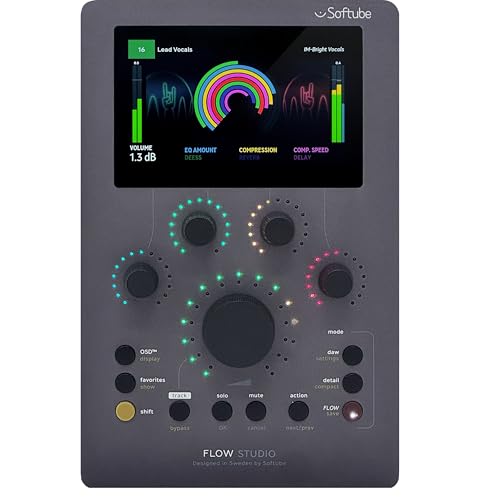
- Compact USB-C control surface for PC/Mac
- 4.3-inch high-resolution screen
- Five knobs and nine buttons
Best For: Users who want a small desktop controller with a screen
Assignable key control hub
Yamaha CC1 with motorized fader and LCD keys

- 12 assignable LCD keys and four knobs
- 100 mm touch-sensitive motorized fader
- Dual USB-C plus foot-pedal input
Best For: DAW users who want customizable control with one motorized fader
Flagship touchscreen console
iCON V1-M touchscreen DAW controller

- 8 motorized touch faders with 12-bit resolution
- 7-inch customizable touchscreen with color-coded layers
- Expandable to 64 channels with V1-X expanders
Best For: Producers who want deep DAW control and expandable tactile mixing
Portable Ableton mixer
Akai MIDImix compact DAW mixer

- 8 line faders plus 1 master fader
- 24 knobs and 16 buttons for mix control
- Instant 1-to-1 mapping with Ableton Live
Best For: Ableton Live users who want a compact hands-on mixer
12-fader desktop bank
EM-12F 12-channel motorized fader controller

- 12 motorized 100mm faders with feedback
- Programmable MIDI CC mapping for DAWs
- Class-compliant USB MIDI with no driver needed
Best For: Users who want a compact 12-fader surface for mixing and recall
Universal DAW Remote – Behringer X-TOUCH 9-Fader Surface
The Behringer X-TOUCH is a studio control surface with motorized faders built for hands-on DAW mixing and live control. Its 9 touch-sensitive 100 mm faders, LCD scribble strips, and support for HUI/Mackie Control make it a practical choice when you want track control and readable feedback without constant mouse work.
Best For: Producers who want a flexible, protocol-friendly DAW control surface for studio or live use.
Pros:
- 9 fully automated, touch-sensitive 100 mm motorized faders
- 8 LCD scribble strips for track names and parameter overview
- Supports HUI and Mackie Control for broad software compatibility
- Includes USB, Ethernet RTP, and MIDI connectivity
Cons:
- Focuses on control rather than deep onboard mixing features
- Best fit for DAW users who already know their control protocol setup
The X-TOUCH stands out if you need a versatile surface that can move between DAW control and live workflows. Its combination of motorized faders, scribble strips, and multiple connection options makes it a strong fit for streamlined session navigation and tactile mixing.
Precision Mixing Desk – PreSonus FaderPort 16 Control
The PreSonus FaderPort 16 is a studio control surface with motorized faders aimed at fast, tactile DAW mixing. With 16 touch-sensitive 100 mm faders, dedicated transport and automation controls, and Scribble Strip displays, it gives you a clear, compact way to handle larger sessions from the desk.
Best For: Engineers and producers who want a 16-fader layout for precise DAW mixing and editing.
Pros:
- 16 touch-sensitive 100 mm motorized faders in a compact chassis
- 16 high-definition Scribble Strip displays for easy channel identification
- Strong control set for transport, automation, marker navigation, and channel functions
- Compatible with major DAWs on Mac and Windows via Mackie Control and HUI emulation
Cons:
- USB 2.0 connectivity may feel basic compared with newer interfaces
- Best value is tied to DAW users who will use the expanded control layout
If you want more faders than a compact controller without jumping to a full console, the FaderPort 16 is an efficient middle ground. Its combination of channel access, session navigation, and software compatibility makes it especially useful for detailed mixing work.
Console Workflow Fader Bank – Softube Console 1 Fader Mk III
The Softube Console 1 Fader Mk III is a studio control surface with motorized faders for users who want direct tactile control over DAW work. Its 10-channel layout, USB connection, and push-button fader controller design keep the focus on hands-on mixing in a compact desktop footprint.
Best For: Desktop studios that want a compact motor-fader control surface for software-based mixing.
Pros:
- 10-channel fader control surface with motorized faders
- USB connection for straightforward setup
- Compact design that suits studio recording environments
- Includes USB cable and user manual
Cons:
- Supplied notes list Ableton Live support, so compatibility details are narrower than some rivals
- Less feature-dense than larger surfaces with more buttons or displays
This is a focused choice if you want a simple, modern fader bank rather than an oversized controller. The Mk III’s compact build makes it appealing for smaller studios where desk space matters and tactile level rides are the priority.
Compact DAW Fader Controller – Behringer X-Touch Compact
The Behringer X-Touch Compact is a studio control surface with motorized faders designed for smaller setups that still need tactile mixing. It combines 9 touch-sensitive motor faders with illuminated buttons and rotary encoders, giving you a practical control layer for supported DAW workflows.
Best For: Compact studios and creators who want motorized faders without moving to a full-size surface.
Pros:
- 9 touch-sensitive motorized faders
- 39 illuminated buttons and 16 rotary encoders for hands-on control
- Compact form factor for smaller desks and setups
- USB/MIDI controller with Windows and Mac support
Cons:
- Less track capacity than larger 16-fader surfaces
- Bullets emphasize button and encoder control more than advanced display feedback
The X-Touch Compact is a sensible pick if you want motorized fader control but need to keep the footprint manageable. It offers a useful mix of faders, buttons, and encoders for everyday DAW work without taking over the desk.
16-channel mixing focus – PreSonus FaderPort 16 with motorized faders
If you want a studio control surface with motorized faders that feels built for hands-on mixing, the PreSonus FaderPort 16 gives you a wide 16-fader layout with touch sensitivity and strong session control. It also adds 16 scribble strips, so channel identification stays clear while you move through tracks, automation, and plug-in control.
Best For: Producers and mixers who want a 16-fader USB control surface with deep session navigation and Studio One integration.
Pros:
- 16 touch-sensitive, 100mm motorized faders for precise mixing
- 16 high-definition scribble strips for fast channel identification
- Includes Undo/Redo, Arm All, Solo/Mute Clear, and tap tempo Click On/Off
- Controls level, pan, solo, mute, automation modes, plug-ins, and bus sends
Cons:
- Large 16-fader footprint may be more than compact desks can easily handle
- Feature depth may be more than casual users need
For users who want a more traditional mixing workflow, this is the most console-like option in the group. The included protective cover is a practical bonus for keeping the unit safe from dust, spills, and scratches when not in use.
Compact control and display – Softube Flow Studio compact control surface
The Softube Flow Studio Control Surface is a compact studio control surface with motorized faders that leans into quick tactile access rather than a wide-channel mixing layout. With five knobs, a 4.3-inch high-resolution screen, nine buttons, and USB-C connectivity, it is aimed at users who want a streamlined hardware companion for DAW work.
Best For: PC and Mac users who want a compact USB-C control surface with a screen, knobs, and button-driven workflow.
Pros:
- Compact design for tighter desktop setups
- 4.3-inch high-resolution screen for on-device feedback
- Five knobs and nine buttons for hands-on control
- USB-C connectivity for modern desktop workflows
Cons:
- Only five knobs and nine buttons, so it is less expansive than larger surfaces
- It is not a traditional many-fader mixer layout
This is a good fit if you value a smaller footprint and a display-centered workflow over a full bank of faders. It should appeal to users who want practical DAW control without dedicating much desk space.
Assignable key control hub – Yamaha CC1 with motorized fader and LCD keys
The Yamaha CC1 is a studio control surface with motorized faders that blends DAW control with Stream Deck-style assignable keys. It includes 12 assignable LCD keys, four push-and-turn knobs, a 100 mm touch-sensitive motorized fader, dual USB-C, and a foot-pedal TRS input, making it a flexible choice for programmable control.
Best For: Users who want programmable DAW and Stream Deck-style control with a motorized fader and lots of assignable keys.
Pros:
- 12 full-assignable LCD keys for flexible workflow control
- 100 mm touch-sensitive motorized fader for precise level moves
- Four push-and-turn knobs plus a full transport section
- Dual USB-C and foot-controller input add integration options
Cons:
- Single-fader layout is less suited to multi-channel mixing
- Best-known software support in the notes is for Cubase, so compatibility focus is narrower than some alternatives
This is the most command-center-style option here, especially if you want assignable keys alongside touch-based fader control. It makes sense for users who prioritize customization and transport access over having many physical faders.
Flagship touchscreen console – iCON V1-M touchscreen DAW controller
If you want a studio control surface with motorized faders that feels closer to a full DAW command center than a basic mixer, the iCON Pro Audio V1-M is built for that job. It combines 8 touch-sensitive motorized faders, a 7-inch customizable touchscreen, and multiple feedback displays to speed up editing, mixing, and navigation.
Best For: Producers and engineers who want deep DAW control, multi-DAW support, and an expandable tactile setup.
Pros:
- 8 touch-sensitive motorized faders with 12-bit resolution for precise level moves
- 7-inch customizable touchscreen with 5 color-coded layers for fast access to DAW functions
- Works with major DAWs including Bitwig, Cubase/Nuendo, Logic Pro X, Ableton Live, and Pro Tools
- Expandable to 64 channels with V1-X expanders for larger workflows
Cons:
- Larger and heavier than compact entry-level controllers
- Designed for serious desktop studio use rather than ultra-portable setups
- Advanced feature set may be more than casual users need
The V1-M stands out when you want hands-on control plus visual feedback without relying on your computer monitor. Its expandable channel count and multi-DAW compatibility make it a strong fit for evolving studio rigs.
Portable Ableton mixer – Akai MIDImix compact DAW mixer
The Akai Professional MIDImix is a compact studio control surface with motorized faders alternatives in mind if you need simple hands-on mixing, though its strength is really its lightweight 8-fader layout and instant Ableton Live mapping. It gives you direct access to levels, sends, EQ, and track functions without taking up much desk space.
Best For: Ableton Live users who want a small, portable mixer-style controller for basic hands-on control.
Pros:
- 8 individual line faders plus 1 master fader for quick volume control
- 24 knobs and 16 buttons provide hands-on access to EQ, sends, mute, solo, and record arm
- Instant 1-to-1 mapping with Ableton Live for fast setup
- Lightweight, compact, and portable for small studios or mobile rigs
Cons:
- Does not use motorized faders
- Best suited to Ableton Live rather than broad multi-DAW workflows
- Fewer tactile mixing features than larger control surfaces
If your priority is portability and straightforward mixer control, the MIDImix delivers a practical layout with minimal setup friction. It is less advanced than a motorized-fader surface, but it remains a useful budget-friendly hands-on controller.
12-fader desktop bank – EM-12F 12-channel motorized fader controller
The EM-12F is a studio control surface with motorized faders designed for users who want more individual track control in a compact desktop footprint. With 12 motorized 100mm sliders, position feedback, and fully programmable MIDI mapping, it is aimed at mixing and scene recall across DAWs and performance setups.
Best For: Engineers and performers who need 12 motorized faders for mixing, mapping, and scene recall.
Pros:
- 12 motorized 100mm faders with position feedback for synchronized DAW control
- Fully programmable MIDI CC mapping for volume, pan, sends, and expression
- Class-compliant USB MIDI with no extra driver needed
- Compact desktop layout with a stable aluminum base
Cons:
- Focused on fader control, so it lacks the broader interface features of larger surfaces
- No built-in touchscreen or display system mentioned
- Best suited to users comfortable with MIDI mapping and DAW setup
For users who want a dedicated fader bank rather than a feature-heavy console, the EM-12F keeps the workflow direct. Its 12 channels and motorized recall make it a practical option for mixing, live control, and post-production.
How We Picked the Best Studio Control Surface with Motorized Faders
We prioritized control surfaces that offer reliable motorized faders, solid DAW integration, and enough hands-on control to justify the desk space. We also looked at build quality, display feedback, transport controls, expandability, and whether the unit is best suited for detailed mix work or broader production tasks.
Quick Comparison
In simple terms, smaller units are best for compact setups, single-seat editing, and portable rigs, while larger surfaces are better for mix-heavy workflows and users who want more channels under their fingers at once. If you work in multiple DAWs, compatibility and mapping flexibility matter just as much as fader count.
Key Buying Factors for a Studio Control Surface with Motorized Faders
Fader Count and Size
More faders usually mean less banking and faster access to a full mix, but larger surfaces take more room. Eight to sixteen channels is a common sweet spot for most home and project studios.
Motorization and Touch Response
A good motorized fader should move smoothly, recall automation accurately, and respond well to touch. This is essential for writing rides and making precise level changes without fighting the hardware.
DAW Compatibility
Check whether the surface offers deep native support for your DAW or relies on MIDI mapping. Native integration typically provides better transport control, track banking, plugin access, and visual feedback.
Feedback and Workflow Features
LCD scribble strips, channel labeling, transport buttons, encoder knobs, and dedicated mode controls can dramatically improve speed and reduce mistakes during sessions.
Connectivity and Setup
USB is the simplest route for most users, while Ethernet or MIDI options can be useful in more advanced setups. Choose a unit that matches your studio routing and computer setup without unnecessary complexity.
Who Should Buy Which Studio Control Surface with Motorized Faders?
If you want the most direct mixing workflow, choose a full-featured surface with enough faders for your typical session size. Producers who mostly edit, automate, and work in the box may prefer a compact controller with fewer channels but strong transport and navigation controls. Users building a hybrid setup should look for a Studio Control Surface with Motorized Faders that balances DAW integration, expandability, and desk-friendly size. For fast, flexible mixing across multiple tracks, the best choice is usually the one that matches your workflow first and your channel count second.